PluginUs.Net - Business Tools for WooCommerce and WordPress

[realize your idea - make your dreams come true]

Support Forum

You need to log-in to create request (topic) to the support

WOOF - Previous button on safari & iOS

The support doesn work on Saturdays and Sundays, so some Friday requests can be answered on Monday. If you have problems with registration ask help on contact us page please
If you not got email within 24~36 business hours, firstly check your spam box, and if no any email from the support there - back to the forum and read answer here. DO NOT ANSWER ON EMAILS [noreply@pluginus.net] FROM THE FORUM!! Emails are just for your info, all answers should be published only here.
The support doesn work on Saturdays and Sundays, so some Friday requests can be answered on Monday.

Hello,

we have a problem with woof, on safari browser and Chrome on iOS.

The filter works fine, we can filter products but when we click on the previous page button (of the browser or the phone),
we have only the loading image and nothing else happens. The page doesn't load.

Here's the page where you can see :
https://com-en-ligne.fr/sommelier/notre-sommelier-vous-guide/

Thank You for help.

Hello

Please  update  the  plugin  to latest  version - https://products-filter.com/how-to-make-auto-update-for-wordpress-plugins-and-themes-bought-on-envato/

Clear all  cache  and  do a test

Bonjour

la mise a été faite, les caches vidés mais le problème reste identique.

https://com-en-ligne.fr/sommelier/notre-sommelier-vous-guide/


Hello

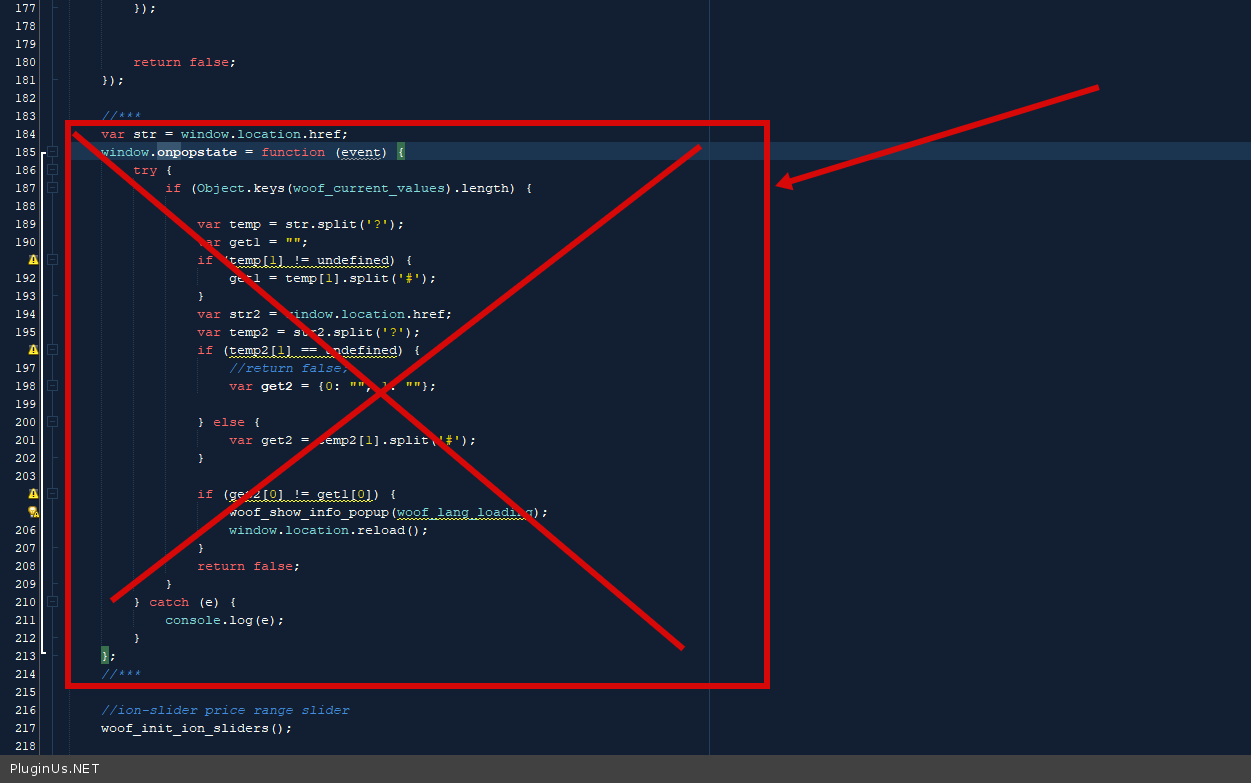
Try  in file - \wp-content\plugins\woocommerce-products-filter\js\front.js

delete  this  code - https://c2n.me/4bUnL7q.png - clear  all  cache   and do  a test

Bonjour,

la modification demandée a été faite mais ca ne fonctionne pas.


Hello

Developers are working on it.

As soon as we get the result I will write you

OK thank you