WOOF - Not working on Dynamic WooCommerce Category pages(Sidebar or Short-code).
The support doesn work on Saturdays and Sundays, so some Friday requests can be answered on Monday. If you have problems with registration ask help on contact us page pleaseIf you not got email within 24~36 business hours, firstly check your spam box, and if no any email from the support there - back to the forum and read answer here. DO NOT ANSWER ON EMAILS [noreply@pluginus.net] FROM THE FORUM!! Emails are just for your info, all answers should be published only here.
The support doesn work on Saturdays and Sundays, so some Friday requests can be answered on Monday.

Quote from wpallweb on December 21, 2020, 04:15Hi,
I’m having a problem getting Woof to work with WooCommerce Product Category Pages.
You can see woof(sidebar) works great on my home page: https://d-r-o.allweb.solutions/
Note: I’m using Chrome to test this.
But, I cannot seem to get it to work om Product Category Pages.
I’m using Divi. I also have category pages set up as a TEMPLATE.
2 Columns:
Column-1: Woof (Sidebar)
Column-2: Divi (WooCommerce Shop Module(Product Category, Current Category)
Example:
- Click: https://d-r-o.allweb.solutions/product/used-daves-radio-outlet-test-item-01-copy/
- Then Click: Pre-Owned Products on that page.
- It should bring you to this page: https://d-r-o.allweb.solutions/product-category/pre_owned_products/
You can see that the Woof Sidebar is not showing at ALL. I even tried short-code. Still nothing. I’d prefer that it is displayed dynamically(using the pass-through variables) as it’s settings. But I can’t even get WOOF to display at all on the category(page/template). I read the documentation and tried a number of things to get it to work. NO LUCK.
Can you please help?
Thanks,
wpallweb
Hi,
I’m having a problem getting Woof to work with WooCommerce Product Category Pages.
You can see woof(sidebar) works great on my home page: https://d-r-o.allweb.solutions/
Note: I’m using Chrome to test this.
But, I cannot seem to get it to work om Product Category Pages.
I’m using Divi. I also have category pages set up as a TEMPLATE.
2 Columns:
Column-1: Woof (Sidebar)
Column-2: Divi (WooCommerce Shop Module(Product Category, Current Category)
Example:
- Click: https://d-r-o.allweb.solutions/product/used-daves-radio-outlet-test-item-01-copy/
- Then Click: Pre-Owned Products on that page.
- It should bring you to this page: https://d-r-o.allweb.solutions/product-category/pre_owned_products/
You can see that the Woof Sidebar is not showing at ALL. I even tried short-code. Still nothing. I’d prefer that it is displayed dynamically(using the pass-through variables) as it’s settings. But I can’t even get WOOF to display at all on the category(page/template). I read the documentation and tried a number of things to get it to work. NO LUCK.
Can you please help?
Thanks,
wpallweb

Quote from Pablo Borysenco on December 21, 2020, 14:34Hello
This is a very logical behavior. On the category page, you can show ONLY products that belong to the category OR child category. It makes sense to show only child categories( of the current category ), because clicking on any other category will always give zero products )
In another case this is not a filter - this menu
Hello
This is a very logical behavior. On the category page, you can show ONLY products that belong to the category OR child category. It makes sense to show only child categories( of the current category ), because clicking on any other category will always give zero products )
In another case this is not a filter - this menu
Quote from wpallweb on December 21, 2020, 16:15I was using another Plugin for Product Filter(short-code) before switching to Woof. It was picking up the "pass through" values and displaying the filter menu in column-1 with the Category that I clicked "checked" and displaying the other menu(categories) items unchecked.
I just reinstalled the other Product Filter(it has it's own shortcomings so I converted to Woof). See the example below again with the old Product Filter.
Example:
- Click: https://d-r-o.allweb.solutions/product/used-daves-radio-outlet-test-item-01-copy/
- Then Click: Pre-Owned Products on that page.
- It should bring you to this page: https://d-r-o.allweb.solutions/product-category/pre_owned_products/
This is what I'm talking about. So, are you saying Woof can't do this?
If you can't do the above, Here is really my preferred method. Can you help me with this?
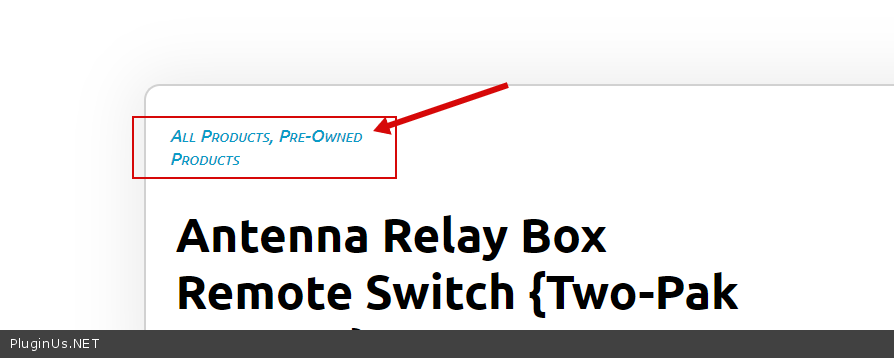
- In step-1 above, I can replace the (get categories for this product) function (display: All Products, Pre-Owned Products) with a Woof function. Do you have a command set that can query and display the current categories of a product dynamically like it does in the example?
- When someone clicks on one of the categories above, it will generate a WOOF query string and display the results (Category query results for the clicked Category) back to the HOME screen?
Please provide some solution for me.
Thank you.
wpallweb
I was using another Plugin for Product Filter(short-code) before switching to Woof. It was picking up the"pass through" values and displaying the filter menu in column-1 with the Category that I clicked"checked" and displaying the other menu(categories) items unchecked.
I just reinstalled the other Product Filter(it has it's own shortcomings so I converted to Woof). See the example below again with the old Product Filter.
Example:
- Click: https://d-r-o.allweb.solutions/product/used-daves-radio-outlet-test-item-01-copy/
- Then Click: Pre-Owned Products on that page.
- It should bring you to this page: https://d-r-o.allweb.solutions/product-category/pre_owned_products/
This is what I'm talking about. So, are you saying Woof can't do this?
If you can't do the above, Here is really my preferred method. Can you help me with this?
- In step-1 above, I can replace the (get categories for this product) function (display: All Products, Pre-Owned Products) with a Woof function. Do you have a command set that can query and display the current categories of a product dynamically like it does in the example?
- When someone clicks on one of the categories above, it will generate a WOOF query string and display the results (Category query results for the clicked Category) back to the HOME screen?
Please provide some solution for me.
Thank you.
wpallweb
Quote from Pablo Borysenco on December 22, 2020, 12:13Hello
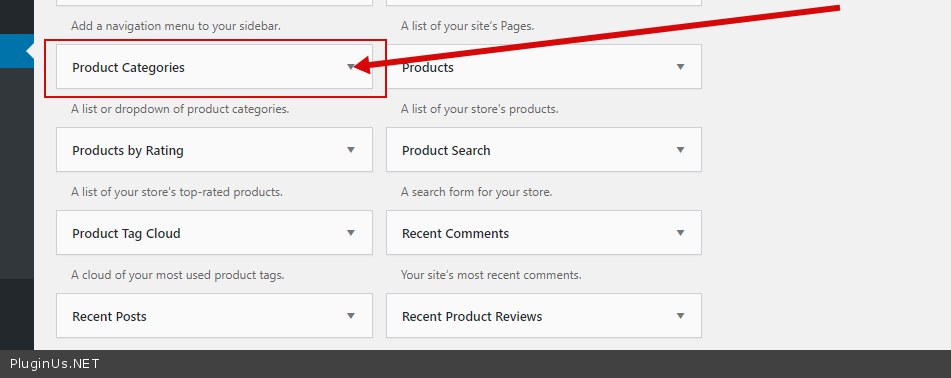
If you can't do the above, Here is really my preferred method - It is not correct to display another category on the category page. If you need different behavior just use the menu - to redirect the user to another category page. An example - https://c2n.me/4ak4FLW.png
In step-1 above, I can replace the (get categories for this product) function - the plugin does not have this feature. You need code customization to create link with search query - /shop/?swoof =1&product_cat=pre_owned_products
https://c2n.me/4ak5AA1.png - where and how these links are formed depends on your theme
Hello
If you can't do the above, Here is really my preferred method - It is not correct to display another category on the category page. If you need different behavior just use the menu - to redirect the user to another category page. An example - https://c2n.me/4ak4FLW.png
In step-1 above, I can replace the (get categories for this product) function - the plugin does not have this feature. You need code customization to create link with search query - /shop/?swoof =1&product_cat=pre_owned_products
https://c2n.me/4ak5AA1.png - where and how these links are formed depends on your theme