
WOOF - Horizontal filter alignment
The support doesn work on Saturdays and Sundays, so some Friday requests can be answered on Monday. If you have problems with registration ask help on contact us page pleaseIf you not got email within 24~36 business hours, firstly check your spam box, and if no any email from the support there - back to the forum and read answer here. DO NOT ANSWER ON EMAILS [noreply@pluginus.net] FROM THE FORUM!! Emails are just for your info, all answers should be published only here.
The support doesn work on Saturdays and Sundays, so some Friday requests can be answered on Monday.

Quote from Aurelien on July 29, 2020, 04:28Hello,
I just installed WOOF on my website.
I would like to have the CSS code to horizontally align the filter like in the following example:
https://thedesignspacedemo.co/luxecommerce-divi/store/
the page of my website is : https://gaiamour.com/boutique/
thank you
Hello,
I just installed WOOF on my website.
I would like to have the CSS code to horizontally align the filter like in the following example:
https://thedesignspacedemo.co/
the page of my website is : https://gaiamour.com/boutique/
thank you

Quote from Pablo Borysenco on July 29, 2020, 12:29Hello
Please check an option - https://c2n.me/48zMbsO.png
And add CSS
.woof .woof_sid_auto_shortcode .woof_container {width: 100%;
}
result - https://c2n.me/48zMjE8.jpg
Hello
Please check an option - https://c2n.me/48zMbsO.png
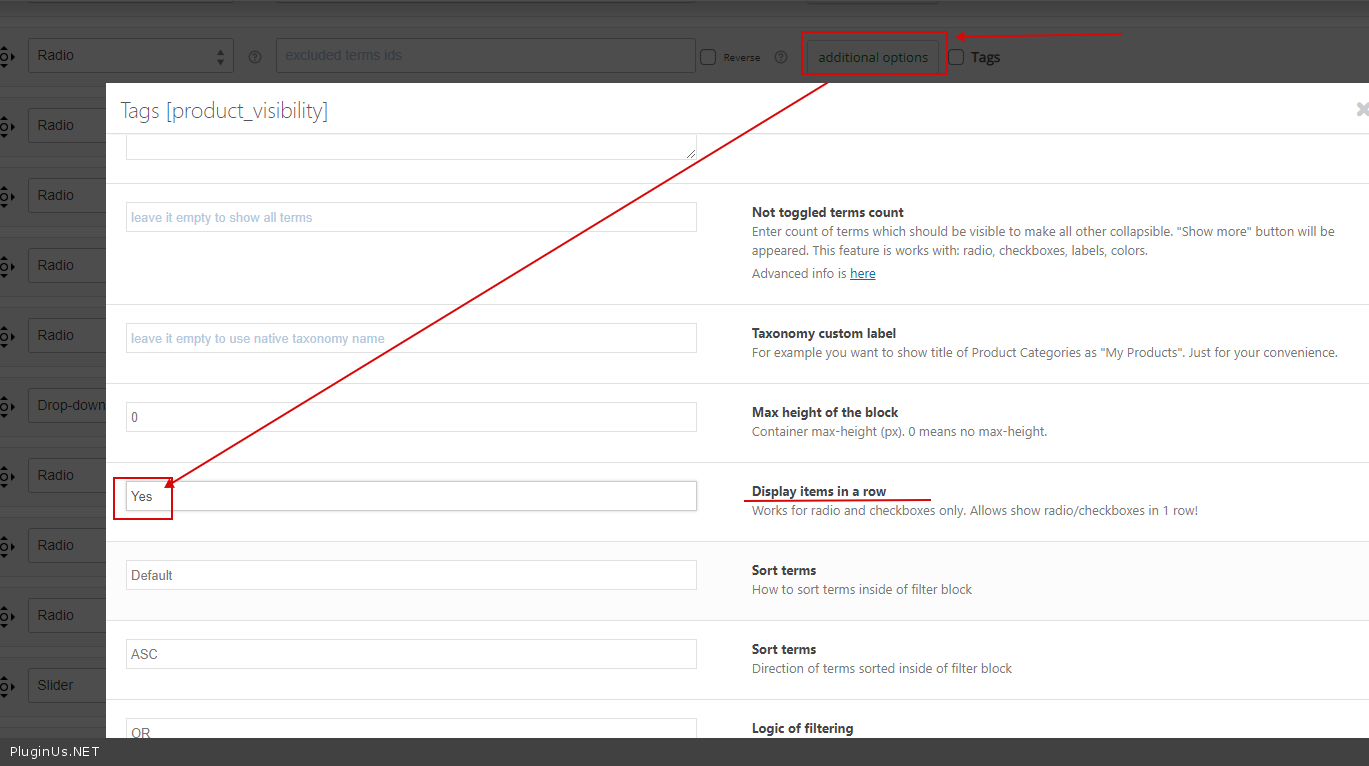
And add CSS
width: 100%;
}
result - https://c2n.me/48zMjE8.jpg
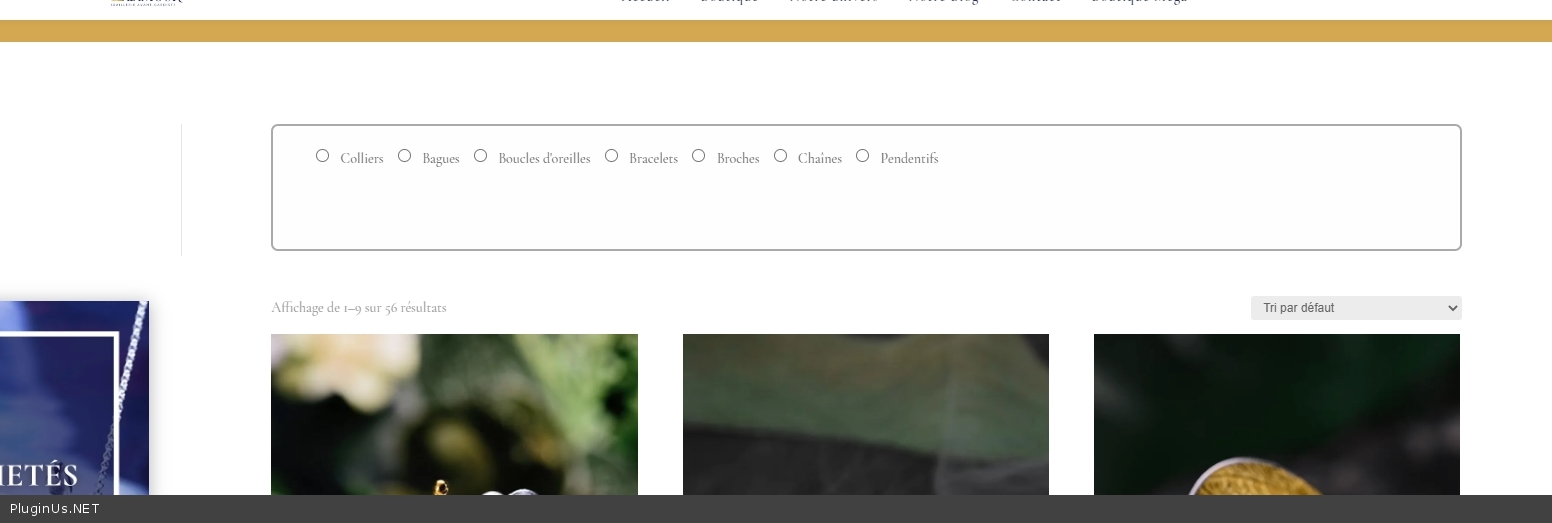
Quote from Aurelien on July 29, 2020, 21:31Hello,
Thank you for you'r help.
I don't see where to put the CSS code. i tried in different places but it doesn't work, the filter doesn't line up as you show.
Also, I would like to know how to perssonize the product categories filter.
Hello,
Thank you for you'r help.
I don't see where to put the CSS code. i tried in different places but it doesn't work, the filter doesn't line up as you show.
Also, I would like to know how to perssonize the product categories filter.
Quote from Aurelien on July 29, 2020, 21:33and I want to remove the text "show blocks helper" above the filter
and I want to remove the text"show blocks helper" above the filter
Quote from Pablo Borysenco on July 30, 2020, 11:59Hello
When setting up a site, disable all cache and optimization. Now I see the styles for the filter are not connected at all - please fix it
and I want to remove the text "show blocks helper" above the filter - Advanced->Options- https://c2n.me/48AHUIJ.png
I would like to know how to perssonize the product categories filter. - Describe it in more detail
Hello
When setting up a site, disable all cache and optimization. Now I see the styles for the filter are not connected at all - please fix it
and I want to remove the text"show blocks helper" above the filter - Advanced->Options- https://c2n.me/48AHUIJ.png
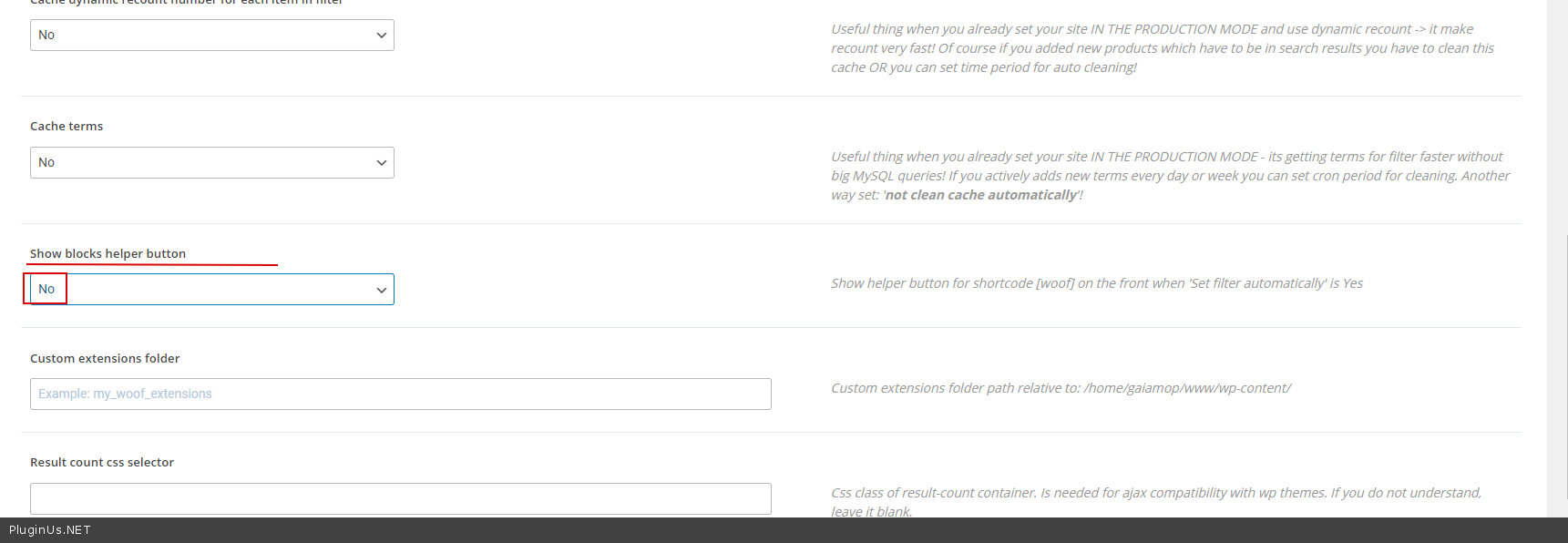
I would like to know how to perssonize the product categories filter. - Describe it in more detail
Quote from Aurelien on July 30, 2020, 16:25Hello,
I have disabled Jetpack protection.
I don't see what to fix, can you do it?
Thanks for "showblock helper"
Hello,
I have disabled Jetpack protection.
I don't see what to fix, can you do it?
Thanks for"showblock helper"
Quote from Aurelien on July 30, 2020, 23:52I would like to be able to increase the size of the writing, transform the filters into buttons in the colors of the shop, center the filters in the frame. The objective is to have a nice rendering.
I would like to be able to increase the size of the writing, transform the filters into buttons in the colors of the shop, center the filters in the frame. The objective is to have a nice rendering.
Quote from Pablo Borysenco on July 31, 2020, 12:02Hello
The problem remains.
CSS files of my plugin are not loading at all. Check your optimization and cache settings
I would like to be able to increase the size of the writing, transform the filters into buttons in the colors of the shop, center the filters in the frame. - In this case, you should hire a front-end developer. Unfortunately, customization of the code is not included in the support
Hello
The problem remains.
CSS files of my plugin are not loading at all. Check your optimization and cache settings
I would like to be able to increase the size of the writing, transform the filters into buttons in the colors of the shop, center the filters in the frame. - In this case, you should hire a front-end developer. Unfortunately, customization of the code is not included in the support
Quote from Aurelien on July 31, 2020, 18:38Hello.
I don't understand why you don't do the manipulation for me !?
I disabled all cache and optimization plugins:
- Theme Divi optimization: Desactivate
- Jetpack: Desactivate
- WP Rocket: Desactivate
- Divi Booster: DesactivateAll plugins are working fine except yours!
I'm tired of waiting, I need to launch the website!
Without solutions I will go to the solution of one of your competitors and completely unsubscribe from WOOF.
Either find a solution or we drop it and I move on to another plugin.
Sorry but it's starting to take a long time for a simple alignment!
Hello.
I don't understand why you don't do the manipulation for me !?
I disabled all cache and optimization plugins:
- Theme Divi optimization: Desactivate
- Jetpack: Desactivate
- WP Rocket: Desactivate
- Divi Booster: Desactivate
All plugins are working fine except yours!
I'm tired of waiting, I need to launch the website!
Without solutions I will go to the solution of one of your competitors and completely unsubscribe from WOOF.
Either find a solution or we drop it and I move on to another plugin.
Sorry but it's starting to take a long time for a simple alignment!
Quote from Aurelien on July 31, 2020, 22:12I have deactivated WOFF, I no longer need help thank you
I have deactivated WOFF, I no longer need help thank you
Quote from Pablo Borysenco on August 3, 2020, 11:15Hello
I also do not know what you configured to disable styles.
When I looked at your site for the first time everything worked correctly. And I provided the code you want. I also made tests of this code
Hello
I also do not know what you configured to disable styles.
When I looked at your site for the first time everything worked correctly. And I provided the code you want. I also made tests of this code