

Woof Filter Not show all Collection
The support doesn work on Saturdays and Sundays, so some Friday requests can be answered on Monday. If you have problems with registration ask help on contact us page pleaseIf you not got email within 24~36 business hours, firstly check your spam box, and if no any email from the support there - back to the forum and read answer here. DO NOT ANSWER ON EMAILS [noreply@pluginus.net] FROM THE FORUM!! Emails are just for your info, all answers should be published only here.
The support doesn work on Saturdays and Sundays, so some Friday requests can be answered on Monday.

Quote from patriciavndx on April 13, 2022, 18:17Hello Support team,
I am facing issue of multiple collection not showing on the filter even they are having count.
https://www.omnialeather.com/product-category/leather/
On Above Page I am not able to see Oxford in the list but if you check the screenshot ( https://prnt.sc/CY_Z4g7bhlH9 ), That shows count but then it is not showing in the filter.
Can you please let me know if there is something in the setting I’ve missed or is that a bug?
Thanks in Advance
Hello Support team,
I am facing issue of multiple collection not showing on the filter even they are having count.
https://www.omnialeather.com/product-category/leather/
On Above Page I am not able to see Oxford in the list but if you check the screenshot ( https://prnt.sc/CY_Z4g7bhlH9 ), That shows count but then it is not showing in the filter.
Can you please let me know if there is something in the setting I’ve missed or is that a bug?
Thanks in Advance

Quote from Pablo Borysenco on April 14, 2022, 12:40Hello
Please paste your license key here - https://share.pluginus.net/image/i20210618130558.png -> https://share.pluginus.net/image/i20210618130614.png
Update the plugin to latest version - https://products-filter.com/how-to-make-auto-update-for-wordpress-plugins-and-themes-bought-on-envato
Hello
Please paste your license key here - https://share.pluginus.net/image/i20210618130558.png -> https://share.pluginus.net/image/i20210618130614.png


Update the plugin to latest version - https://products-filter.com/how-to-make-auto-update-for-wordpress-plugins-and-themes-bought-on-envato
Quote from patriciavndx on April 14, 2022, 19:24I've shared the Private data because after Update plugin also I am not able to resolve the issue. Still all product attributes "Search by Collection" not showing on front-end of my website on below page:
http://205.134.254.135/~team6/omnia-leather-new/product-category/leather/
I've shared the Private data because after Update plugin also I am not able to resolve the issue. Still all product attributes"Search by Collection" not showing on front-end of my website on below page:
http://205.134.254.135/~team6/omnia-leather-new/product-category/leather/
Quote from Pablo Borysenco on April 15, 2022, 11:36Hello
Please update the plugin to latest version - https://products-filter.com/how-to-make-auto-update-for-wordpress-plugins-and-themes-bought-on-envato - You are using an old version of the plugin
Still all product attributes"Search by Collection" not showing on front-end of my website on below page: - This is a category page and there are no products that have this attribute in this category - https://share.pluginus.net/image/i20220415093134.png
https://c2n.me/4fr7ND2.png - You only have one product with this attribute, but this product doesn't even show up on the edit page - https://share.pluginus.net/image/i20220415093607.png
Hello
Please update the plugin to latest version - https://products-filter.com/how-to-make-auto-update-for-wordpress-plugins-and-themes-bought-on-envato - You are using an old version of the plugin
Still all product attributes"Search by Collection" not showing on front-end of my website on below page: - This is a category page and there are no products that have this attribute in this category - https://share.pluginus.net/image/i20220415093134.png

https://c2n.me/4fr7ND2.png - You only have one product with this attribute, but this product doesn't even show up on the edit page - https://share.pluginus.net/image/i20220415093607.png
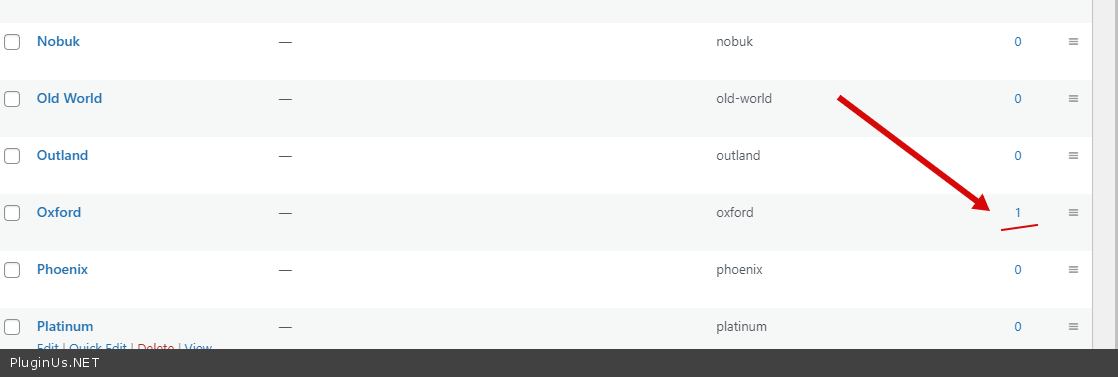

Quote from patriciavndx on April 15, 2022, 16:14Hello
If you check below URL, Manually I assign a attribute to the Product and still it does not show in the filter.
http://205.134.254.135/~team6/omnia-leather-new/wp-admin/edit.php?pa_search-by-collection=oxford&post_type=product
Let me know what I can do to fix this as it is a bit urgent.
Hello
If you check below URL, Manually I assign a attribute to the Product and still it does not show in the filter.
Let me know what I can do to fix this as it is a bit urgent.
Quote from Pablo Borysenco on April 18, 2022, 11:09Hello
Update plugin! We do not support older versions of the plugin!!!
Ok! My test - https://c2n.me/4fsczqM - it works correctly
Hello
Update plugin! We do not support older versions of the plugin!!!
Ok! My test - https://c2n.me/4fsczqM - it works correctly
Quote from patriciavndx on April 18, 2022, 18:54Hello
I am having the latest version of the Plugin. Downloaded after purchase. ( https://prnt.sc/Rq1k8MkT-TTN )
Also, There are multiple other collections which does not show up. Below page having 9 products in it but filter category oxford Not Showing in the search by collection dropdown on front in my live website. So What can be the cause for this? Let me know so I can look into it.
https://prnt.sc/fxmMAzWMitEW
Hello
I am having the latest version of the Plugin. Downloaded after purchase. ( https://prnt.sc/Rq1k8MkT-TTN )
Also, There are multiple other collections which does not show up. Below page having 9 products in it but filter category oxford Not Showing in the search by collection dropdown on front in my live website. So What can be the cause for this? Let me know so I can look into it.
Quote from Pablo Borysenco on April 19, 2022, 10:38Hello
You are using an old version of the plugin! I hope you agree with me that I know better.
And I really don't understand how you could get such the old version of the plugin if you bought a license recently.
https://prnt.sc/fxmMAzWMitEW - And in this screenshot, in general, an even older version (not the one installed on your site)
So please update the plugin as described in the article - https://products-filter.com/how-to-make-auto-update-for-wordpress-plugins-and-themes-bought-on-envato
Hello
You are using an old version of the plugin! I hope you agree with me that I know better.
And I really don't understand how you could get such the old version of the plugin if you bought a license recently.
https://prnt.sc/fxmMAzWMitEW - And in this screenshot, in general, an even older version (not the one installed on your site)
So please update the plugin as described in the article - https://products-filter.com/how-to-make-auto-update-for-wordpress-plugins-and-themes-bought-on-envato
Quote from patriciavndx on April 19, 2022, 11:11Hello,
I again download the plugin and the current version is 2.2.6.4 which was before 2.2.4
Also from the Article we do not have Envato market Admin page as I am not using envato theme.
After update also I am not able to see the collection. Can you please help me out here.
Thanks
Hello,
I again download the plugin and the current version is 2.2.6.4 which was before 2.2.4
Also from the Article we do not have Envato market Admin page as I am not using envato theme.
After update also I am not able to see the collection. Can you please help me out here.
Thanks
Quote from Pablo Borysenco on April 19, 2022, 12:19Also from the Article we do not have Envato market Admin page as I am not using envato theme. - ??? It means the account where you bought the plugin
Everything works great on the test site. So please clear all cache -https://c2n.me/4fsTau7.png
Also from the Article we do not have Envato market Admin page as I am not using envato theme. - ??? It means the account where you bought the plugin
Everything works great on the test site. So please clear all cache -https://c2n.me/4fsTau7.png
Quote from patriciavndx on April 20, 2022, 16:28Hello
I mean that Second last option from the Article you shared ( https://prnt.sc/tJbXx3hvxVrJ ), is not present in back-end of my WordPress Setup.
Also, I am not able to find the cache setting you shared in the screenshot. Can you please let me know where it can be found or a direct URL to access that.
Thanks
Hello
I mean that Second last option from the Article you shared ( https://prnt.sc/tJbXx3hvxVrJ ), is not present in back-end of my WordPress Setup.
Also, I am not able to find the cache setting you shared in the screenshot. Can you please let me know where it can be found or a direct URL to access that.
Thanks
Quote from Pablo Borysenco on April 21, 2022, 11:11Hello
Did you install Envato plugin?
.Can you please let me know where it can be found - Advanced->Options tab
Hello
Did you install Envato plugin?
.Can you please let me know where it can be found - Advanced->Options tab
Quote from patriciavndx on April 21, 2022, 13:16Hello
I do not install envato plugin. Also the Advanced->Options tab is not visible in my back-end can you share a screenshot please where I can find it?
Thanks
Hello
I do not install envato plugin. Also the Advanced->Options tab is not visible in my back-end can you share a screenshot please where I can find it?
Thanks
Quote from Pablo Borysenco on April 22, 2022, 11:52Hello
I do not install envato plugin. - Ok! So please try to read this article - https://products-filter.com/how-to-make-auto-update-for-wordpress-plugins-and-themes-bought-on-envato and update the plugin to latest version
can you share a screenshot please where I can find it? - https://c2n.me/4fuMj2D.mp4
Hello
I do not install envato plugin. - Ok! So please try to read this article - https://products-filter.com/how-to-make-auto-update-for-wordpress-plugins-and-themes-bought-on-envato and update the plugin to latest version
can you share a screenshot please where I can find it? - https://c2n.me/4fuMj2D.mp4
Quote from patriciavndx on April 22, 2022, 19:08Envato plugin added and all the steps followed. Still I am not able to see the cache option in back-end of my WordPress Setup. Where Can I find it?
Envato plugin added and all the steps followed. Still I am not able to see the cache option in back-end of my WordPress Setup. Where Can I find it?
Quote from Pablo Borysenco on April 25, 2022, 12:22Hello
Please read my messages - https://share.pluginus.net/image/i20220425102203.png - this video how to find this option
Hello
Please read my messages - https://share.pluginus.net/image/i20220425102203.png - this video how to find this option

Quote from patriciavndx on April 26, 2022, 18:03Hello
I check the video but these option are not showing in my WordPress Setup.
Hello
I check the video but these option are not showing in my WordPress Setup.
Quote from Pablo Borysenco on April 27, 2022, 11:59Hello
Make a video with filter settings on your site
Hello
Make a video with filter settings on your site