
Woof filter - no search results page not showing right
The support doesn work on Saturdays and Sundays, so some Friday requests can be answered on Monday. If you have problems with registration ask help on contact us page pleaseIf you not got email within 24~36 business hours, firstly check your spam box, and if no any email from the support there - back to the forum and read answer here. DO NOT ANSWER ON EMAILS [noreply@pluginus.net] FROM THE FORUM!! Emails are just for your info, all answers should be published only here.
The support doesn work on Saturdays and Sundays, so some Friday requests can be answered on Monday.

Quote from Redsteps on August 9, 2020, 05:28Hi
I have a website I am building and the search function is currently allowing slider options that are not relevant to the product, which enables the customer to search for products that are not available. The end result is that the customer gets sent to a no results found page.
_________________________________
No Results Found
The page you requested could not be found. Try refining your search, or use the navigation above to locate the post.
________________________
I am also using BodyCommerce and Divi to have a custom search page.
My ultimate goal for the site and the search function;
- I have set up each product range to have it's own page and each page only shows the products in that category. Eg - Water tanks, Chemical tanks, round tanks. etc.
- I would like the search function on each page to then only search the products in that category and on that page and only show the options available for that category and page. Eg - if there are only tanks up to 200mm high, the height slider should only show 200mm high as the tallest option to search by. - Currently the height search options can go up to 6000mm which is the tallest tank on the entire site.
- Then when showing the results - I would like the user to still be in the same page with the results narrowed - eg the customer stays on the Water tank page and the results show the water tanks that are 100mm high if that is what they have searched. Currently - on submit the user is taken off to the search results page and it just shows the results for that search but the customer might be confused as to where they have been taken.
Can you please assist in ensuring I have the settings right. I can provide logins - the site is in maintenance mode right now as it is not ready to go live.
Hi
I have a website I am building and the search function is currently allowing slider options that are not relevant to the product, which enables the customer to search for products that are not available. The end result is that the customer gets sent to a no results found page.
_________________________________
No Results Found
The page you requested could not be found. Try refining your search, or use the navigation above to locate the post.
________________________
I am also using BodyCommerce and Divi to have a custom search page.
My ultimate goal for the site and the search function;
- I have set up each product range to have it's own page and each page only shows the products in that category. Eg - Water tanks, Chemical tanks, round tanks. etc.
- I would like the search function on each page to then only search the products in that category and on that page and only show the options available for that category and page. Eg - if there are only tanks up to 200mm high, the height slider should only show 200mm high as the tallest option to search by. - Currently the height search options can go up to 6000mm which is the tallest tank on the entire site.
- Then when showing the results - I would like the user to still be in the same page with the results narrowed - eg the customer stays on the Water tank page and the results show the water tanks that are 100mm high if that is what they have searched. Currently - on submit the user is taken off to the search results page and it just shows the results for that search but the customer might be confused as to where they have been taken.
Can you please assist in ensuring I have the settings right. I can provide logins - the site is in maintenance mode right now as it is not ready to go live.

Quote from Pablo Borysenco on August 10, 2020, 11:54Hello
Paste your license key here - https://c2n.me/43SC6rb.png -> https://c2n.me/42HBIt7.png
Hello
Paste your license key here - https://c2n.me/43SC6rb.png -> https://c2n.me/42HBIt7.png


Quote from Redsteps on August 11, 2020, 12:36I have done this now for you.
I have done this now for you.
Quote from Pablo Borysenco on August 12, 2020, 10:35Hello
Please check options - https://c2n.me/48J1XLt.png
And - https://c2n.me/48J21uh.png
Drop me wp-admin access and exact links to the issue - https://c2n.me/43SC6rb.png ->https://c2n.me/42BAoj4.png
Hello
Please check options - https://c2n.me/48J1XLt.png
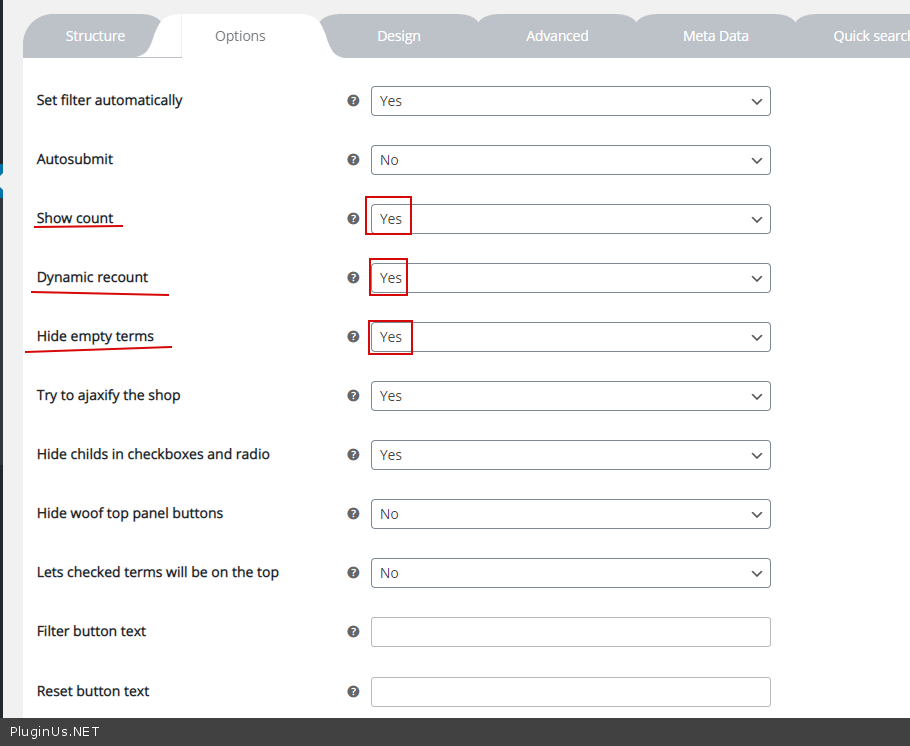
And - https://c2n.me/48J21uh.png
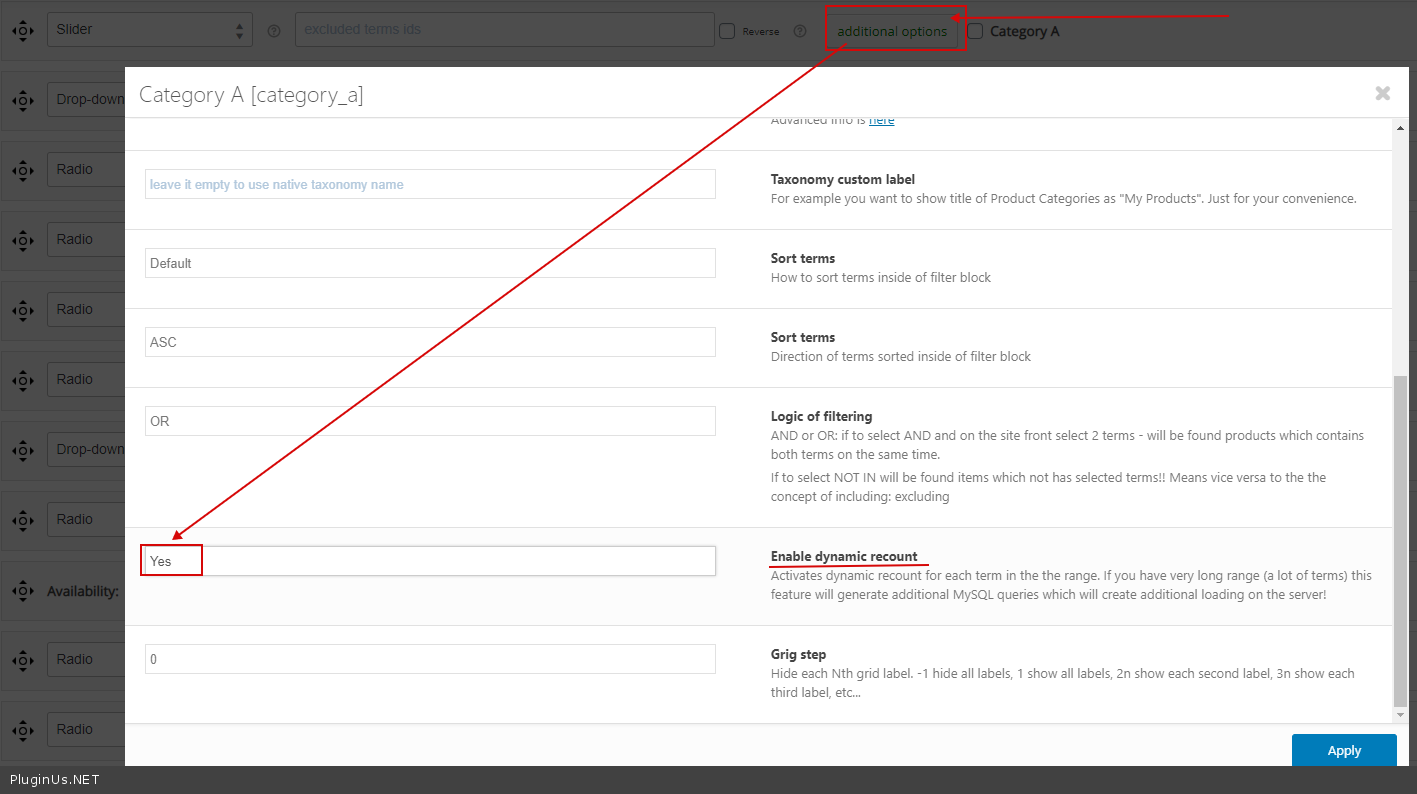
Drop me wp-admin access and exact links to the issue - https://c2n.me/43SC6rb.png ->https://c2n.me/42BAoj4.png
