WOOF > DIVI layout doesn't work
The support doesn work on Saturdays and Sundays, so some Friday requests can be answered on Monday. If you have problems with registration ask help on contact us page pleaseIf you not got email within 24~36 business hours, firstly check your spam box, and if no any email from the support there - back to the forum and read answer here. DO NOT ANSWER ON EMAILS [noreply@pluginus.net] FROM THE FORUM!! Emails are just for your info, all answers should be published only here.
The support doesn work on Saturdays and Sundays, so some Friday requests can be answered on Monday.

Quote from cafesolo on March 31, 2021, 14:12Hi, I have installed and called WOOF in a Divi layout that I built with DIVI Theme builder
WOOF appears well in my left column in my category page layout but when I choose an Size attribute, it open default Woocommerce layout,
not mine, have you got an issue ?
Thanks
Hi, I have installed and called WOOF in a Divi layout that I built with DIVI Theme builder
WOOF appears well in my left column in my category page layout but when I choose an Size attribute, it open default Woocommerce layout,
not mine, have you got an issue ?
Thanks
Quote from cafesolo on March 31, 2021, 15:28Maybe I must insert a shortcode in my result page layout ? It's that ?
So, if I want display products with attribute Size M, is there a short code specific to insert in my DIVI layout ?
Thanks
Maybe I must insert a shortcode in my result page layout ? It's that ?
So, if I want display products with attribute Size M, is there a short code specific to insert in my DIVI layout ?
Thanks

Quote from Pablo Borysenco on April 1, 2021, 12:27Hello
Please drop me exact link to the issue
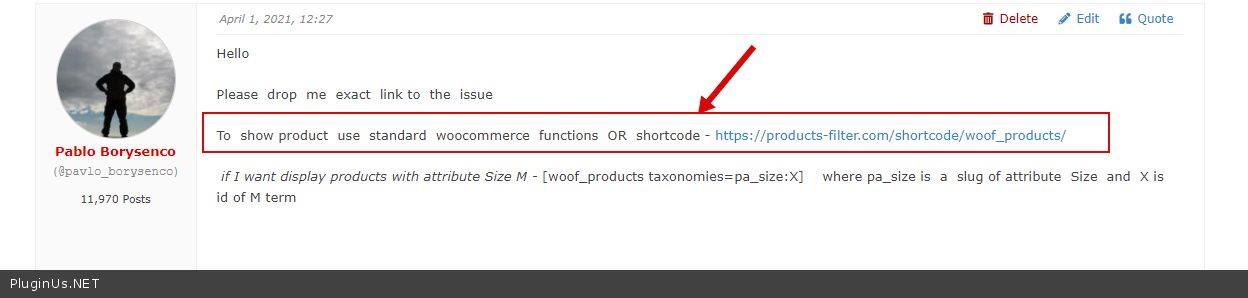
To show product use standard woocommerce functions OR shortcode - https://products-filter.com/shortcode/woof_products/
if I want display products with attribute Size M - [woof_products taxonomies=pa_size:X] where pa_size is a slug of attribute Size and X is id of M term
Hello
Please drop me exact link to the issue
To show product use standard woocommerce functions OR shortcode - https://products-filter.com/shortcode/woof_products/
if I want display products with attribute Size M - [woof_products taxonomies=pa_size:X] where pa_size is a slug of attribute Size and X is id of M term
Quote from cafesolo on April 1, 2021, 16:32Hi,
Thanks for your answer. I just tried your short code insert in my layout but it doesn't work well, results are good but layout is again woocommerce default layout. I can give you link with "Private data for topic" ?
Hi,
Thanks for your answer. I just tried your short code insert in my layout but it doesn't work well, results are good but layout is again woocommerce default layout. I can give you link with"Private data for topic" ?
Quote from Pablo Borysenco on April 2, 2021, 11:03Hello
Yes! But as I wrote above - https://c2n.me/4bxvoE4.png
The problem is that third-party templates cannot hear search queries.
Hello
Yes! But as I wrote above - https://c2n.me/4bxvoE4.png
The problem is that third-party templates cannot hear search queries.
Quote from cafesolo on April 2, 2021, 11:58Hello,
I bought Pro WOOF module. Purchase license and first question in Private data.
Is there another support for Pro version ?
Thanks, have a good day.
Hello,
I bought Pro WOOF module. Purchase license and first question in Private data.
Is there another support for Pro version ?
Thanks, have a good day.
Quote from Pablo Borysenco on April 5, 2021, 10:38Hello
Delete the free version and install the paid version. All settings will be saved
customization of the code is not included in support
Hello
Delete the free version and install the paid version. All settings will be saved
customization of the code is not included in support
Quote from cafesolo on April 6, 2021, 15:09Hello Pablo,
I am sending you links to screenshots in order to visualize my problem: my layout made with the DIVI Theme Builder is not taken into account in the display of search results.
My screenshots also include the layout views from the Theme Builder
Is this a syntax problem? I don't know, it's strange because the displayed results are good ...
https://ibb.co/bRBLbcd
https://ibb.co/jLBjm0L
https://ibb.co/S6DSn16
https://ibb.co/8bNjRfLThanks for your help
Hello Pablo,
I am sending you links to screenshots in order to visualize my problem: my layout made with the DIVI Theme Builder is not taken into account in the display of search results.
My screenshots also include the layout views from the Theme Builder
Is this a syntax problem? I don't know, it's strange because the displayed results are good ...
https://ibb.co/bRBLbcd
https://ibb.co/jLBjm0L
https://ibb.co/S6DSn16
https://ibb.co/8bNjRfL
Thanks for your help
Quote from Pablo Borysenco on April 7, 2021, 13:10Hello
Please drop me exact link to the issue
Try to disable ajax mode. is_ajax=0
Hello
Please drop me exact link to the issue
Try to disable ajax mode. is_ajax=0
Quote from cafesolo on April 7, 2021, 16:02Hello,
Add is_ajax=0 but it doesn't work.
I gave you link in Private data box.
Thanks
Hello,
Add is_ajax=0 but it doesn't work.
I gave you link in Private data box.
Thanks
Quote from Pablo Borysenco on April 8, 2021, 12:38Hello
It looks like it's a conflict with this plugin - Perfect Brands for WooCommerce \
Other filters work correctly - https://c2n.me/4bC9dNs
You can use attributes as brands
Hello
It looks like it's a conflict with this plugin - Perfect Brands for WooCommerce \
Other filters work correctly - https://c2n.me/4bC9dNs
You can use attributes as brands
Quote from cafesolo on April 8, 2021, 15:07Hello Pablo,
Thank you first of all.
However when you say that I can do the same thing with the attributes, it poses the problem that putting the Brands in attributes
will cause the brand to appear in a drop-down menu in the product sheet, like sizes, as a purchase option, right?
Shouldn't I use labels instead ? But can we make families or categories of tags so that it appears like the current column of Marks?
Brands:
- AirDesign
- Dudek
- Gradient
Thanks again
Hello Pablo,
Thank you first of all.
However when you say that I can do the same thing with the attributes, it poses the problem that putting the Brands in attributes
will cause the brand to appear in a drop-down menu in the product sheet, like sizes, as a purchase option, right?
Shouldn't I use labels instead ? But can we make families or categories of tags so that it appears like the current column of Marks?
Brands:
- AirDesign
- Dudek
- Gradient
Thanks again
Quote from cafesolo on April 9, 2021, 12:20Hello Pablo,
Oops sorry, this will appear on the product sheet in a drop-down menu only if there are price variations depending on the attribute. So I'm going to use the attributes ...
New questions:
- how to display filters according to the category where you are, let me explain: if I am on the paragliding page I do not want to display the helmet brands and conversely on the helmets page I would like it not to are there any brands of helmets?
- how to hide the filter column on the mobile version and only display it at the click of a button?Thanks again and have a good weekend
Hello Pablo,
Oops sorry, this will appear on the product sheet in a drop-down menu only if there are price variations depending on the attribute. So I'm going to use the attributes ...
New questions:
- how to display filters according to the category where you are, let me explain: if I am on the paragliding page I do not want to display the helmet brands and conversely on the helmets page I would like it not to are there any brands of helmets?
- how to hide the filter column on the mobile version and only display it at the click of a button?
Thanks again and have a good weekend
Quote from Pablo Borysenco on April 12, 2021, 12:08Hello
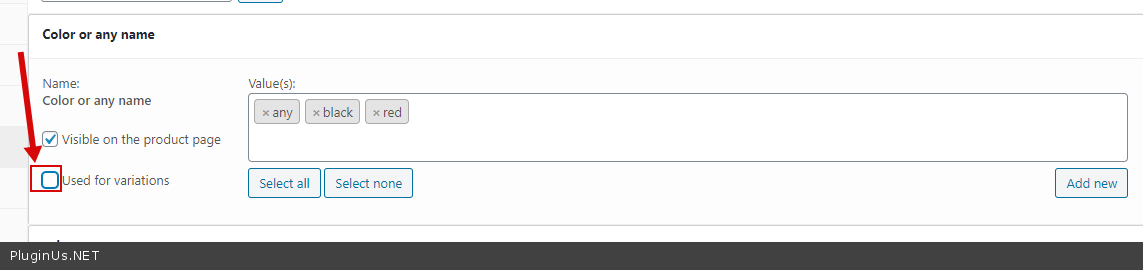
will cause the brand to appear in a drop-down menu in the product sheet,like sizes, as a purchase option, right? - No! Use this option - https://c2n.me/4bEKkdN.png
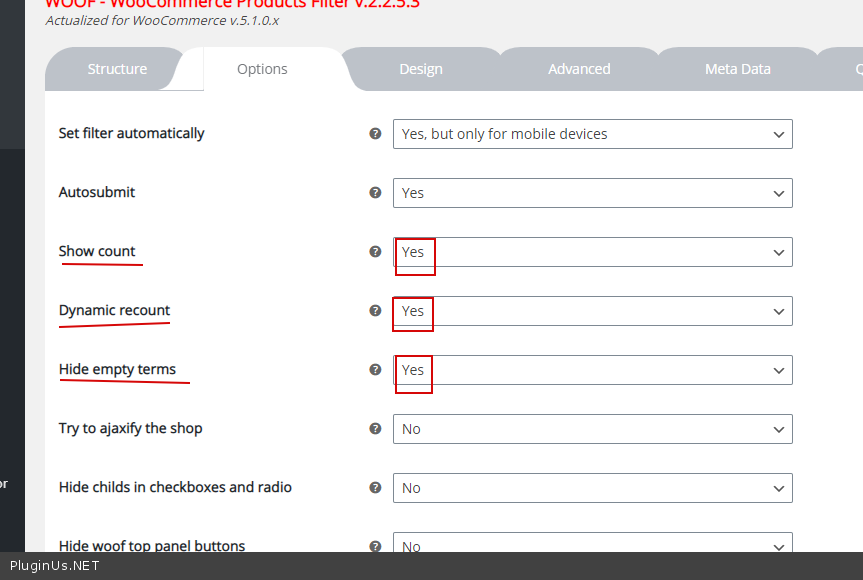
- If you are using the standard category page, the filter will only show the actual filters. check options please - https://c2n.me/4bEKK98.png
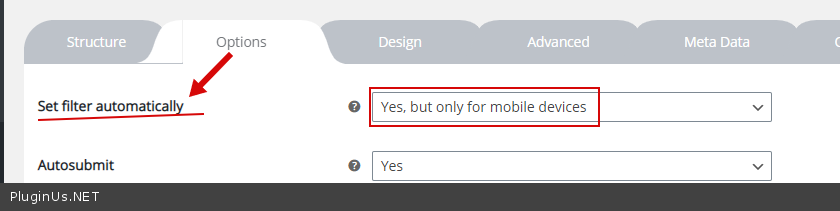
- you can hide widget for mobile (use third patry plugins ) and check option - https://c2n.me/4bEKVDR.png
Hello
will cause the brand to appear in a drop-down menu in the product sheet,like sizes, as a purchase option, right? - No! Use this option - https://c2n.me/4bEKkdN.png
- If you are using the standard category page, the filter will only show the actual filters. check options please - https://c2n.me/4bEKK98.png
- you can hide widget for mobile (use third patry plugins ) and check option - https://c2n.me/4bEKVDR.png
Quote from cafesolo on April 26, 2021, 12:55Hello Pablo,
1/ Thanks a lot for your solution to show only filters used on category page.
2/ When I asked : "how to hide the filter column on the mobile version and only display it at the click of a button?" I was talking
about this kind of thing :
https://ibb.co/1d0MwMV
https://ibb.co/dkJ1Vy8Because "Set filter automatically" doesn't hide filter column, maybe I don't understand something,
you was talking about third party plugins, can you telle more ?...
Thanks a lot for your help
Hello Pablo,
1/ Thanks a lot for your solution to show only filters used on category page.
2/ When I asked :"how to hide the filter column on the mobile version and only display it at the click of a button?" I was talking
about this kind of thing :
https://ibb.co/1d0MwMV
https://ibb.co/dkJ1Vy8
Because"Set filter automatically" doesn't hide filter column, maybe I don't understand something,
you was talking about third party plugins, can you telle more ?...
Thanks a lot for your help
Quote from Pablo Borysenco on April 27, 2021, 11:18Hello
I was talking about this kind of thing : - Read this please - https://products-filter.com/extencion/slideout/
you was talking about third party plugins, can you telle more ?... - https://wordpress.org/plugins/widget-logic/ - use key - !wp_is_mobile()
Hello
I was talking about this kind of thing : - Read this please - https://products-filter.com/extencion/slideout/
you was talking about third party plugins, can you telle more ?... - https://wordpress.org/plugins/widget-logic/ - use key - !wp_is_mobile()
Quote from cafesolo on April 27, 2021, 12:31Hello,
So I need to download these the two extensions to hide filter column : Widget logic and Slideout WOOF extension ?
Because in dashboard of WooCommerce Products Filter there is not extension tab...
If I need Slideout Woof Extension, I don't find how to download it...
Thanks for all
Hello,
So I need to download these the two extensions to hide filter column : Widget logic and Slideout WOOF extension ?
Because in dashboard of WooCommerce Products Filter there is not extension tab...
If I need Slideout Woof Extension, I don't find how to download it...
Thanks for all
Quote from Pablo Borysenco on April 28, 2021, 11:27Hello
Please try to watch a video - https://products-filter.com/video-tutorials/#video_beGT6p_look
Hello
Please try to watch a video - https://products-filter.com/video-tutorials/#video_beGT6p_look
Quote from cafesolo on May 6, 2021, 16:42Hello,
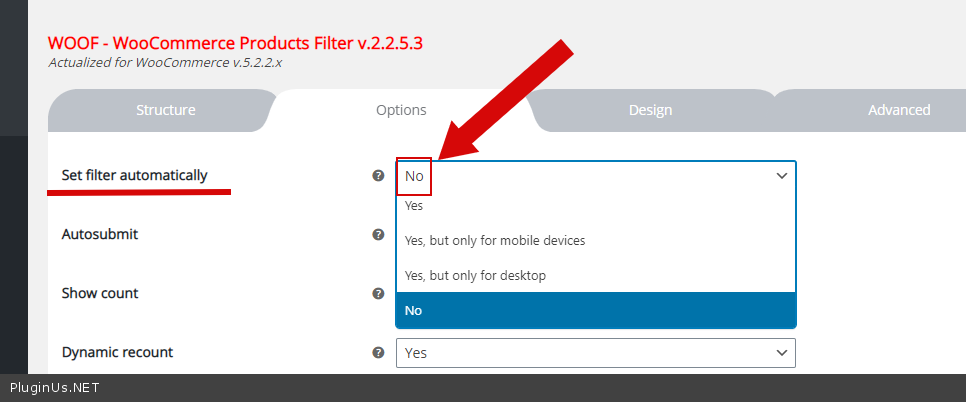
Just one thing, on mobile I've got two filter block, I supposed I have activated an option,
can you help me to desactivate second one : https://ibb.co/Sx4MtC3
Thanks
Hello,
Just one thing, on mobile I've got two filter block, I supposed I have activated an option,
can you help me to desactivate second one : https://ibb.co/Sx4MtC3
Thanks
Quote from Pablo Borysenco on May 7, 2021, 11:55Hello
Please check option - https://c2n.me/4bX8bWr.png
Hello
Please check option - https://c2n.me/4bX8bWr.png