Pablo Borysenco(@pavlo_borysenco)
34,196 Posts
Quote from Pablo Borysenco on April 25, 2022, 11:26
Hello
Unfortunately your license code is not valid.
Drop me exact link to the issue
Hello
Unfortunately your license code is not valid.
Drop me exact link to the issue
Pablo Borysenco(@pavlo_borysenco)
34,196 Posts
Quote from Pablo Borysenco on April 26, 2022, 13:01
Hello
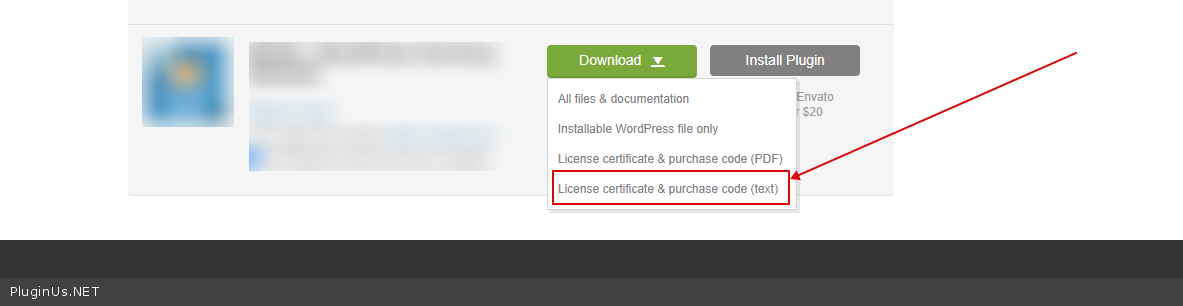
To get license key - https://codecanyon.net/downloads -> https://c2n.me/49ZXJv0.png
(pass in private data, as well as admin access). - https://share.pluginus.net/image/i20220426110059.png
Hello
To get license key - https://codecanyon.net/downloads -> https://c2n.me/49ZXJv0.png
(pass in private data, as well as admin access). - https://share.pluginus.net/image/i20220426110059.png
Pablo Borysenco(@pavlo_borysenco)
34,196 Posts
Quote from Pablo Borysenco on April 27, 2022, 11:07
Hello
Your license key is ok!
Please add the correct password - https://share.pluginus.net/image/i20220427090709.png
Hello
Your license key is ok!
Please add the correct password - https://share.pluginus.net/image/i20220427090709.png
Pablo Borysenco(@pavlo_borysenco)
34,196 Posts
Quote from Pablo Borysenco on April 27, 2022, 12:58
Ok! Please add FTP access
Ok! Please add FTP access
Pablo Borysenco(@pavlo_borysenco)
34,196 Posts
Quote from Pablo Borysenco on April 28, 2022, 11:16
Hello
Please check your FTP access( this access does not lead to the site folder )
Hello
Please check your FTP access( this access does not lead to the site folder )
Pablo Borysenco(@pavlo_borysenco)
34,196 Posts
Quote from Pablo Borysenco on April 28, 2022, 12:09
Hello
To hide autofilter( filter at the top of the page ) - https://share.pluginus.net/image/i20220428100628.png
after disabling this filter this will work
Paste the full path in the widget settings
Hello
To hide autofilter( filter at the top of the page ) - https://share.pluginus.net/image/i20220428100628.png
after disabling this filter this will work
Paste the full path in the widget settings
Pablo Borysenco(@pavlo_borysenco)
34,196 Posts
Quote from Pablo Borysenco on May 3, 2022, 11:55
Welcome;)
Welcome;)