

When I would like to activate Woof, I get a fatal error
The support doesn work on Saturdays and Sundays, so some Friday requests can be answered on Monday. If you have problems with registration ask help on contact us page pleaseIf you not got email within 24~36 business hours, firstly check your spam box, and if no any email from the support there - back to the forum and read answer here. DO NOT ANSWER ON EMAILS [noreply@pluginus.net] FROM THE FORUM!! Emails are just for your info, all answers should be published only here.
The support doesn work on Saturdays and Sundays, so some Friday requests can be answered on Monday.

Quote from Dominik on April 13, 2022, 14:42Hi!
When I install plugin, and after I wold like to activate that. I get a fatal error.Fatal error: Uncaught TypeError: Cannot access offset of type string on string in /wp-content/plugins/woocommerce-products-filter/index.php:145 Stack trace: #0 /wp-includes/class-wp-hook.php(307): WOOF->init('') #1 /wp-includes/class-wp-hook.php(331): WP_Hook->apply_filters(NULL, Array) #2 /wp-includes/plugin.php(474): WP_Hook->do_action(Array) #3 /wp-settings.php(587): do_action('init') #4 /wp-config.php(96): require_once('/wp-settings.ph...') #5 /wp-load.php(50): require_once('/wp-config.php') #6 /wp-admin/admin.php(34): require_once('/wp-load.php') #7 /wp-admin/plugins.php(10): require_once('/wp-admin/admin...') #8 {main} thrown in /wp-content/plugins/woocommerce-products-filter/index.php on line 145
I use PHP 8.1, Wordpress 5.9.3
What can I do?
Thanks for helping!
Hi!
When I install plugin, and after I wold like to activate that. I get a fatal error.
Fatal error: Uncaught TypeError: Cannot access offset of type string on string in /wp-content/plugins/woocommerce-products-filter/index.php:145 Stack trace: #0 /wp-includes/class-wp-hook.php(307): WOOF->init('') #1 /wp-includes/class-wp-hook.php(331): WP_Hook->apply_filters(NULL, Array) #2 /wp-includes/plugin.php(474): WP_Hook->do_action(Array) #3 /wp-settings.php(587): do_action('init') #4 /wp-config.php(96): require_once('/wp-settings.ph...') #5 /wp-load.php(50): require_once('/wp-config.php') #6 /wp-admin/admin.php(34): require_once('/wp-load.php') #7 /wp-admin/plugins.php(10): require_once('/wp-admin/admin...') #8 {main} thrown in /wp-content/plugins/woocommerce-products-filter/index.php on line 145
I use PHP 8.1, Wordpress 5.9.3
What can I do?
Thanks for helping!

Quote from Pablo Borysenco on April 14, 2022, 11:47Hello
what plugin version number are you using?
Hello
what plugin version number are you using?
Quote from Dominik on April 14, 2022, 13:43Hello
I was trying with WOOF – Products Filter for WooCommerce version 1.2.6.4.
And my WooCommerce version is 6.3.1.Thanks for your helping.
Hello
I was trying with WOOF – Products Filter for WooCommerce version 1.2.6.4.
And my WooCommerce version is 6.3.1.
Thanks for your helping.
Quote from Pablo Borysenco on April 15, 2022, 10:17Hello
Have you customized the plugin code?
try in file - /wp-content/plugins/woocommerce-products-filter/index.php - change this code - https://c2n.me/4fr3YBv.png
$this->settings['delete_image'] = WOOF_LINK . "img/delete.png";
Hello
Have you customized the plugin code?
try in file - /wp-content/plugins/woocommerce-products-filter/index.php - change this code - https://c2n.me/4fr3YBv.png
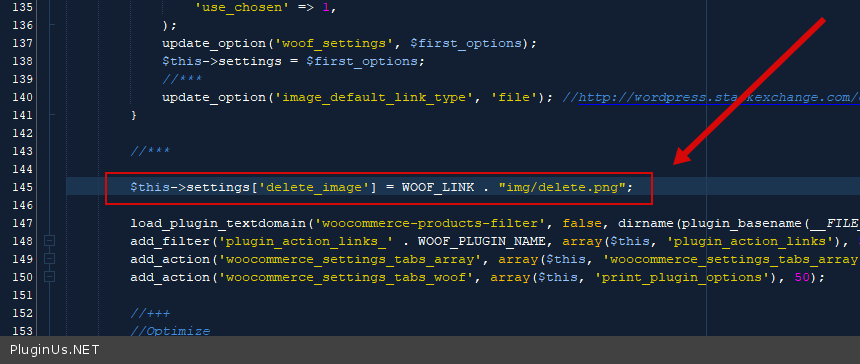
$this->settings['delete_image'] = WOOF_LINK ."img/delete.png";
Quote from Dominik on April 16, 2022, 10:34Hello!
I haven't customized the plugin code. I haven't customized any source code in my project. I downloaded WorPress, and after I would liked to install and activate plugins, but only the WOOF cause fatal error, all other plugins work well.
I tried to change this code, but this throw the same error.
Thank for your helping!
Hello!
I haven't customized the plugin code. I haven't customized any source code in my project. I downloaded WorPress, and after I would liked to install and activate plugins, but only the WOOF cause fatal error, all other plugins work well.
I tried to change this code, but this throw the same error.
Thank for your helping!
Quote from Pablo Borysenco on April 18, 2022, 11:11Hello
Please drop me wp-admin+FTP access - https://share.pluginus.net/image/i20210618130558.png ->https://share.pluginus.net/image/i20210618130637.png
Hello
Please drop me wp-admin+FTP access - https://share.pluginus.net/image/i20210618130558.png ->https://share.pluginus.net/image/i20210618130637.png


Quote from Dominik on April 18, 2022, 11:59Hello!
I shared the access!
Thanks for your helping!
Hello!
I shared the access!
Thanks for your helping!
Quote from Pablo Borysenco on April 18, 2022, 14:21Unfortunately, this FTP access does not work.
Unfortunately, this FTP access does not work.
Quote from Dominik on April 18, 2022, 14:28Would you try to log in again?
You may not have been able to log in because I was logged in as well.
I hope you can log in, because I also log in with this data.
(I use WinSCP to connect FTP)
Would you try to log in again?
You may not have been able to log in because I was logged in as well.
I hope you can log in, because I also log in with this data.
(I use WinSCP to connect FTP)
Quote from Pablo Borysenco on April 19, 2022, 10:13Hello
Unfortunately not successful
Hello
Unfortunately not successful
Quote from Dominik on April 19, 2022, 12:06Hello,
I don't know what is the problem, because I can log in with the data I gave.
What can I do?
Hello,
I don't know what is the problem, because I can log in with the data I gave.
What can I do?
Quote from Pablo Borysenco on April 20, 2022, 09:30Hello
Check if you have access restriction by IP
Added my IP to private data
Hello
Check if you have access restriction by IP
Added my IP to private data
Quote from Dominik on April 21, 2022, 09:31Hello
Okay, that was probably the problem.
Now, please try to connect the FTP.
Thanks for your helping.
Hello
Okay, that was probably the problem.
Now, please try to connect the FTP.
Thanks for your helping.
Quote from Pablo Borysenco on April 21, 2022, 12:09Hello
Please do a test
Hello
Please do a test
Quote from Dominik on April 21, 2022, 13:46Hello
Nice, it is working!
I bought the pro version and it also works.
I'm grateful you helped so much.
Hello
Nice, it is working!
I bought the pro version and it also works.
I'm grateful you helped so much.
Quote from Pablo Borysenco on April 22, 2022, 11:53Hello
Great!
Welcome;)
Hello
Great!
Welcome;)