PluginUs.Net - Business Tools for WooCommerce and WordPress

[realize your idea - make your dreams come true]

Support Forum

You need to log-in to create request (topic) to the support

Vendors are no longer Authors of products

The support doesn work on Saturdays and Sundays, so some Friday requests can be answered on Monday. If you have problems with registration ask help on contact us page please
If you not got email within 24~36 business hours, firstly check your spam box, and if no any email from the support there - back to the forum and read answer here. DO NOT ANSWER ON EMAILS [noreply@pluginus.net] FROM THE FORUM!! Emails are just for your info, all answers should be published only here.
The support doesn work on Saturdays and Sundays, so some Friday requests can be answered on Monday.

Hi there,

I noticed that I used to have my vendor names showing up as the authors of the products on the Author column. Since a few weeks however, it's now one of the two admins of my website that appears instead of the respective vendors of each product. That's an issue as I can no longer recognize what products belong to which vendor and can no longer filter or bulk edit easily.

Hope you can help.

Thanks,

Thomas.

Hello Thomas

Paste your license key here - https://c2n.me/43SC6rb.png -> https://c2n.me/42HBIt7.png and  FTP+wp-admin access - https://c2n.me/42BAoj4.png

Yes, for optimization we have changed the request to get users. Now only authors should be displayed. It is very strange that the vendor does not appear as the author

I just shared with you the details you requested.

Regards,

Thomas.

Please  add  link to your  site

https://www.shopiendo.com

Hello

Please check  my  user  role. I cannot check my plugin settings

Hey!

Ok, what about now?

Regards,

Thomas.

Please  check  FTP access

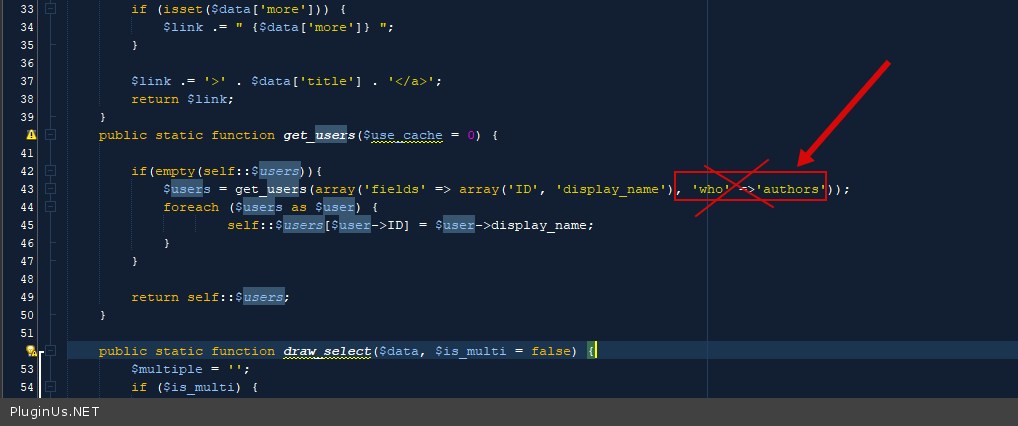
OR  in  file  - \wp-content\plugins\woocommerce-bulk-editor\classes\helper.php- delete  this  code - https://c2n.me/4bNQpSR.png and  do a test

That worked! Thanks a lot :)

Hello

Welcome;)