

variations products with stock 0 is shown instead to be hidden!
The support doesn work on Saturdays and Sundays, so some Friday requests can be answered on Monday. If you have problems with registration ask help on contact us page pleaseIf you not got email within 24~36 business hours, firstly check your spam box, and if no any email from the support there - back to the forum and read answer here. DO NOT ANSWER ON EMAILS [noreply@pluginus.net] FROM THE FORUM!! Emails are just for your info, all answers should be published only here.
The support doesn work on Saturdays and Sundays, so some Friday requests can be answered on Monday.

Quote from Valerio on April 7, 2020, 16:56I have the premium version and trying to filter products per attribute.
When filtering per attribute (in this case attribute is Size 10), I see however products filter per attribute correctly, but on the same attribute variation, have quantity 0. So the thing is : when i filter per attribute, variations products that have stock quantity 0 must not be showed....its a supported functionality? please if anyone has encountered this issue, text me soon as possible!!!!!
I have the premium version and trying to filter products per attribute.
When filtering per attribute (in this case attribute is Size 10), I see however products filter per attribute correctly, but on the same attribute variation, have quantity 0. So the thing is : when i filter per attribute, variations products that have stock quantity 0 must not be showed....its a supported functionality? please if anyone has encountered this issue, text me soon as possible!!!!!

Quote from Pablo Borysenco on April 8, 2020, 12:38Hello
Please activate an extension - https://c2n.me/46U71r2.png and check this option - https://c2n.me/46U7fsw.png
And check in Advanced->Options-> https://c2n.me/46U7nVa.png
If no luck drop me FTP access
Hello
Please activate an extension - https://c2n.me/46U71r2.png and check this option - https://c2n.me/46U7fsw.png
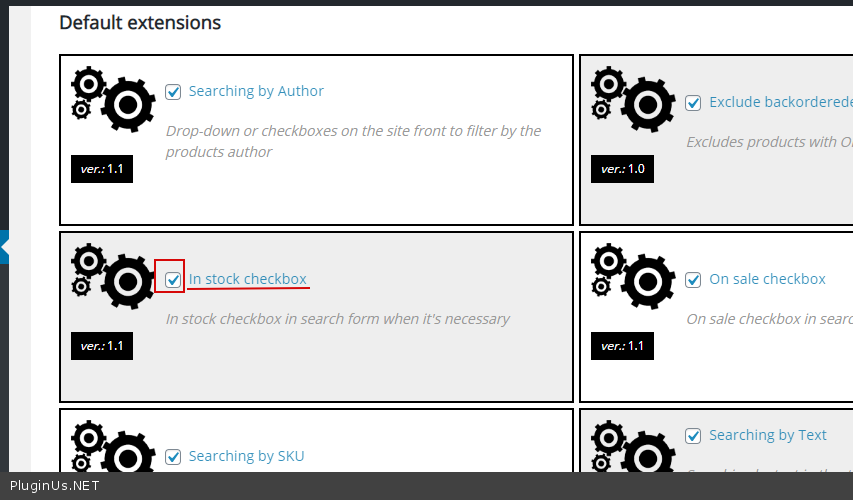
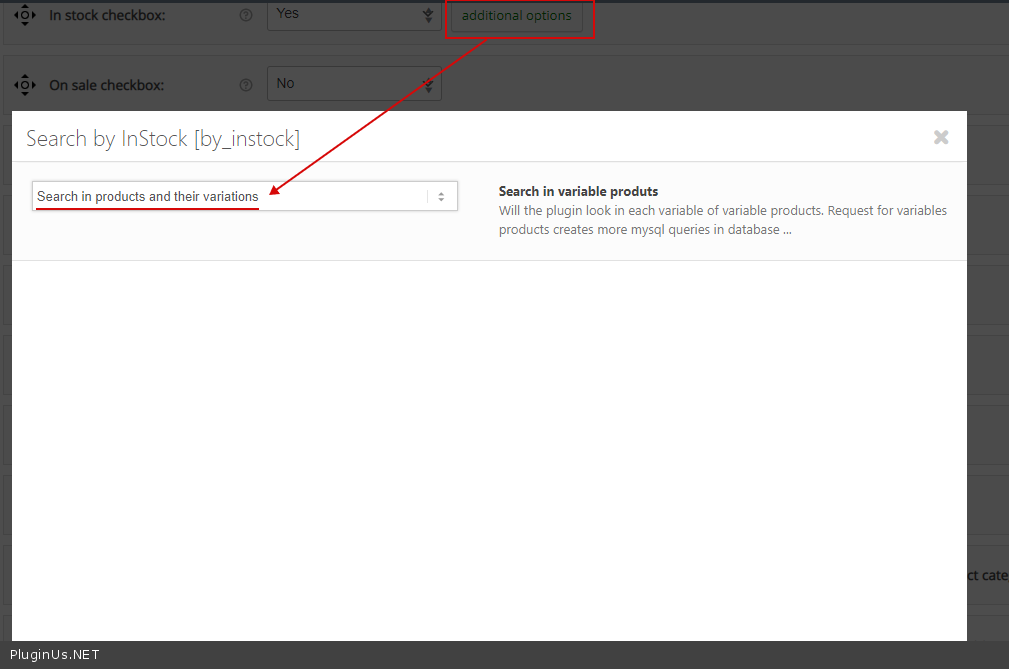
And check in Advanced->Options-> https://c2n.me/46U7nVa.png
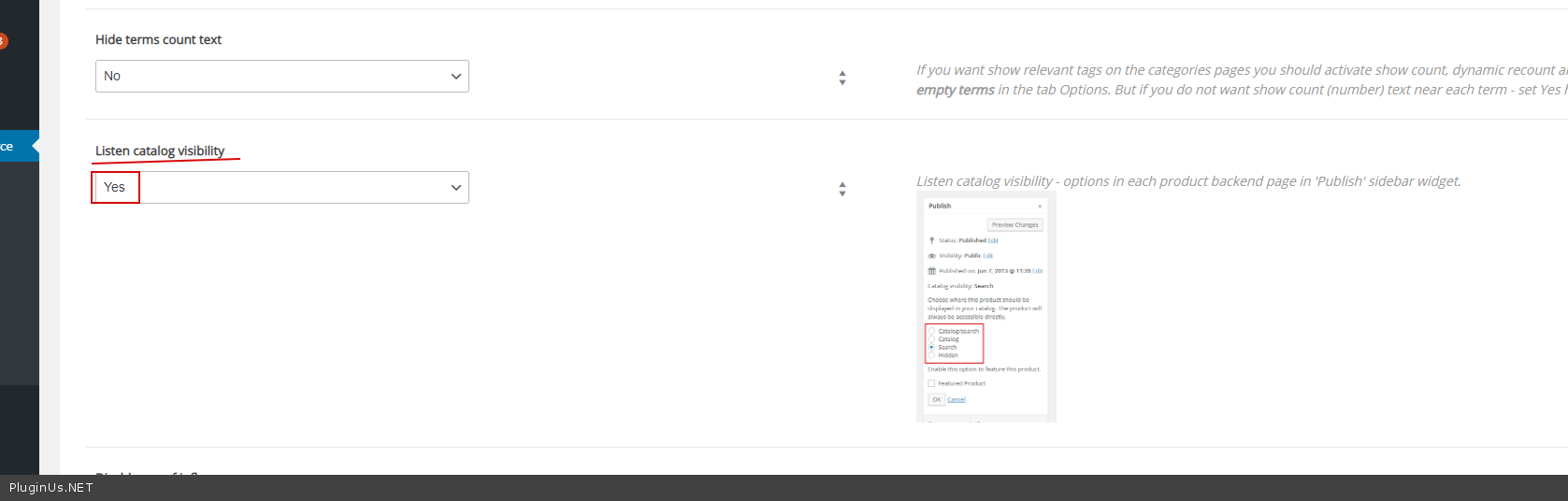
If no luck drop me FTP access
Quote from Valerio on April 8, 2020, 17:17Thanks for response. I have tried your istructions without results...if you login on the backend, you can see by yourself everything...
anyway i give ftp access. please let me know
Thanks for response. I have tried your istructions without results...if you login on the backend, you can see by yourself everything...
anyway i give ftp access. please let me know
Quote from Pablo Borysenco on April 9, 2020, 12:25Hello
Please drop me exact link to the product with this issue
Hello
Please drop me exact link to the product with this issue
Quote from Valerio on April 9, 2020, 12:32you can check this link
http://petrolioshop.net/scarpe-tecniche-basket/if you want to be sure the filter is working for all products in that page, check this other link
its the "old site" made on Prestashop where filters works correctly....
https://www.petrolioshop.com/it/11-scarpe-tecniche-basket
basically I have to reproduce filters as the "old one"....
you can check this link
http://petrolioshop.net/scarpe-tecniche-basket/
if you want to be sure the filter is working for all products in that page, check this other link
its the"old site" made on Prestashop where filters works correctly....
https://www.petrolioshop.com/it/11-scarpe-tecniche-basket
basically I have to reproduce filters as the"old one"....
Quote from Pablo Borysenco on April 10, 2020, 17:53Hello
It looks like you have problems on the side of the database. After updating the product, it works correctly. My test - https://c2n.me/46XbuT5
Hello
It looks like you have problems on the side of the database. After updating the product, it works correctly. My test - https://c2n.me/46XbuT5
Quote from Valerio on April 10, 2020, 19:59first of all, thank you for response....
just seen your post, I tried to:
- backup DB --> ok;
- repair DB -->ok;
- turn off and turn on the option manage stock..
the thing is: if I do from the dashboard just like you show me, it works even if I dont understand the cause;but if I do from Php Code it doesnt work even if the option manage stock is turned off...
//this is the code that update the product and its working
update_post_meta($id, '_manage_stock', 'no')
wp_update_post( array( 'ID' => $product_id ) );on the specific case, this code should make the same trick we do from the dashboard, so the product filtering could be working...
but it doesnt work by code..
there are almost 1200 products, i can flag/unflag one by one...
you understand me?
first of all, thank you for response....
just seen your post, I tried to:
- backup DB --> ok;
- repair DB -->ok;
- turn off and turn on the option manage stock..
the thing is: if I do from the dashboard just like you show me, it works even if I dont understand the cause;
but if I do from Php Code it doesnt work even if the option manage stock is turned off...
//this is the code that update the product and its working
update_post_meta($id, '_manage_stock', 'no')
wp_update_post( array( 'ID' => $product_id ) );
on the specific case, this code should make the same trick we do from the dashboard, so the product filtering could be working...
but it doesnt work by code..
there are almost 1200 products, i can flag/unflag one by one...
you understand me?
Quote from Pablo Borysenco on April 13, 2020, 12:21Hello
I will try to explain this error in more detail.
The problem is not of this value - _manage_stock - but in _stock_status. if you check this value in all products - it's - onbackorder - although your settings do not allow this.
if you change this setting"manage stock" in the edit page, the product is updated and the correct value is set - _stock_status = 'outofstock'
Possible reason: You did the product import and the import script assigned these values to the products _stock_status = onbackorder by default
Hello
I will try to explain this error in more detail.
The problem is not of this value - _manage_stock - but in _stock_status. if you check this value in all products - it's - onbackorder - although your settings do not allow this.
if you change this setting"manage stock" in the edit page, the product is updated and the correct value is set - _stock_status = 'outofstock'
Possible reason: You did the product import and the import script assigned these values to the products _stock_status = onbackorder by default
Quote from Valerio on April 13, 2020, 23:12Thanks for the quick response!!!!!! you such a genius!!!!!
I have been trying to do as you told me...
in other words....
I made a script where I cycle product by product in each variation....
i wrote like this..if(stock_status==onbackorder)
update_post_meta(id,stockstatus,outofstock);and it seems to be working as I want!
If I disable the in_stock option to avoid clicking the checkbox everytime, it will work on the same way?
Because I set up the woof filter:
as you seen I split the page in 2 columns
+++++++++++++++++++++++++++++++++++++++++++++++++++++++++++++++++++++++++++
+ + +
+ + +
+ + +
+ + +
+ + +
+ + +
+++++++++++++++++++++++++++++++++++++++++++++++++++++++++++++++++++++++++++
First column:
[woof sid="auto_shortcode" autohide=0 taxonomies=product_cat:5134]Second column:
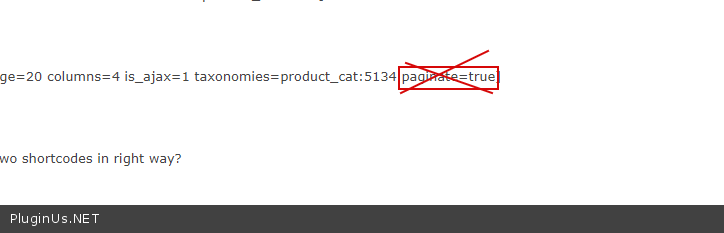
[woof_products per_page=20 columns=4 is_ajax=1 taxonomies=product_cat:5134 paginate=true]
You think I set up the two shortcodes in right way?
Thanks for the quick response!!!!!! you such a genius!!!!!
I have been trying to do as you told me...
in other words....
I made a script where I cycle product by product in each variation....
i wrote like this..
if(stock_status==onbackorder)
update_post_meta(id,stockstatus,outofstock);
and it seems to be working as I want!
If I disable the in_stock option to avoid clicking the checkbox everytime, it will work on the same way?
Because I set up the woof filter:
as you seen I split the page in 2 columns
+++++++++++++++++++++++++++++++++++++++++++++++++++++++++++++++++++++++++++
+ + +
+ + +
+ + +
+ + +
+ + +
+ + +
+++++++++++++++++++++++++++++++++++++++++++++++++++++++++++++++++++++++++++
First column:
[woof sid="auto_shortcode" autohide=0 taxonomies=product_cat:5134]
Second column:
[woof_products per_page=20 columns=4 is_ajax=1 taxonomies=product_cat:5134 paginate=true]
You think I set up the two shortcodes in right way?
Quote from Pablo Borysenco on April 14, 2020, 12:27Hello
If I disable the in_stock option to avoid clicking the checkbox everytime, it will work on the same way? - Check this option https://c2n.me/470DNNS.png and read this - https://products-filter.com/manipulate-search-data-options/
Yes, it seems like shortcodes are correct. this attribute is not needed - https://c2n.me/470Ehci.png
Hello
If I disable the in_stock option to avoid clicking the checkbox everytime, it will work on the same way? - Check this option https://c2n.me/470DNNS.png and read this - https://products-filter.com/manipulate-search-data-options/
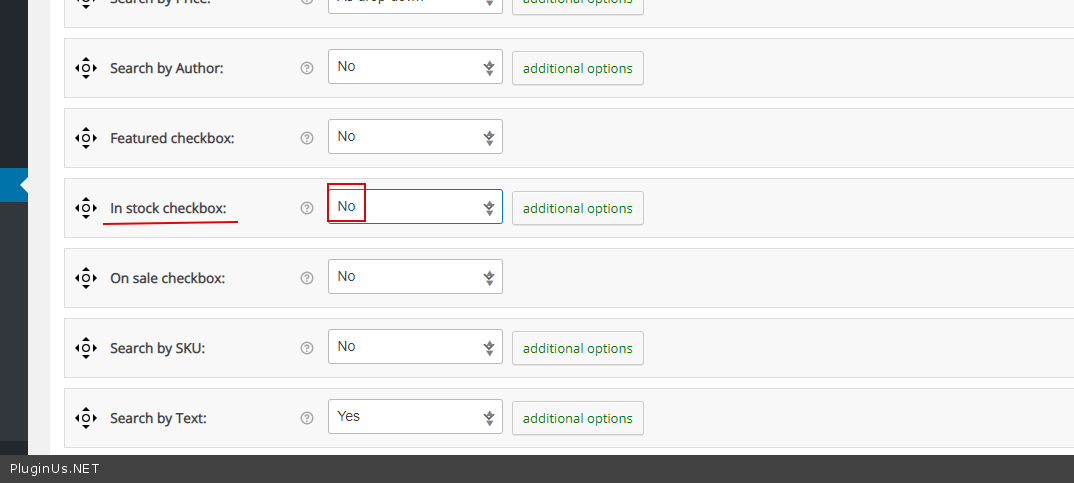
Yes, it seems like shortcodes are correct. this attribute is not needed - https://c2n.me/470Ehci.png
Quote from Valerio on April 16, 2020, 00:28everything is setup...now product filtering is working correctly!!!!! :')
LAST THING
please explain me how to set up properly the product filters..
i have all this attributes... --> https://paste.pics/2d6963a84e0cd2d998e35edcb82304a3
if i select all attributes, filter will display all filterings checked...how i can set up the shortcode to display only the attributes I want for that page?
THANK YOU VERY MUCH!!!!!!!!!!!!!!
everything is setup...now product filtering is working correctly!!!!! :')
LAST THING
please explain me how to set up properly the product filters..
i have all this attributes... --> https://paste.pics/2d6963a84e0cd2d998e35edcb82304a3
if i select all attributes, filter will display all filterings checked...how i can set up the shortcode to display only the attributes I want for that page?
THANK YOU VERY MUCH!!!!!!!!!!!!!!
Quote from Pablo Borysenco on April 16, 2020, 12:18Hello
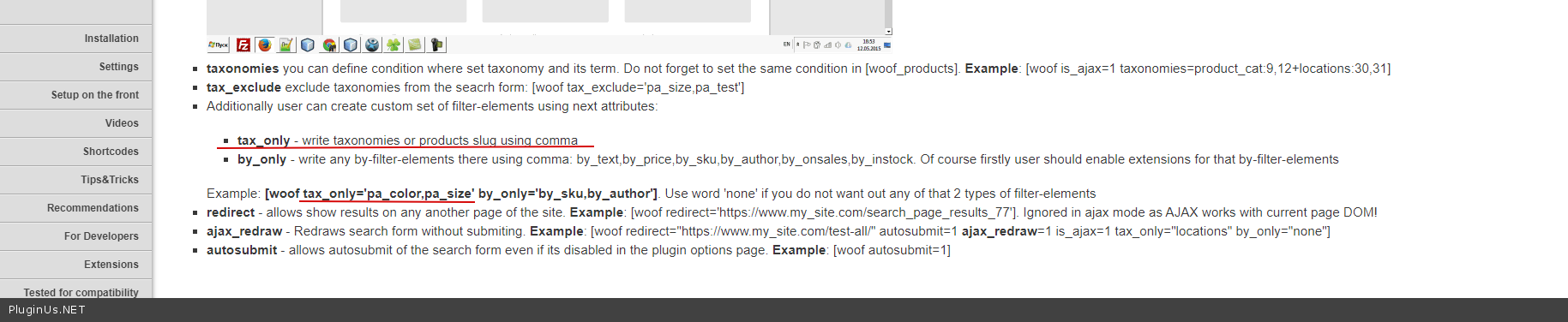
Please read this - https://products-filter.com/documentation/#section_3_2
For taxonomies(attributes) use tax_only - https://c2n.me/473mmCE.png
Hello
Please read this - https://products-filter.com/documentation/#section_3_2
For taxonomies(attributes) use tax_only - https://c2n.me/473mmCE.png
Quote from Valerio on April 20, 2020, 23:14everything is working and i appreciate the assistance you gave me.
as you know customers are always pretencious...i got a question now...
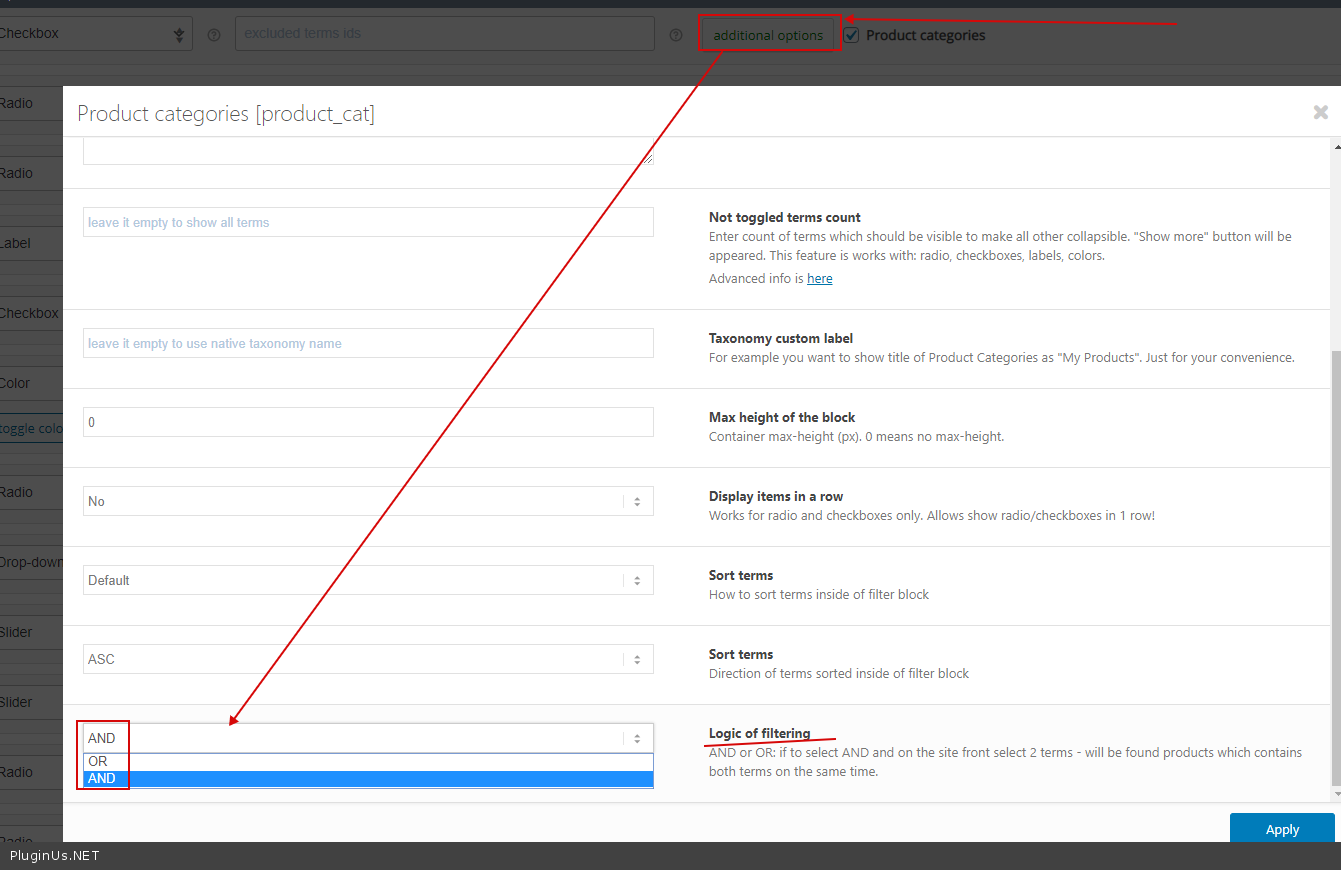
is there any logical operator when i filter products? i mean
and / or operators?
if i select us9 and us10
it displays only same us9 and us10..
as customer says...it should display only with us9, us10 or both..
if you have any suggestion let me know please...
thanks btw
everything is working and i appreciate the assistance you gave me.
as you know customers are always pretencious...
i got a question now...
is there any logical operator when i filter products? i mean
and / or operators?
if i select us9 and us10
it displays only same us9 and us10..
as customer says...it should display only with us9, us10 or both..
if you have any suggestion let me know please...
thanks btw
Quote from Pablo Borysenco on April 21, 2020, 12:36Hello
You can check this option - https://c2n.me/478nVX8.png
Hello
You can check this option - https://c2n.me/478nVX8.png
Quote from Valerio on June 3, 2020, 19:44Hi Pablo..
everything worked well...
during this period we were testing everything and we found this:
on this page/link -> petrolioshop.com/scarpe-tecniche-basket/ (and also in other pages)
in filter plugin, where we can set filter for products, on filter "Taglie Uomo" (they are all the attributes related to the shoe size), if I select this attribute US 5Y, it returns 0(zero) products, which is basically wrong, because if there are not products matching, I suppose that filter should be hidden..
Can you check or explain the working of that? eventually you can send me additional code to fix that issue...I updated the info on private ticket if you want to check directly.
Thanks for collaborating
Valerio
Hi Pablo..
everything worked well...
during this period we were testing everything and we found this:
on this page/link -> petrolioshop.com/scarpe-tecniche-basket/ (and also in other pages)
in filter plugin, where we can set filter for products, on filter"Taglie Uomo" (they are all the attributes related to the shoe size), if I select this attribute US 5Y, it returns 0(zero) products, which is basically wrong, because if there are not products matching, I suppose that filter should be hidden..
Can you check or explain the working of that? eventually you can send me additional code to fix that issue...
I updated the info on private ticket if you want to check directly.
Thanks for collaborating
Valerio
Quote from Pablo Borysenco on June 4, 2020, 14:01Hello Valerio
Please update plugin to latest version - https://products-filter.com/how-to-make-auto-update-for-wordpress-plugins-and-themes-bought-on-envato/
Add FTP access
Can I disable plugins/theme to test?
Hello Valerio
Please update plugin to latest version - https://products-filter.com/how-to-make-auto-update-for-wordpress-plugins-and-themes-bought-on-envato/
Add FTP access
Can I disable plugins/theme to test?
Quote from Valerio on June 4, 2020, 14:22I updated the plugin and it appears fixed!! you have any suggestion to get filtering so much faster?
I updated the plugin and it appears fixed!! you have any suggestion to get filtering so much faster?
Quote from Pablo Borysenco on June 5, 2020, 12:13Hello
Read this please - https://products-filter.com/searching-is-slow/
Hello
Read this please - https://products-filter.com/searching-is-slow/
Quote from Valerio on February 9, 2022, 02:15Hi Pablo hope you doing good! unfortunately we encountered so many issues with woof plugin.
i give you site test access, please can you do a check on plugin functionalities and check just one page to see if everything is good?
this is an example page to check -> https://wonderful-hellman.213-32-89-114.plesk.page/scarpe-tecniche-basket
as you can see:
woof displays so many attributes that are not related with those products;
each product count is wrong -> if you see on select box, you can find an attribute (size (1) ) and when you filter that, it shows nothingPlease we have the ecommerce blocked because woof plugin put the whole site in timeout error. Please text me back and i will attach credentials
Thank you
Hi Pablo hope you doing good! unfortunately we encountered so many issues with woof plugin.
i give you site test access, please can you do a check on plugin functionalities and check just one page to see if everything is good?
this is an example page to check -> https://wonderful-hellman.213-32-89-114.plesk.page/scarpe-tecniche-basket
as you can see:
woof displays so many attributes that are not related with those products;
each product count is wrong -> if you see on select box, you can find an attribute (size (1) ) and when you filter that, it shows nothing
Please we have the ecommerce blocked because woof plugin put the whole site in timeout error. Please text me back and i will attach credentials
Thank you
Quote from Pablo Borysenco on February 9, 2022, 12:47Hello
I checked your page, everything seems to be working correctly.
You placed the filter on a custom page and it will show all the elements as for any other custom page (blog, home page, etc.) This is because the filter does not know that you are using a third party way to display (some) products on this page.
To make the filter aware of the current category, use standard archive pages. something like that - /product-category/scarpe-tecniche-basket - then the filter will get information about the current category
OR to show filter use a shortcode - https://products-filter.com/shortcode/woof with attribute: taxonomies An example: [woof taxonomies='product_cat:X' ] where X is id of scarpe-tecniche-basket
Hello
I checked your page, everything seems to be working correctly.
You placed the filter on a custom page and it will show all the elements as for any other custom page (blog, home page, etc.) This is because the filter does not know that you are using a third party way to display (some) products on this page.
To make the filter aware of the current category, use standard archive pages. something like that - /product-category/scarpe-tecniche-basket - then the filter will get information about the current category
OR to show filter use a shortcode - https://products-filter.com/shortcode/woof with attribute: taxonomies An example: [woof taxonomies='product_cat:X' ] where X is id of scarpe-tecniche-basket