

Upsell Table Multiple Items Add To Cart Error
The support doesn work on Saturdays and Sundays, so some Friday requests can be answered on Monday. If you have problems with registration ask help on contact us page pleaseIf you not got email within 24~36 business hours, firstly check your spam box, and if no any email from the support there - back to the forum and read answer here. DO NOT ANSWER ON EMAILS [noreply@pluginus.net] FROM THE FORUM!! Emails are just for your info, all answers should be published only here.
The support doesn work on Saturdays and Sundays, so some Friday requests can be answered on Monday.

Quote from Quadica on December 24, 2021, 21:56This is a similar error to the one I reported in this post.
If I select multiple products in the upsells table and use the Add Selected button, the cart counter is not updated, and if you check the cart contents using the cart widget, it is empty. Now, if you reload the page, then the cart count will be updated, and the products will show up in the cart. This happens every time you try to add multiple items from the upsell table.
Here is a video demonstrating the problem:
https://screencast-o-matic.com/watch/crlZq7V2Rcu
Suggestions to fix?
This is a similar error to the one I reported in this post.
If I select multiple products in the upsells table and use the Add Selected button, the cart counter is not updated, and if you check the cart contents using the cart widget, it is empty. Now, if you reload the page, then the cart count will be updated, and the products will show up in the cart. This happens every time you try to add multiple items from the upsell table.
Here is a video demonstrating the problem:
https://screencast-o-matic.com/watch/crlZq7V2Rcu
Suggestions to fix?

Quote from Pablo Borysenco on December 27, 2021, 10:24hello
Please drop me wp-admin+FTP access - https://share.pluginus.net/image/i20210618130558.png -> https://share.pluginus.net/image/i20210618130637.png
hello
Please drop me wp-admin+FTP access - https://share.pluginus.net/image/i20210618130558.png -> https://share.pluginus.net/image/i20210618130637.png


Quote from Quadica on January 1, 2022, 07:31Site access credentials added to the private area.
Site access credentials added to the private area.
Quote from Pablo Borysenco on January 3, 2022, 14:44Hello
Please do a test
Hello
Please do a test
Quote from Quadica on January 3, 2022, 18:47This appears to be working correctly now.
What do I need to do to apply the fix to our staging sites?
This appears to be working correctly now.
What do I need to do to apply the fix to our staging sites?
Quote from Pablo Borysenco on January 4, 2022, 10:31Hello
Try in file - "\wp-content\plugins\woot-products-tables\profiles\woocommerce\js\woocommerce-cart.js" - add code - https://c2n.me/4ew5kMx.png
//fix for woocommerce native cart
//document.body.dispatchEvent(new CustomEvent('woot-added-to-cart'));
jQuery(document.body).trigger('woot-added-to-cart', [null, null, null]);
jQuery(document.body).trigger('wc_fragment_refresh');
Hello
Try in file -"\wp-content\plugins\woot-products-tables\profiles\woocommerce\js\woocommerce-cart.js" - add code - https://c2n.me/4ew5kMx.png
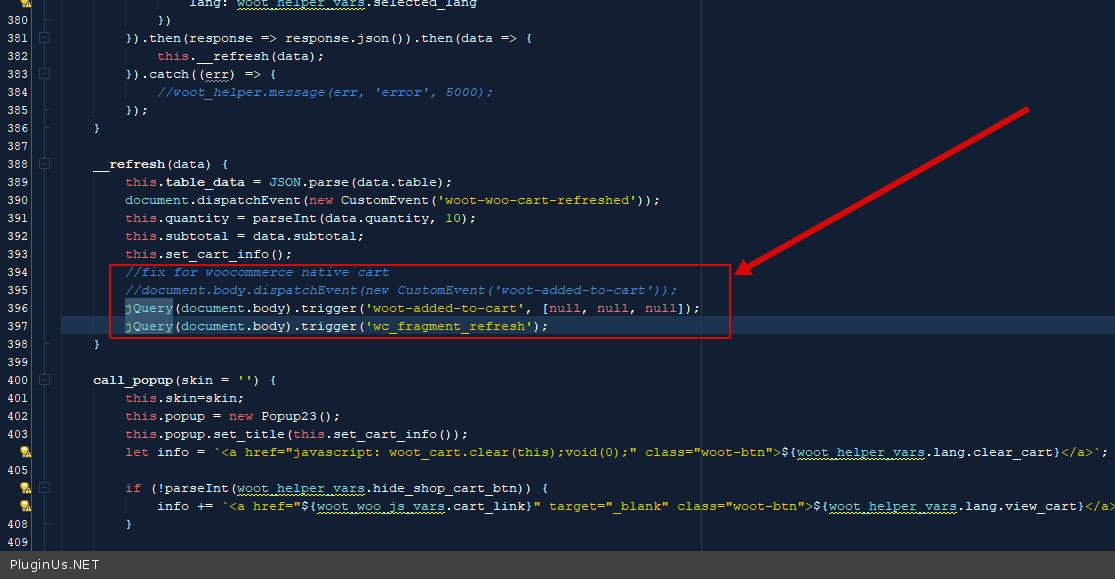
//fix for woocommerce native cart
//document.body.dispatchEvent(new CustomEvent('woot-added-to-cart'));
jQuery(document.body).trigger('woot-added-to-cart', [null, null, null]);
jQuery(document.body).trigger('wc_fragment_refresh');
Quote from Quadica on January 17, 2022, 21:21Hello Pablo,
I thought that was solved, but apparently, it is not. I added the code change to our staging site, but I still see problems with the cart not being updated when you use the Add to cart button to add items from a WOOT table.
I have updated the cloned site so you can test this. Details are in the private data section. All plugins have been disabled except for ones that are needed to test this functionality, including:
- Elementor
- Elementor Pro
- JetBlocks For Elementor
- JetMenu
- Woocommerce
- WOOT
- WP Rocket
If you go to the table page link I provided in the private notes and try to add a single product using the Add to Cart button in the table, you will notice that the dialog says that the product was added, but the cart count is not being updated and if you click on the cart link, it shows that the cart is empty. If you go to the /cart page you will see the item in the cart. Adding additional products will not update the cart count either.
If you try to add multiple items to the cart from the table, the same problem will happen.
Hello Pablo,
I thought that was solved, but apparently, it is not. I added the code change to our staging site, but I still see problems with the cart not being updated when you use the Add to cart button to add items from a WOOT table.
I have updated the cloned site so you can test this. Details are in the private data section. All plugins have been disabled except for ones that are needed to test this functionality, including:
- Elementor
- Elementor Pro
- JetBlocks For Elementor
- JetMenu
- Woocommerce
- WOOT
- WP Rocket
If you go to the table page link I provided in the private notes and try to add a single product using the Add to Cart button in the table, you will notice that the dialog says that the product was added, but the cart count is not being updated and if you click on the cart link, it shows that the cart is empty. If you go to the /cart page you will see the item in the cart. Adding additional products will not update the cart count either.
If you try to add multiple items to the cart from the table, the same problem will happen.
Quote from Quadica on January 18, 2022, 06:51I have traced the problem down to the WP Rocket plugin. When I disabled the plugin, the add to cart functionality works just fine.
This plugin has been the source of several problems with other plugins as well, and at this point, I think I am going to remove it—so no need to go any further with this problem.
I have traced the problem down to the WP Rocket plugin. When I disabled the plugin, the add to cart functionality works just fine.
This plugin has been the source of several problems with other plugins as well, and at this point, I think I am going to remove it—so no need to go any further with this problem.
Quote from Pablo Borysenco on January 18, 2022, 10:39Hello
Ok! Great!
I have traced the problem down to the WP Rocket plugin - This is a good plugin, I advise you to play with its settings
Hello
Ok! Great!
I have traced the problem down to the WP Rocket plugin - This is a good plugin, I advise you to play with its settings
Quote from Quadica on January 18, 2022, 20:02I agree that WP Rocket is a great plugin.
We are hosted on Kinsta, which has an excellent server-based caching system. They do allow some approved caching plugins (WP Rocket is one). However, they do discourage using them as they are not needed. However, Kinsta is missing several other optimization options that WP Rocket offers, such as file optimization, preloading, database enhancements, etc. These are the functions I was interested in.
But after using the plugin for some time, I found that the server-based Kinsta caching just worked much better with virtually no conflicts with other plugins. So as much as I would like to use WP Rocket for all of the other functions it offers, I am removing it.
I agree that WP Rocket is a great plugin.
We are hosted on Kinsta, which has an excellent server-based caching system. They do allow some approved caching plugins (WP Rocket is one). However, they do discourage using them as they are not needed. However, Kinsta is missing several other optimization options that WP Rocket offers, such as file optimization, preloading, database enhancements, etc. These are the functions I was interested in.
But after using the plugin for some time, I found that the server-based Kinsta caching just worked much better with virtually no conflicts with other plugins. So as much as I would like to use WP Rocket for all of the other functions it offers, I am removing it.
Quote from Pablo Borysenco on January 19, 2022, 10:26Hello
Understand. I hope everything works correctly now
Hello
Understand. I hope everything works correctly now