Pablo Borysenco(@pavlo_borysenco)
34,196 Posts
Quote from Pablo Borysenco on February 16, 2022, 19:48
Hello
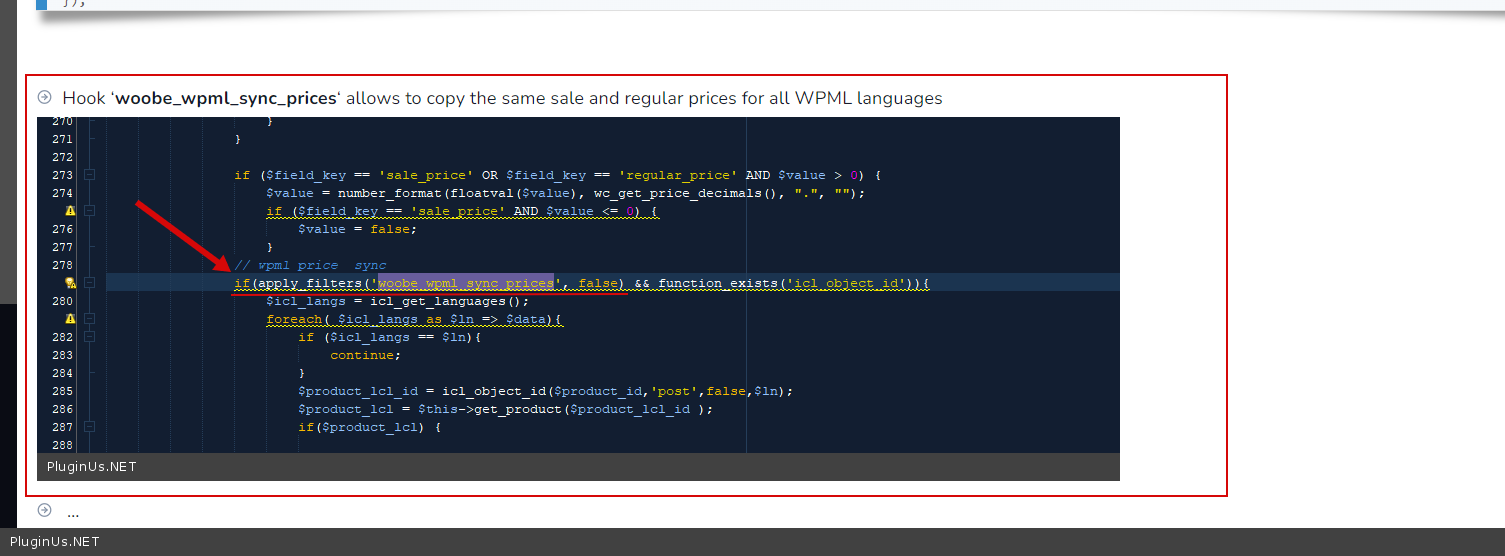
Please read this( https://c2n.me/4eXJmao.png ) - https://bulk-editor.com/document/more-settings-implicit
add in functions.php
add_filter('woobe_wpml_sync_prices', function($do){
return true;
});
Hello
Please read this( https://c2n.me/4eXJmao.png ) - https://bulk-editor.com/document/more-settings-implicit
add in functions.php
add_filter('woobe_wpml_sync_prices', function($do){
return true;
});
Pablo Borysenco(@pavlo_borysenco)
34,196 Posts
Quote from Pablo Borysenco on February 18, 2022, 11:35
Hello
What plugin version number are you using?
Hello
What plugin version number are you using?
Pablo Borysenco(@pavlo_borysenco)
34,196 Posts
Quote from Pablo Borysenco on February 18, 2022, 13:01
Please update the plugin to latest version - https://bulk-editor.com/how-to-make-auto-update-for-wordpress-plugins-and-themes-bought-on-envato
Please update the plugin to latest version - https://bulk-editor.com/how-to-make-auto-update-for-wordpress-plugins-and-themes-bought-on-envato
Pablo Borysenco(@pavlo_borysenco)
34,196 Posts
Quote from Pablo Borysenco on February 21, 2022, 10:19
Hello
In this case, contact support of envato plugin
Paste your license key here - https://share.pluginus.net/image/i20210618130558.png -> https://share.pluginus.net/image/i20210618130614.png
Hello
In this case, contact support of envato plugin
Paste your license key here - https://share.pluginus.net/image/i20210618130558.png -> https://share.pluginus.net/image/i20210618130614.png
Pablo Borysenco(@pavlo_borysenco)
34,196 Posts
Quote from Pablo Borysenco on February 21, 2022, 11:34
You should write to envato plugin support. Because with their plugin you can't update WOOBE/BEAR. Unfortunately, this does not depend on our plugin.
OR
You can delete the old version and install the new version of the plugin
You should write to envato plugin support. Because with their plugin you can't update WOOBE/BEAR. Unfortunately, this does not depend on our plugin.
OR
You can delete the old version and install the new version of the plugin