

Turbomode and hiding empty terms not working
The support doesn work on Saturdays and Sundays, so some Friday requests can be answered on Monday. If you have problems with registration ask help on contact us page pleaseIf you not got email within 24~36 business hours, firstly check your spam box, and if no any email from the support there - back to the forum and read answer here. DO NOT ANSWER ON EMAILS [noreply@pluginus.net] FROM THE FORUM!! Emails are just for your info, all answers should be published only here.
The support doesn work on Saturdays and Sundays, so some Friday requests can be answered on Monday.

Quote from martin123 on July 28, 2022, 12:35Hey
I have turbomode on and i dont wont to show empty terms. But it still shows even with these Setting. What to do??
Show count - yes
Dynamic recount- yes for all Devices
Hide empty terms - YesPlease have a look on this video
https://we.tl/t-LtnbiSdmWX
Hey
I have turbomode on and i dont wont to show empty terms. But it still shows even with these Setting. What to do??
Show count - yes
Dynamic recount- yes for all Devices
Hide empty terms - Yes
Please have a look on this video
https://we.tl/t-LtnbiSdmWX
Quote from martin123 on July 28, 2022, 12:56btw link to site is
https://staging-mybabysteps.kinsta.cloud
Purchase code is enterd also. Please provide a quick fix if you can. Filter is also online on live site
btw link to site is
https://staging-mybabysteps.kinsta.cloud
Purchase code is enterd also. Please provide a quick fix if you can. Filter is also online on live site

Quote from Pablo Borysenco on July 29, 2022, 11:58Hello
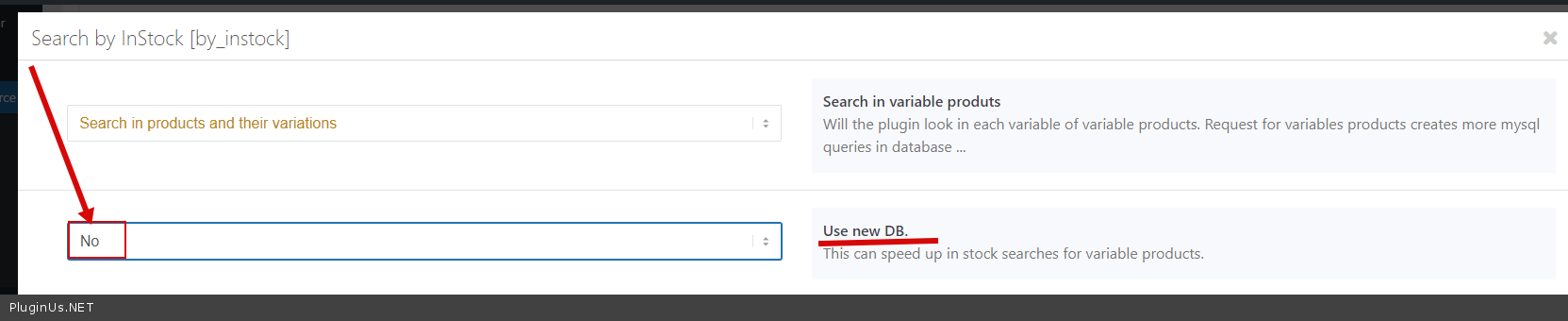
Please check this option - https://c2n.me/4ggv2hY.png re-create a turbo mode file and do a test
Hello
Please check this option - https://c2n.me/4ggv2hY.png re-create a turbo mode file and do a test
Quote from Pablo Borysenco on July 29, 2022, 12:00Also in the video you are doing a test with the old version of the plugin - update it please
Also in the video you are doing a test with the old version of the plugin - update it please
Quote from martin123 on July 29, 2022, 12:00Hello. I dont have that option on sizes ??? could you please login in a have a look.
Acces its in the private popup
Hello. I dont have that option on sizes ??? could you please login in a have a look.
Acces its in the private popup
Quote from martin123 on July 29, 2022, 12:02i have version 2.2.9.1?
i have version 2.2.9.1?
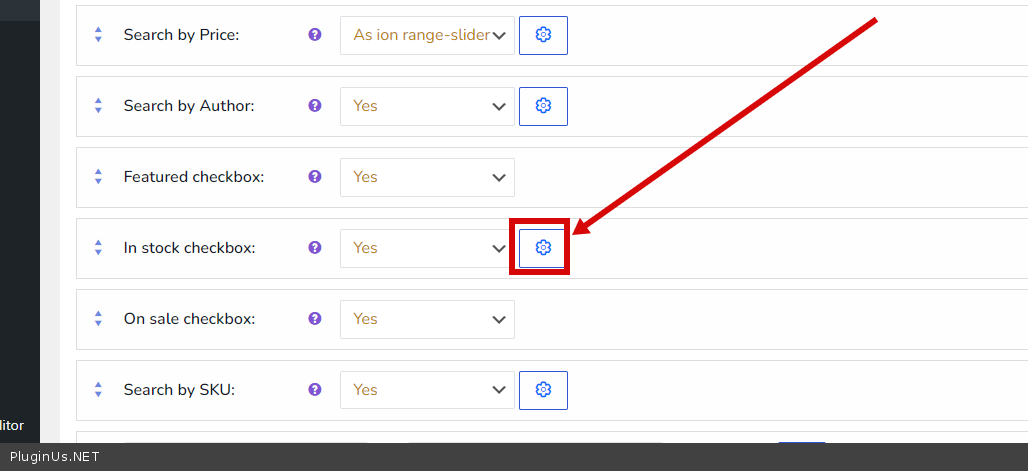
Quote from martin123 on July 29, 2022, 12:17and i dont have that function "In stock checkbox:" on. It set to no because i load in stock in function file so it allways show in stock
and i dont have that function"In stock checkbox:" on. It set to no because i load in stock in function file so it allways show in stock
Quote from Pablo Borysenco on July 29, 2022, 12:29This is a plugin setting - https://c2n.me/4ggwO4x.png
This is a plugin setting - https://c2n.me/4ggwO4x.png
Quote from martin123 on July 29, 2022, 12:30did a test. Not working. Could you please login at have a look ? I need this very much as it live
did a test. Not working. Could you please login at have a look ? I need this very much as it live
Quote from martin123 on July 29, 2022, 12:39can i use Conditionals to make sure "sizes" ( only show in stock ?
If yes what code should i use ?
can i use Conditionals to make sure"sizes" ( only show in stock ?
If yes what code should i use ?
Quote from martin123 on July 29, 2022, 13:02Please dont let me hang 24 hours more.
Please login in and have a look. I need to push this live. Thanks
Please dont let me hang 24 hours more.
Please login in and have a look. I need to push this live. Thanks
Quote from Pablo Borysenco on July 29, 2022, 13:05Ok! I got it
for now you can disable Turbo mode - This should work correctly - https://c2n.me/4ggy8L5
Add FTP access - https://share.pluginus.net/image/i20210618130558.png ->https://share.pluginus.net/image/i20210618130637.png - our developer will check it on monday.
Ok! I got it
for now you can disable Turbo mode - This should work correctly - https://c2n.me/4ggy8L5
Add FTP access - https://share.pluginus.net/image/i20210618130558.png ->https://share.pluginus.net/image/i20210618130637.png - our developer will check it on monday.


Quote from martin123 on July 29, 2022, 13:08Okay thanks. I do now it works with turbo off. But yes i really need turbo Mode on because it so slow.
anyway to speed it up without turbo mode?
Ill provide FTP access
Thanks
Okay thanks. I do now it works with turbo off. But yes i really need turbo Mode on because it so slow.
anyway to speed it up without turbo mode?
Ill provide FTP access
Thanks
Quote from Pablo Borysenco on July 29, 2022, 13:24Read this - https://products-filter.com/searching-is-slow
I have enabled query caching - https://c2n.me/4ggzFM9 - it seems to work faster than turbo mode
Read this - https://products-filter.com/searching-is-slow
I have enabled query caching - https://c2n.me/4ggzFM9 - it seems to work faster than turbo mode
Quote from martin123 on July 29, 2022, 13:40Your right. Seems faster now.
Can we do anything about sections closing every time a user make a selection. I need to stay open so user can make multi choise with out open section againg every time.
Your right. Seems faster now.
Can we do anything about sections closing every time a user make a selection. I need to stay open so user can make multi choise with out open section againg every time.
Quote from Pablo Borysenco on August 1, 2022, 18:48Hello
Can we do anything about sections closing every time a user make a selection. - unfortunately sections don't work like that, you can try turning off autosubmit
our developer checked Turbo mode - it looks like some third party script interferes with the request when creating the search file and excludes all products (out of stock). Do you use custom code for instock?
Hello
Can we do anything about sections closing every time a user make a selection. - unfortunately sections don't work like that, you can try turning off autosubmit
our developer checked Turbo mode - it looks like some third party script interferes with the request when creating the search file and excludes all products (out of stock). Do you use custom code for instock?