

Turbo mode not presenting any results
The support doesn work on Saturdays and Sundays, so some Friday requests can be answered on Monday. If you have problems with registration ask help on contact us page pleaseIf you not got email within 24~36 business hours, firstly check your spam box, and if no any email from the support there - back to the forum and read answer here. DO NOT ANSWER ON EMAILS [noreply@pluginus.net] FROM THE FORUM!! Emails are just for your info, all answers should be published only here.
The support doesn work on Saturdays and Sundays, so some Friday requests can be answered on Monday.

Quote from Dimitris on January 26, 2022, 14:32Hi Pablo,
dimitrisv here (https://pluginus.net/support/topic/cant-figure-out-the-excluded-terms-id/?part=2#postid-63232) I created a new user as I cannot login to my account and the password reset does not seem to be working.
We reduced the number of attributes to half but we are unable to see noticeable improvement on rendering performance. I tried the turbo mode but in our case it doesnt seem to be working at all. Attributes with greek names get completely rejected. See here how terms in greek are diasappering during load.
https://femmefatale.ecode.gr/product-category/makigiaz/
I noticed a few posts about the turbo mode and there was a mention of ajax incompatibility. I disable ajax but the problem persists.
Thank you.
Hi Pablo,
dimitrisv here (https://pluginus.net/support/topic/cant-figure-out-the-excluded-terms-id/?part=2#postid-63232) I created a new user as I cannot login to my account and the password reset does not seem to be working.
We reduced the number of attributes to half but we are unable to see noticeable improvement on rendering performance. I tried the turbo mode but in our case it doesnt seem to be working at all. Attributes with greek names get completely rejected. See here how terms in greek are diasappering during load.
https://femmefatale.ecode.gr/product-category/makigiaz/
I noticed a few posts about the turbo mode and there was a mention of ajax incompatibility. I disable ajax but the problem persists.
Thank you.

Quote from Pablo Borysenco on January 27, 2022, 12:33Hello
Please paste your license key here - https://share.pluginus.net/image/i20210618130558.png -> https://share.pluginus.net/image/i20210618130614.png and FTP+wp-admin access - https://share.pluginus.net/image/i20210618130637.png
Update the plugin to latest version - https://products-filter.com/how-to-make-auto-update-for-wordpress-plugins-and-themes-bought-on-envato
Hello
Please paste your license key here - https://share.pluginus.net/image/i20210618130558.png -> https://share.pluginus.net/image/i20210618130614.png and FTP+wp-admin access - https://share.pluginus.net/image/i20210618130637.png


Update the plugin to latest version - https://products-filter.com/how-to-make-auto-update-for-wordpress-plugins-and-themes-bought-on-envato
Quote from Dimitris on January 27, 2022, 14:07Thank you.
I just posted licence, and new ftp password.
Thank you.
I just posted licence, and new ftp password.
Quote from Dimitris on January 27, 2022, 14:48Also I tried the evnato plugin suggestion but my bundle purchase is not being recognised. I just see themes and plugins that I have bought individually.
Also I tried the evnato plugin suggestion but my bundle purchase is not being recognised. I just see themes and plugins that I have bought individually.

Quote from admin on January 27, 2022, 15:26Hello Dimitris
Looks like you forgotten to press save button, please paste the data https://share.pluginus.net/image/i20210618130637.png and press Save button
Hello Dimitris
Looks like you forgotten to press save button, please paste the data https://share.pluginus.net/image/i20210618130637.png and press Save button
Quote from Pablo Borysenco on January 27, 2022, 15:30please don't forget to press the button - https://c2n.me/4eK7qoT.png
please don't forget to press the button - https://c2n.me/4eK7qoT.png
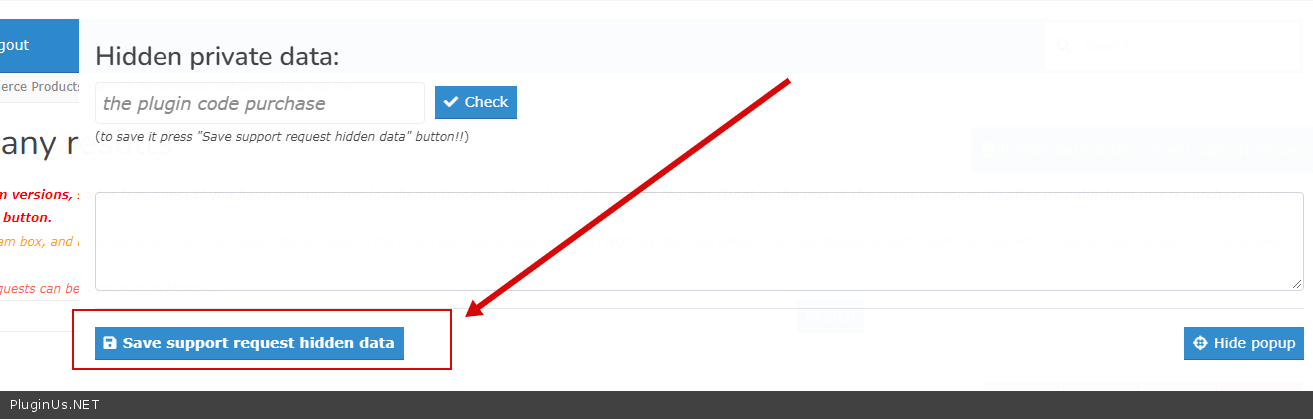
Quote from Dimitris on January 27, 2022, 15:53Actually I didnt forget, I said that my details are on the thread with the account of mine that is currently locked so I was unable to get them. Please see why my account dimitrisv is locked and I cannot login. I am sure you can get them from the original thread:
https://pluginus.net/support/topic/cant-figure-out-the-excluded-terms-id/?part=2#postid-63232Else I have to create new credentials because I do not remember the password that I had given to you in the wp admin.
Actually I didnt forget, I said that my details are on the thread with the account of mine that is currently locked so I was unable to get them. Please see why my account dimitrisv is locked and I cannot login. I am sure you can get them from the original thread:
https://pluginus.net/support/topic/cant-figure-out-the-excluded-terms-id/?part=2#postid-63232
Else I have to create new credentials because I do not remember the password that I had given to you in the wp admin.
Quote from Dimitris on January 28, 2022, 04:41I reset the password and provided you the details.
Please see to the issue with envato so that all of us who got the bundle offering can get the latest version. As you will see I am three versions behind.
I reset the password and provided you the details.
Please see to the issue with envato so that all of us who got the bundle offering can get the latest version. As you will see I am three versions behind.
Quote from Pablo Borysenco on January 28, 2022, 13:35Hello
Please clear all cache and do a test
Hello
Please clear all cache and do a test
Quote from Pablo Borysenco on January 28, 2022, 13:44As you will see I am three versions behind. - please check it, now it should have the latest versions
As you will see I am three versions behind. - please check it, now it should have the latest versions
Quote from Dimitris on January 30, 2022, 02:14Thank you. It was fixed. But still turbo mode although presents the results faster, is a lot slower in presenting the filter options.
Apart from that can you please solve the issue of the updates for those of us who have bundle license so that we can get our product updates?
Thank you once more.
Thank you. It was fixed. But still turbo mode although presents the results faster, is a lot slower in presenting the filter options.
Apart from that can you please solve the issue of the updates for those of us who have bundle license so that we can get our product updates?
Thank you once more.
Quote from Pablo Borysenco on January 31, 2022, 13:50Hello
is a lot slower in presenting the filter options. - This extension is useful if you have a weak server. But the problem is that it takes time for the filtering data to be loaded on the client.
who have bundle license so that we can get our product updates? - Sure!
Hello
is a lot slower in presenting the filter options. - This extension is useful if you have a weak server. But the problem is that it takes time for the filtering data to be loaded on the client.
who have bundle license so that we can get our product updates? - Sure!
Quote from Dimitris on January 31, 2022, 21:29Thank you. When you resolve it and we are able to get updates please let me know here so that I can reload the graphics that I changed.
Keep well,
Dimitris
Thank you. When you resolve it and we are able to get updates please let me know here so that I can reload the graphics that I changed.
Keep well,
Dimitris
Quote from Pablo Borysenco on February 1, 2022, 12:38Hello Dimitris
After each update of the plugin from the collection, you should receive a notification
Hello Dimitris
After each update of the plugin from the collection, you should receive a notification
Quote from Dimitris on February 7, 2022, 03:33I am still stuck in the version 2.6.1.1
I abandoned for the time being the tagdiv theme because I was thinking their cloud templates cause undue pain. I made a replica of the site and now using athemes botiga theme but still the issue of paging in the results remains.
https://botiga.ecode.gr/wp/product-category/makigiaz/prosopo-kalypsi/poydres-bronzers/
If you select anything in your filter you will only see three results. The paging is not working (is on infinite load) but even when I changed it to load more or the default is still not working. In the options advanced section of Woof I have put -1.
You may login with the credentials provided above
I am still stuck in the version 2.6.1.1
I abandoned for the time being the tagdiv theme because I was thinking their cloud templates cause undue pain. I made a replica of the site and now using athemes botiga theme but still the issue of paging in the results remains.
https://botiga.ecode.gr/wp/product-category/makigiaz/prosopo-kalypsi/poydres-bronzers/
If you select anything in your filter you will only see three results. The paging is not working (is on infinite load) but even when I changed it to load more or the default is still not working. In the options advanced section of Woof I have put -1.
You may login with the credentials provided above
Quote from Pablo Borysenco on February 7, 2022, 13:46Hello
Please read this - https://products-filter.com/make-infinite-scroll-for-filtered-products-also
Hello
Please read this - https://products-filter.com/make-infinite-scroll-for-filtered-products-also
Quote from Dimitris on February 7, 2022, 17:25Thank you, I installed it but it is not loading any more result than 3 regardless of the type of pagination.
I thought that this was an issue in the tagdiv cloud template ( I never managed it to work there) but it persists here as well.
Thank you, I installed it but it is not loading any more result than 3 regardless of the type of pagination.
I thought that this was an issue in the tagdiv cloud template ( I never managed it to work there) but it persists here as well.
Quote from Pablo Borysenco on February 8, 2022, 11:56Hello
Please check your access - https://share.pluginus.net/image/i20220208095439.png
Hello
Please check your access - https://share.pluginus.net/image/i20220208095439.png
