

Total sales in BEAR is not same woo database
The support doesn work on Saturdays and Sundays, so some Friday requests can be answered on Monday. If you have problems with registration ask help on contact us page pleaseIf you not got email within 24~36 business hours, firstly check your spam box, and if no any email from the support there - back to the forum and read answer here. DO NOT ANSWER ON EMAILS [noreply@pluginus.net] FROM THE FORUM!! Emails are just for your info, all answers should be published only here.
The support doesn work on Saturdays and Sundays, so some Friday requests can be answered on Monday.

Quote from ratchapol on January 20, 2021, 18:01Total sales in BEAR is not same woo database.
I tried to input the fake total 10 sales thru woo bulk editor. After save, woo bulk editor show 10 sales but product page show 0 sale. You can visit my site, www.mvcamera.com
Total sales in BEAR is not same woo database.
I tried to input the fake total 10 sales thru woo bulk editor. After save, woo bulk editor show 10 sales but product page show 0 sale. You can visit my site, http://www.mvcamera.com

Quote from Pablo Borysenco on January 21, 2021, 10:41Hello
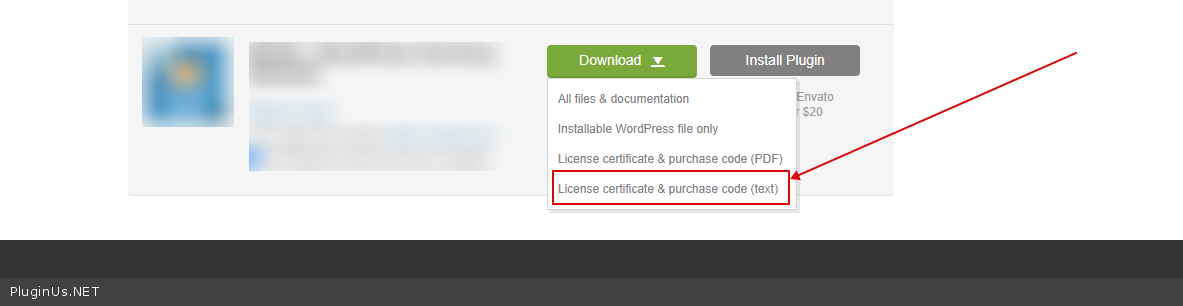
To get license key - https://codecanyon.net/downloads -> https://c2n.me/49ZXJv0.png
Paste your license key here - https://c2n.me/43SC6rb.png -> https://c2n.me/42HBIt7.png
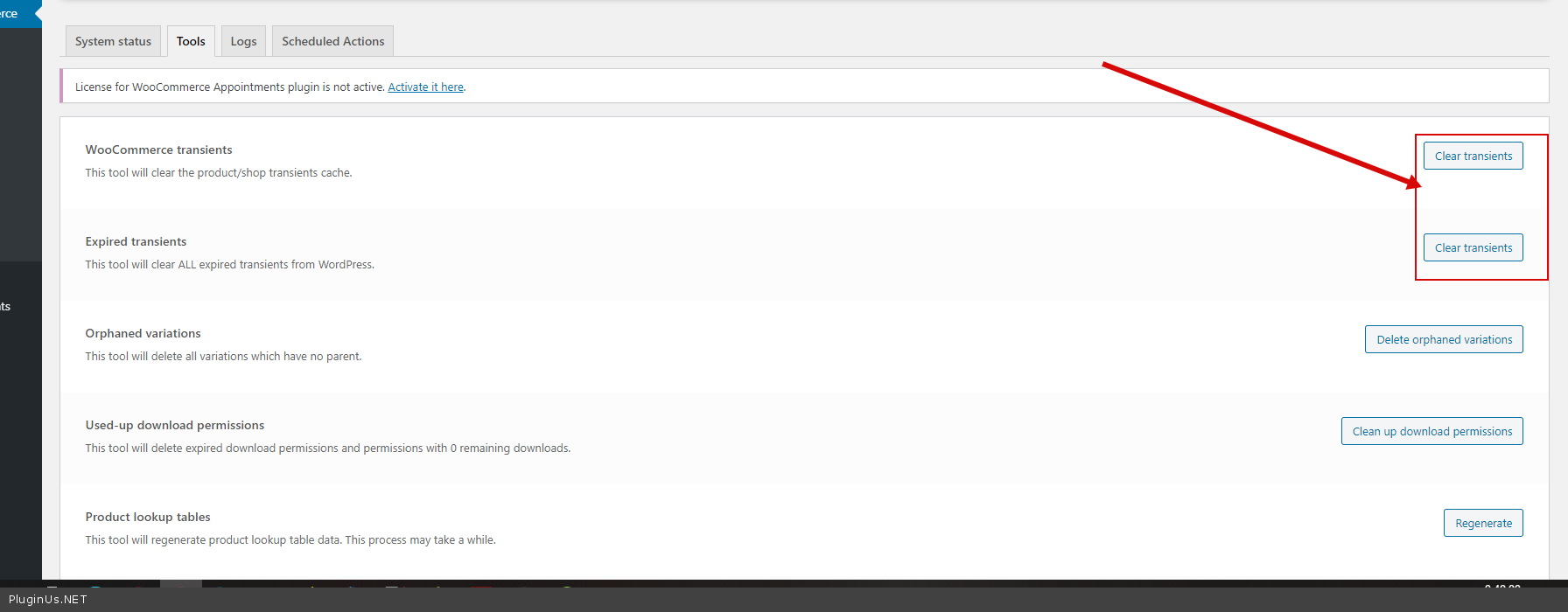
Clear all cache + -> https://c2n.me/4aDyuzS.png and do a test
Drop me exact link to this product
Hello
To get license key - https://codecanyon.net/downloads -> https://c2n.me/49ZXJv0.png
Paste your license key here - https://c2n.me/43SC6rb.png -> https://c2n.me/42HBIt7.png


Clear all cache + -> https://c2n.me/4aDyuzS.png and do a test
Drop me exact link to this product
Quote from ratchapol on January 22, 2021, 22:05I paste license info as your instructions. Please help to correct this issues.
I paste license info as your instructions. Please help to correct this issues.
Quote from Pablo Borysenco on January 25, 2021, 11:33Hello
I did the test - https://c2n.me/4aGjfAg
Unfortunately, I cannot repeat this error. Maybe I'm doing something wrong
Hello
I did the test - https://c2n.me/4aGjfAg
Unfortunately, I cannot repeat this error. Maybe I'm doing something wrong
Quote from ratchapol on January 25, 2021, 18:00After I tested to place order for acA1300-60gc , total sales increased to 36 pcs in woo but fronted did not change sales quantity, 33 pcs. 33 is awts-custom-count. You can see at the first custom fields or notice from top right box of product edit page (total sales area). Before fix issue , this total sales area work well. I tried to remove plugin “woo total sales” and re-install. But Frontend show total sales incorrect.
After I tested to place order for acA1300-60gc , total sales increased to 36 pcs in woo but fronted did not change sales quantity, 33 pcs. 33 is awts-custom-count. You can see at the first custom fields or notice from top right box of product edit page (total sales area). Before fix issue , this total sales area work well. I tried to remove plugin “woo total sales” and re-install. But Frontend show total sales incorrect.
Quote from Pablo Borysenco on January 26, 2021, 11:17Hello
I did the test - https://c2n.me/4aHdShP
Hello
I did the test - https://c2n.me/4aHdShP
Quote from ratchapol on January 26, 2021, 14:02"Total sales field" is "awts-custom-count field".
if awts-custom-count field is 777, Total sales in woo and frontend must be 777 too.
Currenty Total sales in woo is 50 (view by BEAR Bulk editor). - https://mvcamera.com/debug/01.png
But Total sales in frontend is 777. - https://mvcamera.com/debug/05.pngAfter you test to change awts-custom-count to other number, It meet our requirement.
- https://mvcamera.com/debug/02.png
- https://mvcamera.com/debug/03.png
- https://mvcamera.com/debug/04.png
But we need you help to adjust Total sales in woo to be equal the both awts-custom-count and total sales in frontend, 777.
- https://mvcamera.com/debug/05.pngPlace order testing by disable catalog mode - https://mvcamera.com/debug/06.png
After place order and confirm order - https://mvcamera.com/debug/09.png
Total sales increase from 50 to 51 and Stock quantity drease from 10 to 9. - https://mvcamera.com/debug/07.png
It s incorrect because Total sale in woo and Frontend should be 778 with Stock quantity decrease to 9.
But Frontend Total sales still display total sales 777. Woo Total sales is 51.
- https://mvcamera.com/debug/08.pngIn addition, all products view should show regular price in product price but it show "total sales" - https://mvcamera.com/debug/ 10.png
"Total sales field" is"awts-custom-count field".
if awts-custom-count field is 777, Total sales in woo and frontend must be 777 too.
Currenty Total sales in woo is 50 (view by BEAR Bulk editor). - https://mvcamera.com/debug/01.png
But Total sales in frontend is 777. - https://mvcamera.com/debug/05.png


After you test to change awts-custom-count to other number, It meet our requirement.
- https://mvcamera.com/debug/02.png
- https://mvcamera.com/debug/03.png
- https://mvcamera.com/debug/04.png
But we need you help to adjust Total sales in woo to be equal the both awts-custom-count and total sales in frontend, 777.
- https://mvcamera.com/debug/05.png


Place order testing by disable catalog mode - https://mvcamera.com/debug/06.png
After place order and confirm order - https://mvcamera.com/debug/09.png
Total sales increase from 50 to 51 and Stock quantity drease from 10 to 9. - https://mvcamera.com/debug/07.png
It s incorrect because Total sale in woo and Frontend should be 778 with Stock quantity decrease to 9.
But Frontend Total sales still display total sales 777. Woo Total sales is 51.
- https://mvcamera.com/debug/08.png


In addition, all products view should show regular price in product price but it show"total sales" - https://mvcamera.com/debug/ 10.png
Quote from Pablo Borysenco on January 27, 2021, 10:51Hello
My plugin is a field editor and edits these fields correctly. This plugin does not add features to your store
In fact, my plugin correctly edits the meta fields that you added. The relation between these fields is the logic of the third party plugin
And if the third party plugin can't sync their fields it doesn't depend on my plugin. In this case, you should contact the support of the third-party plugin.
Hello
My plugin is a field editor and edits these fields correctly. This plugin does not add features to your store
In fact, my plugin correctly edits the meta fields that you added. The relation between these fields is the logic of the third party plugin
And if the third party plugin can't sync their fields it doesn't depend on my plugin. In this case, you should contact the support of the third-party plugin.
Quote from ratchapol on January 27, 2021, 11:24Where can I download the latest plugin ?
I will restore my website to original before install BEAR Bulk editor.
Where can I download the latest plugin ?
I will restore my website to original before install BEAR Bulk editor.
Quote from Pablo Borysenco on January 27, 2021, 13:47Here - https://codecanyon.net/downloads