

Toggle button to include title
The support doesn work on Saturdays and Sundays, so some Friday requests can be answered on Monday. If you have problems with registration ask help on contact us page pleaseIf you not got email within 24~36 business hours, firstly check your spam box, and if no any email from the support there - back to the forum and read answer here. DO NOT ANSWER ON EMAILS [noreply@pluginus.net] FROM THE FORUM!! Emails are just for your info, all answers should be published only here.
The support doesn work on Saturdays and Sundays, so some Friday requests can be answered on Monday.

Quote from chrismitchell on September 6, 2021, 11:40Hi Support,
Great plugin :D but i'm hoping you can help me with an odd request from a client?
I need to make the toggle button include the title as well as the toggle icon. I can't find where this is in the plugin code. Is there a bit of JS code or something that you could provide me with to make this work?
Thanks in advance :)
Chris
Hi Support,
Great plugin :D but i'm hoping you can help me with an odd request from a client?
I need to make the toggle button include the title as well as the toggle icon. I can't find where this is in the plugin code. Is there a bit of JS code or something that you could provide me with to make this work?
Thanks in advance :)
Chris

Quote from Pablo Borysenco on September 6, 2021, 15:51Hello Chris
As I understood you mean this button: https://clip2net.com/s/4df2moM - if yes, you can do it by CSS:
.woof_btn_default.woof_hide_auto_form::after,
.woof_btn_default.woof_show_auto_form::after{
position: absolute;
left: 100px;
margin-left: 36px;
margin-top: 4px;
}

.woof_btn_default.woof_hide_auto_form::after{
content: 'Hide filter form';

}

.woof_btn_default.woof_show_auto_form::after{
content: 'Show filter form';
}
Result: https://clip2net.com/s/4df30SE
Hello Chris
As I understood you mean this button: https://clip2net.com/s/4df2moM - if yes, you can do it by CSS:
.woof_btn_default.woof_hide_auto_form::after,
.woof_btn_default.woof_show_auto_form::after{
position: absolute;
left: 100px;
margin-left: 36px;
margin-top: 4px;
}

.woof_btn_default.woof_hide_auto_form::after{
content: 'Hide filter form';

}

.woof_btn_default.woof_show_auto_form::after{
content: 'Show filter form';
}
Result: https://clip2net.com/s/4df30SE
Quote from chrismitchell on September 6, 2021, 15:56Hi Pablo,
Sorry was more meaning this, i've done a short video to explain what I mean. No sound just mouse movement and selection:
https://drive.google.com/file/d/1_fAyLf-lZ54QZ99-WpW_sXJq99cUi8zg/view
Essentially I need to make the title section highlighted as the expand button, not just the + or - as shown.
I can't seem to find where the code is to put the button around the h4 tag of the title.
Any help would be great :)
Chris
Hi Pablo,
Sorry was more meaning this, i've done a short video to explain what I mean. No sound just mouse movement and selection:
https://drive.google.com/file/d/1_fAyLf-lZ54QZ99-WpW_sXJq99cUi8zg/view
Essentially I need to make the title section highlighted as the expand button, not just the + or - as shown.
I can't seem to find where the code is to put the button around the h4 tag of the title.
Any help would be great :)
Chris
Quote from Pablo Borysenco on September 7, 2021, 15:41Hello Chris
In this case use please next code:
.woof_is_opened::after,
.woof_is_closed::after{
    position: absolute;
    width: 100px;
    margin-left: 20px;
    margin-top: 1px;
}

.woof_is_closed::after{
   content: 'Show';
}

.woof_is_opened::after{
   content: 'Hide';
}
Result:
Hello Chris
In this case use please next code:
.woof_is_opened::after,
.woof_is_closed::after{
    position: absolute;
    width: 100px;
    margin-left: 20px;
    margin-top: 1px;
}

.woof_is_closed::after{
   content: 'Show';
}

.woof_is_opened::after{
   content: 'Hide';
}
Result: 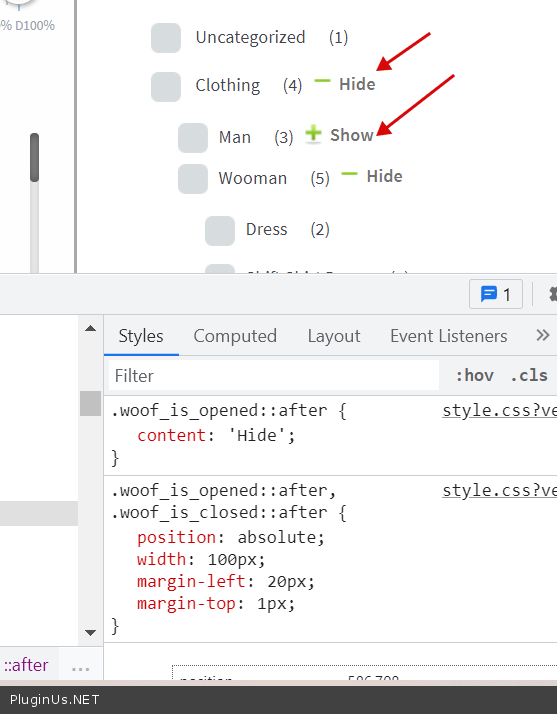
Quote from chrismitchell on September 7, 2021, 15:53Hi Pablo,
Thanks for the above, sadly this isn't what I was wanting to achieve.
I needed to make the Title, see below to be a button, not just the +/- bit. Is that possible?
Essentially I need the whole thing to be a button to expand. The whole red bit, which is the title (h4 I think) and the +/- bit.
Is this possible?
Chris
Hi Pablo,
Thanks for the above, sadly this isn't what I was wanting to achieve.
I needed to make the Title, see below to be a button, not just the +/- bit. Is that possible?

Essentially I need the whole thing to be a button to expand. The whole red bit, which is the title (h4 I think) and the +/- bit.
Is this possible?
Chris
Quote from Pablo Borysenco on September 7, 2021, 17:38Hello Chris
I hope I understood you now right :)
Yes possible, and I created js script + prepared an article about this case: https://products-filter.com/how-to-make-toggle-button-include-the-title-as-well-as-the-toggle-icon/
Try it please ...
Hello Chris
I hope I understood you now right :)
Yes possible, and I created js script + prepared an article about this case: https://products-filter.com/how-to-make-toggle-button-include-the-title-as-well-as-the-toggle-icon/
Try it please ...
Quote from chrismitchell on September 7, 2021, 17:43Thats perfect!
Thank you so much for your help!
Thats perfect!
Thank you so much for your help!
Quote from Pablo Borysenco on September 7, 2021, 17:54Welcome :)
Welcome :)