Pablo Borysenco(@pavlo_borysenco)
34,196 Posts
Quote from Pablo Borysenco on July 8, 2022, 11:11
Hello
Please try to do a test with native woocommerce price filter
Can you add wp-admin access - https://share.pluginus.net/image/i20210618130558.png ->https://share.pluginus.net/image/i20210618130637.png
Hello
Please try to do a test with native woocommerce price filter
Can you add wp-admin access - https://share.pluginus.net/image/i20210618130558.png ->https://share.pluginus.net/image/i20210618130637.png
Pablo Borysenco(@pavlo_borysenco)
34,196 Posts
Quote from Pablo Borysenco on July 8, 2022, 12:26
Where can I change these limits for price values in the plugin code? - What are limits? The plugin has no price limits
Where can I change these limits for price values in the plugin code? - What are limits? The plugin has no price limits
Pablo Borysenco(@pavlo_borysenco)
34,196 Posts
Quote from Pablo Borysenco on July 11, 2022, 10:54
Hello
Ok! Try in file - \wp-content\plugins\woocommerce-products-filter\index.php - change this code - https://share.pluginus.net/image/i20220711085415.png
$meta_query[] = [
'relation' => 'AND',
[
'key' => '_price',
'value' => floatval($request['min_price']),
'compare' => '>',
'type' => 'NUMERIC'
],
[
'key' => '_price',
'value' => floatval($request['max_price']),
'compare' => '<',
'type' => 'NUMERIC'
]
];
Hello
Ok! Try in file - \wp-content\plugins\woocommerce-products-filter\index.php - change this code - https://share.pluginus.net/image/i20220711085415.png
$meta_query[] = [
'relation' => 'AND',
[
'key' => '_price',
'value' => floatval($request['min_price']),
'compare' => '>',
'type' => 'NUMERIC'
],
[
'key' => '_price',
'value' => floatval($request['max_price']),
'compare' => '<',
'type' => 'NUMERIC'
]
];
Pablo Borysenco(@pavlo_borysenco)
34,196 Posts
Quote from Pablo Borysenco on July 15, 2022, 10:35
Hello
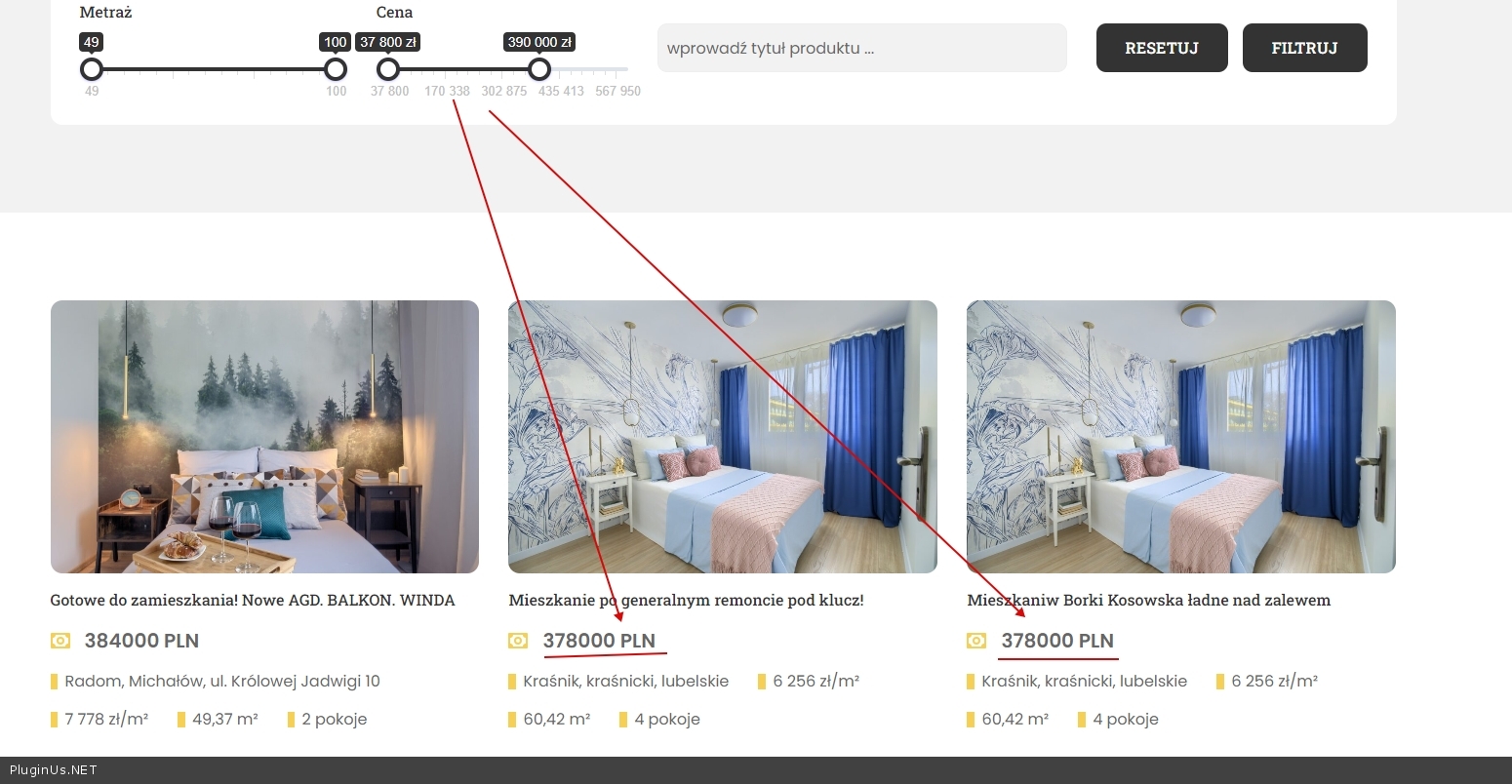
I did a test - https://c2n.me/4g9JjkM.jpg
Please give me a link to the product that should appear
Hello
I did a test - https://c2n.me/4g9JjkM.jpg
Please give me a link to the product that should appear
Pablo Borysenco(@pavlo_borysenco)
34,196 Posts
Quote from Pablo Borysenco on July 15, 2022, 11:45
https://share.pluginus.net/image/i20220715094039.png - it looks like I didn't understand you because you missed one zero
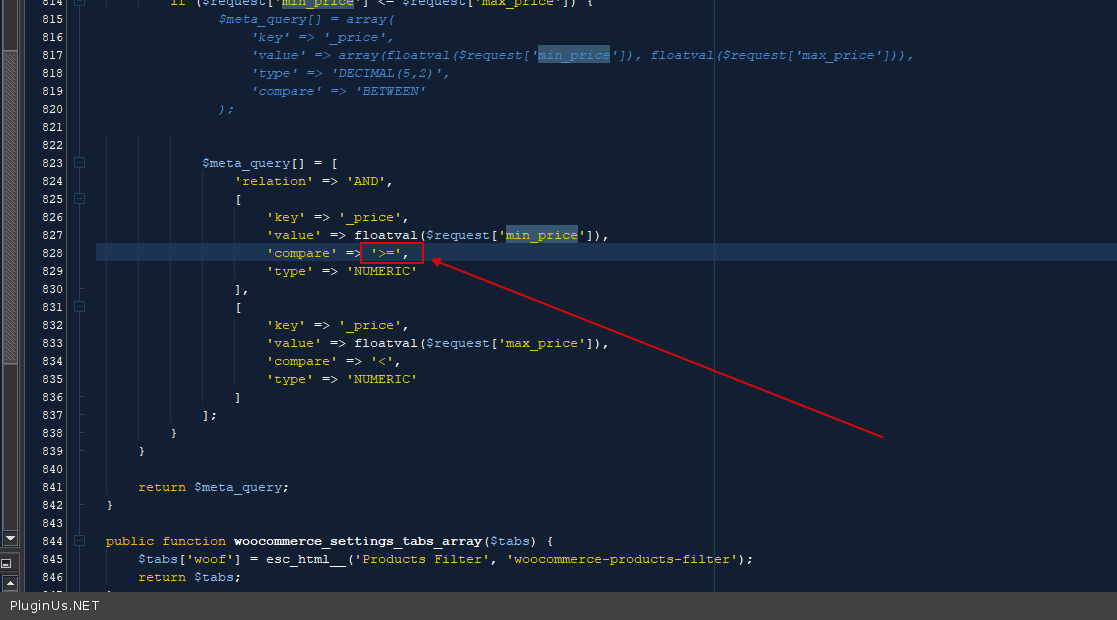
Try in file - \wp-content\plugins\woocommerce-products-filter\index.php - change this code - https://c2n.me/4g9MGN4.png
'compare' => '>=',
and do a test
https://share.pluginus.net/image/i20220715094039.png - it looks like I didn't understand you because you missed one zero
Try in file - \wp-content\plugins\woocommerce-products-filter\index.php - change this code - https://c2n.me/4g9MGN4.png
'compare' => '>=',
and do a test
Pablo Borysenco(@pavlo_borysenco)
34,196 Posts
Quote from Pablo Borysenco on July 18, 2022, 11:00
Welcome;)
Welcome;)