

Text search failing on live site test page
The support doesn work on Saturdays and Sundays, so some Friday requests can be answered on Monday. If you have problems with registration ask help on contact us page pleaseIf you not got email within 24~36 business hours, firstly check your spam box, and if no any email from the support there - back to the forum and read answer here. DO NOT ANSWER ON EMAILS [noreply@pluginus.net] FROM THE FORUM!! Emails are just for your info, all answers should be published only here.
The support doesn work on Saturdays and Sundays, so some Friday requests can be answered on Monday.

Quote from jimbunte on January 25, 2022, 00:39Hello Pablo - i've set up the search on the live site and created a hidden test page to try it out.
Tags work great.
Categories work great.
But text search hangs / fails every time. On my test site, no problem. But on the live site - dead. I copied all the settings exactly from my test to live site. What have I done wrong?
Try a search on the test page - see what I mean. I appreciate your help.
Hello Pablo - i've set up the search on the live site and created a hidden test page to try it out.
Tags work great.
Categories work great.
But text search hangs / fails every time. On my test site, no problem. But on the live site - dead. I copied all the settings exactly from my test to live site. What have I done wrong?
Try a search on the test page - see what I mean. I appreciate your help.

Quote from Pablo Borysenco on January 25, 2022, 13:45Hello
It works but very slowly - https://c2n.me/4eIo08s.jpg - possible conflict with a third party plugin
Please paste your license key here - https://share.pluginus.net/image/i20210618130558.png -> https://share.pluginus.net/image/i20210618130614.png and wp-admin access - https://share.pluginus.net/image/i20210618130637.png
Hello
It works but very slowly - https://c2n.me/4eIo08s.jpg - possible conflict with a third party plugin

Please paste your license key here - https://share.pluginus.net/image/i20210618130558.png -> https://share.pluginus.net/image/i20210618130614.png and wp-admin access - https://share.pluginus.net/image/i20210618130637.png


Quote from jimbunte on January 25, 2022, 14:24All requested info added to private block. Thank you for your help!
All requested info added to private block. Thank you for your help!
Quote from jimbunte on January 25, 2022, 14:41per your suggestion, i've tried deactivating all the absolutely non-essential plugins, but it still is taking 20-30 seconds to return a result when using the text field search. i had tried other search plugins (yith, etc.) and those are all deactivated - no change.
the regular theme search returns results immediately (magnifying glass in header).
i have no idea what is wrong.
per your suggestion, i've tried deactivating all the absolutely non-essential plugins, but it still is taking 20-30 seconds to return a result when using the text field search. i had tried other search plugins (yith, etc.) and those are all deactivated - no change.
the regular theme search returns results immediately (magnifying glass in header).
i have no idea what is wrong.
Quote from Pablo Borysenco on January 26, 2022, 12:45Hello
I disabled ajax mode - please do a test
It looks like something on your site slows down Ajax requests
Hello
I disabled ajax mode - please do a test
It looks like something on your site slows down Ajax requests
Quote from jimbunte on January 26, 2022, 14:19Pablo - thank you for help debugging this. It is normal search speed again - you're right, it must have been ajax.
do you recommend i use caching or leave that alone? this is a high traffic site with a lot of searching. i'd appreciate your recommendation.
thank you again for your help, as always. love this plugin and the support is 100% awesome.
Pablo - thank you for help debugging this. It is normal search speed again - you're right, it must have been ajax.
do you recommend i use caching or leave that alone? this is a high traffic site with a lot of searching. i'd appreciate your recommendation.
thank you again for your help, as always. love this plugin and the support is 100% awesome.
Quote from jimbunte on January 26, 2022, 17:13I have an additional question, if that's ok.
On a link in the private info, you'll see when you pull down on year/make/model (tags) that it shows a large number of tags, most of which do not belong. I have specified in the shortcode the three tags i want (1955, 1956, 1957 Thunderbird), but all the Corvette ones show up as well. This is because a single product is also tagged for use in both Corvettes and Thunderbirds. How do I have ONLY the three tags i want and suppress the rest? Here's is my woof shortcode:
[woof taxonomies=product_cat:180+tag:246,247,248] - those three tags are the only ones i want showing up. (same cat/tags are in the woof_products shortcode).
I have an additional question, if that's ok.
On a link in the private info, you'll see when you pull down on year/make/model (tags) that it shows a large number of tags, most of which do not belong. I have specified in the shortcode the three tags i want (1955, 1956, 1957 Thunderbird), but all the Corvette ones show up as well. This is because a single product is also tagged for use in both Corvettes and Thunderbirds. How do I have ONLY the three tags i want and suppress the rest? Here's is my woof shortcode:
[woof taxonomies=product_cat:180+tag:246,247,248] - those three tags are the only ones i want showing up. (same cat/tags are in the woof_products shortcode).
Quote from Pablo Borysenco on January 27, 2022, 12:54hello
You can use this cache(only after the full setup of the site) - Advanced->Options - https://c2n.me/4eJXkYH.png
Please try this shortcode
[woof taxonomies=product_cat:180+product_tag:246,247,248]
hello
You can use this cache(only after the full setup of the site) - Advanced->Options - https://c2n.me/4eJXkYH.png
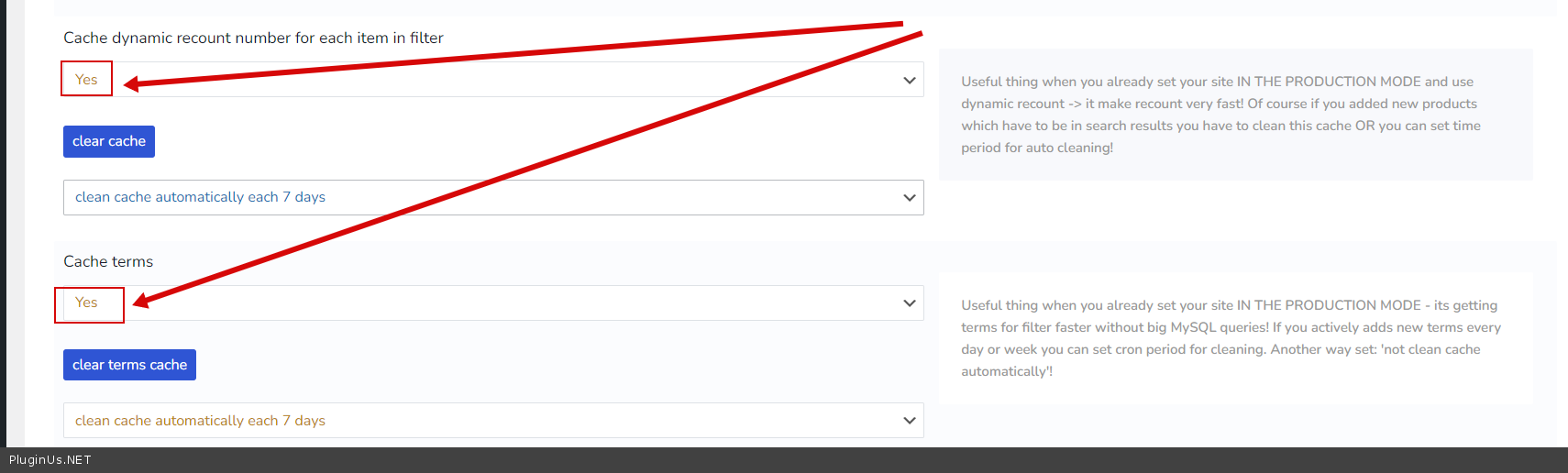
Please try this shortcode
[woof taxonomies=product_cat:180+product_tag:246,247,248]
Quote from jimbunte on January 27, 2022, 14:24Hello Pablo - i used the revised shortcode but the non-desired tags continue to show up (Corvette years plus late / modern 2002-2005 Thunderbird), as before. no change.
thank you for the tip on caching. how often do you recommend having the cache dumped?
Hello Pablo - i used the revised shortcode but the non-desired tags continue to show up (Corvette years plus late / modern 2002-2005 Thunderbird), as before. no change.
thank you for the tip on caching. how often do you recommend having the cache dumped?
Quote from Pablo Borysenco on January 28, 2022, 12:37Hello
these attributes do not remove anything, this is prefiltering
how often do you recommend having the cache dumped? - it depends on how often you update products.
Hello
these attributes do not remove anything, this is prefiltering
how often do you recommend having the cache dumped? - it depends on how often you update products.
Quote from jimbunte on January 28, 2022, 14:12OK, sounds like the only solution is for me to remove "1955" "1956" and "1957" thunderbird tags from those products to keep them from showing up.
thank you for your help.
OK, sounds like the only solution is for me to remove"1955""1956" and"1957" thunderbird tags from those products to keep them from showing up.
thank you for your help.
Quote from Pablo Borysenco on January 31, 2022, 12:46Hello
Yes OR - you can create a custom code with this hook - https://products-filter.com/hook/woof_sort_terms_before_out
Hello
Yes OR - you can create a custom code with this hook - https://products-filter.com/hook/woof_sort_terms_before_out