
Taxonomy detail page the taxonomy dropdow now
The support doesn work on Saturdays and Sundays, so some Friday requests can be answered on Monday. If you have problems with registration ask help on contact us page pleaseIf you not got email within 24~36 business hours, firstly check your spam box, and if no any email from the support there - back to the forum and read answer here. DO NOT ANSWER ON EMAILS [noreply@pluginus.net] FROM THE FORUM!! Emails are just for your info, all answers should be published only here.
The support doesn work on Saturdays and Sundays, so some Friday requests can be answered on Monday.

Quote from Swaranan on November 19, 2021, 16:33Hello,
I am using the pro version. Facing an issue.
- On the taxonomy detail page, the taxonomy dropdown is not showing: https://staging2.tyretectrading.co.uk/bridgestone/
Please let me know, how to make the taxonomy dropdown visible on the taxonomy detail page.
Hello,
I am using the pro version. Facing an issue.
- On the taxonomy detail page, the taxonomy dropdown is not showing: https://staging2.tyretectrading.co.uk/bridgestone/
Please let me know, how to make the taxonomy dropdown visible on the taxonomy detail page.

Quote from Pablo Borysenco on November 22, 2021, 13:10Hello
Please add a correct license key - https://share.pluginus.net/image/i20210618130558.png -> https://share.pluginus.net/image/i20210618130637.png
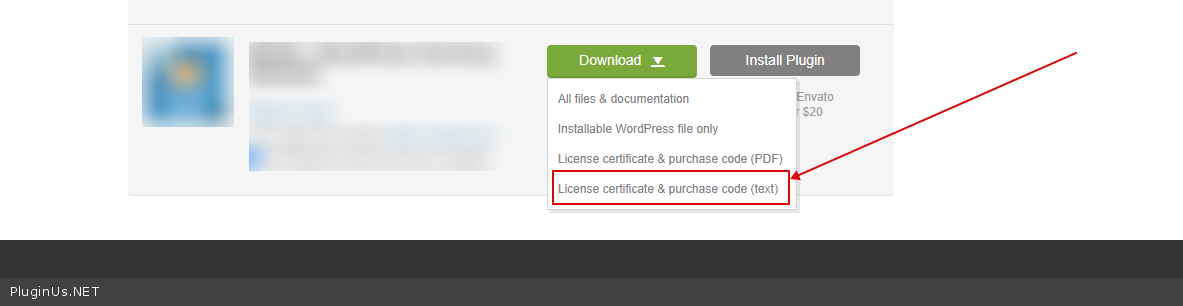
To get the license key - https://codecanyon.net/downloads -> https://c2n.me/49ZXJv0.png
This is a very logical behavior. On the category page, you can show ONLY products that belong to the category OR child category. It makes sense to show only child categories( of the current category ), because clicking on any other category will always give zero products )
Hello
Please add a correct license key - https://share.pluginus.net/image/i20210618130558.png -> https://share.pluginus.net/image/i20210618130637.png


To get the license key - https://codecanyon.net/downloads -> https://c2n.me/49ZXJv0.png
This is a very logical behavior. On the category page, you can show ONLY products that belong to the category OR child category. It makes sense to show only child categories( of the current category ), because clicking on any other category will always give zero products )
Quote from Swaranan on November 23, 2021, 10:03Yes, I can understand. But you can see that the filter is not showing the result on the same page. It redirect to shop page and show the result. So my concern is, what if user want to browse different brands product from one brand detail page? Atleast the pro version should have an option to enable/disable that dropdown.
Yes, I can understand. But you can see that the filter is not showing the result on the same page. It redirect to shop page and show the result. So my concern is, what if user want to browse different brands product from one brand detail page? Atleast the pro version should have an option to enable/disable that dropdown.
Quote from Pablo Borysenco on November 23, 2021, 13:36Hello
Please add a correct license key - https://share.pluginus.net/image/i20210618130558.png -> https://share.pluginus.net/image/i20210618130637.png
Hello
Please add a correct license key - https://share.pluginus.net/image/i20210618130558.png -> https://share.pluginus.net/image/i20210618130637.png
Quote from Swaranan on November 23, 2021, 14:38Asked client to send the licence key from codecanyon. Will add in few hour
Asked client to send the licence key from codecanyon. Will add in few hour
Quote from Swaranan on November 23, 2021, 15:00Hello,
I have added the licence key.
Hello,
I have added the licence key.
Quote from Pablo Borysenco on November 24, 2021, 12:09Hello
It redirect to shop page and show the result. - Please drop me exact link to the issue. The plugin redirects to the shop page only when there is no way to display the search result on the current page
what if user want to browse different brands product from one brand detail page? - In this case, he should use the menu and not the filter.
Hello
It redirect to shop page and show the result. - Please drop me exact link to the issue. The plugin redirects to the shop page only when there is no way to display the search result on the current page
what if user want to browse different brands product from one brand detail page? - In this case, he should use the menu and not the filter.
Quote from Swaranan on November 25, 2021, 12:18Okay, So there is no way to show the brands dropdown on brand detail page? I mean by anying any code or something like a filter? My client does not like the idea to force user to go another page and search with brand dropdown.
Please drop me exact link to the issue. The plugin redirects to the shop page only when there is no way to display the search result on the current page
> This issue is not regarding the redirection. It is about to show the brand dropdown on brands detail page.
Okay, So there is no way to show the brands dropdown on brand detail page? I mean by anying any code or something like a filter? My client does not like the idea to force user to go another page and search with brand dropdown.
Please drop me exact link to the issue. The plugin redirects to the shop page only when there is no way to display the search result on the current page
> This issue is not regarding the redirection. It is about to show the brand dropdown on brands detail page.
Quote from Pablo Borysenco on November 25, 2021, 14:52Hello
I mean by anying any code or something like a filter? - You can change the code and the dropdown will be displayed, but as I wrote earlier this will not give any result
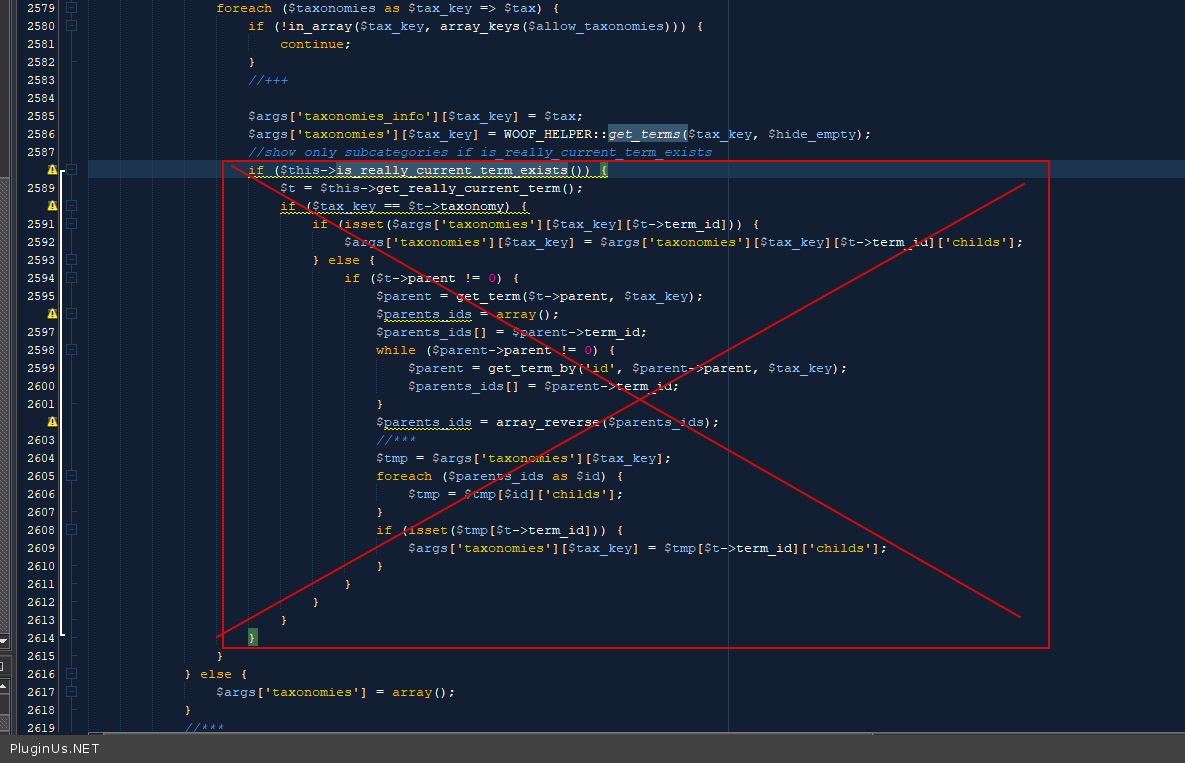
In file - \wp-content\plugins\woocommerce-products-filter\index.php - delete this code - https://c2n.me/4e7vNB1.png
Hello
I mean by anying any code or something like a filter? - You can change the code and the dropdown will be displayed, but as I wrote earlier this will not give any result
In file - \wp-content\plugins\woocommerce-products-filter\index.php - delete this code - https://c2n.me/4e7vNB1.png
Quote from Swaranan on November 26, 2021, 10:50Hello,
Thanks that helped. It enabled the brands dropdown. I have another question. Is there a way to redirect the search result to a particular page(shop page), instead of showing on the same page.
Hello,
Thanks that helped. It enabled the brands dropdown. I have another question. Is there a way to redirect the search result to a particular page(shop page), instead of showing on the same page.
Quote from Pablo Borysenco on November 26, 2021, 13:12hello
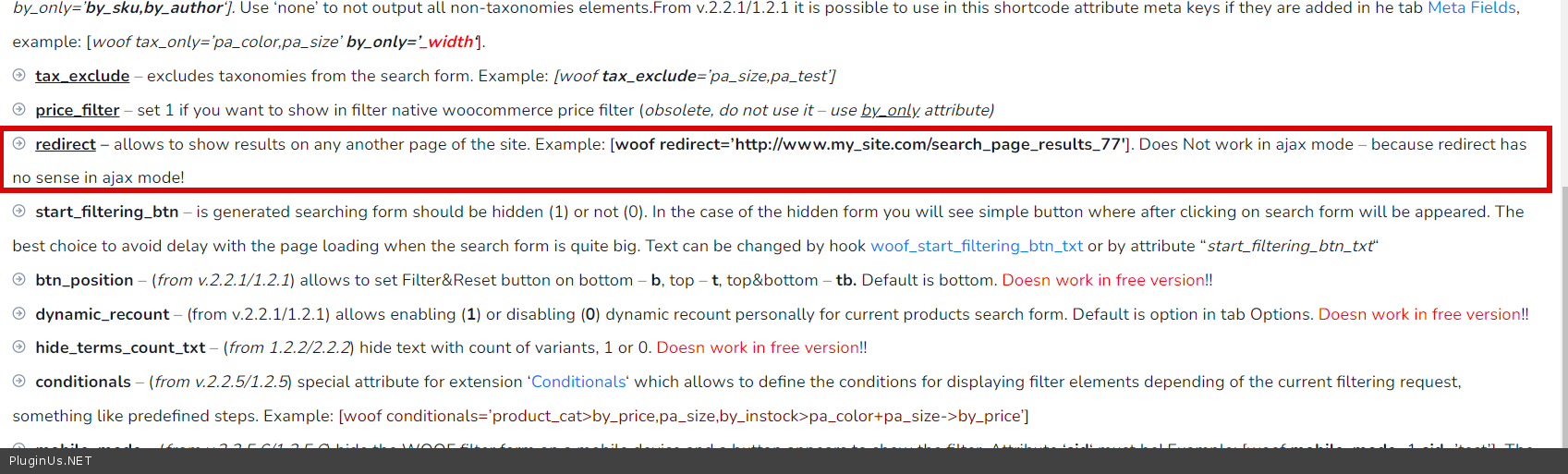
Yes! use a shortcode(https://c2n.me/4e8fkgi.png) - https://products-filter.com/shortcode/woof
hello
Yes! use a shortcode(https://c2n.me/4e8fkgi.png) - https://products-filter.com/shortcode/woof
Quote from Swaranan on November 26, 2021, 15:56Awesome
. Thanks. I do not have any queries now. You can close the topic. Just one thing, will be great if there have an option to enable the taxonomy dropdown on future updates for taxonomy detail page.
Awesome . Thanks. I do not have any queries now. You can close the topic. Just one thing, will be great if there have an option to enable the taxonomy dropdown on future updates for taxonomy detail page.
Quote from Pablo Borysenco on November 29, 2021, 12:51Hello
Welcome;)
I will pass it to the developers
Hello
Welcome;)
I will pass it to the developers