PluginUs.Net - Business Tools for WooCommerce and WordPress

[realize your idea - make your dreams come true]

Support Forum

You need to log-in to create request (topic) to the support

Support for Woof Filter

The support doesn work on Saturdays and Sundays, so some Friday requests can be answered on Monday. If you have problems with registration ask help on contact us page please
If you not got email within 24~36 business hours, firstly check your spam box, and if no any email from the support there - back to the forum and read answer here. DO NOT ANSWER ON EMAILS [noreply@pluginus.net] FROM THE FORUM!! Emails are just for your info, all answers should be published only here.
The support doesn work on Saturdays and Sundays, so some Friday requests can be answered on Monday.

Hello,

I write to you because I purchased WOOF Woocommerce Product Filter 23/10/2020.
Licence Nb PRIVATE DATA
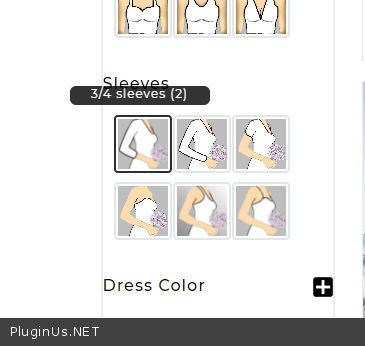
I use the filter form on my page's left side bar. I added images as attribute terms. The problem is - when pointing to an image with the mouse bullet filter shows it's name in an 'info bubble'. For the images that are on the left side their name is cut and can not be seen. I send you a print screen to better explain my problem.
Could you advise me what to do to see the text correctly? I am not a programmer, can you advise me a simple solution or explain very detailed if some change in code is needed?
Thank You very much !!
Best Regards,
Ineta Magone

Hello Ineta

Please  drop  me  exact link to  the  issue I will  check it

Hello Palblo,

Thank You for your reply.

Here is the link: https://sweetberries.fr/shop/

Issue is - when pointing on the left sidebar with a mouse bullet under Filter categories 'Dress Style' and others below with images, the name of each left side image is cut.

Thank You very much !!

Please  add CSS

.primary-sidebar .widget.widget-woof{

overflow: inherit;

}

.widget-woof p:hover.woof_tooltip span.woof_tooltip_data {

left: calc(50% + 30px);

}

Result - https://c2n.me/49G8CL2.png

Thank You very much, I addad CSS in filter's Advanced tab and it worked. I just put at the end 60px instead of 30px and it works completely for all left side images!

You're the best!

Hello

Great!  Welcome;)

http://codecanyon.net/downloads - rate please the plugin if you liked it ...