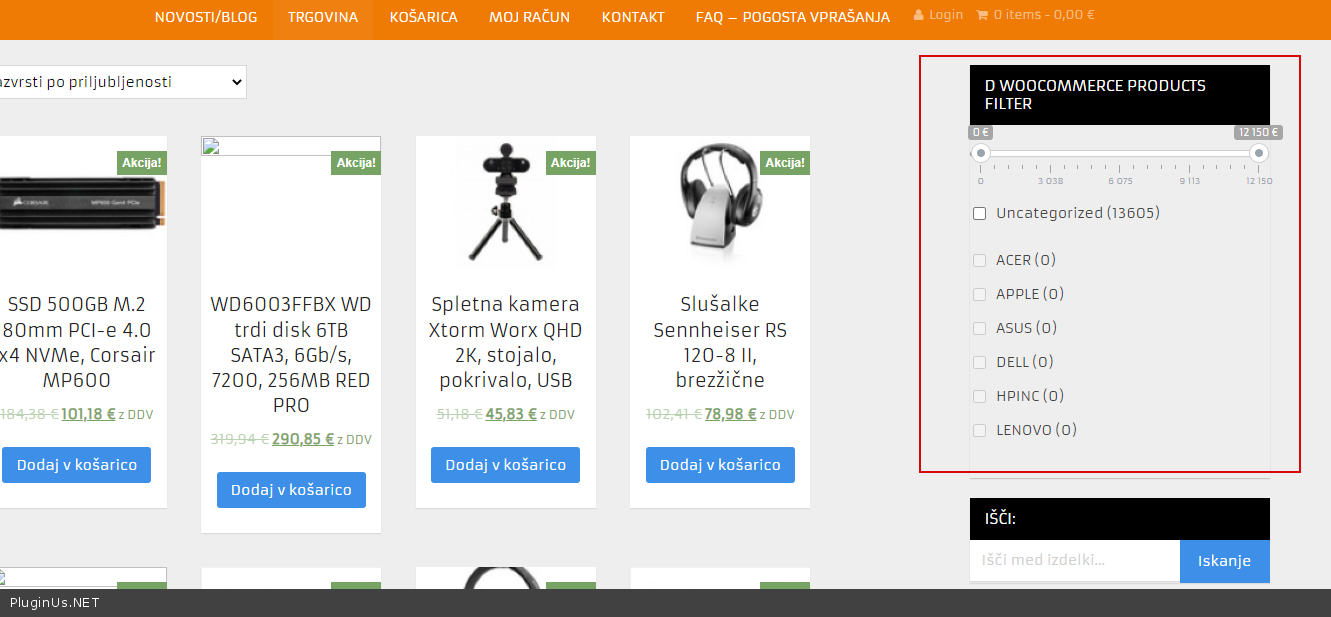
Structure not working
The support doesn work on Saturdays and Sundays, so some Friday requests can be answered on Monday. If you have problems with registration ask help on contact us page pleaseIf you not got email within 24~36 business hours, firstly check your spam box, and if no any email from the support there - back to the forum and read answer here. DO NOT ANSWER ON EMAILS [noreply@pluginus.net] FROM THE FORUM!! Emails are just for your info, all answers should be published only here.
The support doesn work on Saturdays and Sundays, so some Friday requests can be answered on Monday.

Quote from lojze1 on March 27, 2022, 16:57I am at the very beginning with plugin structure, but the appearance is somehow not working. I would like to attach screenshots (just how?) and I hope that you can help.
I am at the very beginning with plugin structure, but the appearance is somehow not working. I would like to attach screenshots (just how?) and I hope that you can help.

Quote from Pablo Borysenco on March 28, 2022, 12:07Hello
To add screenshots:
You can use services to transfer images via links or google drive
OR
Create a custom page on your site with images and drop me the link
Hello
To add screenshots:
You can use services to transfer images via links or google drive
OR
Create a custom page on your site with images and drop me the link
Quote from lojze1 on March 28, 2022, 14:25Link for images is https://wetransfer.com/downloads/ce604d3a333cbc03c46c9b388f122dec20220328122253/83c98a383c33d6aca1c8b554f617f2c920220328122357/a73d7a
Link for images is https://wetransfer.com/downloads/ce604d3a333cbc03c46c9b388f122dec20220328122253/83c98a383c33d6aca1c8b554f617f2c920220328122357/a73d7a
Quote from Pablo Borysenco on March 29, 2022, 10:59Hello
Please drop me exact link to the issue
product tags do you set up as brands?
Hello
Please drop me exact link to the issue
product tags do you set up as brands?
Quote from lojze1 on March 29, 2022, 12:21Hi,
What do you mean by "exact link"?
Hopefully not to the admin area, or still?
And re. product tags: I didn't set any "additional options" or "options". And while "product PROIZVAJALEC" works, none of additional two "Product categories" and "Product tags" work.
Hi,
What do you mean by"exact link"?
Hopefully not to the admin area, or still?
And re. product tags: I didn't set any"additional options" or"options". And while"product PROIZVAJALEC" works, none of additional two"Product categories" and"Product tags" work.
Quote from Pablo Borysenco on March 29, 2022, 13:03
What do you mean by"exact link"? - link to a page with the filter
Can you describe in more detail what problem you have?
Because the only thing I see (in your screenshots) is that the tags are configured as dropdowns, and there are no dropdowns in the widget
What do you mean by"exact link"? - link to a page with the filter
Can you describe in more detail what problem you have?
Because the only thing I see (in your screenshots) is that the tags are configured as dropdowns, and there are no dropdowns in the widget
Quote from lojze1 on March 30, 2022, 19:26So I need to give you an access to admin area?
So I need to give you an access to admin area?
Quote from Pablo Borysenco on March 31, 2022, 11:48Hello
So I need to give you an access to admin area? - No!
What do you mean by"exact link"? - link to a page with the filter(shop or category)
Can you describe in more detail what problem you have? - Because the only thing I see (in your screenshots) is that the tags are configured as dropdowns, and there are no dropdowns in the widget
Hello
So I need to give you an access to admin area? - No!
What do you mean by"exact link"? - link to a page with the filter(shop or category)
Can you describe in more detail what problem you have? - Because the only thing I see (in your screenshots) is that the tags are configured as dropdowns, and there are no dropdowns in the widget
Quote from lojze1 on April 1, 2022, 22:10
- Link to a page with a filter: https://www.staging2.tehnika.net/
Unfortunately you don't see anything, despite plugin is installed, first steps with configuration are made and widget "WOOF - WooCommerce Products Filter" is added to https://www.staging2.tehnika.net/wp-admin/widgets.php area.
What am I doing wrong?
- Link to a page with a filter: https://www.staging2.tehnika.net/
Unfortunately you don't see anything, despite plugin is installed, first steps with configuration are made and widget"WOOF - WooCommerce Products Filter" is added to https://www.staging2.tehnika.net/wp-admin/widgets.php area.
What am I doing wrong?
Quote from Pablo Borysenco on April 4, 2022, 12:11Hello
- Link to a page with a filter: https://www.staging2.tehnika.net/ - unfortunately your site is closed
Hello
- Link to a page with a filter: https://www.staging2.tehnika.net/ - unfortunately your site is closed
Quote from lojze1 on April 4, 2022, 12:23It is under password, as it is not live.
How can I send you a password?
It is under password, as it is not live.
How can I send you a password?
Quote from Pablo Borysenco on April 5, 2022, 10:21please use a "private data" field - https://share.pluginus.net/image/i20210618130558.png ->https://share.pluginus.net/image/i20210618130637.png
please use a "private data" field - https://share.pluginus.net/image/i20210618130558.png ->https://share.pluginus.net/image/i20210618130637.png


Quote from lojze1 on April 5, 2022, 11:10Hidden data updated.
Hidden data updated.
Quote from Pablo Borysenco on April 5, 2022, 12:15Hello
My plugin is disabled on your site
Hello
My plugin is disabled on your site
Quote from lojze1 on April 5, 2022, 14:46Strange, as I see:
WOOF - WooCommerce Products Filter .. so it is activated.
How to go on?
Strange, as I see:
| WOOF - WooCommerce Products Filter |
.. so it is activated.
How to go on?
Quote from Pablo Borysenco on April 6, 2022, 10:37Hello
My plugin is still disabled
Hello
My plugin is still disabled
Quote from lojze1 on April 6, 2022, 11:18Where do you see it is disabled?
I would like to have it working.
Where do you see it is disabled?
I would like to have it working.
Quote from Pablo Borysenco on April 6, 2022, 12:03I check which files are included on your site and there are no files related to my plugin. And by this I conclude that my plugin is disabled
I check which files are included on your site and there are no files related to my plugin. And by this I conclude that my plugin is disabled
Quote from lojze1 on April 6, 2022, 12:07But then, in Installed Plugins you can see:
WOOF - WooCommerce Products Filter
So that means that plugin is installed.
How to proceed, when there is no word "disabled"?
But then, in Installed Plugins you can see:
| WOOF - WooCommerce Products Filter |
So that means that plugin is installed.
How to proceed, when there is no word"disabled"?
Quote from Pablo Borysenco on April 7, 2022, 10:08Hello
I disabled this plugin - https://c2n.me/4fmHVTf.png
Now I see the filter- https://c2n.me/4fmHXDV.png - everything works correctly
Hello
I disabled this plugin - https://c2n.me/4fmHVTf.png
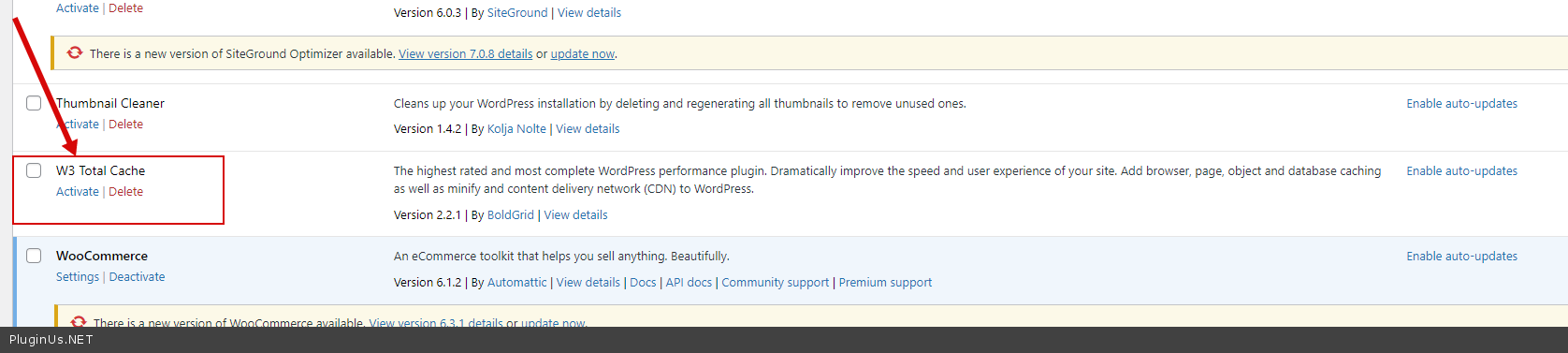
Now I see the filter- https://c2n.me/4fmHXDV.png - everything works correctly