
Sooooo many issues
The support doesn work on Saturdays and Sundays, so some Friday requests can be answered on Monday. If you have problems with registration ask help on contact us page pleaseIf you not got email within 24~36 business hours, firstly check your spam box, and if no any email from the support there - back to the forum and read answer here. DO NOT ANSWER ON EMAILS [noreply@pluginus.net] FROM THE FORUM!! Emails are just for your info, all answers should be published only here.
The support doesn work on Saturdays and Sundays, so some Friday requests can be answered on Monday.

Quote from beadbook on August 22, 2022, 22:47Hi,
I'm sorry, I've been trying to figure these out for myself, but I give up. I'm working with:
BEAR - WooCommerce Bulk Editor Professional v.2.1.2
Actualized for WooCommerce v.6.8.0
First, the whole reason I got this was to remove all variations and switch over to simple products. The removing of the variations was easy. Switching products from variable to simple does not work off the BEAR Bulk Editor screen. I tried disabling my caching plugin, it didn't help. So I said, ok, I'll do it the hard way.
Next problem: I go into each product, bypassing BEAR, and change it from variable to simple and enter the price. When I click Update, though, 1/4 of all products change over to "out of stock". (yes, I checked that they were "in stock" when I click "update") Ok, no problem, I'll just switch it from the BEAR screen, right....nope. It shows that it updates to "in stock" until I reload the page.
At this point, this product is creating more work than need be. Is there a way to fix this?
Hi,
I'm sorry, I've been trying to figure these out for myself, but I give up. I'm working with:
BEAR - WooCommerce Bulk Editor Professional v.2.1.2
Actualized for WooCommerce v.6.8.0
First, the whole reason I got this was to remove all variations and switch over to simple products. The removing of the variations was easy. Switching products from variable to simple does not work off the BEAR Bulk Editor screen. I tried disabling my caching plugin, it didn't help. So I said, ok, I'll do it the hard way.
Next problem: I go into each product, bypassing BEAR, and change it from variable to simple and enter the price. When I click Update, though, 1/4 of all products change over to"out of stock". (yes, I checked that they were"in stock" when I click"update") Ok, no problem, I'll just switch it from the BEAR screen, right....nope. It shows that it updates to"in stock" until I reload the page.
At this point, this product is creating more work than need be. Is there a way to fix this?

Quote from Pablo Borysenco on August 23, 2022, 10:06Hello
Please paste your license key here - https://share.pluginus.net/image/i20210618130558.png -> https://share.pluginus.net/image/i20210618130614.png and wp-admin access - https://share.pluginus.net/image/i20210618130637.png
It looks like a conflict with the sync plugin or your customization
Hello
Please paste your license key here - https://share.pluginus.net/image/i20210618130558.png -> https://share.pluginus.net/image/i20210618130614.png and wp-admin access - https://share.pluginus.net/image/i20210618130637.png


It looks like a conflict with the sync plugin or your customization
Quote from beadbook on August 23, 2022, 18:11Are you asking for the login information to my wp-admin?
Are you asking for the login information to my wp-admin?
Quote from Pablo Borysenco on August 24, 2022, 09:33Hello
Unfortunately your license key is not correct. Please paste the correct key
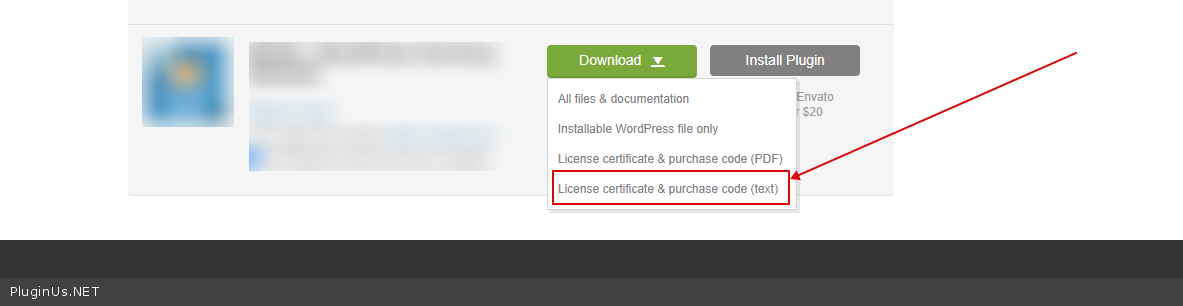
To get license key - https://codecanyon.net/downloads -> https://c2n.me/49ZXJv0.png
the login information to my wp-admin? - Yes
Hello
Unfortunately your license key is not correct. Please paste the correct key
To get license key - https://codecanyon.net/downloads -> https://c2n.me/49ZXJv0.png
the login information to my wp-admin? - Yes
Quote from beadbook on August 30, 2022, 23:40I have looked everywhere for my license key. I bought it from codecanyon. I have the confirmation emails from them. I can't find a license key in my .zip download folder. I have checked my spam folder. I was never asked for a key during my installation. I don't know how to give you that info.
I have looked everywhere for my license key. I bought it from codecanyon. I have the confirmation emails from them. I can't find a license key in my .zip download folder. I have checked my spam folder. I was never asked for a key during my installation. I don't know how to give you that info.
Quote from Pablo Borysenco on August 31, 2022, 09:35Hello
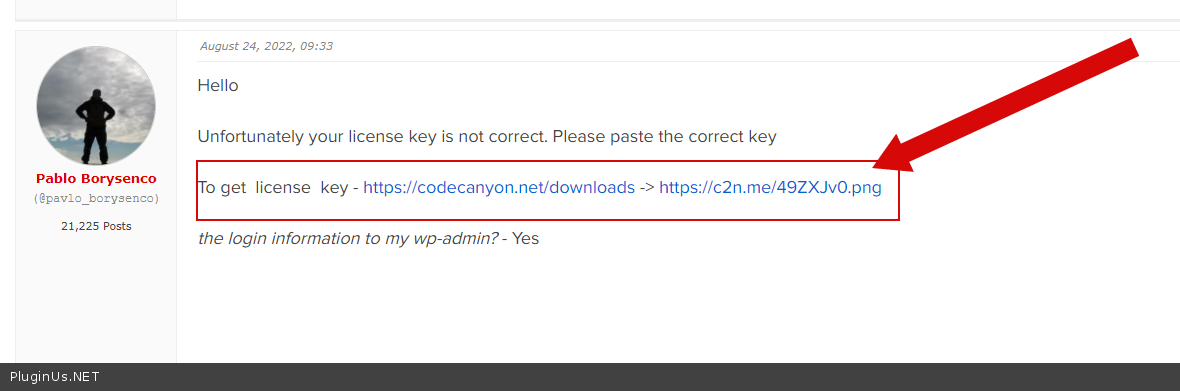
I showed in the previous message where to get the license key - https://c2n.me/4gvI1QX.png
Hello
I showed in the previous message where to get the license key - https://c2n.me/4gvI1QX.png
Quote from beadbook on August 31, 2022, 19:14I'm so sorry. I had clicked on the link and thought I was supposed to purchase it again. I have updated the private data. Also, were you asking for my wp admin login info?
I'm so sorry. I had clicked on the link and thought I was supposed to purchase it again. I have updated the private data. Also, were you asking for my wp admin login info?
Quote from Pablo Borysenco on September 1, 2022, 09:21Hello
Also, were you asking for my wp admin login info? - yes please( https://share.pluginus.net/image/i20210618130558.png ->https://share.pluginus.net/image/i20210618130637.png ). I want to check these problems: product type and status change.
Can I disable plugis to test?
Hello
Also, were you asking for my wp admin login info? - yes please( https://share.pluginus.net/image/i20210618130558.png ->https://share.pluginus.net/image/i20210618130637.png ). I want to check these problems: product type and status change.
Can I disable plugis to test?
Quote from beadbook on September 2, 2022, 19:17Yes, you can disable plugins
Info added to private data
Yes, you can disable plugins
Info added to private data
Quote from Pablo Borysenco on September 5, 2022, 10:00Hello
Please check your first access
Hello
Please check your first access
Quote from beadbook on September 5, 2022, 23:05Sorry about that. It's updated now.
P.s I'm AFK till 9/12
Sorry about that. It's updated now.
P.s I'm AFK till 9/12
Quote from Pablo Borysenco on September 6, 2022, 09:36Hello
Unfortunately, access(.htaccess ) doesn't work
Hello
Unfortunately, access(.htaccess ) doesn't work
Quote from beadbook on September 21, 2022, 21:23I have tried updating the password in the "private data" box again. I double checked that it was saved. I hope it did.
I have tried updating the password in the"private data" box again. I double checked that it was saved. I hope it did.
Quote from Pablo Borysenco on September 22, 2022, 10:03Hello
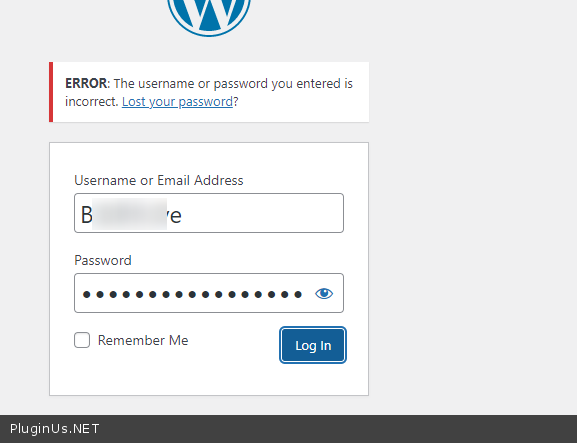
Your access - https://c2n.me/4gGXhle.png
Hello
Your access - https://c2n.me/4gGXhle.png
Quote from beadbook on September 22, 2022, 21:32I'm so sorry. I don't know where my heads at lately. I have corrected it.
I'm so sorry. I don't know where my heads at lately. I have corrected it.
Quote from Pablo Borysenco on September 26, 2022, 16:25Hello
Ok! Now give this user a condition: manage_options
Because I can't change anything
Hello
Ok! Now give this user a condition: manage_options
Because I can't change anything
Quote from beadbook on September 26, 2022, 23:00I don't really understand what you're asking me to do.
I don't really understand what you're asking me to do.
Quote from Pablo Borysenco on September 27, 2022, 10:00Hello
each user(user role) has conditions - https://wordpress.org/support/article/roles-and-capabilities/
to work correctly in BEAR, the user must have - manage_options
The user (the access you gave me) does not have this condition and therefore I cannot change the product data (the plugin prohibits for security reasons)
Maybe that's the reason why it doesn't work for you.
Hello
each user(user role) has conditions - https://wordpress.org/support/article/roles-and-capabilities/
to work correctly in BEAR, the user must have - manage_options
The user (the access you gave me) does not have this condition and therefore I cannot change the product data (the plugin prohibits for security reasons)
Maybe that's the reason why it doesn't work for you.
Quote from beadbook on September 27, 2022, 21:37The manage_options should be enabled by default for both our users, since they are administrators. I find no code added to the theme or the child theme to disable it. I have been trying to find a solution, but I'm not getting much via google. I'm at a loss as to what to do.
The manage_options should be enabled by default for both our users, since they are administrators. I find no code added to the theme or the child theme to disable it. I have been trying to find a solution, but I'm not getting much via google. I'm at a loss as to what to do.
Quote from beadbook on September 27, 2022, 21:38I'm going to disable all plugins that are unnecesary.
I'm going to disable all plugins that are unnecesary.