

Some questions before buying the premium version
The support doesn work on Saturdays and Sundays, so some Friday requests can be answered on Monday. If you have problems with registration ask help on contact us page pleaseIf you not got email within 24~36 business hours, firstly check your spam box, and if no any email from the support there - back to the forum and read answer here. DO NOT ANSWER ON EMAILS [noreply@pluginus.net] FROM THE FORUM!! Emails are just for your info, all answers should be published only here.
The support doesn work on Saturdays and Sundays, so some Friday requests can be answered on Monday.

Quote from Thesilver on August 1, 2021, 19:53Hi, we are interested in the premium version of the plug-in, but first we would need to understand if the following questions are solvable:
1. - When filtering by size, one "0" or the first number of the list is often appeared instead of the filter name (eg. size)
2. - The widget, if you use a "drop down", allows you to create a progressively increasingly short drop down and the last filter finds itself with a curtain of a single line. Can the height of the curtain be established?
3. - On the "Options" page, if you select the "Show count" and "Dynamic Recount" entries, I find myself with the filters in gray and not clickable. How come ?
4. - The most important: I would need to create a different filtering based on the category. In this case, it seems to me that filtering is unique. Is it possible to make a custom filter for each category?
Moreover, if I have the same unique filter for all categories it would be useful to view, within the filter, only the attributes actually present on the page. If I find myself in the "clothing" category it is normal that I view, for example, the Dior brand, Versace, etc. But the presence of these brands would be totally sensed if I go to the "food" category.
Is it possible to make only the attributes actually present on the page in the list of attributes to filter?5. - Another important thing: I noticed that "stock" filtering is present. Is it possible to filter products with variable attributes based on presence in stock? For a sample, if I have a pair of shoes in which the 43 is in stock and the 44 is out of stock, then the 44 should not appear in the list of sizes to be filtered if I selected "In stock".
Thanks for the assistance
Cheers
Hi, we are interested in the premium version of the plug-in, but first we would need to understand if the following questions are solvable:
1. - When filtering by size, one"0" or the first number of the list is often appeared instead of the filter name (eg. size)
2. - The widget, if you use a"drop down", allows you to create a progressively increasingly short drop down and the last filter finds itself with a curtain of a single line. Can the height of the curtain be established?
3. - On the"Options" page, if you select the"Show count" and"Dynamic Recount" entries, I find myself with the filters in gray and not clickable. How come ?
4. - The most important: I would need to create a different filtering based on the category. In this case, it seems to me that filtering is unique. Is it possible to make a custom filter for each category?
Moreover, if I have the same unique filter for all categories it would be useful to view, within the filter, only the attributes actually present on the page. If I find myself in the"clothing" category it is normal that I view, for example, the Dior brand, Versace, etc. But the presence of these brands would be totally sensed if I go to the"food" category.
Is it possible to make only the attributes actually present on the page in the list of attributes to filter?
5. - Another important thing: I noticed that"stock" filtering is present. Is it possible to filter products with variable attributes based on presence in stock? For a sample, if I have a pair of shoes in which the 43 is in stock and the 44 is out of stock, then the 44 should not appear in the list of sizes to be filtered if I selected"In stock".
Thanks for the assistance
Cheers

Quote from Pablo Borysenco on August 2, 2021, 11:55Hello
Please watch a video - https://products-filter.com/video-tutorials/#video_beGT6p_look
1/2 - drop me exact link to the issue
3 - Yes, this is the correct behavior.The filter considers the actual attributes for the current search query
4 - check options - https://share.pluginus.net/image/i20210802125334.png
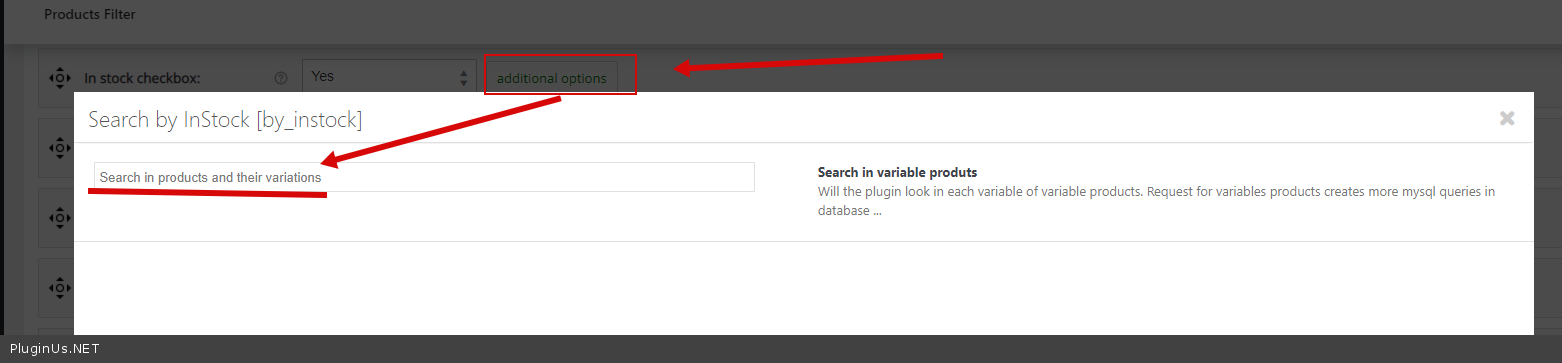
5 - Use extension - https://share.pluginus.net/image/i20210802125427.png check an option - https://c2n.me/4cStZF3.png
Hello
Please watch a video - https://products-filter.com/video-tutorials/#video_beGT6p_look
1/2 - drop me exact link to the issue
3 - Yes, this is the correct behavior.The filter considers the actual attributes for the current search query
4 - check options - https://share.pluginus.net/image/i20210802125334.png

5 - Use extension - https://share.pluginus.net/image/i20210802125427.png check an option - https://c2n.me/4cStZF3.png

Quote from Thesilver on August 2, 2021, 12:39First of all thanks for your answer :)
I had already seen the video of introduction but it was not very clear, however I deepen it further.
1. - I noticed that (if I'm not mistaken) this inconvenience occurs when the filter to size is put as last in the list of filters. I proceeded to put the filter for size not last and now it seems to show the filter name instead of the first element of the list.
2. - The site is currently in maintenance mode, so for the moment it is a bit difficult to give you the link, however we can therefore consider this a secondary problem.
3. - If I didn't understand the answer, the filter would remain all in gray because it doesn't find any of the attributes on the current page. This is not exact, since there are many of the filterable attributes on the current page. I don't understand why. At this time the "Show Count" option only allows me to select the "No" option, while the "Yes" option is in gray. Can you tell me why?
4. - If I have not misunderstood, your proposal would be to use a unique filter and then set the attributes not in the current page as "hidden". Right ?
If I'm not mistaken you can also do using a personalized shortcode. Which do you think is the best mode?5. - OK
PS: the options marked in red within the program related to the Premium version?
I have much appreciated the speed of the program and the possibility of putting it in the footer. Practically it does not slow down at all the loading of the page!
If these questions are solved I will immediately pass to acqivia specium :)
Thanks for pre-sale assurance
First of all thanks for your answer :)
I had already seen the video of introduction but it was not very clear, however I deepen it further.
1. - I noticed that (if I'm not mistaken) this inconvenience occurs when the filter to size is put as last in the list of filters. I proceeded to put the filter for size not last and now it seems to show the filter name instead of the first element of the list.
2. - The site is currently in maintenance mode, so for the moment it is a bit difficult to give you the link, however we can therefore consider this a secondary problem.
3. - If I didn't understand the answer, the filter would remain all in gray because it doesn't find any of the attributes on the current page. This is not exact, since there are many of the filterable attributes on the current page. I don't understand why. At this time the"Show Count" option only allows me to select the"No" option, while the"Yes" option is in gray. Can you tell me why?
4. - If I have not misunderstood, your proposal would be to use a unique filter and then set the attributes not in the current page as"hidden". Right ?
If I'm not mistaken you can also do using a personalized shortcode. Which do you think is the best mode?
5. - OK
PS: the options marked in red within the program related to the Premium version?
I have much appreciated the speed of the program and the possibility of putting it in the footer. Practically it does not slow down at all the loading of the page!
If these questions are solved I will immediately pass to acqivia specium :)
Thanks for pre-sale assurance
Quote from Thesilver on August 2, 2021, 19:56I just purchased the premium version of the software.
In addition to the post of first, I would like to specify that I have, somehow understood the question problem number 3. Since I need to filter many different categories and go a unique filter for the whole store, I set "Hide Empty Terms" On Yes, but automatically it select "Dynamic Recount" and "Show count". My problem was that when I opened a page with categories and products, the filter remained deactivated in gray. I didn't understand what the problem could be.
Later I noticed that after 25 seconds the filters became accessible!
This happens every time I do a filtering or change page (page 1, 2, 3, etc.) in the product list.
I have never seen such a thing in any site where products filtering options are present. The filter pane cannot appear 25 seconds after loading the page. I can't publish a site in this way.
Surely it's me who still don't know the program. Is there a way to speed up this operation or any trick ?
Thank you
Best regards
I just purchased the premium version of the software.
In addition to the post of first, I would like to specify that I have, somehow understood the question problem number 3. Since I need to filter many different categories and go a unique filter for the whole store, I set"Hide Empty Terms" On Yes, but automatically it select"Dynamic Recount" and"Show count". My problem was that when I opened a page with categories and products, the filter remained deactivated in gray. I didn't understand what the problem could be.
Later I noticed that after 25 seconds the filters became accessible!
This happens every time I do a filtering or change page (page 1, 2, 3, etc.) in the product list.
I have never seen such a thing in any site where products filtering options are present. The filter pane cannot appear 25 seconds after loading the page. I can't publish a site in this way.
Surely it's me who still don't know the program. Is there a way to speed up this operation or any trick ?
Thank you
Best regards
Quote from Pablo Borysenco on August 3, 2021, 12:44Hello
Please disable Turbo Mode
Use a cache - > Advanced->Options - https://share.pluginus.net/image/i20210803134253.png
Read this - https://products-filter.com/searching-is-slow/
Hello
Please disable Turbo Mode
Use a cache - > Advanced->Options - https://share.pluginus.net/image/i20210803134253.png

Read this - https://products-filter.com/searching-is-slow/
Quote from Thesilver on August 5, 2021, 12:09Hello,
thanks for the support. I applied suggestions.
Finally you start to reason! :) Now it's definitely better!
The other tips on caching I'll watch them calmly.Only some details remain to be defined:
1. - I noticed that when filtering is applied, a full screen appears (circle that turns or Kitt style bar :)). This animation appears even when you switch from one page to another product, even if the filter has not been applied.
Is it possible to remove this animation or not view it when you are changing product list page?2. - Only products present in the warehouse are shown in my online store. It is, however, it is necessary that the "In stock" option is selected to be able to filter elements with variable attributes based on actual availability.
I would like to know if it is possible to have the "In-stock" option already selected by default when the page is opened or by default without the need to show the selection box.3. - I noticed that if I use the filtering on the price with the smooth horizontal bar, at the beginning it shows me the minimum price and the maximum price of filterable products, but when I make a reset of the filters it gives me a value from 0 to 125138 always. It often happens to me even after applying filtering.
Sipuò fix?Thank you
Hello,
thanks for the support. I applied suggestions.
Finally you start to reason! :) Now it's definitely better!
The other tips on caching I'll watch them calmly.
Only some details remain to be defined:
1. - I noticed that when filtering is applied, a full screen appears (circle that turns or Kitt style bar :)). This animation appears even when you switch from one page to another product, even if the filter has not been applied.
Is it possible to remove this animation or not view it when you are changing product list page?
2. - Only products present in the warehouse are shown in my online store. It is, however, it is necessary that the"In stock" option is selected to be able to filter elements with variable attributes based on actual availability.
I would like to know if it is possible to have the"In-stock" option already selected by default when the page is opened or by default without the need to show the selection box.
3. - I noticed that if I use the filtering on the price with the smooth horizontal bar, at the beginning it shows me the minimum price and the maximum price of filterable products, but when I make a reset of the filters it gives me a value from 0 to 125138 always. It often happens to me even after applying filtering.
Sipuò fix?
Thank you
Quote from Pablo Borysenco on August 6, 2021, 12:07Hello
1 Please check option - https://share.pluginus.net/image/i20210806130441.png and add CSS
#woof_html_buffer{
display: none !important;
}2 Read this - https://products-filter.com/manipulate-search-data-options/
3 Drop me exact link to the issue please
Hello
1 Please check option - https://share.pluginus.net/image/i20210806130441.png and add CSS

#woof_html_buffer{
display: none !important;
}
2 Read this - https://products-filter.com/manipulate-search-data-options/
3 Drop me exact link to the issue please