Some clarification on what can be done.
The support doesn work on Saturdays and Sundays, so some Friday requests can be answered on Monday. If you have problems with registration ask help on contact us page pleaseIf you not got email within 24~36 business hours, firstly check your spam box, and if no any email from the support there - back to the forum and read answer here. DO NOT ANSWER ON EMAILS [noreply@pluginus.net] FROM THE FORUM!! Emails are just for your info, all answers should be published only here.
The support doesn work on Saturdays and Sundays, so some Friday requests can be answered on Monday.

Quote from George on October 28, 2020, 14:22Hi I am just looking for clarification regarding what the plugin can and cannot do. I bought my first license for a client in 2015 and I use it on another site as well with this newish license.
The plugin the client is looking for should be able to do the following:
1. It should allow for multiple filter types based on taxonomies for example product categories can be in checkboxes and Brands which is another taxonomy from another plugin e.g. Woocommerce Brands Pro can be in checkboxes as well. Also a price filter should be included These should be able to work together using this one filter plugin.
This seems that it already works2. It should allow the creation of multiple different Shortcodes so that we are able to have different sets of filters on different categories for example using the Content Aware Sidebars Plugin
This seems that it already works3. When creating a filter for a specific product category it should allow for the exclusion of other categories based on taxonomy id for example thus excluding their children as well.
I tried using [woof is_ajax=1 taxonomies=product_cat:165] this works sort of but it's doesn't hide my other main categories the reason might me that I am forced to add ?swoof=1 to category urls to make point #5 workif your look at anither site https://broadcast.bswusa.com/nav/type/products/cat1/broadcast/cat2/broadcast_amplifiers/0 this is what I am trying to recreate Broadcast is still there although I am in a subcategory called Amplifiers
4. The plugin should allow for Hierarchical Display of children (subcategories) and children of children (subcategories of subcategories)You plugin seems to do this but the main category disappears when I am in a subcategory
5. The selected terms should be on the top of the filter So for example if I have a main category called Broadcast and a subcategory called Antennas and I land on /product-category/broadcast/antennas then I expect to land on a page with the products from Antennas are shown but the filter in the sidebar should show Broadcast on the top of the filter ticked and bold and Antennas ticketed and bold right under Broadcast then after that the rest of the children of Broadcast un-ticked of course. As per requirement #3 above the rest of the main categories and their children should be hidden since I set their taxonomies to be excluded in the Shortcode for the category.
I can force the ticks to be added if I add ?swoof=1&paged=1 to the category slug not sure if that the right way to do it.6. The filter should allow us to set a maximum number of visible terms of each taxonomy e.g. 6 Products Categories and 6 Brands with a link to click on each taxonomy to "show more" if the user wants to see more.
This can be done
The theme being used is Divi
Can you kindly check and tell me if this plugin can do all the above and guide me if I am using the wrong method to accomplish any of the above. Also let me know what the pluin cannot do based on the points above
Hi I am just looking for clarification regarding what the plugin can and cannot do. I bought my first license for a client in 2015 and I use it on another site as well with this newish license.
The plugin the client is looking for should be able to do the following:
1. It should allow for multiple filter types based on taxonomies for example product categories can be in checkboxes and Brands which is another taxonomy from another plugin e.g. Woocommerce Brands Pro can be in checkboxes as well. Also a price filter should be included These should be able to work together using this one filter plugin.
This seems that it already works
2. It should allow the creation of multiple different Shortcodes so that we are able to have different sets of filters on different categories for example using the Content Aware Sidebars Plugin
This seems that it already works
3. When creating a filter for a specific product category it should allow for the exclusion of other categories based on taxonomy id for example thus excluding their children as well.
I tried using [woof is_ajax=1 taxonomies=product_cat:165] this works sort of but it's doesn't hide my other main categories the reason might me that I am forced to add ?swoof=1 to category urls to make point #5 work
if your look at anither site https://broadcast.bswusa.com/nav/type/products/cat1/broadcast/cat2/broadcast_amplifiers/0 this is what I am trying to recreate Broadcast is still there although I am in a subcategory called Amplifiers
4. The plugin should allow for Hierarchical Display of children (subcategories) and children of children (subcategories of subcategories)
You plugin seems to do this but the main category disappears when I am in a subcategory
5. The selected terms should be on the top of the filter So for example if I have a main category called Broadcast and a subcategory called Antennas and I land on /product-category/broadcast/antennas then I expect to land on a page with the products from Antennas are shown but the filter in the sidebar should show Broadcast on the top of the filter ticked and bold and Antennas ticketed and bold right under Broadcast then after that the rest of the children of Broadcast un-ticked of course. As per requirement #3 above the rest of the main categories and their children should be hidden since I set their taxonomies to be excluded in the Shortcode for the category.
I can force the ticks to be added if I add ?swoof=1&paged=1 to the category slug not sure if that the right way to do it.
6. The filter should allow us to set a maximum number of visible terms of each taxonomy e.g. 6 Products Categories and 6 Brands with a link to click on each taxonomy to"show more" if the user wants to see more.
This can be done
The theme being used is Divi
Can you kindly check and tell me if this plugin can do all the above and guide me if I am using the wrong method to accomplish any of the above. Also let me know what the pluin cannot do based on the points above

Quote from Pablo Borysenco on October 29, 2020, 12:46Hello
1/2/6 - Yes. Watch a video - https://products-filter.com/video-tutorials#video_beGT6p_look
3) This option does not hide anything. This is a prefiltration option. To hide terms - https://products-filter.com/hook/woof_sort_terms_before_out/
4) Yes/ correct
5) The plugin does not have this feature.
Hello
1/2/6 - Yes. Watch a video - https://products-filter.com/video-tutorials#video_beGT6p_look
3) This option does not hide anything. This is a prefiltration option. To hide terms - https://products-filter.com/hook/woof_sort_terms_before_out/
4) Yes/ correct
5) The plugin does not have this feature.
Quote from George on October 29, 2020, 13:15Thanks for taking the time to answer everything. Regarding point #4 Is there any way for the main Category to remain visible?
Thanks for taking the time to answer everything. Regarding point #4 Is there any way for the main Category to remain visible?
Quote from Pablo Borysenco on October 30, 2020, 13:00Hello
it's impossible and it doesn't make sense. If you select any other category on the category page, it will always give zero products
Hello
it's impossible and it doesn't make sense. If you select any other category on the category page, it will always give zero products
Quote from George on October 30, 2020, 15:22I actually agree with you so to make things happen the way the client wants want them to be I am trying to do a little trick using
woof_sort_terms_before_outlet's say I add a custom link to my nav that is this http://tru2.local/shop/?swoof=1&product_cat=broadcast,19-inch-racks
This will do what I need in terms of ticking my main category and the subcategory 19 inch racks as seen in the screenshot I am attaching https://drive.google.com/file/d/1Sqku05NDlaojSUNjXX63vkzcP9qzD3pT/view?usp=sharing but of course other main categories remain
Here's a list of my category ids
Uncategorized = 15 (hidden via plugin options)
Offers = 206 (hidden via plugin options)
Broadcast = 165 (this is supposedly where I am)=================anything below this needs to be hidden so that the filter look liek I need it to============================
Studio = 174
Software = 265
Used Gear = 316
Components = 198==================================================================================================
So obviously I need to code a little trying to remove 174,265,316 and 198 and hopefully their children somehow here's what I came up with but I must be doing something wrong with unset I guess. If you feel like suggesting something feel free
[code]
add_filter('woof_sort_terms_before_out', function($terms,$type){// Test if the query exists in the URL//echo get_query_var('product_cat'); //this comes out with broadcast,19-inch-racksif ( get_query_var('product_cat') == "broadcast,19-inch-racks") { //this tells me where I am so I know what to hide// If so echo the valueforeach($terms as $term){//check terms and deleteif(($term["term_id"] > 165 && $term["term_id"] <= 174 ) || ($term["term_id"] > 174 && $term["term_id"] <= 198) || ($term["term_id"] > 265 && $term["term_id"] <= 316) || $term["term_id"] > 316) ){unset($term);}}return $terms;}},99,2);[/code]
Seems like unset isn't removing thee terms from the filter. Feel free to take a look if you have time I am desperately trying not abandon this amazing plugin
I actually agree with you so to make things happen the way the client wants want them to be I am trying to do a little trick using
let's say I add a custom link to my nav that is this http://tru2.local/shop/?swoof=1&product_cat=broadcast,19-inch-racks
This will do what I need in terms of ticking my main category and the subcategory 19 inch racks as seen in the screenshot I am attaching https://drive.google.com/file/d/1Sqku05NDlaojSUNjXX63vkzcP9qzD3pT/view?usp=sharing but of course other main categories remain
Here's a list of my category ids
Uncategorized = 15 (hidden via plugin options)
Offers = 206 (hidden via plugin options)
Broadcast = 165 (this is supposedly where I am)
=================anything below this needs to be hidden so that the filter look liek I need it to============================
Studio = 174
Software = 265
Used Gear = 316
Components = 198
==================================================================================================
So obviously I need to code a little trying to remove 174,265,316 and 198 and hopefully their children somehow here's what I came up with but I must be doing something wrong with unset I guess. If you feel like suggesting something feel free
[code]
[/code]
Seems like unset isn't removing thee terms from the filter. Feel free to take a look if you have time I am desperately trying not abandon this amazing plugin
Quote from George on October 30, 2020, 15:42if should say
foreach($terms as $term){//check terms and deleteif( ($term["term_id"] > 174 && $term["term_id"] <= 198) ||($term["term_id"] => 265 && $term["term_id"] <= 316) ||$term["term_id"] > 316){unset($term);}}return $terms;}},99,2);
if should say
Quote from George on October 30, 2020, 16:00add_filter('woof_sort_terms_before_out', function($terms,$type){// Test if the query exists in the URL//echo get_query_var('product_cat'); //this comes out with broadcast,19-inch-racksif ( get_query_var('product_cat') == "broadcast,19-inch-racks") { //this tell me where I am so I know what to hide// If so echo the value//foreach($terms as $term){//check terms and deleteif( ($term["term_id"] > 174 && $term["term_id"] <= 198) ||($term["term_id"] >= 265 && $term["term_id"] <= 316) ||$term["term_id"] > 316){unset($term);}}return $terms;},99,2);
Quote from George on October 30, 2020, 16:29My final thought is this but still unset doesn't seem to want to comply
add_filter('woof_sort_terms_before_out', function($terms,$type){// Test if the query exists in the URL//echo get_query_var('product_cat'); //this comes out with broadcast,19-inch-racksif ( get_query_var('product_cat') == "broadcast,19-inch-racks") { //this tells me where I am so I know what to hide// If so echo the valueforeach($terms as $term){//check terms and deleteif(($term["term_id"] > 165 && $term["term_id"] <= 174 ) ||($term["term_id"] > 174 && $term["term_id"] <= 198) ||($term["term_id"] > 265 && $term["term_id"] <= 316) ||$term["term_id"] > 316){unset($term);}}return $terms;}},99,2);
My final thought is this but still unset doesn't seem to want to comply
Quote from Pablo Borysenco on November 2, 2020, 12:02Hello
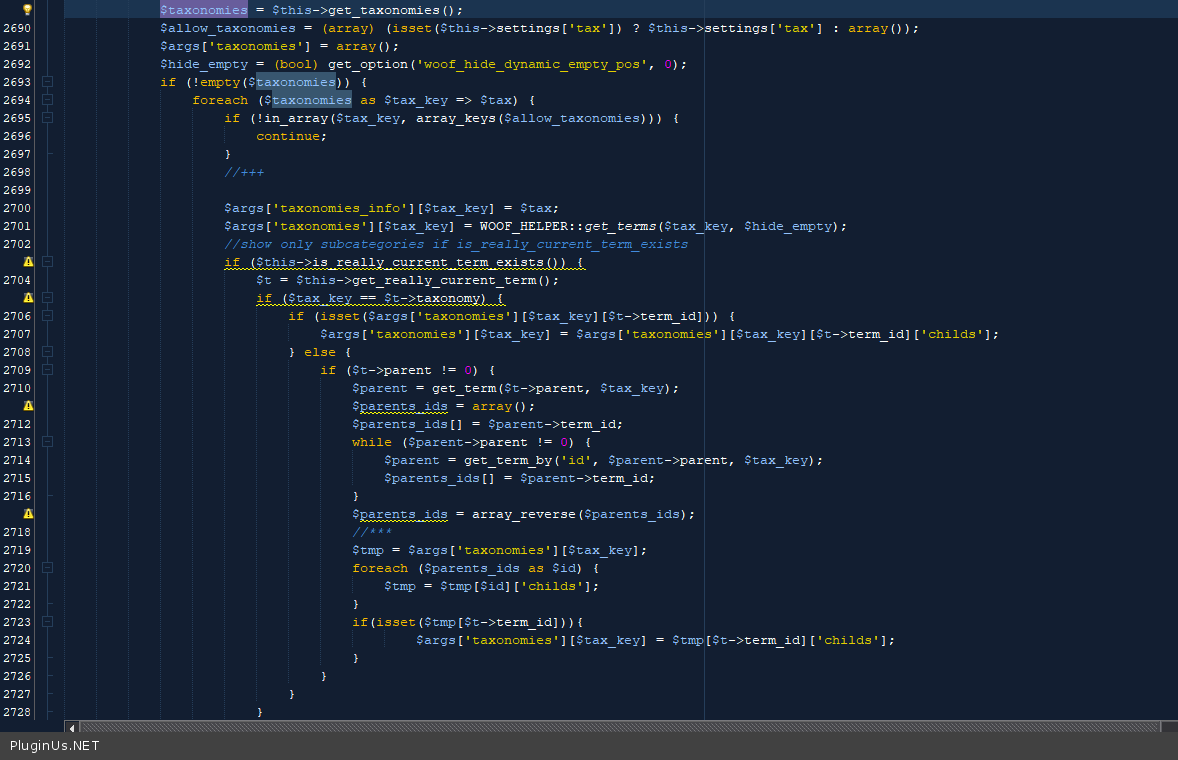
this trick won't work because only child terms are passed
The terms are formed here - \wp-content\plugins\woocommerce-products-filter\index.php - https://c2n.me/49F80dQ.png
Hello
this trick won't work because only child terms are passed
The terms are formed here - \wp-content\plugins\woocommerce-products-filter\index.php - https://c2n.me/49F80dQ.png