Slow speeds
The support doesn work on Saturdays and Sundays, so some Friday requests can be answered on Monday. If you have problems with registration ask help on contact us page pleaseIf you not got email within 24~36 business hours, firstly check your spam box, and if no any email from the support there - back to the forum and read answer here. DO NOT ANSWER ON EMAILS [noreply@pluginus.net] FROM THE FORUM!! Emails are just for your info, all answers should be published only here.
The support doesn work on Saturdays and Sundays, so some Friday requests can be answered on Monday.

Quote from nielsjvd on March 29, 2021, 12:08One of our clients has a webshop with around 9.000 products.
When we enable turbomode it takes around 8 seconds to retrieve, evaluate and activate all the javascript of the product filters plugin. It takes around 5 seconds to parse and evaluate the turbo_mode.js file according to lighthouse.https://ibb.co/p0kXDxc
This is, of course, not optimal and we would like that speed to be decreased. Why does the turbo mode take that long to load?
One of our clients has a webshop with around 9.000 products.
When we enable turbomode it takes around 8 seconds to retrieve, evaluate and activate all the javascript of the product filters plugin. It takes around 5 seconds to parse and evaluate the turbo_mode.js file according to lighthouse.
This is, of course, not optimal and we would like that speed to be decreased. Why does the turbo mode take that long to load?
Quote from nielsjvd on March 29, 2021, 12:16Adding to that:
The filtering on categories takes about 7 seconds to fully load.
Dynamic recount enabled and hiding empty terms is also enabled.
Why is the turbo mode so slow?
Adding to that:
The filtering on categories takes about 7 seconds to fully load.
Dynamic recount enabled and hiding empty terms is also enabled.
Why is the turbo mode so slow?

Quote from Pablo Borysenco on March 29, 2021, 13:27Hello
Paste your license key here - https://c2n.me/43SC6rb.png -> https://c2n.me/42HBIt7.png and drop me exact link to the issue
Hello
Paste your license key here - https://c2n.me/43SC6rb.png -> https://c2n.me/42HBIt7.png and drop me exact link to the issue


Quote from nielsjvd on March 29, 2021, 13:45I put the link and license key in the private data.
I put the link and license key in the private data.
Quote from Pablo Borysenco on March 30, 2021, 11:13Hello
Why is the turbo mode so slow? - It depends on the number of taxonomy and the number of products. And the filter downloads a file with all products to the client, and if the file is large, it may take some time
Hello
Why is the turbo mode so slow? - It depends on the number of taxonomy and the number of products. And the filter downloads a file with all products to the client, and if the file is large, it may take some time
Quote from nielsjvd on March 30, 2021, 11:15But the turbo mode is supposed to make everything faster, especially for a bigger number of products. But right now the turbo mode is just as slow (if not slower) as the normal mode, is there a way to make the turbo mode a lot faster?
But the turbo mode is supposed to make everything faster, especially for a bigger number of products. But right now the turbo mode is just as slow (if not slower) as the normal mode, is there a way to make the turbo mode a lot faster?
Quote from Pablo Borysenco on March 30, 2021, 13:11Hello
this is an alternative solution and works faster, but not in all cases.
For example, if the user has a weak server, this setting is to transfer part of the load to the client
Hello
this is an alternative solution and works faster, but not in all cases.
For example, if the user has a weak server, this setting is to transfer part of the load to the client
Quote from nielsjvd on March 30, 2021, 13:26Correct me if I am wrong:
But what you are saying is that when you have a large amount of products, you could better use another plugin because this one doesn't work well with big amounts and becomes slow?Is there absolutely nothing you can do to make this process faster?
Correct me if I am wrong:
But what you are saying is that when you have a large amount of products, you could better use another plugin because this one doesn't work well with big amounts and becomes slow?
Is there absolutely nothing you can do to make this process faster?
Quote from Pablo Borysenco on March 31, 2021, 10:53Hello
But what you are saying - I never said that!
If the resources of your server allow you to have such a number of products:
Disable turbo mode
Read this please - https://products-filter.com/searching-is-slow/
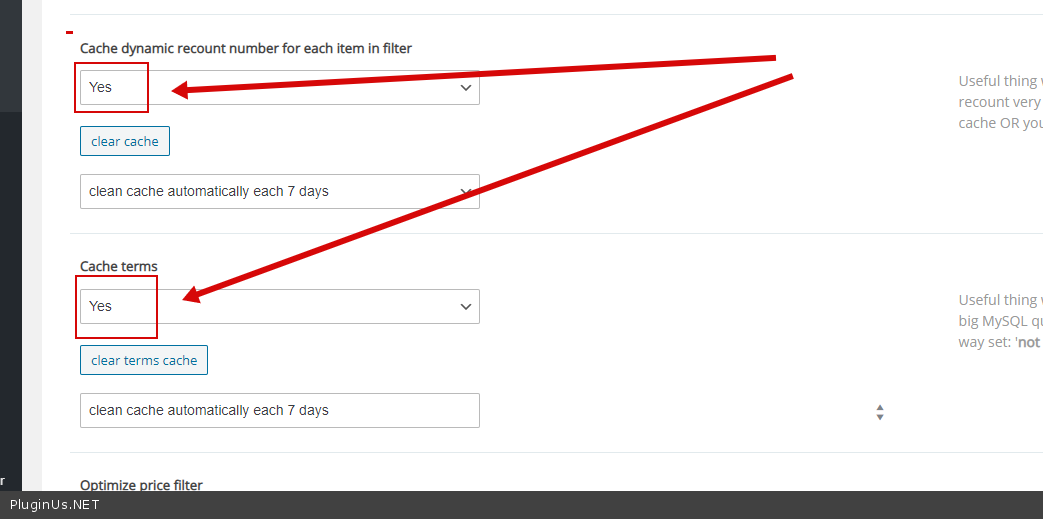
Use cache ->Advanced->Options - https://c2n.me/4bvCsnj.png
Hello
But what you are saying - I never said that!
If the resources of your server allow you to have such a number of products:
Disable turbo mode
Read this please - https://products-filter.com/searching-is-slow/
Use cache ->Advanced->Options - https://c2n.me/4bvCsnj.png