
slider not working
The support doesn work on Saturdays and Sundays, so some Friday requests can be answered on Monday. If you have problems with registration ask help on contact us page pleaseIf you not got email within 24~36 business hours, firstly check your spam box, and if no any email from the support there - back to the forum and read answer here. DO NOT ANSWER ON EMAILS [noreply@pluginus.net] FROM THE FORUM!! Emails are just for your info, all answers should be published only here.
The support doesn work on Saturdays and Sundays, so some Friday requests can be answered on Monday.

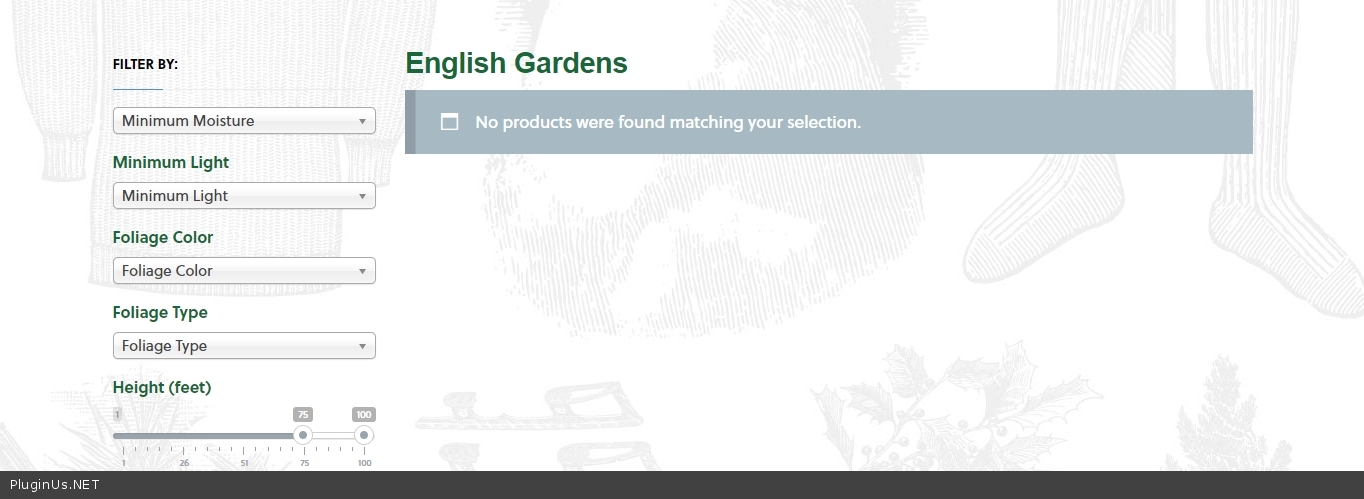
Quote from danconia on December 23, 2020, 17:59Have added a slider for meta field height. The value for this field in "Balsam Fir" is 50. When using the slider the "Balsam Fir" always appears. It should filter out when selecting a range like 75-100. Any ideas?
https://staging.englishgardens.com/plant-database/
Have added a slider for meta field height. The value for this field in"Balsam Fir" is 50. When using the slider the"Balsam Fir" always appears. It should filter out when selecting a range like 75-100. Any ideas?

Quote from Pablo Borysenco on December 24, 2020, 13:26Hello
Paste your license key here - https://c2n.me/43SC6rb.png -> https://c2n.me/42HBIt7.png
I did a test - https://c2n.me/4am1nhh.jpg
Update plugin to latest version - https://products-filter.com/how-to-make-auto-update-for-wordpress-plugins-and-themes-bought-on-envato/
Hello
Paste your license key here - https://c2n.me/43SC6rb.png -> https://c2n.me/42HBIt7.png


I did a test - https://c2n.me/4am1nhh.jpg
Update plugin to latest version - https://products-filter.com/how-to-make-auto-update-for-wordpress-plugins-and-themes-bought-on-envato/
Quote from danconia on January 4, 2021, 17:29I updated to the latest version and still have the same issue. The filter is specific to the plant database category. You can see the issue here: https://staging.englishgardens.com/plant-database/
I updated to the latest version and still have the same issue. The filter is specific to the plant database category. You can see the issue here: https://staging.englishgardens.com/plant-database/
Quote from danconia on January 4, 2021, 17:33the two results are not being displayed...
the two results are not being displayed...
Quote from danconia on January 4, 2021, 17:51It works here using a sidebar widget: https://staging.englishgardens.com/plant-database/
But does not work using as a shortcode on a page: https://staging.englishgardens.com/plant-database-application/
It works here using a sidebar widget: https://staging.englishgardens.com/plant-database/
But does not work using as a shortcode on a page: https://staging.englishgardens.com/plant-database-application/
Quote from Pablo Borysenco on January 5, 2021, 12:03Hello
But does not work using as a shortcode on a page - there are no filtration products on this page. to show products on custom page use woocommerce standard functions oR shortcode [woof_products]
Please try to watch a video - https://products-filter.com/video-tutorials/#video_beGT6p_look AND https://products-filter.com/video-tutorials/#video_kmrp4dAsrrw
Hello
But does not work using as a shortcode on a page - there are no filtration products on this page. to show products on custom page use woocommerce standard functions oR shortcode [woof_products]
Please try to watch a video - https://products-filter.com/video-tutorials/#video_beGT6p_look AND https://products-filter.com/video-tutorials/#video_kmrp4dAsrrw
Quote from danconia on January 5, 2021, 17:54Here is the shortcode I am using on this page https://staging.englishgardens.com/plant-database-application/
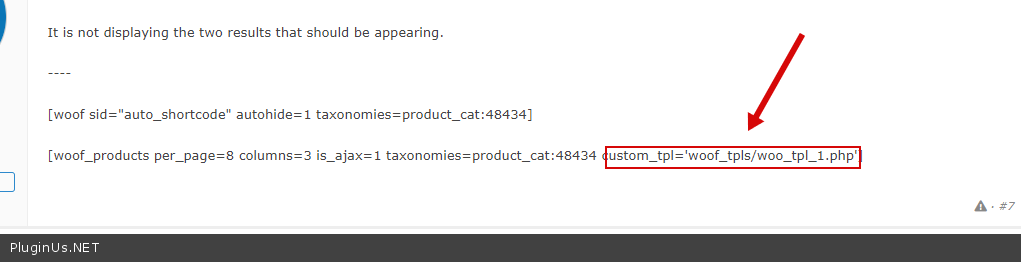
It is not displaying the two results that should be appearing.
----
[woof sid="auto_shortcode" autohide=1 taxonomies=product_cat:48434]
[woof_products per_page=8 columns=3 is_ajax=1 taxonomies=product_cat:48434 custom_tpl='woof_tpls/woo_tpl_1.php']
Here is the shortcode I am using on this page https://staging.englishgardens.com/plant-database-application/
It is not displaying the two results that should be appearing.
----
[woof sid="auto_shortcode" autohide=1 taxonomies=product_cat:48434]
[woof_products per_page=8 columns=3 is_ajax=1 taxonomies=product_cat:48434 custom_tpl='woof_tpls/woo_tpl_1.php']
Quote from Pablo Borysenco on January 6, 2021, 12:24Hello
Please read docs - https://products-filter.com/shortcode/woof_products/
https://c2n.me/4asUnHN.png - Have you created a custom template? Please delete this attribute/ Use [woof_products per_page=8 columns=3 is_ajax=1 taxonomies=product_cat:48434 ]
Hello
Please read docs - https://products-filter.com/shortcode/woof_products/
https://c2n.me/4asUnHN.png - Have you created a custom template? Please delete this attribute/ Use [woof_products per_page=8 columns=3 is_ajax=1 taxonomies=product_cat:48434 ]
Quote from danconia on January 6, 2021, 20:18Thank you! That worked.
Does your team take on custom work? We would like to hire you to complete the build out of this application if possible.
Thank you! That worked.
Does your team take on custom work? We would like to hire you to complete the build out of this application if possible.
Quote from danconia on January 6, 2021, 21:05also, for several of the filters we would like to add and default to "select all" or "any". How can that be done?
also, for several of the filters we would like to add and default to"select all" or"any". How can that be done?
Quote from Pablo Borysenco on January 7, 2021, 12:53Hello
Unfortunately we don't have time for custom tasks.
and default to "select all" or "any". - The plugin does not have this feature.
Hello
Unfortunately we don't have time for custom tasks.
and default to"select all" or"any". - The plugin does not have this feature.