sidebar with filter box vanishing on filter select
The support doesn work on Saturdays and Sundays, so some Friday requests can be answered on Monday. If you have problems with registration ask help on contact us page pleaseIf you not got email within 24~36 business hours, firstly check your spam box, and if no any email from the support there - back to the forum and read answer here. DO NOT ANSWER ON EMAILS [noreply@pluginus.net] FROM THE FORUM!! Emails are just for your info, all answers should be published only here.
The support doesn work on Saturdays and Sundays, so some Friday requests can be answered on Monday.

Quote from ffwebdesigner on July 8, 2021, 15:27hi guys,
tried many settings under options. none worked. whenever we select an option in the sidebar widget the sidebar vanishes (option: set filter automatically: yes) or it comes up once right but on reload the sidebar vanishes (option: set filter automatically: no).
further more, the filter plugin ouputs wrong products. eg just select "zustand" "gebraucht" = used. there are also many articles mit "werksneu" listet. why?
also, generally, whenever you click on the pagination buttons all filter settings are lost. why?
i'm working on a text input field above volume filter slider. managed to update the slider position in jquery. but which event do i have to trigger to update the filtered listings?
cheers
frank
hi guys,
tried many settings under options. none worked. whenever we select an option in the sidebar widget the sidebar vanishes (option: set filter automatically: yes) or it comes up once right but on reload the sidebar vanishes (option: set filter automatically: no).
further more, the filter plugin ouputs wrong products. eg just select"zustand""gebraucht" = used. there are also many articles mit"werksneu" listet. why?
also, generally, whenever you click on the pagination buttons all filter settings are lost. why?
i'm working on a text input field above volume filter slider. managed to update the slider position in jquery. but which event do i have to trigger to update the filtered listings?
cheers
frank

Quote from Pablo Borysenco on July 9, 2021, 16:41Hello frank
Please watch a video - https://products-filter.com/video-tutorials/#video_beGT6p_look
Unfortunately my plugin does not affect the sidebar display in your theme. as I see your theme's sidebar is at the bottom of the page (and it doesn't matter which widget you use) - https://c2n.me/4cEf4hq - I checked the filter it looks like it works correctly
but which event do i have to trigger to update the filtered listings? - You can check it here -\wp-content\plugins\woocommerce-products-filter\ext\slider\js\html_types\slider.js
woof_current_values[tax] = add your data
AND
woof_submit_link(woof_get_submit_link());
Hello frank
Please watch a video - https://products-filter.com/video-tutorials/#video_beGT6p_look
Unfortunately my plugin does not affect the sidebar display in your theme. as I see your theme's sidebar is at the bottom of the page (and it doesn't matter which widget you use) - https://c2n.me/4cEf4hq - I checked the filter it looks like it works correctly
but which event do i have to trigger to update the filtered listings? - You can check it here -\wp-content\plugins\woocommerce-products-filter\ext\slider\js\html_types\slider.js
woof_current_values[tax] = add your data
AND
woof_submit_link(woof_get_submit_link());
Quote from ffwebdesigner on August 19, 2021, 11:32last post seems vanished again. thanks for yout help, could solve the problem with vanishing sidebar.
but even with your hints to autoupdate the filter after input of numbers in my new text input fields i couldn't get the list to update.
you may use my extension in future verisons of your plugin in exchange for your help:i insert the new text fields for volumen in a custom ff-webdesigner.cs in the head via jquery:
var slider_values = [];

jQuery(document).ready(function($){

   neue_felder='<div class="ff-vol-input">Von <input type="text" id="ff_vol_from" name="ff_vol_from"> bis <input type="text" id="ff_vol_to" name="ff_vol_to"></div>'
$(neue_felder).insertAfter( ".woof_container_inner_produktvolumen h4" );

function get_values(){
   $('.woof_container_inner_produktvolumen .irs-grid-text').each(function() {
   //console.log( $(this).prev()[0].style.left);

   slider_values.push(
   {
   val: $(this).html(),
   pos: $(this).prev()[0].style.left
   })
});

// slider beschriftungen sortieren da sie in falscher reihenfolge ausgegeben werden
   slider_values.sort(function(a, b) {
      return a['val'] - b['val'];
   });
   //console.log(slider_values);
}

function check_values(){
   $("#ff_vol_from").change(function(){

   for(i = 0; i<slider_values.length; i++){

   if(Number(slider_values[i]['val']) > Number($(this).val())) {
      from_value = slider_values[i]['val'];
      console.log(from_value+" "+slider_values[i]['pos']);
      $(".irs-slider.from").css("left",slider_values[i]['pos']);
      var values = slider_values.map(function(v){ return v['val'] });
      //console.log(values);
      woof_current_values['pa_volumen'] = (values.slice(from_value, 10000 + 1)).join(',');
      //woof_update_tax_slider(titles, input, from_value, 10000);

      break;
   }
};
})

$("#ff_vol_to").change(function(){

for(i = slider_values.length-1; i>1; i--){
   if(Number(slider_values[i]['val']) < Number($(this).val())) {
      to_value = slider_values[i]['val'];
      $(".irs-slider.to").css("left",slider_values[i]['pos']);
      break;
   }
};
})
}

var checkExist = setInterval(function() {
   if ($('.woof_container_inner_produktvolumen .irs-grid-text').length) {
   get_values();
   check_values();
   clearInterval(checkExist);
} }, 100); // check every 100ms.
});
what i don't get to work: update the list by the code marked in red. is there any easy way to reinclude the needed functions from your plugin in my js? always got redeclaration errors... i just need the vars titles and input in my script...
last post seems vanished again. thanks for yout help, could solve the problem with vanishing sidebar.
but even with your hints to autoupdate the filter after input of numbers in my new text input fields i couldn't get the list to update.
you may use my extension in future verisons of your plugin in exchange for your help:
i insert the new text fields for volumen in a custom ff-webdesigner.cs in the head via jquery:
var slider_values = [];

jQuery(document).ready(function($){

   neue_felder='<div class="ff-vol-input">Von <input type="text" id="ff_vol_from" name="ff_vol_from"> bis <input type="text" id="ff_vol_to" name="ff_vol_to"></div>'
$(neue_felder).insertAfter(".woof_container_inner_produktvolumen h4" );

function get_values(){
   $('.woof_container_inner_produktvolumen .irs-grid-text').each(function() {
   //console.log( $(this).prev()[0].style.left);

   slider_values.push(
   {
   val: $(this).html(),
   pos: $(this).prev()[0].style.left
   })
});

// slider beschriftungen sortieren da sie in falscher reihenfolge ausgegeben werden
   slider_values.sort(function(a, b) {
      return a['val'] - b['val'];
   });
   //console.log(slider_values);
}

function check_values(){
   $("#ff_vol_from").change(function(){

   for(i = 0; i<slider_values.length; i++){

   if(Number(slider_values[i]['val']) > Number($(this).val())) {
      from_value = slider_values[i]['val'];
      console.log(from_value+""+slider_values[i]['pos']);
      $(".irs-slider.from").css("left",slider_values[i]['pos']);
      var values = slider_values.map(function(v){ return v['val'] });
      //console.log(values);
      woof_current_values['pa_volumen'] = (values.slice(from_value, 10000 + 1)).join(',');
      //woof_update_tax_slider(titles, input, from_value, 10000);

      break;
   }
};
})

$("#ff_vol_to").change(function(){

for(i = slider_values.length-1; i>1; i--){
   if(Number(slider_values[i]['val']) < Number($(this).val())) {
      to_value = slider_values[i]['val'];
      $(".irs-slider.to").css("left",slider_values[i]['pos']);
      break;
   }
};
})
}

var checkExist = setInterval(function() {
   if ($('.woof_container_inner_produktvolumen .irs-grid-text').length) {
   get_values();
   check_values();
   clearInterval(checkExist);
} }, 100); // check every 100ms.
});
what i don't get to work: update the list by the code marked in red. is there any easy way to reinclude the needed functions from your plugin in my js? always got redeclaration errors... i just need the vars titles and input in my script...
Quote from Pablo Borysenco on August 19, 2021, 13:34Hello
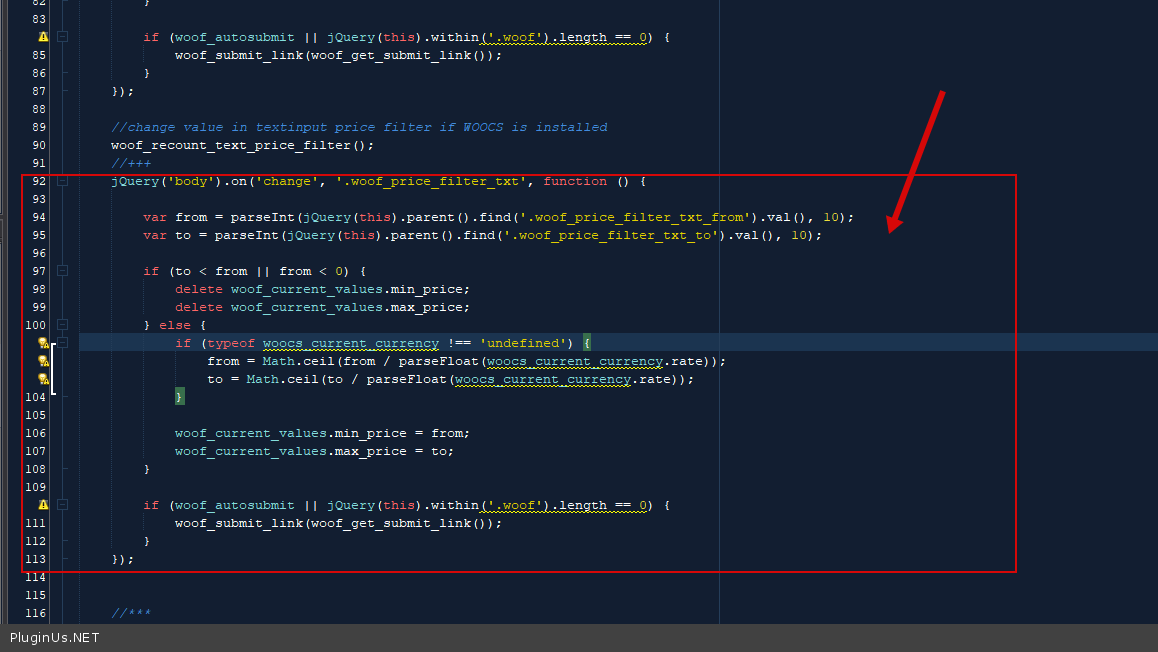
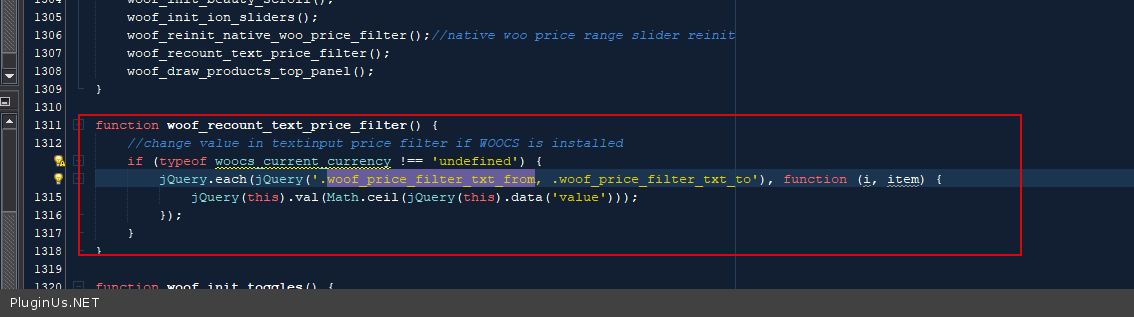
Check how it is done for the filter for the price. in file - wp-content\plugins\woocommerce-products-filter\js\front.js - an example - https://share.pluginus.net/image/i20210819143356.png https://c2n.me/4d3NgQo.png
you may use my extension in future verisons - Thank you! But we don't need this code
Hello
Check how it is done for the filter for the price. in file - wp-content\plugins\woocommerce-products-filter\js\front.js - an example - https://share.pluginus.net/image/i20210819143356.png https://c2n.me/4d3NgQo.png

you may use my extension in future verisons - Thank you! But we don't need this code
Quote from ffwebdesigner on August 30, 2021, 12:12hi pablo,
thanks for the reply. i just can't extend your plugin the customer wants. would you please send me an offer for custom programming:
- auto update the slider values by the text input fields above with the correct values. right now the values seem to be "rightish" but not 100% correct, always a littel more or less. can't figure out why.
- autosubmit the form after slider update whenever the text field inputs above have changed
please send the offer straight to ff-webdesigner.com (email there)
hi pablo,
thanks for the reply. i just can't extend your plugin the customer wants. would you please send me an offer for custom programming:
- auto update the slider values by the text input fields above with the correct values. right now the values seem to be"rightish" but not 100% correct, always a littel more or less. can't figure out why.
- autosubmit the form after slider update whenever the text field inputs above have changed
please send the offer straight to ff-webdesigner.com (email there)
Quote from Pablo Borysenco on August 30, 2021, 13:26Hello
Unfortunately, at the moment we do not have time for custom tasks.
Please drop me exacy link to the issue I will check it
Hello
Unfortunately, at the moment we do not have time for custom tasks.
Please drop me exacy link to the issue I will check it
Quote from ffwebdesigner on September 2, 2021, 11:09hi pablo,
link: https://inox.ff-webdesigner.com/produkt-kategorie/produkte/sofort-ab-lager/
achieved; tha text input values under "Produkt Volumen" from (ab) are already transfered do the slider below - 5% exactely, slightly different values, no idea why.
what i couldn't code in hours of tries:
when you submit the form the values transfered from the text input fields to the slider are ignored.checked both my code and your funtions calls in vain:
woof_current_values[tax] = add your data
woof_submit_link(woof_get_submit_link());
hi pablo,
link: https://inox.ff-webdesigner.com/produkt-kategorie/produkte/sofort-ab-lager/
achieved; tha text input values under"Produkt Volumen" from (ab) are already transfered do the slider below - 5% exactely, slightly different values, no idea why.
what i couldn't code in hours of tries:
when you submit the form the values transfered from the text input fields to the slider are ignored.
checked both my code and your funtions calls in vain:
woof_current_values[tax] = add your data
woof_submit_link(woof_get_submit_link());
Quote from Pablo Borysenco on September 2, 2021, 12:52Hello
rom (ab) are already transfered do the slider below - 5% exactely, slightly different values, no idea why. - You should pay attention that the taxonomy slider only works with specific values - https://share.pluginus.net/image/i20210902132348.png - as you can see this is not a mathematical range, these are terms of this taxonomy. And in your case, you just choose the next value
Where you use this code ? - https://share.pluginus.net/image/i20210902134906.png - Here is a sample code of how it works for Price slider ( https://share.pluginus.net/image/i20210902135126.png ) - https://c2n.me/4dcAOV7.png
Hello
rom (ab) are already transfered do the slider below - 5% exactely, slightly different values, no idea why. - You should pay attention that the taxonomy slider only works with specific values - https://share.pluginus.net/image/i20210902132348.png - as you can see this is not a mathematical range, these are terms of this taxonomy. And in your case, you just choose the next value

Where you use this code ? - https://share.pluginus.net/image/i20210902134906.png - Here is a sample code of how it works for Price slider ( https://share.pluginus.net/image/i20210902135126.png ) - https://c2n.me/4dcAOV7.png