

Settings change after i click save
The support doesn work on Saturdays and Sundays, so some Friday requests can be answered on Monday. If you have problems with registration ask help on contact us page pleaseIf you not got email within 24~36 business hours, firstly check your spam box, and if no any email from the support there - back to the forum and read answer here. DO NOT ANSWER ON EMAILS [noreply@pluginus.net] FROM THE FORUM!! Emails are just for your info, all answers should be published only here.
The support doesn work on Saturdays and Sundays, so some Friday requests can be answered on Monday.

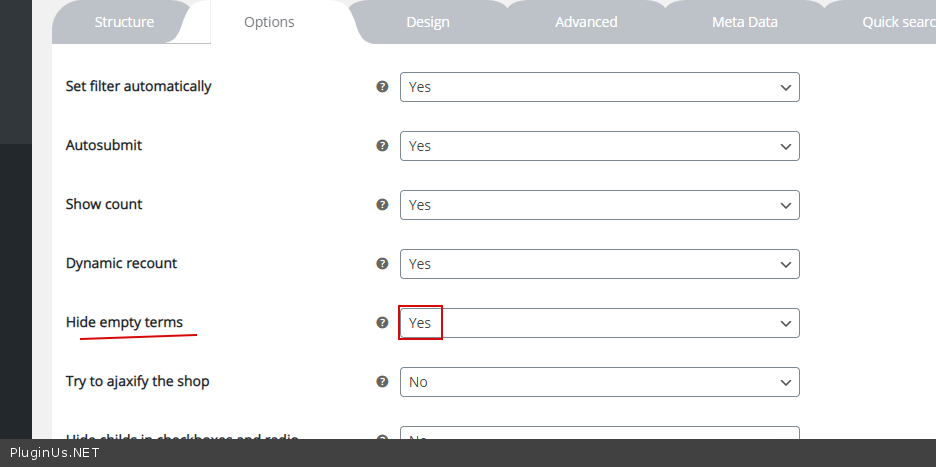
Quote from definiteimage on February 18, 2021, 18:26I am noticing everytime I make a change in my settings and I refresh to view them in my store they are constantly different. I always click to hide empty categories but i change a different setting, i find the empty categories visible on the site, why is this?
Also, sometimes this box shows up at the top of the page that says "show blocks helper", sometimes i doesnt. How can I get rid of this. https://www.spa-venus.com/shop/
I dont understand how these settings work
I am noticing everytime I make a change in my settings and I refresh to view them in my store they are constantly different. I always click to hide empty categories but i change a different setting, i find the empty categories visible on the site, why is this?
Also, sometimes this box shows up at the top of the page that says"show blocks helper", sometimes i doesnt. How can I get rid of this. https://www.spa-venus.com/shop/
I dont understand how these settings work

Quote from Pablo Borysenco on February 19, 2021, 12:18Hello
Paste your license key here - https://c2n.me/43SC6rb.png -> https://c2n.me/42HBIt7.png
"show blocks helper" - This is only visible to the administrator. Users don't see it
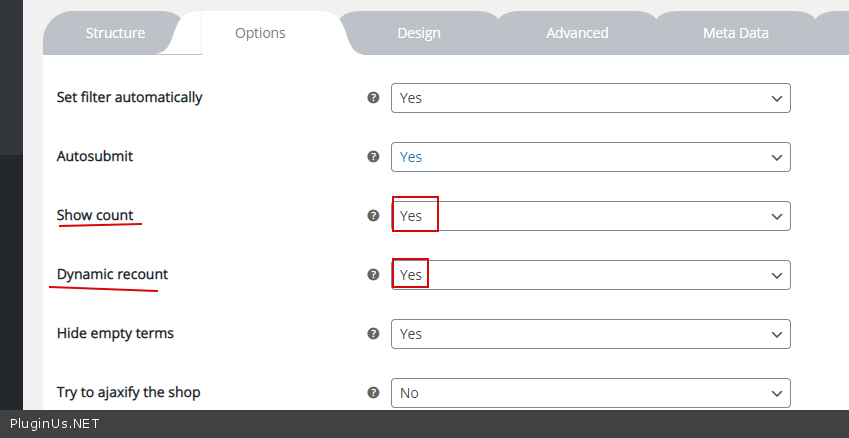
To set this option - https://c2n.me/4b1cEzY.png - these options must be activated - https://c2n.me/4b1cLRb.png
Hello
Paste your license key here - https://c2n.me/43SC6rb.png -> https://c2n.me/42HBIt7.png


"show blocks helper" - This is only visible to the administrator. Users don't see it
To set this option - https://c2n.me/4b1cEzY.png - these options must be activated - https://c2n.me/4b1cLRb.png
Quote from definiteimage on February 19, 2021, 16:31Hi, I do not mean that title only i mean the entire box at the top of the shop.
https://www.spa-venus.com/shop/I want all the categories in the sidebar like in the demo, but not all the duplicates at the top of the page.
Hi, I do not mean that title only i mean the entire box at the top of the shop.
https://www.spa-venus.com/shop/
I want all the categories in the sidebar like in the demo, but not all the duplicates at the top of the page.
Quote from Pablo Borysenco on February 22, 2021, 11:53Hello
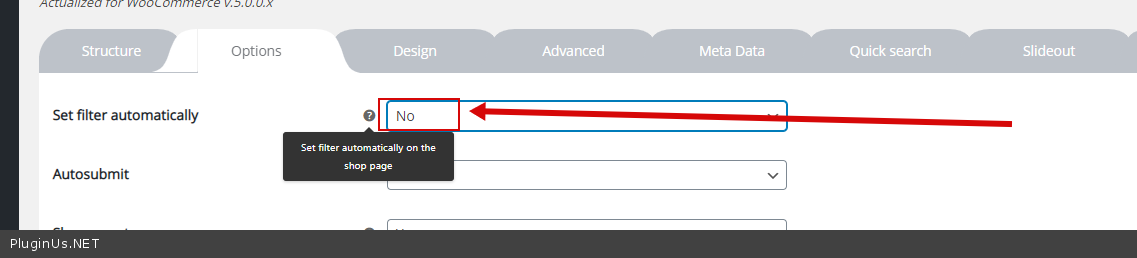
Please try to watch a video - https://products-filter.com/video-tutorials/#video_beGT6p_look
Check this option - https://c2n.me/4b31IfX.png
Hello
Please try to watch a video - https://products-filter.com/video-tutorials/#video_beGT6p_look
Check this option - https://c2n.me/4b31IfX.png
Quote from definiteimage on February 22, 2021, 16:19Hi,
I understand, I would like to keep the functionality of the automatic filtering without keeping that box on top as it look repetitive on the page. I would like to simply hide it, not disable the entire option
Hi,
I understand, I would like to keep the functionality of the automatic filtering without keeping that box on top as it look repetitive on the page. I would like to simply hide it, not disable the entire option
Quote from definiteimage on February 22, 2021, 16:50The demo does not have this block at the top of the page and the filters respond right away
The demo does not have this block at the top of the page and the filters respond right away
Quote from Pablo Borysenco on February 23, 2021, 13:08Hello
Please watch a video - https://products-filter.com/video-tutorials/#video_beGT6p_look - you will learn about basic settings
https://c2n.me/4b31IfX.png - This setting has nothing to do with autosubmit of filter
Hello
Please watch a video - https://products-filter.com/video-tutorials/#video_beGT6p_look - you will learn about basic settings
https://c2n.me/4b31IfX.png - This setting has nothing to do with autosubmit of filter
Quote from definiteimage on February 23, 2021, 16:52Hi,
I watched the video, and yes, it does take away this functionality. When I turn this option off, I need to click "filter", it does not apply anything right away.
I am not sure why you cannot help.. it works properly in the demo.
Hi,
I watched the video, and yes, it does take away this functionality. When I turn this option off, I need to click"filter", it does not apply anything right away.
I am not sure why you cannot help.. it works properly in the demo.
Quote from Pablo Borysenco on February 24, 2021, 12:58Hello
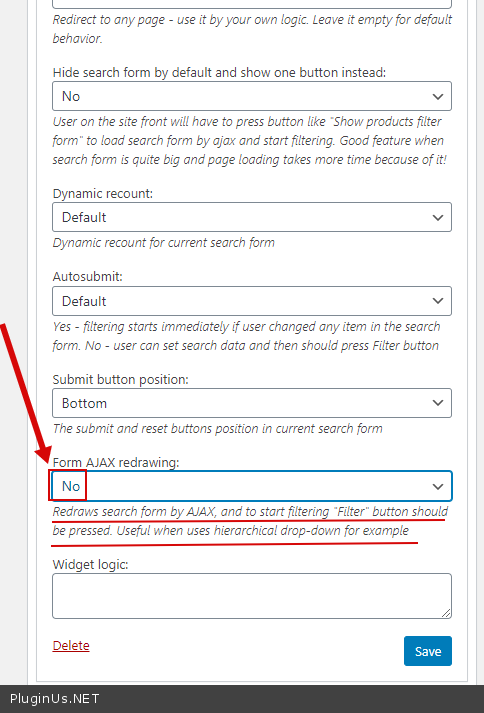
Please check widget option - https://c2n.me/4b4DLkt.png
I am not sure why you cannot help.. - I try to help you, but you just need to know the settings. Because after every random change of thw settings, you will write to support
Hello
Please check widget option - https://c2n.me/4b4DLkt.png
I am not sure why you cannot help.. - I try to help you, but you just need to know the settings. Because after every random change of thw settings, you will write to support
Quote from definiteimage on February 24, 2021, 19:02Thank you very much. Solved.
I am trying to learn the settings but I am finding the documentation to be lacking some clarity that is why I am coming to you for support.
Thank you very much. Solved.
I am trying to learn the settings but I am finding the documentation to be lacking some clarity that is why I am coming to you for support.
Quote from Pablo Borysenco on February 25, 2021, 12:26Hello
I am finding the documentation to be lacking some clarity - Ok! We are working on it
Welcome;)
Hello
I am finding the documentation to be lacking some clarity - Ok! We are working on it
Welcome;)