

SEO URL request - H1 and Meta Descriptions not work, search in website
The support doesn work on Saturdays and Sundays, so some Friday requests can be answered on Monday. If you have problems with registration ask help on contact us page pleaseIf you not got email within 24~36 business hours, firstly check your spam box, and if no any email from the support there - back to the forum and read answer here. DO NOT ANSWER ON EMAILS [noreply@pluginus.net] FROM THE FORUM!! Emails are just for your info, all answers should be published only here.
The support doesn work on Saturdays and Sundays, so some Friday requests can be answered on Monday.

Quote from explosive on November 13, 2025, 19:57I installed your plugin on my site and have a few questions.
1) SEO URL request - H1 and Meta Descriptions aren't being replaced on pages. Title and SEO text are being replaced correctly.
The Yoast SEO plugin is installed on the site.
2) I only need the plugin for product filtering. Is it possible to disable site search using your plugin?
Thanks in advance
I installed your plugin on my site and have a few questions.
1) SEO URL request - H1 and Meta Descriptions aren't being replaced on pages. Title and SEO text are being replaced correctly.
The Yoast SEO plugin is installed on the site.
2) I only need the plugin for product filtering. Is it possible to disable site search using your plugin?
Thanks in advance

Quote from Alex Dovlatov on November 14, 2025, 13:18Hello
- Provide please exact link and screen of page code what is corrent and what is wrong by your idea. You can see page code using CTRL+U for example
- Here is not option but you can do it by code placed into file functions.php:
add_action('template_redirect', function() { if (is_search() && !is_admin()) { wp_redirect(home_url('/shop/')); exit; } });
OR
add_filter('posts_search', function($search, $query) {
if (!is_admin() && $query->is_search() && $query->is_main_query()) {
$search = " AND 0=1 ";
}
return $search;
}, 10, 2);Welcome!
Hello
- Provide please exact link and screen of page code what is corrent and what is wrong by your idea. You can see page code using CTRL+U for example
- Here is not option but you can do it by code placed into file functions.php:
add_action('template_redirect', function() { if (is_search() && !is_admin()) { wp_redirect(home_url('/shop/')); exit; } });
OR
add_filter('posts_search', function($search, $query) {
if (!is_admin() && $query->is_search() && $query->is_main_query()) {
$search =" AND 0=1";
}
return $search;
}, 10, 2);
Welcome!
Quote from explosive on November 14, 2025, 15:44
Link - https://www.gmformula.ru/product-category/masla-gidravlicheskie/swoof/5vyazkost-iso-46/
H1 - The "h1" tag disappears
Descriptions - The same as on the main page of the online store<!-- This site is optimized with the Yoast SEO plugin v24.6 - https://yoast.com/wordpress/plugins/seo/ -->
<title>Гидравлические масла ISO 46 - купить в интернет магазине</title>
<meta name="description" content="Каталог масел в GM-Formula. Индивидуальный подход к каждому клиенту. Удобная форма заказа на сайте, варианты форм оплаты. Доставка по Санкт-Петербургу и всей России." class="yoast-seo-meta-tag" />Settings - https://drive.google.com/file/d/1LsU9wuLNpk1-lo72BFvmcNfir71uydve/view?usp=sharing
Link - https://www.gmformula.ru/product-category/masla-gidravlicheskie/swoof/5vyazkost-iso-46/
H1 - The"h1" tag disappears
Descriptions - The same as on the main page of the online store
<!-- This site is optimized with the Yoast SEO plugin v24.6 - https://yoast.com/wordpress/plugins/seo/ -->
<title>Гидравлические масла ISO 46 - купить в интернет магазине</title>
<meta name="description" content="Каталог масел в GM-Formula. Индивидуальный подход к каждому клиенту. Удобная форма заказа на сайте, варианты форм оплаты. Доставка по Санкт-Петербургу и всей России." class="yoast-seo-meta-tag" />
Settings - https://drive.google.com/file/d/1LsU9wuLNpk1-lo72BFvmcNfir71uydve/view?usp=sharing
Quote from Alex Dovlatov on November 17, 2025, 13:07Hello
So, we just checked it on the basic set of scripts (woo+woof+yoast+wp theme twentytwelve) and its works. Try next please:
- use /5vyazkost-iso-46/ in rules then check
- if no luck create stage site using https://wordpress.org/plugins/duplicator/ and disable there all plugins exept to check woo+woof+yoast
- if doesn work also, change wp theme to see if theme has prevent code inside
If you do not have knoweledge how to check it you can provide us with stage site access (wp-admin + ftp) in the private area of this ticket
Also please provide actual purchase code
https://share.pluginus.net/image/i20230222134241.png
https://share.pluginus.net/image/i20230222134615.png
https://share.pluginus.net/image/i20230222134511.png
Hello
So, we just checked it on the basic set of scripts (woo+woof+yoast+wp theme twentytwelve) and its works. Try next please:
- use /5vyazkost-iso-46/ in rules then check
- if no luck create stage site using https://wordpress.org/plugins/duplicator/ and disable there all plugins exept to check woo+woof+yoast
- if doesn work also, change wp theme to see if theme has prevent code inside
If you do not have knoweledge how to check it you can provide us with stage site access (wp-admin + ftp) in the private area of this ticket
Also please provide actual purchase code
https://share.pluginus.net/image/i20230222134241.png
https://share.pluginus.net/image/i20230222134615.png
https://share.pluginus.net/image/i20230222134511.png


Quote from explosive on November 26, 2025, 17:25Can you tell me how to access the plugin from my theme? So I can check if the page has the rule specified and display the 'h1' tag in the theme?
Can you tell me how to access the plugin from my theme? So I can check if the page has the rule specified and display the 'h1' tag in the theme?
Quote from Alex Dovlatov on November 27, 2025, 12:31Hello
I think I understand the confusion now.
Your site's internal search (the search box in your theme) searches through actual content - product titles, descriptions, posts, etc. HUSKY filter pages are not part of this search because they are dynamic URLs, not actual database entries.
HUSKY SEO URLs (like
/brand/nike/color/red/) are generated dynamically when someone uses filters. These pages don't exist in WordPress database as posts or pages.For Google/external search engines to find these URLs, you need to:
- Add them to your sitemap.xml
- HUSKY has a setting to generate SEO URLs for sitemaps
- Submit the sitemap to Google Search Console
Your internal site search will NOT find HUSKY filter pages - it only searches real products/posts. This is normal behavior.
If you want HUSKY filter combinations to appear in Google search results, make sure:
- SEO URLs are enabled in HUSKY settings
- The URLs are added to your sitemap
- Meta descriptions and H1 tags are configured in HUSKY
Hello
I think I understand the confusion now.
Your site's internal search (the search box in your theme) searches through actual content - product titles, descriptions, posts, etc. HUSKY filter pages are not part of this search because they are dynamic URLs, not actual database entries.
HUSKY SEO URLs (like /brand/nike/color/red/) are generated dynamically when someone uses filters. These pages don't exist in WordPress database as posts or pages.
For Google/external search engines to find these URLs, you need to:
- Add them to your sitemap.xml
- HUSKY has a setting to generate SEO URLs for sitemaps
- Submit the sitemap to Google Search Console
Your internal site search will NOT find HUSKY filter pages - it only searches real products/posts. This is normal behavior.
If you want HUSKY filter combinations to appear in Google search results, make sure:
- SEO URLs are enabled in HUSKY settings
- The URLs are added to your sitemap
- Meta descriptions and H1 tags are configured in HUSKY
Quote from explosive on November 27, 2025, 21:32For some reason, this condition (highlighted in bold in the code) isn't met in the code. Because of this, the H1 tag isn't being replaced.
public function set_page_title($title, $id) {$rule = $this->check_search_rules();if ($rule && is_page($id) && $this->do_index()) {if (isset($rule['h1']) AND $rule['h1']) {$title = apply_filters('woof_seo_h1', $this->replace_vars($rule['h1'], $this->get_current_replace_vars()));}}return $title;}
For some reason, this condition (highlighted in bold in the code) isn't met in the code. Because of this, the H1 tag isn't being replaced.
Quote from Alex Dovlatov on November 28, 2025, 13:57Hello
Thank you for the signal! We revise the function code and here is new one:
public function set_page_title($title, $id) {
$rule = $this->check_search_rules();//$is_valid_page = is_page($id) || is_shop() || is_product_category() || is_product_tag() || is_tax() || is_post_type_archive('product');
if ($rule && (is_page($id) || is_woocommerce()) && $this->do_index()) {
if (isset($rule['h1']) AND $rule['h1']) {
$title = apply_filters('woof_seo_h1', $this->replace_vars($rule['h1'], $this->get_current_replace_vars()));
}
}
return $title;
}please try it and give us know that ot works on your side
Hello
Thank you for the signal! We revise the function code and here is new one:
public function set_page_title($title, $id) {
$rule = $this->check_search_rules();
//$is_valid_page = is_page($id) || is_shop() || is_product_category() || is_product_tag() || is_tax() || is_post_type_archive('product');
if ($rule && (is_page($id) || is_woocommerce()) && $this->do_index()) {
if (isset($rule['h1']) AND $rule['h1']) {
$title = apply_filters('woof_seo_h1', $this->replace_vars($rule['h1'], $this->get_current_replace_vars()));
}
}
return $title;
}
please try it and give us know that ot works on your side
Quote from explosive on November 28, 2025, 20:37This code works, but for some reason not only the H1 tag is replaced, but also all the links (<a ...)
This code works, but for some reason not only the H1 tag is replaced, but also all the links (<a ...)
Quote from Alex Dovlatov on December 1, 2025, 13:07Hello
Its good, that it works! Send me please screen of replaced wrongly code, and exect link to see it alive, maybe the code need a little improvement in its logic ...
Hello
Its good, that it works! Send me please screen of replaced wrongly code, and exect link to see it alive, maybe the code need a little improvement in its logic ...
Quote from explosive on December 1, 2025, 13:31Code:
public function set_page_title($title, $id) {$rule = $this->check_search_rules();if ($rule && (is_page($id) || is_woocommerce()) && $this->do_index()) {if (isset($rule['h1']) AND $rule['h1']) {$title = apply_filters('woof_seo_h1', $this->replace_vars($rule['h1'], $this->get_current_replace_vars()));}}return $title;}Example:
https://www.gmformula.ru/product-category/masla-gidravlicheskie/swoof/4tip-masla-sinteticheskoye-maslo/
Please note "Гидравлические синтетические масла"
Code:
Example:
Please note"Гидравлические синтетические масла"
Quote from Alex Dovlatov on December 2, 2025, 12:56Hello
yes, we catched it, replace code function please:
public function set_page_title($title, $id) {
$rule = $this->check_search_rules();//$is_valid_page = is_page($id) || is_shop() || is_product_category() || is_product_tag() || is_tax() || is_post_type_archive('product');
if ($rule && (is_page($id) || is_woocommerce()) && $this->do_index()) {
if (!in_the_loop() || !is_main_query()) {
return $title;
}if (isset($rule['h1']) AND $rule['h1']) {
$title = apply_filters('woof_seo_h1', $this->replace_vars($rule['h1'], $this->get_current_replace_vars()));
}
}
return $title;
}
Hello
yes, we catched it, replace code function please:
public function set_page_title($title, $id) {
$rule = $this->check_search_rules();
//$is_valid_page = is_page($id) || is_shop() || is_product_category() || is_product_tag() || is_tax() || is_post_type_archive('product');
if ($rule && (is_page($id) || is_woocommerce()) && $this->do_index()) {
if (!in_the_loop() || !is_main_query()) {
return $title;
}
if (isset($rule['h1']) AND $rule['h1']) {
$title = apply_filters('woof_seo_h1', $this->replace_vars($rule['h1'], $this->get_current_replace_vars()));
}
}
return $title;
}
Quote from explosive on December 3, 2025, 23:24The H1 tag is no longer replaced and some <a> tags are still being replaced
The H1 tag is no longer replaced and some <a> tags are still being replaced
Quote from Alex Dovlatov on December 4, 2025, 13:06Hello
Ok, in private area of this ticket please provide actual purchase code, wp-admin access to the site and ftp, you can create clone of it by https://wordpress.org/plugins/duplicator/ - I will look in to it, on our side its looks good (woo+wp theme storefront only): https://share.pluginus.net/image/i20251204130528.png + https://share.pluginus.net/image/i20251204130530.png + https://share.pluginus.net/image/i20251204130531.png + https://share.pluginus.net/image/i20251204130532.png
Link: https://dev.pluginus.net/shop/swoof/product_cat-decor/
https://share.pluginus.net/image/i20230222134241.png
https://share.pluginus.net/image/i20230222134615.png
https://share.pluginus.net/image/i20230222134511.png
Hello
Ok, in private area of this ticket please provide actual purchase code, wp-admin access to the site and ftp, you can create clone of it by https://wordpress.org/plugins/duplicator/ - I will look in to it, on our side its looks good (woo+wp theme storefront only): https://share.pluginus.net/image/i20251204130528.png + https://share.pluginus.net/image/i20251204130530.png + https://share.pluginus.net/image/i20251204130531.png + https://share.pluginus.net/image/i20251204130532.png


Link: https://dev.pluginus.net/shop/swoof/product_cat-decor/
https://share.pluginus.net/image/i20230222134241.png
https://share.pluginus.net/image/i20230222134615.png
https://share.pluginus.net/image/i20230222134511.png
Quote from explosive on December 7, 2025, 21:57I provided the data
I provided the data
Quote from Alex Dovlatov on December 8, 2025, 15:15Hello
Its done
Your OceanWP theme uses its own mechanism for displaying page titles (ocean_title) instead of the standard WooCommerce hook. A race condition occurred: the theme requested the page title BEFORE the HUSKY SEO module had fully initialized. Therefore, SEO rules weren't applied to the H1 tag.
Solution:
Added special code to functions.php that:// Removing the_title hook from WOOF SEO
add_action('wp', function() {
global $WOOF;if (isset($WOOF) && is_object($WOOF)) {
// Checking if extensions have SEO
if (isset(WOOF_EXT::$includes['applications']['url_request']->seo)) {
$seo_obj = WOOF_EXT::$includes['applications']['url_request']->seo;
remove_filter('the_title', array($seo_obj, 'set_page_title'), 10000);
}
}
}, 999);// Fix HUSKY SEO H1
add_action('ocean_before_page_header', function () {
add_filter('ocean_title', function ($title) {// Get WOOF settings directly from the database
$woof_settings = get_option('woof_settings', []);// Check if SEO mode is enabled
if (!isset($woof_settings['woof_url_request']['enable']) || !$woof_settings['woof_url_request']['enable']) {
return $title;
}// Get the current locale
$current_lang = get_locale();// Get rules for the current language
if (!isset($woof_settings['woof_url_request']['seo_rules'][$current_lang]) ||
!is_array($woof_settings['woof_url_request']['seo_rules'][$current_lang])) {
return $title;
}$seo_rules = $woof_settings['woof_url_request']['seo_rules'][$current_lang];
if (empty($seo_rules)) {
return $title;
}// Get the current URL
$current_url = $_SERVER['REQUEST_URI'];// Looking for a suitable rule
$matched_rule = null;
foreach ($seo_rules as $rule_data) {
if (!isset($rule_data['url'])) {
continue;
}// Convert the URL pattern to regex
$needle = ['{any}', '/', 'end'];
$replace = ['.*', '\/', '$'];
$url_pattern = str_replace($needle, $replace, $rule_data['url']);// Check for a match
if (preg_match('/' . $url_pattern . '/', $current_url)) {
$matched_rule = $rule_data;
break;
}
}// If the rule is not found or H1 is empty
if (!$matched_rule || !isset($matched_rule['h1']) || !$matched_rule['h1']) {
return $title;
}// Take H1 from the rule
$h1 = $matched_rule['h1'];// Basic variable substitutions
$h1 = str_replace('{site_name}', get_bloginfo('name'), $h1);// If you need complex replacements (like {pa_color}, {current_tax_name}, etc.)
// you can add additional logic
global $WOOF;
if (isset($WOOF) && is_object($WOOF)) {
// Get the current taxonomy
if (method_exists($WOOF, 'get_really_current_term')) {
$current_term = $WOOF->get_really_current_term();
if ($current_term) {
$h1 = str_replace('{current_tax_name}', $current_term->name, $h1);
}
}// Get parameters from the URL
$request = isset($_REQUEST) ? $_REQUEST : [];
$taxonomies = $WOOF->get_taxonomies();foreach ($request as $key => $val) {
if (isset($taxonomies[$key])) {
$slugs = explode(',', $val);
$terms = get_terms([
'taxonomy' => $taxonomies[$key]->name,
'slug' => $slugs,
'fields' => 'names'
]);
if (is_array($terms) && !empty($terms)) {
$h1 = str_replace('{' . $key . '}', implode(', ', $terms), $h1);$tax_label = isset($taxonomies[$key]->labels->name) ? $taxonomies[$key]->labels->name : '';
$h1 = str_replace('{' . $key . '_title}', $tax_label, $h1);
}
}
}
}// Remove unreplaced variables
$h1 = preg_replace('/\{[a-zA-Z0-9_\W]+?\}/m', '', $h1);return apply_filters('woof_seo_h1', $h1);
}, 9999999);
});Works directly with plugin settings from the database
Connects to the theme hook (ocean_title)
Fires at the right time – right before the title is displayed
Isn't dependent on the plugin initialization orderSEO titles now work correctly with your theme.
Hello
Its done
Your OceanWP theme uses its own mechanism for displaying page titles (ocean_title) instead of the standard WooCommerce hook. A race condition occurred: the theme requested the page title BEFORE the HUSKY SEO module had fully initialized. Therefore, SEO rules weren't applied to the H1 tag.
Solution:
Added special code to functions.php that:
// Removing the_title hook from WOOF SEO
add_action('wp', function() {
global $WOOF;
if (isset($WOOF) && is_object($WOOF)) {
// Checking if extensions have SEO
if (isset(WOOF_EXT::$includes['applications']['url_request']->seo)) {
$seo_obj = WOOF_EXT::$includes['applications']['url_request']->seo;
remove_filter('the_title', array($seo_obj, 'set_page_title'), 10000);
}
}
}, 999);
// Fix HUSKY SEO H1
add_action('ocean_before_page_header', function () {
add_filter('ocean_title', function ($title) {
// Get WOOF settings directly from the database
$woof_settings = get_option('woof_settings', []);
// Check if SEO mode is enabled
if (!isset($woof_settings['woof_url_request']['enable']) || !$woof_settings['woof_url_request']['enable']) {
return $title;
}
// Get the current locale
$current_lang = get_locale();
// Get rules for the current language
if (!isset($woof_settings['woof_url_request']['seo_rules'][$current_lang]) ||
!is_array($woof_settings['woof_url_request']['seo_rules'][$current_lang])) {
return $title;
}
$seo_rules = $woof_settings['woof_url_request']['seo_rules'][$current_lang];
if (empty($seo_rules)) {
return $title;
}
// Get the current URL
$current_url = $_SERVER['REQUEST_URI'];
// Looking for a suitable rule
$matched_rule = null;
foreach ($seo_rules as $rule_data) {
if (!isset($rule_data['url'])) {
continue;
}
// Convert the URL pattern to regex
$needle = ['{any}', '/', 'end'];
$replace = ['.*', '\/', '$'];
$url_pattern = str_replace($needle, $replace, $rule_data['url']);
// Check for a match
if (preg_match('/' . $url_pattern . '/', $current_url)) {
$matched_rule = $rule_data;
break;
}
}
// If the rule is not found or H1 is empty
if (!$matched_rule || !isset($matched_rule['h1']) || !$matched_rule['h1']) {
return $title;
}
// Take H1 from the rule
$h1 = $matched_rule['h1'];
// Basic variable substitutions
$h1 = str_replace('{site_name}', get_bloginfo('name'), $h1);
// If you need complex replacements (like {pa_color}, {current_tax_name}, etc.)
// you can add additional logic
global $WOOF;
if (isset($WOOF) && is_object($WOOF)) {
// Get the current taxonomy
if (method_exists($WOOF, 'get_really_current_term')) {
$current_term = $WOOF->get_really_current_term();
if ($current_term) {
$h1 = str_replace('{current_tax_name}', $current_term->name, $h1);
}
}
// Get parameters from the URL
$request = isset($_REQUEST) ? $_REQUEST : [];
$taxonomies = $WOOF->get_taxonomies();
foreach ($request as $key => $val) {
if (isset($taxonomies[$key])) {
$slugs = explode(',', $val);
$terms = get_terms([
'taxonomy' => $taxonomies[$key]->name,
'slug' => $slugs,
'fields' => 'names'
]);
if (is_array($terms) && !empty($terms)) {
$h1 = str_replace('{' . $key . '}', implode(', ', $terms), $h1);
$tax_label = isset($taxonomies[$key]->labels->name) ? $taxonomies[$key]->labels->name : '';
$h1 = str_replace('{' . $key . '_title}', $tax_label, $h1);
}
}
}
}
// Remove unreplaced variables
$h1 = preg_replace('/\{[a-zA-Z0-9_\W]+?\}/m', '', $h1);
return apply_filters('woof_seo_h1', $h1);
}, 9999999);
});
Works directly with plugin settings from the database
Connects to the theme hook (ocean_title)
Fires at the right time – right before the title is displayed
Isn't dependent on the plugin initialization order
SEO titles now work correctly with your theme.
Quote from explosive on December 8, 2025, 22:18Thanks. It works. But the meta description still doesn't work. The Yoast tag is still displayed.
Thanks. It works. But the meta description still doesn't work. The Yoast tag is still displayed.
Quote from Alex Dovlatov on December 9, 2025, 15:42Hello
Here is strange situation: 2 meta descriptions on the same page
So, in functions.php was added next code:
function is_woof_search_going() {global $WOOF;$is_search = false;if ($WOOF && $WOOF->is_isset_in_request_data($WOOF->get_swoof_search_slug())) {$is_search = true;}return $is_search;}add_filter('wpseo_metadesc', 'woof_remove_yoast_description', 999);function woof_remove_yoast_description($description) {if(is_woof_search_going()){return ''; // Пустая строка вместо false}}Now, only onde meta description when WOOF search is going---------------------------------------------------------------------------------------------------------------------------------------------------------------------------------------------------OFFTOP:Now we+partners do test with Telegram shop platform Botoscope, and looks like your shop can take part in it, its free, here is an DEMO example: https://t.me/botoscope_demo4_bot?start=product_1791 - look into the settings to select currency or language you need, telegram shop also has its own filter which works with WOOF. Direct contact with developers.For info: https://botoscope.com/ - but site is under construction so not all info blocks are doneBotoscope connects your WooCommerce store to Telegram — turning it into a fully functional shopping experience inside chat. No coding, no setup headaches — just sell directly where your customers already are.
Hello
Here is strange situation: 2 meta descriptions on the same page
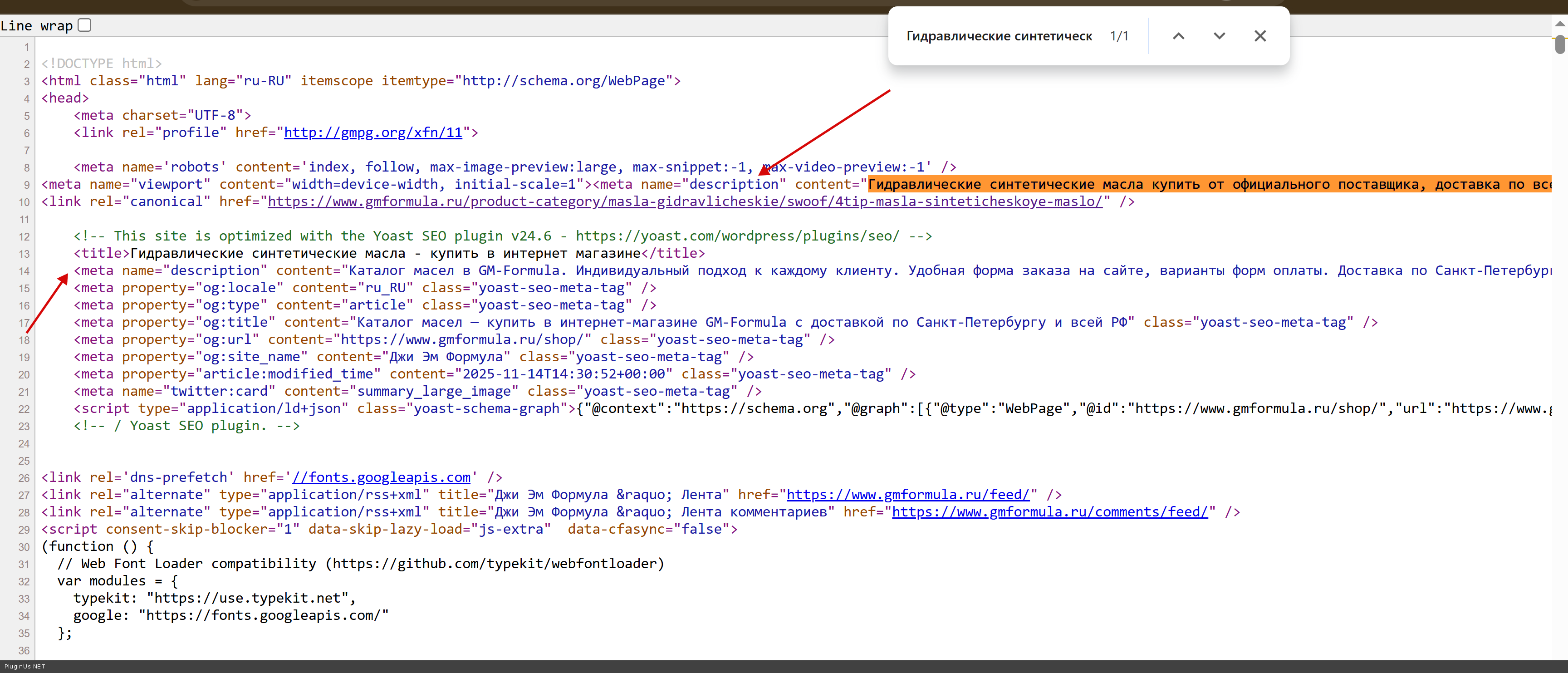
So, in functions.php was added next code:
Botoscope connects your WooCommerce store to Telegram — turning it into a fully functional shopping experience inside chat. No coding, no setup headaches — just sell directly where your customers already are.