

Selecting Multiple variation at once contain specific attribute
The support doesn work on Saturdays and Sundays, so some Friday requests can be answered on Monday. If you have problems with registration ask help on contact us page pleaseIf you not got email within 24~36 business hours, firstly check your spam box, and if no any email from the support there - back to the forum and read answer here. DO NOT ANSWER ON EMAILS [noreply@pluginus.net] FROM THE FORUM!! Emails are just for your info, all answers should be published only here.
The support doesn work on Saturdays and Sundays, so some Friday requests can be answered on Monday.

Quote from Rafilathif on February 1, 2020, 16:19How to select only the Multiple variation at once
Let's say i have 100 Products with multiple variation some of Variations contain a Same attributes for example I added 5 Products Packing type
Packing type
---------------------
Glass Bottle
Plastic BottleSo i need to select All the Glass Bottle Attributed products
Let say like this selection Just I want to make this variation to out of stock at once
How to select only the Multiple variation at once
Let's say i have 100 Products with multiple variation some of Variations contain a Same attributes for example I added 5 Products Packing type
Packing type
---------------------
Glass Bottle
Plastic Bottle
So i need to select All the Glass Bottle Attributed products
Let say like this selection Just I want to make this variation to out of stock at once


Quote from Pablo Borysenco on February 3, 2020, 11:30Hello
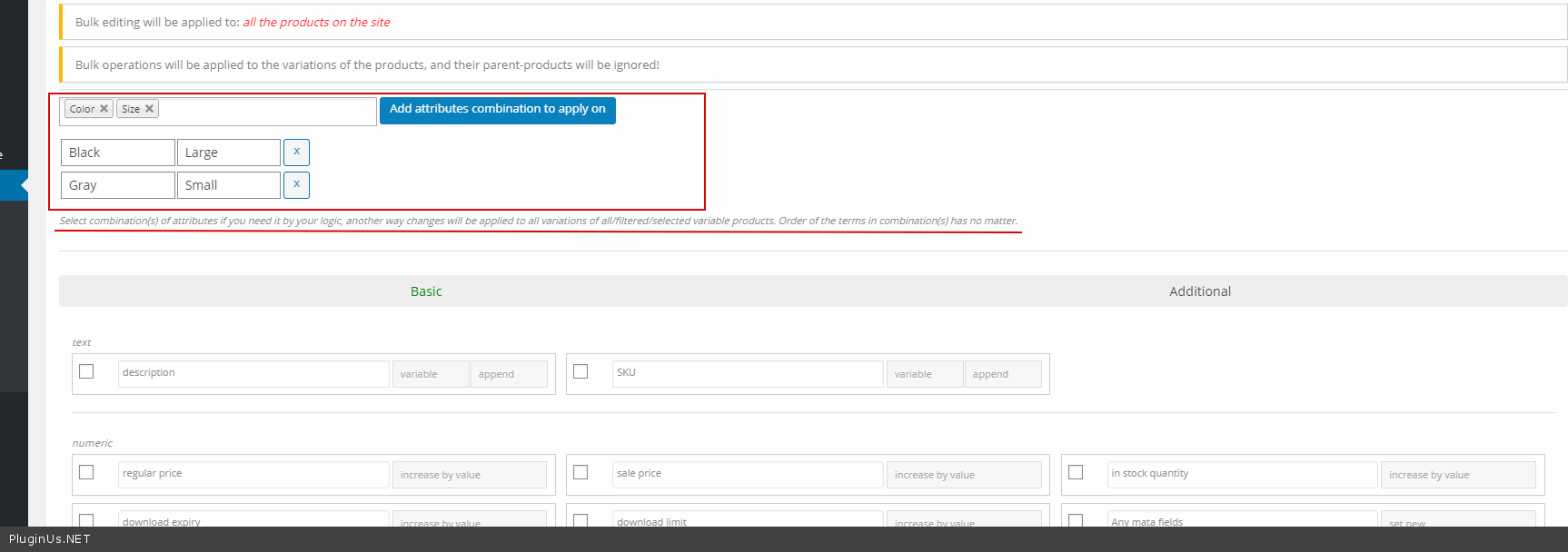
Please check an option - https://c2n.me/45O4axt.png and select the attributes of the variant - https://c2n.me/45O4jrP.png
Hello
Please check an option - https://c2n.me/45O4axt.png and select the attributes of the variant - https://c2n.me/45O4jrP.png

Quote from Rafilathif on February 4, 2020, 19:42I'm Sorry
I Follow your instruction But it's not go Out of stock
After the Bulck Edit process complete the variation contain product still same
Please see here. I need to set All the variation out of stock which products contain "safari"
Looking for the Answer
Thanks
I'm Sorry
I Follow your instruction But it's not go Out of stock

After the Bulck Edit process complete the variation contain product still same
Please see here. I need to set All the variation out of stock which products contain"safari"

Looking for the Answer
Thanks
Quote from Pablo Borysenco on February 5, 2020, 12:39Hello
Please watch videos - https://bulk-editor.com/video-tutorials#video_2502 AND https://bulk-editor.com/video-tutorials#video_2506
You should select all the attributes that are in the variant.(weight AND Stores)
Hello
Please watch videos - https://bulk-editor.com/video-tutorials#video_2502 AND https://bulk-editor.com/video-tutorials#video_2506
You should select all the attributes that are in the variant.(weight AND Stores)
Quote from Rafilathif on February 5, 2020, 14:29Thanks
I watch this video already it's not giving me the Best answer or I'm not Get it
And you said that i want to select all variation to archive the result. Think if i have 1000+ Product and i have multiple variation all are different variation but store only same for many in this time how i can make filter to select
see this Image bellow
The Video tutorial explaining for one product filter Your just talking about the Weight and store and above i want to select multiple attribute but from safari only Because the safari store have too many products with many too many attribute like
Weigh
Volume
Size
Packing type etc..Check bellow image and see the logic from that Filter
So if the Filter is not Work for 130g Product meaning i have to memorise what i choose in the past when i create the product
From this form I just want to select all safari or particular attributed product to set out of stock.
Do one think Please login to my site and test it for safari attributed product and teach me how you did that
I saved all the access info in private data
Thanks
Thanks
I watch this video already it's not giving me the Best answer or I'm not Get it
And you said that i want to select all variation to archive the result. Think if i have 1000+ Product and i have multiple variation all are different variation but store only same for many in this time how i can make filter to select
see this Image bellow

The Video tutorial explaining for one product filter Your just talking about the Weight and store and above i want to select multiple attribute but from safari only Because the safari store have too many products with many too many attribute like
Weigh
Volume
Size
Packing type etc..
Check bellow image and see the logic from that Filter

So if the Filter is not Work for 130g Product meaning i have to memorise what i choose in the past when i create the product
From this form I just want to select all safari or particular attributed product to set out of stock.
Do one think Please login to my site and test it for safari attributed product and teach me how you did that
I saved all the access info in private data
Thanks
Quote from Pablo Borysenco on February 6, 2020, 11:47Hello
To edit variations you should fill in all the attributes.
Unfortunately there is no other way.
Hello
To edit variations you should fill in all the attributes.
Unfortunately there is no other way.