

SELECT PROBLEM
The support doesn work on Saturdays and Sundays, so some Friday requests can be answered on Monday. If you have problems with registration ask help on contact us page pleaseIf you not got email within 24~36 business hours, firstly check your spam box, and if no any email from the support there - back to the forum and read answer here. DO NOT ANSWER ON EMAILS [noreply@pluginus.net] FROM THE FORUM!! Emails are just for your info, all answers should be published only here.
The support doesn work on Saturdays and Sundays, so some Friday requests can be answered on Monday.

Quote from malaya on June 29, 2025, 21:07https://leekart.com/product-category/processor/

Quote from Pablo Borysenco on June 30, 2025, 11:32Hello
Please paste your license key here - https://share.pluginus.net/image/i20230222134241.png -> https://share.pluginus.net/image/i20230222134511.png
Can you describe this issue in more detail?
Hello
Please paste your license key here - https://share.pluginus.net/image/i20230222134241.png -> https://share.pluginus.net/image/i20230222134511.png


Can you describe this issue in more detail?
Quote from malaya on December 11, 2025, 11:26It's not being designed the way you want. my----https://leekart.com/product-category/processor/ and your---https://demo.products-filter.com/demonstration-of-woot-and-woof-compatibility/
It's not being designed the way you want. my----https://leekart.com/product-category/processor/ and your---https://demo.products-filter.com/demonstration-of-woot-and-woof-compatibility/

Quote from Alex Dovlatov on December 11, 2025, 13:02Hello
If you need customization use CSS code
https://demo.products-filter.com/demonstration-of-woot-and-woof-compatibility/ - this is table plugin, you can get it here https://products-tables.com/downloads
Hello
If you need customization use CSS code
https://demo.products-filter.com/demonstration-of-woot-and-woof-compatibility/ - this is table plugin, you can get it here https://products-tables.com/downloads
Quote from malaya on December 11, 2025, 13:29i need side bar like your desin
i need side bar like your desin
Quote from Alex Dovlatov on December 12, 2025, 12:19Its design, buy such one and use
Its design, buy such one and use
Quote from malaya on December 15, 2025, 15:24HOW TO STOP CUSTOM PC BUILDER PAGE HUSKY FILTER THERE IS CREATE compatibility issue
HOW TO STOP CUSTOM PC BUILDER PAGE HUSKY FILTER THERE IS CREATE compatibility issue
Quote from malaya on December 16, 2025, 10:35bow to HUSKY FILTER hide Custom PC Builder PAGE compatibility issue
https://leekart.com/custom-pc-builder/
bow to HUSKY FILTER hide Custom PC Builder PAGE compatibility issue
Quote from Alex Dovlatov on December 16, 2025, 14:09Hello
You don't need custom code. WOOF has a built-in setting for this:
- Go to WOOF Settings → Options
- Find the option "Init plugin on the next site pages only"
- Add the pages where you WANT filters to appear (shop, product category pages, etc.)
- The Custom PC Builder page will be automatically excluded if it's not in that list
OR
If that option is empty (meaning filters show everywhere), you can use the opposite approach - specify pages where filters should NOT appear using custom code or by simply not including that page in the list.
Hello
You don't need custom code. WOOF has a built-in setting for this:
- Go to WOOF Settings → Options
- Find the option "Init plugin on the next site pages only"
- Add the pages where you WANT filters to appear (shop, product category pages, etc.)
- The Custom PC Builder page will be automatically excluded if it's not in that list
OR
If that option is empty (meaning filters show everywhere), you can use the opposite approach - specify pages where filters should NOT appear using custom code or by simply not including that page in the list.
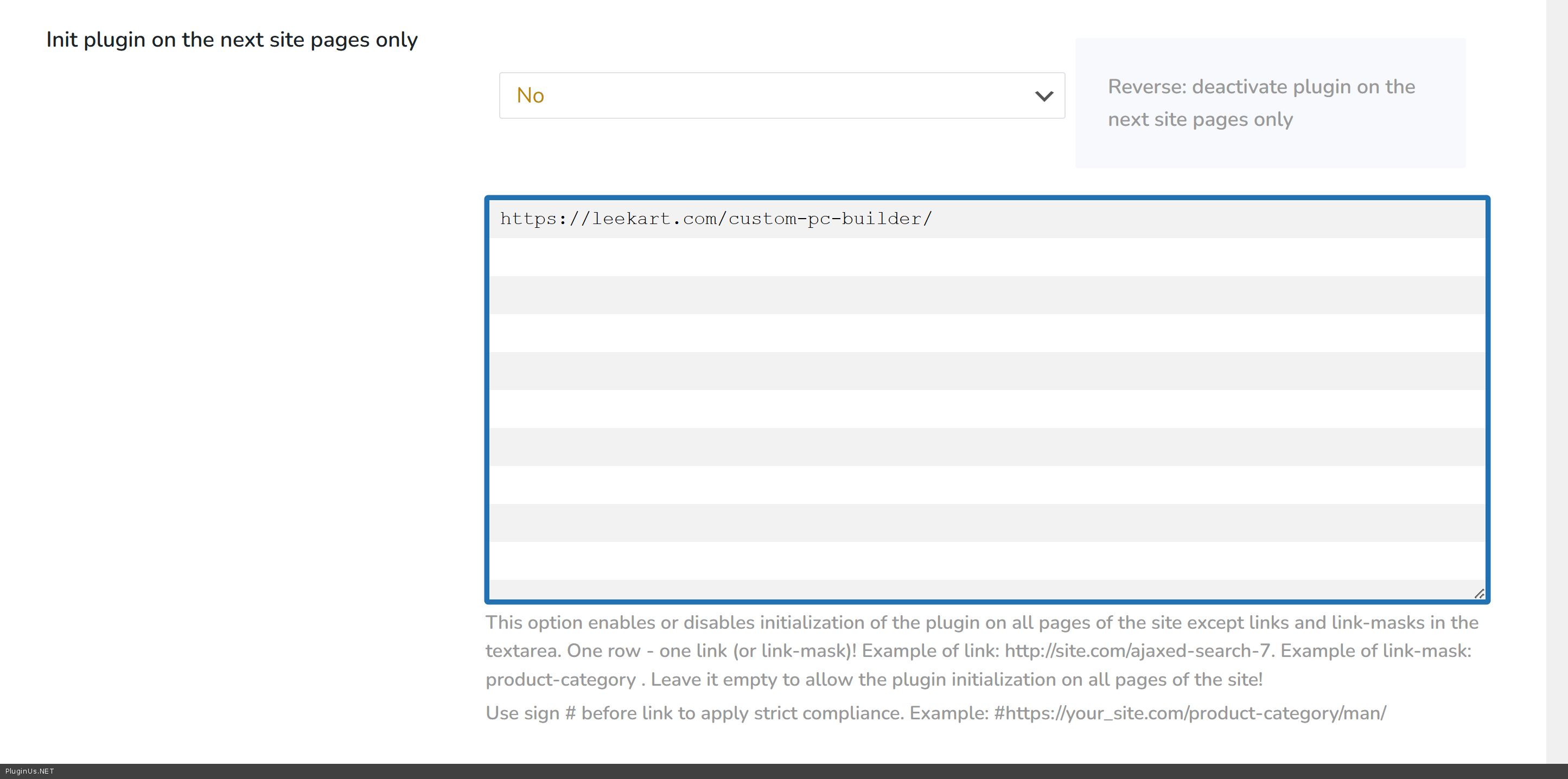
Quote from malaya on December 16, 2025, 14:30https://drive.google.com/file/d/1TCvCgkT5AQcLL6n4KYNNC_JiVv5DlnPX/view?usp=sharing
https://drive.google.com/file/d/17SMII7Ok21zviHPtfuqT6Gi0ZjYj3OpM/view?usp=sharing
https://drive.google.com/file/d/1toxg2ntJHOnvl-qM-m_rrK6NgIyVvv00/view?usp=sharing
On the Classic layout, the price filter/slider range doesn’t work. If you switch to AJAX Layout 1, other filters stop working instead. You can see this behavior in the video below: https://drive.google.com/file/d/1zd9HXatayC7yJYXsWK-UFcjm8-vcsjo9/view?usp=sharing
When I disable that plugin, the “Clear” filter button also shows up as expected.
This issue is caused by a conflict with the HUSKY plugin. As a temporary solution, please disable the HUSKY plugin for now. We also recommend contacting the HUSKY plugin author so they can take a closer look at the compatibility issue
https://drive.google.com/file/d/1TCvCgkT5AQcLL6n4KYNNC_JiVv5DlnPX/view?usp=sharing
https://drive.google.com/file/d/17SMII7Ok21zviHPtfuqT6Gi0ZjYj3OpM/view?usp=sharing
https://drive.google.com/file/d/1toxg2ntJHOnvl-qM-m_rrK6NgIyVvv00/view?usp=sharing
On the Classic layout, the price filter/slider range doesn’t work. If you switch to AJAX Layout 1, other filters stop working instead. You can see this behavior in the video below: https://drive.google.com/file/d/1zd9HXatayC7yJYXsWK-UFcjm8-vcsjo9/view?usp=sharing
When I disable that plugin, the “Clear” filter button also shows up as expected.
This issue is caused by a conflict with the HUSKY plugin. As a temporary solution, please disable the HUSKY plugin for now. We also recommend contacting the HUSKY plugin author so they can take a closer look at the compatibility issue
Quote from Alex Dovlatov on December 19, 2025, 14:32Hello
I could not open your screenshots, but here is conflict witj the plugin in AJAX mode, use please redirect mode instead
Hello
I could not open your screenshots, but here is conflict witj the plugin in AJAX mode, use please redirect mode instead