

search by SKU not clearing
The support doesn work on Saturdays and Sundays, so some Friday requests can be answered on Monday. If you have problems with registration ask help on contact us page pleaseIf you not got email within 24~36 business hours, firstly check your spam box, and if no any email from the support there - back to the forum and read answer here. DO NOT ANSWER ON EMAILS [noreply@pluginus.net] FROM THE FORUM!! Emails are just for your info, all answers should be published only here.
The support doesn work on Saturdays and Sundays, so some Friday requests can be answered on Monday.

Quote from felix007 on August 13, 2020, 16:54Hello
I”m using Searching by SKU extension, the x to clear sku search inside the input field just clears the text inside the input box and not search query.
so if i check another category i”m getting “No products were found matching your selection.” and i cant go back to clear that “sku”.
can you fix it?
see here https://tobi.wpisrael.co.il/shop/?swoof=1&product_cat=mens&woof_sku=RS-0078M
Thank you
Hello
I”m using Searching by SKU extension, the x to clear sku search inside the input field just clears the text inside the input box and not search query.
so if i check another category i”m getting “No products were found matching your selection.” and i cant go back to clear that “sku”.
can you fix it?
see here https://tobi.wpisrael.co.il/shop/?swoof=1&product_cat=mens&woof_sku=RS-0078M
Thank you

Quote from Pablo Borysenco on August 14, 2020, 11:59Hello
Yes! I passed this to the developers
I will write to you as soon as there is a fix
Hello
Yes! I passed this to the developers
I will write to you as soon as there is a fix
Quote from Pablo Borysenco on August 18, 2020, 15:46Hello
The developer answered me:
"This cross is the browser functionality, unfortunately we cannot influence this functionality."
All I can offer is to hide this cross. in file - wp-content\plugins\woocommerce-products-filter\ext\by_sku\views\shortcodes\woof_sku_filter.php - change code - https://c2n.me/48MRv6l.png
and add CSS.woof_show_sku_search{
width: 93%;
padding: 9px !important;
margin: 0 !important;
font-size: 14px;
}
Hello
The developer answered me:
"This cross is the browser functionality, unfortunately we cannot influence this functionality."
All I can offer is to hide this cross. in file - wp-content\plugins\woocommerce-products-filter\ext\by_sku\views\shortcodes\woof_sku_filter.php - change code - https://c2n.me/48MRv6l.png
and add CSS
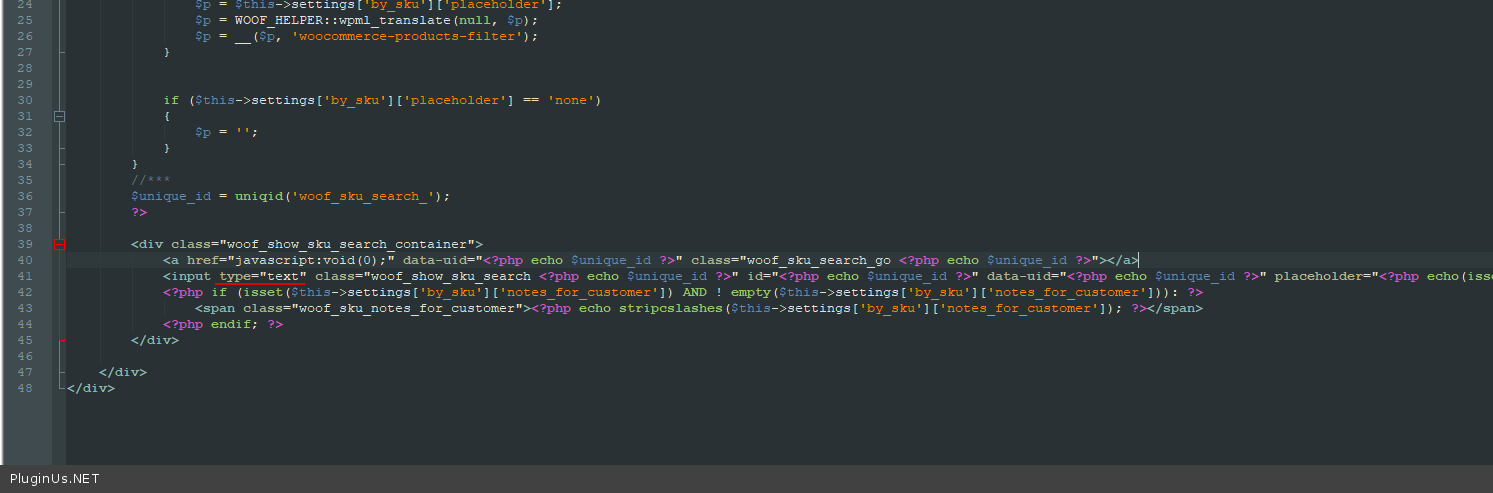
.woof_show_sku_search{
width: 93%;
padding: 9px !important;
margin: 0 !important;
font-size: 14px;
}
Quote from felix007 on August 18, 2020, 17:01Hello
The problem is not show/hide the X but clearing the sku search.
please see video https://storyxpress.co/video/ke02ivy2s3zi9r0as
if you make a sku search and click to see another category you get 0 results and you can't clear your sku search box anymore.
please check again
Thank you
Hello
The problem is not show/hide the X but clearing the sku search.
please see video https://storyxpress.co/video/ke02ivy2s3zi9r0as
if you make a sku search and click to see another category you get 0 results and you can't clear your sku search box anymore.
please check again
Thank you
Quote from Pablo Borysenco on August 19, 2020, 12:16Hello
Please read my message - https://c2n.me/48NqBQt.png
To clear text field - delete text and press [Enter] - OR click here -https://c2n.me/48NqLuu.jpg
Hello
Please read my message - https://c2n.me/48NqBQt.png
To clear text field - delete text and press [Enter] - OR click here -https://c2n.me/48NqLuu.jpg
Quote from felix007 on August 19, 2020, 12:35Hello
but the visitor may miss this or may just go to another category without pressing and want be able to see results (as i showed in the video)
their should be a way to clear this SKU field from inside the input field.
like the magnifying glass icon i think their should be an icon to clear the search - or it's confusing to the visitor.
can you consider adding a clear button?
Hello
but the visitor may miss this or may just go to another category without pressing and want be able to see results (as i showed in the video)
their should be a way to clear this SKU field from inside the input field.
like the magnifying glass icon i think their should be an icon to clear the search - or it's confusing to the visitor.
can you consider adding a clear button?
Quote from Pablo Borysenco on August 20, 2020, 11:21Hello
understood you. I think it makes sense.
I passed this idea to the developers. In the next version of the plugin we will add this functionality.
Hello
understood you. I think it makes sense.
I passed this idea to the developers. In the next version of the plugin we will add this functionality.
Quote from felix007 on August 20, 2020, 11:28This is great news
Thank you
This is great news
Thank you
Quote from Pablo Borysenco on August 21, 2020, 12:23Hello
Welcome;)
Hello
Welcome;)
Quote from felix007 on January 24, 2021, 20:21Hello
Any news about adding this "clear button" functionality?
you said next version.
Thank you
Hello
Any news about adding this"clear button" functionality?
you said next version.
Thank you
Quote from Pablo Borysenco on January 25, 2021, 16:13Hello
Yes! But the latest update has no features. This was an update for compatibility with the latest version of wordpress
Hello
Yes! But the latest update has no features. This was an update for compatibility with the latest version of wordpress