

Search by attributes
The support doesn work on Saturdays and Sundays, so some Friday requests can be answered on Monday. If you have problems with registration ask help on contact us page pleaseIf you not got email within 24~36 business hours, firstly check your spam box, and if no any email from the support there - back to the forum and read answer here. DO NOT ANSWER ON EMAILS [noreply@pluginus.net] FROM THE FORUM!! Emails are just for your info, all answers should be published only here.
The support doesn work on Saturdays and Sundays, so some Friday requests can be answered on Monday.

Quote from farrah on December 2, 2020, 04:04Hi,
I saw in another ticket that you recommend this extension to be able to search by Woo product attributes. How do I get this extension and how much does it cost?
https://products-filter.com/extencion/quick-search/
I already have the WooF product filter purchased.
Hi,
I saw in another ticket that you recommend this extension to be able to search by Woo product attributes. How do I get this extension and how much does it cost?
https://products-filter.com/extencion/quick-search/
I already have the WooF product filter purchased.

Quote from Pablo Borysenco on December 2, 2020, 14:13Hello
Please try to watch a video - https://products-filter.com/video-tutorials#video_beGT6p_look - you will see how to work with extensions
Paste your license key here - https://c2n.me/43SC6rb.png -> https://c2n.me/42HBIt7.png
Hello
Please try to watch a video - https://products-filter.com/video-tutorials#video_beGT6p_look - you will see how to work with extensions
Paste your license key here - https://c2n.me/43SC6rb.png -> https://c2n.me/42HBIt7.png


Quote from farrah on December 2, 2020, 17:57Hi,
I checked out the video, but it doesn't answer the question I have.
Here's the website I'm working on: https://cmi.maleksodigital.com.au/shop/
As an example, for this product, under the ADDITIONAL INFORMATION tab are some attributes (e.g. SKU CODE: NPDPB10000-B). My client wants that (and other attributes) to be searchable using the search by text option (2nd search box on the shop page)
I have enabled the SEARCH BY TEXT extension and have set it to: search by title or content or excerpt.
Hi,
I checked out the video, but it doesn't answer the question I have.
Here's the website I'm working on: https://cmi.maleksodigital.com.au/shop/
As an example, for this product, under the ADDITIONAL INFORMATION tab are some attributes (e.g. SKU CODE: NPDPB10000-B). My client wants that (and other attributes) to be searchable using the search by text option (2nd search box on the shop page)
I have enabled the SEARCH BY TEXT extension and have set it to: search by title or content or excerpt.
Quote from Pablo Borysenco on December 3, 2020, 13:45Hello
How do I get this extension - try to activate it on extensions tab - https://c2n.me/4a4JBHp.png
Read this - https://products-filter.com/extencion/quick-search/
Hello
How do I get this extension - try to activate it on extensions tab - https://c2n.me/4a4JBHp.png
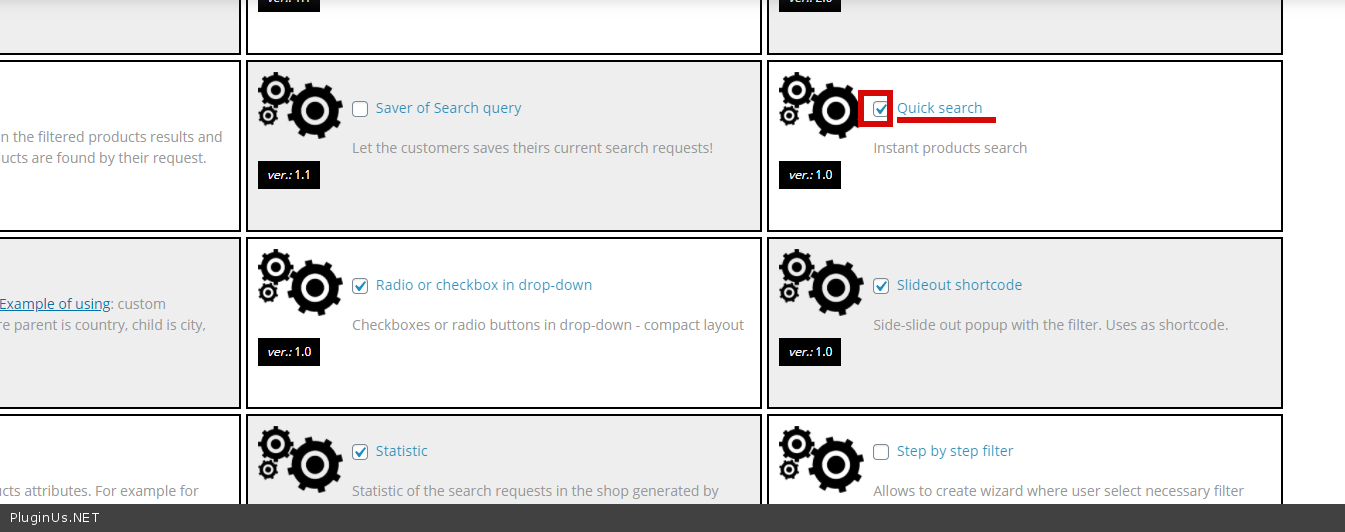
Read this - https://products-filter.com/extencion/quick-search/
Quote from farrah on December 3, 2020, 17:56Hi,
I've initiated this quick search and added the shortcode through the widget. [woof_quick_search]
However the console shows a 404 error for this. I've provided admin rights to the website. Could you guide me here please?
I want the shop page to show the results of the search but the search should allow searching by title, description, SKU, and attributes.
Sorry to be so much trouble.
Farrah
Hi,
I've initiated this quick search and added the shortcode through the widget. [woof_quick_search]
However the console shows a 404 error for this. I've provided admin rights to the website. Could you guide me here please?
I want the shop page to show the results of the search but the search should allow searching by title, description, SKU, and attributes.
Sorry to be so much trouble.
Farrah
Quote from Pablo Borysenco on December 4, 2020, 14:50Hello
Please add the attributes by which you want to search - https://c2n.me/4a5NBDe.png
AND create search file - https://c2n.me/4a5NLeN.png - and do a test
on this page doesn't have a link for me to click and get more information. - https://c2n.me/4a5NQbK.png
Hello
Please add the attributes by which you want to search - https://c2n.me/4a5NBDe.png
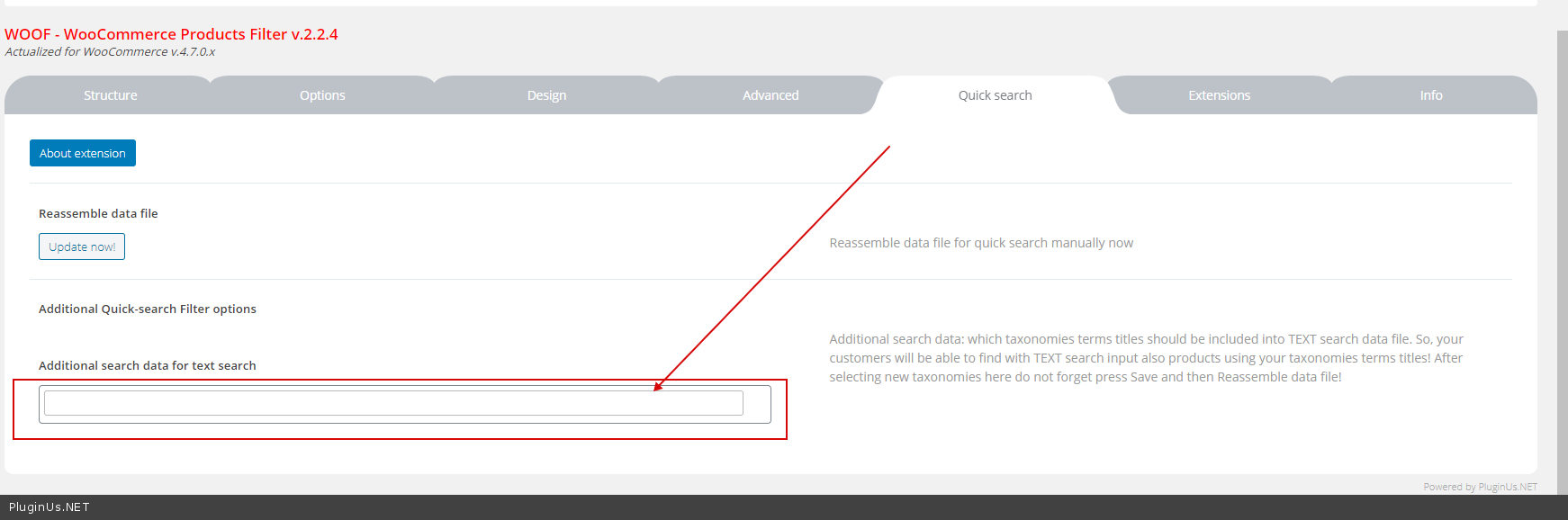
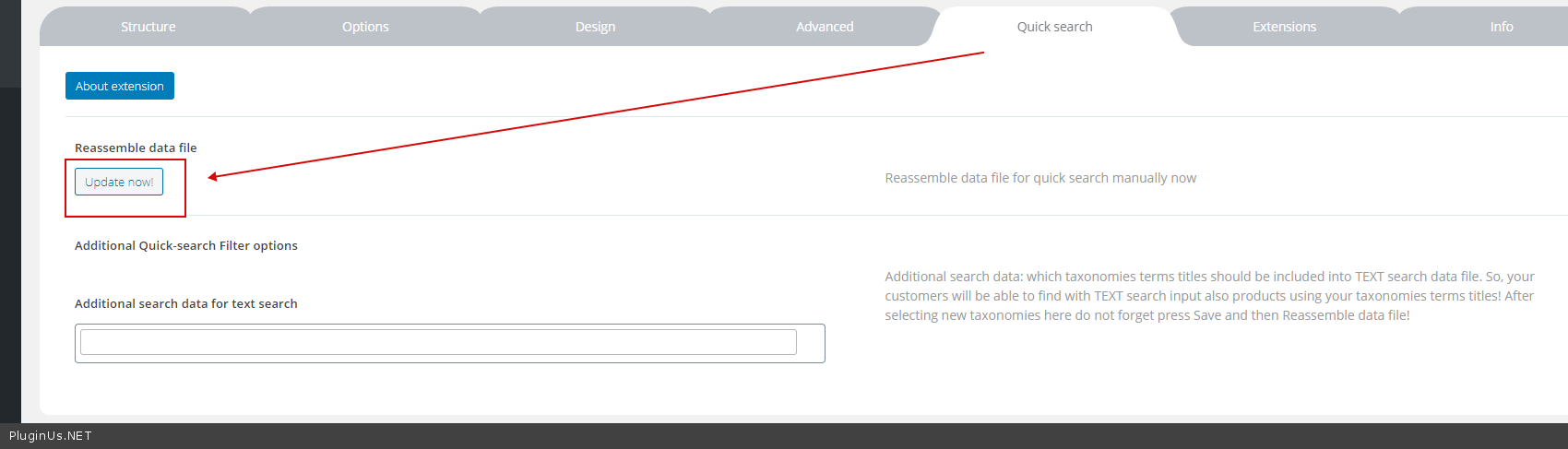
AND create search file - https://c2n.me/4a5NLeN.png - and do a test
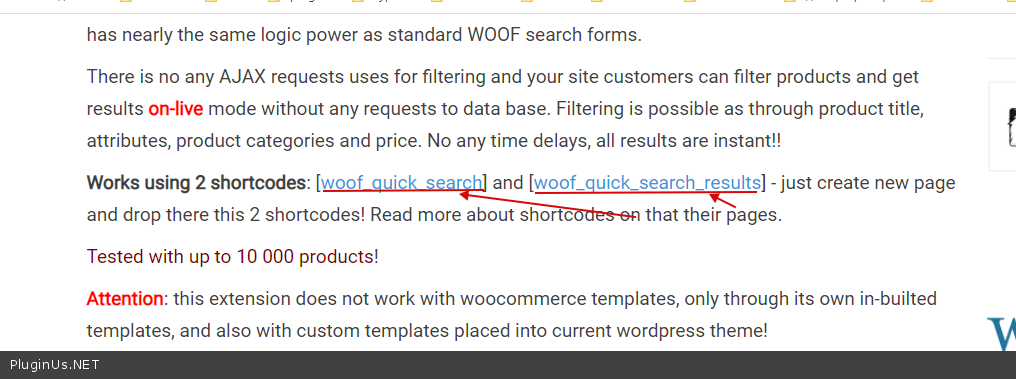
on this page doesn't have a link for me to click and get more information. - https://c2n.me/4a5NQbK.png
Quote from farrah on December 8, 2020, 07:12So far so good, looks like it's working. A few follow up questions:
- I noticed that I can search by these taxonomies and the search also searches in the title, but it doesn't look like it searches the description or excerpt. The other search search by text allows searching title, description, excerpt.
- The search by text has the option to display results as you type them or type and hit enter, then the search results appear on the resulting page. Is there a way to do that with this quick search also?
Standing by....and thank you for all your help. You've been marvelous so far!!!
Farrah
So far so good, looks like it's working. A few follow up questions:
- I noticed that I can search by these taxonomies and the search also searches in the title, but it doesn't look like it searches the description or excerpt. The other search search by text allows searching title, description, excerpt.
- The search by text has the option to display results as you type them or type and hit enter, then the search results appear on the resulting page. Is there a way to do that with this quick search also?
Standing by....and thank you for all your help. You've been marvelous so far!!!
Farrah
Quote from Pablo Borysenco on December 8, 2020, 13:56Hello Farrah
- Unfortunately, this does not allow searching by description and excerpt. The reason is that these fields take up a lot of space (text), and therefore a very large search file is formed. A large file greatly reduces the search speed and can sometimes break this functionality
- It should work this way. Please drop me exact link to the issue
Hello Farrah
- Unfortunately, this does not allow searching by description and excerpt. The reason is that these fields take up a lot of space (text), and therefore a very large search file is formed. A large file greatly reduces the search speed and can sometimes break this functionality
- It should work this way. Please drop me exact link to the issue
Quote from farrah on December 8, 2020, 15:19Hi Pablo,
Understood about #1.
On #2, on this page: http://cmi.maleksodigital.com.au/shop/
If you use the 2nd search box (the quick search) and start typing (e.g. solar), you'll see result options show as part of the search box function, whereas, if you use the 3rd search box (under the PRODUCTS FILTER section), you'll see that you have to type in the word solar, press ENTER, and then the SHOP page reloads to show the results. My client prefers this behavior, rather than showing results as you type in the search keyword.
Hi Pablo,
Understood about #1.
On #2, on this page: http://cmi.maleksodigital.com.au/shop/
If you use the 2nd search box (the quick search) and start typing (e.g. solar), you'll see result options show as part of the search box function, whereas, if you use the 3rd search box (under the PRODUCTS FILTER section), you'll see that you have to type in the word solar, press ENTER, and then the SHOP page reloads to show the results. My client prefers this behavior, rather than showing results as you type in the search keyword.
Quote from Pablo Borysenco on December 9, 2020, 13:01Hello
This is the whole point of Quick search. unfortunately this will not work in another mode.
Only if you use the template as described in the documentation - https://products-filter.com/extencion/quick-search/
Hello
This is the whole point of Quick search. unfortunately this will not work in another mode.
Only if you use the template as described in the documentation - https://products-filter.com/extencion/quick-search/
Quote from farrah on December 10, 2020, 04:26Okay, final 2 questions (I think):
- Can I change the placeholder text that appears in the box?
- If new value options become available for a product attribute, do I need to re-build the file to ensure that they are included? I need to know so I can direct my client accordingly.
Okay, final 2 questions (I think):
- Can I change the placeholder text that appears in the box?
- If new value options become available for a product attribute, do I need to re-build the file to ensure that they are included? I need to know so I can direct my client accordingly.
Quote from Pablo Borysenco on December 10, 2020, 14:01Hello
1 - https://c2n.me/4aaEolI.png For Quick search - https://c2n.me/4aaEsx8.png
2 - do I need to re-build the file - Yes
Hello
1 - https://c2n.me/4aaEolI.png For Quick search - https://c2n.me/4aaEsx8.png
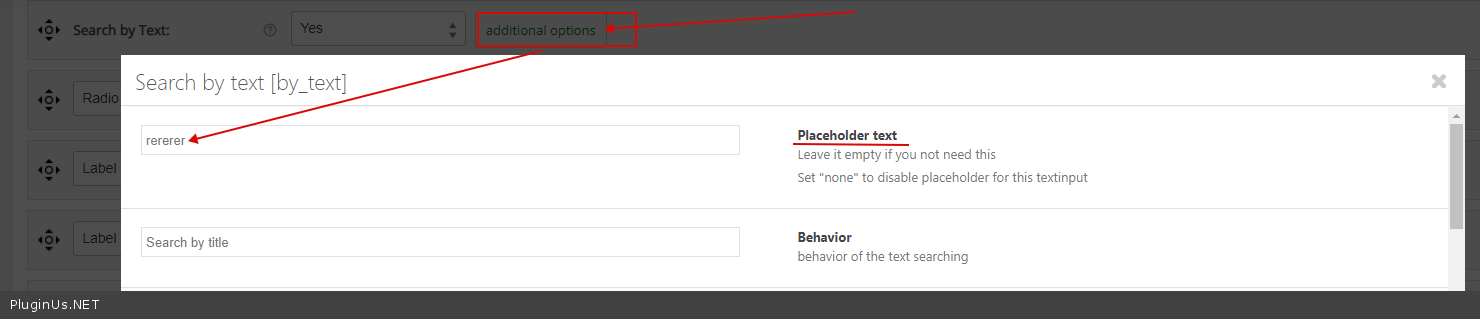
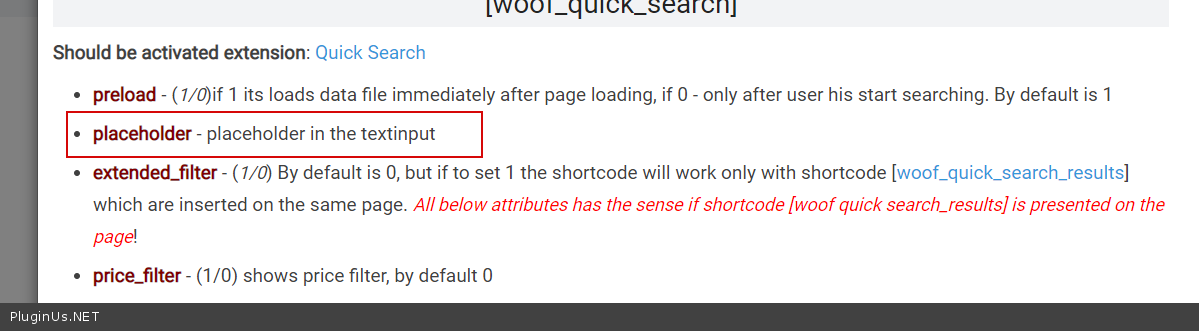
2 - do I need to re-build the file - Yes
Quote from farrah on December 11, 2020, 04:14Thank you thank you thank you. You're wonderful!!!
I'm done pestering you with questions (well...for now).
Have a great weekend!
Thank you thank you thank you. You're wonderful!!!
I'm done pestering you with questions (well...for now).
Have a great weekend!
Quote from farrah on December 11, 2020, 04:31Oh! Please let me know how you fixed this so in case it re-occurs, I know what I need to do: https://pluginus.net/support/topic/search-by-attributes/#postid-19914
Oh! Please let me know how you fixed this so in case it re-occurs, I know what I need to do: https://pluginus.net/support/topic/search-by-attributes/#postid-19914
Quote from Pablo Borysenco on December 11, 2020, 14:54Hello Farrah
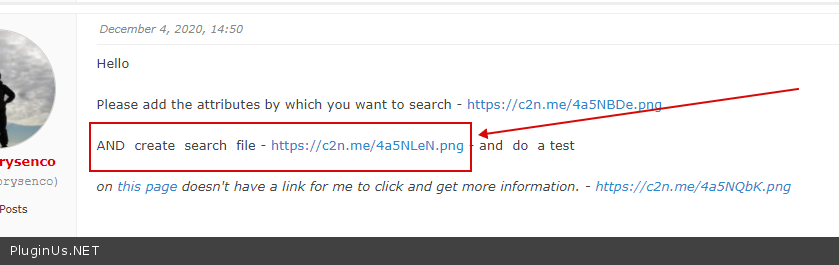
https://c2n.me/4abIO8y.png - Just create a file. (404 - the application cannot find the file)
Hello Farrah
https://c2n.me/4abIO8y.png - Just create a file. (404 - the application cannot find the file)
Quote from farrah on December 12, 2020, 10:41Thank you for everything!
Thank you for everything!
Quote from Pablo Borysenco on December 14, 2020, 15:15Hello
Welcome;)
Hello
Welcome;)
Quote from farrah on January 13, 2021, 17:20Hi Pablo,
My client has a question. The quick search uses a file that gets created with the product and attribute information. However every time a product is added or updated, the file needs to get rebuilt by clicking the UPDATE NOW button under Reassemble Data File. My client doesn't want to have to click a button each time. Is there a way for us to create CRON job that does this automatically? If yes, can you guide me on what action the job needs to do/call the job needs to make to request the update and where the file that needs to get updated is located?
Thanks again!
Farrah
Hi Pablo,
My client has a question. The quick search uses a file that gets created with the product and attribute information. However every time a product is added or updated, the file needs to get rebuilt by clicking the UPDATE NOW button under Reassemble Data File. My client doesn't want to have to click a button each time. Is there a way for us to create CRON job that does this automatically? If yes, can you guide me on what action the job needs to do/call the job needs to make to request the update and where the file that needs to get updated is located?
Thanks again!
Farrah
Quote from farrah on January 13, 2021, 17:47Hi Pablo,
One more question, regarding changing the behaviour of the quick search feature and disabling the drop down values and instead forcing a user to type in the search text and press enter, then show the results on the shop page, you said we would have to use custom templates. However, I'm confused on if I'm simply overriding the existing WooCommerce shop page template to do this. The documentation on this page mentions that the quick search does not work with WooCommerce default templates, so which template am I overriding?
Thanks,
Farrah
Hi Pablo,
One more question, regarding changing the behaviour of the quick search feature and disabling the drop down values and instead forcing a user to type in the search text and press enter, then show the results on the shop page, you said we would have to use custom templates. However, I'm confused on if I'm simply overriding the existing WooCommerce shop page template to do this. The documentation on this page mentions that the quick search does not work with WooCommerce default templates, so which template am I overriding?
Thanks,
Farrah