

Search bar
The support doesn work on Saturdays and Sundays, so some Friday requests can be answered on Monday. If you have problems with registration ask help on contact us page pleaseIf you not got email within 24~36 business hours, firstly check your spam box, and if no any email from the support there - back to the forum and read answer here. DO NOT ANSWER ON EMAILS [noreply@pluginus.net] FROM THE FORUM!! Emails are just for your info, all answers should be published only here.
The support doesn work on Saturdays and Sundays, so some Friday requests can be answered on Monday.

Quote from Georgina on March 8, 2021, 14:17Hi! Do you have any advice on search bar compatibility, I´ve been trying it with Ajax search bar and it´s not working ok.
Thank you very much!
Hi! Do you have any advice on search bar compatibility, I´ve been trying it with Ajax search bar and it´s not working ok.
Thank you very much!

Quote from Pablo Borysenco on March 9, 2021, 13:55Hello Georgina
This plugin is not compatible with third party filters
But if you need ajax text search - https://products-filter.com/extencion/searching-by-text/ and check option - https://c2n.me/4bekYWg.png
Or you can try this plugin - https://wordpress.org/plugins/profit-products-tables-for-woocommerce/ settings - https://demo.products-tables.com/woot_drop_down/
Hello Georgina
This plugin is not compatible with third party filters
But if you need ajax text search - https://products-filter.com/extencion/searching-by-text/ and check option - https://c2n.me/4bekYWg.png
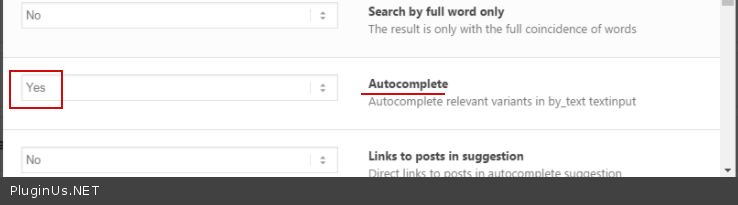
Or you can try this plugin - https://wordpress.org/plugins/profit-products-tables-for-woocommerce/ settings - https://demo.products-tables.com/woot_drop_down/
Quote from Georgina on March 9, 2021, 16:36It worked! First option. Thank you very much!
Sorry do you know how can I customize padding/margin of widget on sidebar? So it fits ok?
It worked! First option. Thank you very much!
Sorry do you know how can I customize padding/margin of widget on sidebar? So it fits ok?
Quote from Pablo Borysenco on March 10, 2021, 13:17Hello
You need CSS code
Please drop me exact link to the issue, and I will help you with small customizations of CSS code
Hello
You need CSS code
Please drop me exact link to the issue, and I will help you with small customizations of CSS code
Quote from Georgina on March 10, 2021, 15:33Thank you so much!
I put the link on private data. I would like to make less margin right and left (similar to the woocommerce css filter, I put the other above so you can see the difference. So that the categories also fit in one line.
Thanks!!!!
Thank you so much!
I put the link on private data. I would like to make less margin right and left (similar to the woocommerce css filter, I put the other above so you can see the difference. So that the categories also fit in one line.
Thanks!!!!

Quote from Pablo Borysenco on March 11, 2021, 12:13Hello
Please try to add this CSS
.widget.widget-woof{
padding: 0px;
}
Hello
Please try to add this CSS
.widget.widget-woof{
padding: 0px;
}
Quote from Georgina on March 11, 2021, 17:27Sorry, it didn´t work.
Sorry, it didn´t work.

Quote from Pablo Borysenco on March 12, 2021, 14:01Hello
Unfortunately I can not test it looks like you disabled my plugin
Hello
Unfortunately I can not test it looks like you disabled my plugin
Quote from Georgina on March 12, 2021, 14:21Hi Pablo!
It´s on, maybe it was a temporary deactivation. Because I´m solving some issues. I tried to adjust padding with yellow pencil CSS it´s not great because it appied to all sidebars but working fine. I´m still trying to feet the term in one line. Can you see it now?
Hi Pablo!
It´s on, maybe it was a temporary deactivation. Because I´m solving some issues. I tried to adjust padding with yellow pencil CSS it´s not great because it appied to all sidebars but working fine. I´m still trying to feet the term in one line. Can you see it now?
Quote from Pablo Borysenco on March 15, 2021, 13:05Hello
OK! Add this CSS
#sidebar .widget .widget.widget-woof{
padding: 0px;
}
Hello
OK! Add this CSS
#sidebar .widget .widget.widget-woof{
padding: 0px;
}
Quote from Georgina on March 15, 2021, 14:08Great! It worked!!
Thank you so much!
And I'm trying to set the filters on mobile to open and close with toggle image.
I set this but it[s not working. is it possible to have toggle button and text (Filters) on mobile? Thank you!!
Great! It worked!!
Thank you so much!
And I'm trying to set the filters on mobile to open and close with toggle image.
I set this but it[s not working. is it possible to have toggle button and text (Filters) on mobile? Thank you!!


Quote from Pablo Borysenco on March 16, 2021, 12:47Hello
Ok! My test - https://c2n.me/4bjVYm7
in your case you need to hide the filter widget for mobile devices. You can use third-party plugins/ an example - https://wordpress.org/plugins/widget-logic/ code: !wp_is_mobile()
Hello
Ok! My test - https://c2n.me/4bjVYm7
in your case you need to hide the filter widget for mobile devices. You can use third-party plugins/ an example - https://wordpress.org/plugins/widget-logic/ code: !wp_is_mobile()
Quote from Georgina on March 16, 2021, 14:59That's great!! Thank you so much! It worked perfect!
Just another issue if there is a way to add some text next to the toggle. Something like this: I put in red.
That's great!! Thank you so much! It worked perfect!
Just another issue if there is a way to add some text next to the toggle. Something like this: I put in red.

Quote from Pablo Borysenco on March 17, 2021, 13:34Hello
In design tab - https://c2n.me/4bkXQwd.png
And add CSS
body .woof_show_auto_form, body .woof_hide_auto_form {background-size: contain;
padding-left: 45px;
width: 132px;
}
Hello
In design tab - https://c2n.me/4bkXQwd.png
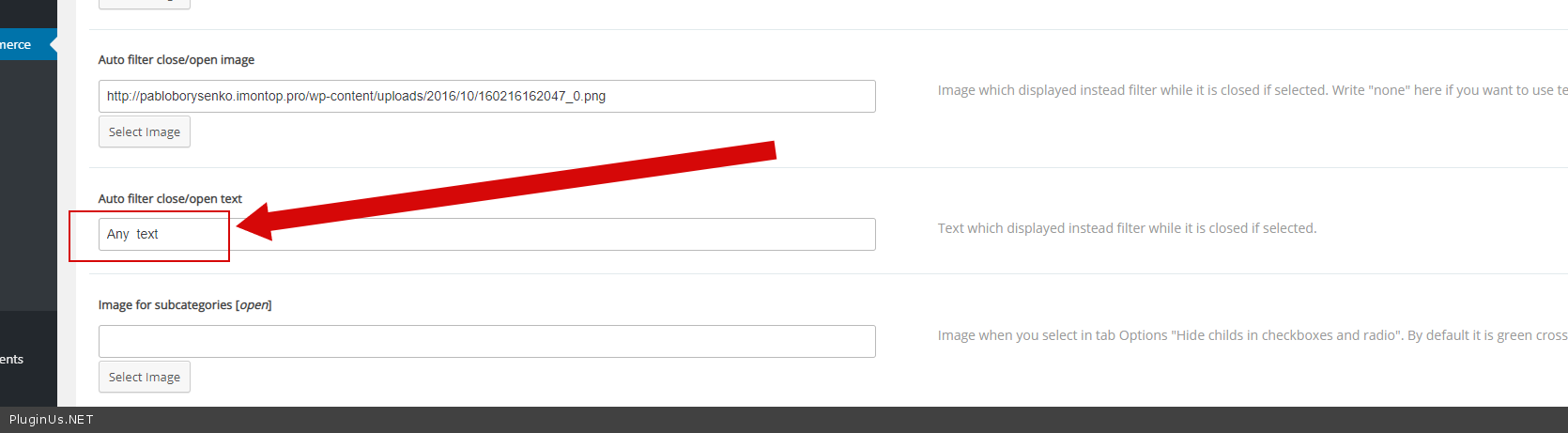
And add CSS
background-size: contain;
padding-left: 45px;
width: 132px;
Quote from Georgina on March 17, 2021, 17:11Hi! It worked fantastic!!
But now I´m trying the search by text and it´s not working. It was working before. You what could have happened? Thank you so much for all your help!!
Hi! It worked fantastic!!
But now I´m trying the search by text and it´s not working. It was working before. You what could have happened? Thank you so much for all your help!!
Quote from Georgina on March 17, 2021, 21:25Solved the issue! Dynamic count wasn´t activated. Thank you very much!
Solved the issue! Dynamic count wasn´t activated. Thank you very much!
Quote from Pablo Borysenco on March 18, 2021, 12:47Hello
Welcome;)
Hello
Welcome;)