
Search Archives Pagination Not working
The support doesn work on Saturdays and Sundays, so some Friday requests can be answered on Monday. If you have problems with registration ask help on contact us page pleaseIf you not got email within 24~36 business hours, firstly check your spam box, and if no any email from the support there - back to the forum and read answer here. DO NOT ANSWER ON EMAILS [noreply@pluginus.net] FROM THE FORUM!! Emails are just for your info, all answers should be published only here.
The support doesn work on Saturdays and Sundays, so some Friday requests can be answered on Monday.

Quote from Mass on March 2, 2022, 19:49So i am using Woocommerce, Shoptimizer Theme, and WOOF Products Filters. When I do a search on my site and go to the search results page, it works perfecly except that if I need to use the pagination to go to page 2 for example of the search results it redirects to page 2 of our shop archives.
Any thought? Staging Copy of Live Site - https://wordpress-497572-2471656.cloudwaysapps.com/cbd-store/
So i am using Woocommerce, Shoptimizer Theme, and WOOF Products Filters. When I do a search on my site and go to the search results page, it works perfecly except that if I need to use the pagination to go to page 2 for example of the search results it redirects to page 2 of our shop archives.
Any thought? Staging Copy of Live Site - https://wordpress-497572-2471656.cloudwaysapps.com/cbd-store/
Quote from Mass on March 2, 2022, 22:55One thing I did notice is that if you are on the search results page and hover over page two of the search results it gives you this url-
https://wordpress-497572-2471656.cloudwaysapps.com/?s=cbd&product-page=2But then redirects to this url (incorrect) when you click the page - https://wordpress-497572-2471656.cloudwaysapps.com/cbd-store/page/2/?swoof=1
One thing I did notice is that if you are on the search results page and hover over page two of the search results it gives you this url-

Quote from Pablo Borysenco on March 3, 2022, 13:32Hello
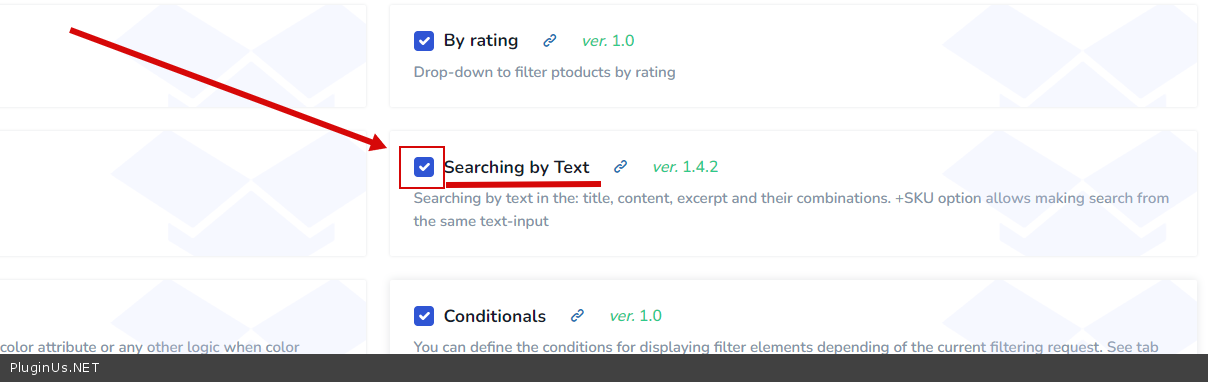
Because it's a third party text filter
Please activate this extension - https://c2n.me/4f5zZvq.png
Hello
Because it's a third party text filter
Please activate this extension - https://c2n.me/4f5zZvq.png
Quote from Mass on March 3, 2022, 22:15I also had an issue with not being able to use the filter by ratings because no matter which one i clicked 4 to 5, 3 to 4, etc it showed no products. But I turned off Turbo mode and the pagination works properly and the filter by reviews now works.
I am assuming that the extension for searches won't help with the reviews filtering properly correct? Also, if I turn turbo mode back on, do you still think adding on that extension will make it work?
Lastly, how do I exclude woof from loading on the search results page (siteurl. com/?s= )
I know there is the option in settings to exclude pages from loading Woof on but no matter how I try to add it, it doesn't work on the search results page. So, how can I exclude it from loading on the search results page?
I also had an issue with not being able to use the filter by ratings because no matter which one i clicked 4 to 5, 3 to 4, etc it showed no products. But I turned off Turbo mode and the pagination works properly and the filter by reviews now works.
I am assuming that the extension for searches won't help with the reviews filtering properly correct? Also, if I turn turbo mode back on, do you still think adding on that extension will make it work?
Lastly, how do I exclude woof from loading on the search results page (siteurl. com/?s= )
I know there is the option in settings to exclude pages from loading Woof on but no matter how I try to add it, it doesn't work on the search results page. So, how can I exclude it from loading on the search results page?
Quote from Pablo Borysenco on March 4, 2022, 13:18Hello
Try to re-create turbo mode file and do a test
how do I exclude woof from loading on the search results page (siteurl. com/?s= ) - Try in file - \wp-content\plugins\woocommerce-products-filter\index.php - add code - https://share.pluginus.net/image/i20220304111641.png
if (isset($_GET['s']) && $_GET['s'] ) {
return false;
}
Hello
Try to re-create turbo mode file and do a test
how do I exclude woof from loading on the search results page (siteurl. com/?s= ) - Try in file - \wp-content\plugins\woocommerce-products-filter\index.php - add code - https://share.pluginus.net/image/i20220304111641.png

if (isset($_GET['s']) && $_GET['s'] ) {
return false;
}
Quote from Mass on March 4, 2022, 17:56I added that code to the index.php woo filters file like you said. Doesn't do anything :-(
I added that code to the index.php woo filters file like you said. Doesn't do anything :-(
Quote from Pablo Borysenco on March 7, 2022, 12:01Hello
I did a test. On the text search result page, my filter is disabled. So my code is working correctly
Hello
I did a test. On the text search result page, my filter is disabled. So my code is working correctly