

scrollable atribute filter
The support doesn work on Saturdays and Sundays, so some Friday requests can be answered on Monday. If you have problems with registration ask help on contact us page pleaseIf you not got email within 24~36 business hours, firstly check your spam box, and if no any email from the support there - back to the forum and read answer here. DO NOT ANSWER ON EMAILS [noreply@pluginus.net] FROM THE FORUM!! Emails are just for your info, all answers should be published only here.
The support doesn work on Saturdays and Sundays, so some Friday requests can be answered on Monday.

Quote from gabriel.pribeagu on January 28, 2021, 10:58Hello,
If we have a lot of brands for a shop, and the brands atribute is listed as a filter in the side bar, is there a way to show something like a an area with a fixed number of brands checkboxes and the rest to be accesible via scrolling?
Thank you!
Hello,
If we have a lot of brands for a shop, and the brands atribute is listed as a filter in the side bar, is there a way to show something like a an area with a fixed number of brands checkboxes and the rest to be accesible via scrolling?
Thank you!
Quote from gabriel.pribeagu on January 28, 2021, 12:41Oh, I saw the setting at the aditional settings.
Two more questions:
- Why the the "brands" atribut values are not showing in the same line with the checkbox. Check the link in the private area.
- If I choose to use the beauty scroll, the list of brands is already scrooled to bottom, and the direction of scrooling is reversed.
- Is there any custom css code so I can make the space smaller between the the rows of the values of a product atribute?
- Is there any custom code to make radio buttons squere with a little rounded corners ?
Oh, I saw the setting at the aditional settings.
Two more questions:
- Why the the"brands" atribut values are not showing in the same line with the checkbox. Check the link in the private area.
- If I choose to use the beauty scroll, the list of brands is already scrooled to bottom, and the direction of scrooling is reversed.
- Is there any custom css code so I can make the space smaller between the the rows of the values of a product atribute?
- Is there any custom code to make radio buttons squere with a little rounded corners ?

Quote from Pablo Borysenco on January 28, 2021, 13:18Hello
1/2 /3) seems to be a conflict with a third party plugin or theme. To a test try to disable all plugins except woo+woof and install another theme
how it should look like - https://c2n.me/4aJg1Ir.png
4) No! It's a standard HTML tag. In this case use checkbox
Hello
1/2 /3) seems to be a conflict with a third party plugin or theme. To a test try to disable all plugins except woo+woof and install another theme
how it should look like - https://c2n.me/4aJg1Ir.png
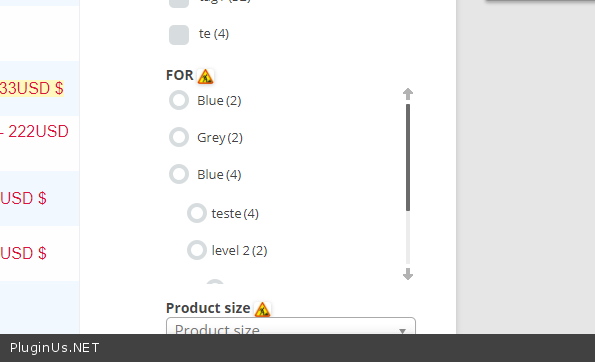
4) No! It's a standard HTML tag. In this case use checkbox
Quote from gabriel.pribeagu on January 28, 2021, 15:15Hello I`ve made some tests.
I have desibled all the other plugins. Only woo + woof + widget logic. https://clip2net.com/s/4aJnLRj
1.
My theme is Flatsome the most popular theme for Woo. It will be hard for me if I have to replace it :)
As you can see here, only in the text widget is make the "brands" atribute values on two rows. The bug is not happening in the woof widget!!
So there is an incompatibility with this Flatsome theme, only in the text widget. Can you fix it? It`s a veeeery popular theme. https://clip2net.com/s/4aJmoOX
Also the nice scroll has problems
2.
Also tested with another popular them Generatepress. https://clip2net.com/s/4aJnHjO
The double row problem disippear in the textwidget so that`s why I thing woof has a small incompatibility with Flatsome theme.
But still, even in Generatepress theme the bug with the scrolling remain.
3.How can I show in text widget in [woof] shortcode the category?
I tried tax_only="product_cat" but no pozitive result.
The testing link is in the private message.
Hello I`ve made some tests.
I have desibled all the other plugins. Only woo + woof + widget logic. https://clip2net.com/s/4aJnLRj
1.
My theme is Flatsome the most popular theme for Woo. It will be hard for me if I have to replace it :)
As you can see here, only in the text widget is make the"brands" atribute values on two rows. The bug is not happening in the woof widget!!
So there is an incompatibility with this Flatsome theme, only in the text widget. Can you fix it? It`s a veeeery popular theme. https://clip2net.com/s/4aJmoOX
Also the nice scroll has problems
2.
Also tested with another popular them Generatepress. https://clip2net.com/s/4aJnHjO
The double row problem disippear in the textwidget so that`s why I thing woof has a small incompatibility with Flatsome theme.
But still, even in Generatepress theme the bug with the scrolling remain.
3.How can I show in text widget in [woof] shortcode the category?
I tried tax_only="product_cat" but no pozitive result.
The testing link is in the private message.
Quote from Pablo Borysenco on January 29, 2021, 13:18Hello
Can you fix it? - It does not depend on me! If you insert any shortcode in this field(text widget), third-party tags will be added
Please drop me wp-admin access - https://c2n.me/43SC6rb.png ->https://c2n.me/42BAoj4.png
Hello
Can you fix it? - It does not depend on me! If you insert any shortcode in this field(text widget), third-party tags will be added
Please drop me wp-admin access - https://c2n.me/43SC6rb.png ->https://c2n.me/42BAoj4.png


Quote from gabriel.pribeagu on January 29, 2021, 17:48Ok, se acces info.
Thank you!!
Ok, se acces info.
Thank you!!
Quote from gabriel.pribeagu on February 1, 2021, 11:23Hello,
So you have acces to my admin.
My theme is Flatsome and I need to keep it.
Here is one more picture that ilustrate the problems https://clip2net.com/s/4aLU1da
So I want to put the questions listed here as conclusions:
- As you can see I have 3 widgets (woof w, text w, and custom hrml w) to test how my product attributes "brands" are listed. It seems that the text widget has a <br> problem between the check box and attribute name (this is a incompatibility with Flatsome theme). I`m happy that I found out that custom html widget works well so problem solved for me.
- The nice scroll is not working correct with Flatsome theme, also not working correct with Generatepress theme, 2 major popular themes. The problems are that the brand list is scrooled already to bottom and the direction of scrooling is reversed when you use the mouse well.
- Can we have control from custom css with the space between rows ofcategory elements, or attributes elements in a list? The gap is to big. We are wasting to much vertical space. It is not ergonomic.
- How can I show in text or html widget in [woof] shortcode the category? I tried tax_only="product_cat" but no pozitive result.
- What do I need to do so when I rollover the mouse over a color attribute icon to see a text name of the color, like a tooltip?
Thank you!!!
Hello,
So you have acces to my admin.
My theme is Flatsome and I need to keep it.
Here is one more picture that ilustrate the problems https://clip2net.com/s/4aLU1da
So I want to put the questions listed here as conclusions:
- As you can see I have 3 widgets (woof w, text w, and custom hrml w) to test how my product attributes"brands" are listed. It seems that the text widget has a <br> problem between the check box and attribute name (this is a incompatibility with Flatsome theme). I`m happy that I found out that custom html widget works well so problem solved for me.
- The nice scroll is not working correct with Flatsome theme, also not working correct with Generatepress theme, 2 major popular themes. The problems are that the brand list is scrooled already to bottom and the direction of scrooling is reversed when you use the mouse well.
- Can we have control from custom css with the space between rows ofcategory elements, or attributes elements in a list? The gap is to big. We are wasting to much vertical space. It is not ergonomic.
- How can I show in text or html widget in [woof] shortcode the category? I tried tax_only="product_cat" but no pozitive result.
- What do I need to do so when I rollover the mouse over a color attribute icon to see a text name of the color, like a tooltip?
Thank you!!!
Quote from Pablo Borysenco on February 1, 2021, 13:19Hello
Add CSS
input.woof_radio_term{
margin-bottom: 0px;
}
.woof label {
margin-bottom: 0px;
padding: 0px;
}Result - https://c2n.me/4aM3xuO.png
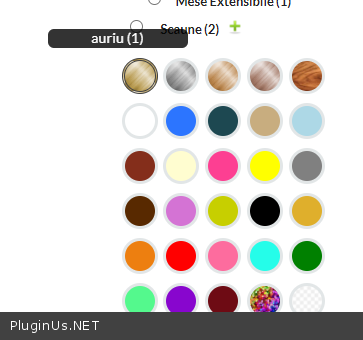
I rollover the mouse over a color attribute icon to see a text name of the color - https://c2n.me/4aM3AMM.png
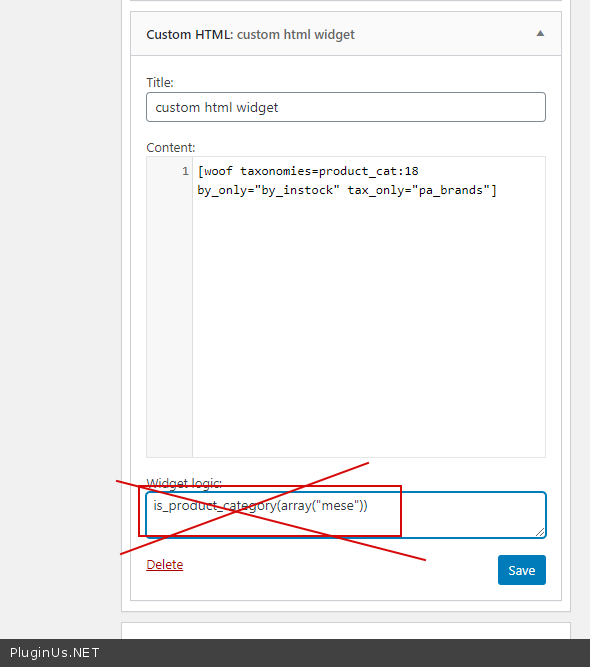
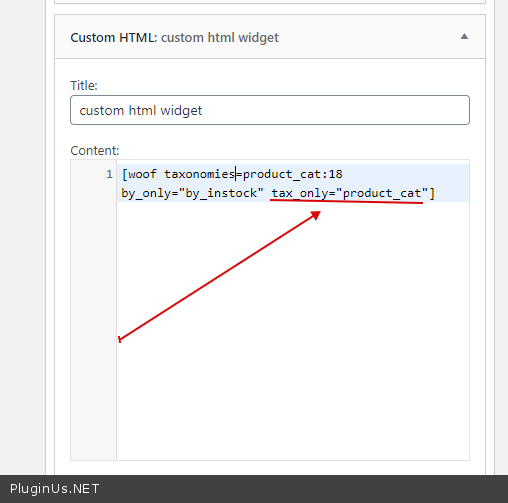
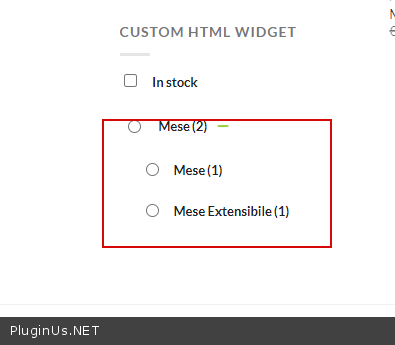
How can I show in text or html widget in [woof] shortcode the category? I tried tax_only="product_cat" but no pozitive result. - I checked it - https://c2n.me/4aM3Udk.png - The filter is displayed correctly (as you configured the shortcode) I changed code - https://c2n.me/4aM44Qo.png - the result is correct - https://c2n.me/4aM47yS.png
Hello
Add CSS
input.woof_radio_term{
margin-bottom: 0px;
}
.woof label {
margin-bottom: 0px;
padding: 0px;
}
Result - https://c2n.me/4aM3xuO.png
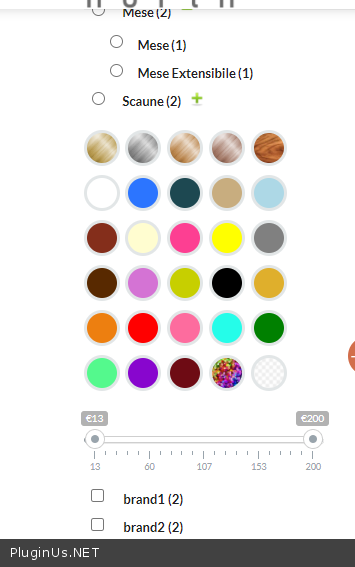
I rollover the mouse over a color attribute icon to see a text name of the color - https://c2n.me/4aM3AMM.png
How can I show in text or html widget in [woof] shortcode the category? I tried tax_only="product_cat" but no pozitive result. - I checked it - https://c2n.me/4aM3Udk.png - The filter is displayed correctly (as you configured the shortcode) I changed code - https://c2n.me/4aM44Qo.png - the result is correct - https://c2n.me/4aM47yS.png
Quote from gabriel.pribeagu on February 2, 2021, 12:07Do I have 2 filter sets for 2 main categories.
I tryed to use taxonomie category parameter in <woof> so I can specify what are categories my filter set is targheting but as I expected bouth widgets that had different filter set were showing, so it is not ok. https://clip2net.com/s/4aMRVAu
Than I tryed to use widget logic plugin. All ok, until I selected a subcategory that show my only product snd on that page the filter disseapear. So I suppose I should add something to widget logic. https://clip2net.com/s/4aMTc7Q
Pls help me
Do I have 2 filter sets for 2 main categories.
I tryed to use taxonomie category parameter in <woof> so I can specify what are categories my filter set is targheting but as I expected bouth widgets that had different filter set were showing, so it is not ok. https://clip2net.com/s/4aMRVAu
Than I tryed to use widget logic plugin. All ok, until I selected a subcategory that show my only product snd on that page the filter disseapear. So I suppose I should add something to widget logic. https://clip2net.com/s/4aMTc7Q
Pls help me
Quote from gabriel.pribeagu on February 2, 2021, 12:08The acces links are in the privat area
The acces links are in the privat area
Quote from Pablo Borysenco on February 2, 2021, 13:14Hello
So I suppose I should add something to widget logic - for scaune add this code: OR (isset($_GET['really_curr_tax']) AND $_GET['really_curr_tax'] == '19-product_cat')
for mese - OR (isset($_GET['really_curr_tax']) AND $_GET['really_curr_tax'] == '18-product_cat')
Hello
So I suppose I should add something to widget logic - for scaune add this code: OR (isset($_GET['really_curr_tax']) AND $_GET['really_curr_tax'] == '19-product_cat')
for mese - OR (isset($_GET['really_curr_tax']) AND $_GET['really_curr_tax'] == '18-product_cat')
Quote from gabriel.pribeagu on February 2, 2021, 19:20Than you!!
My next step si something about design.
Can you help me with the questions from the picture? https://clip2net.com/s/4aNlHtf
Q0: I need to set custom size for attributes font title also for widget title.
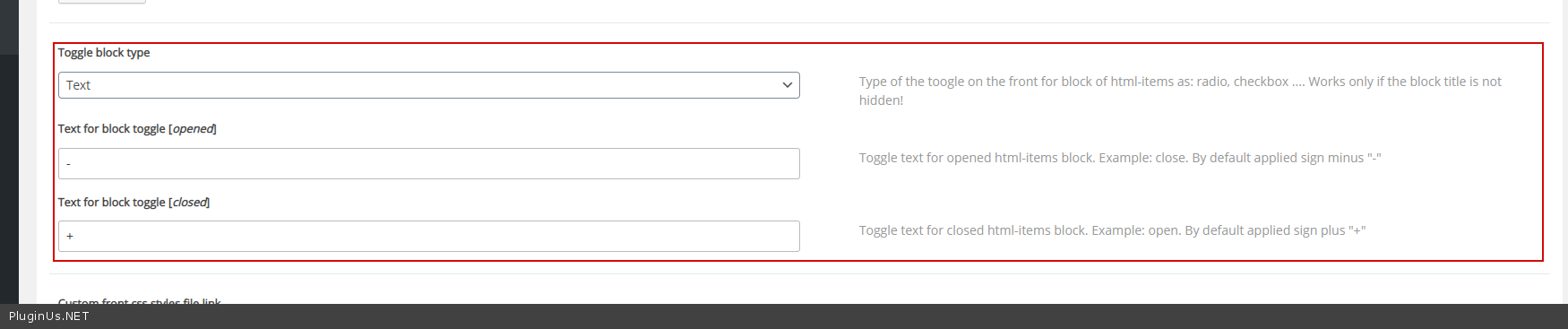
Q1: + and and - signs are reversed on extended and contracted attributes groups. Why?. Can I change with another simbols?
Q2: Can I lef align with some css code the In stock filter with another attributes checkboxes (a margin-left I suppose)
Q3: I need to change the default color for the woocommerge range slider. What css and where exactly to put it in wordpress interface? In woof, in theme or anothere place for custom css?
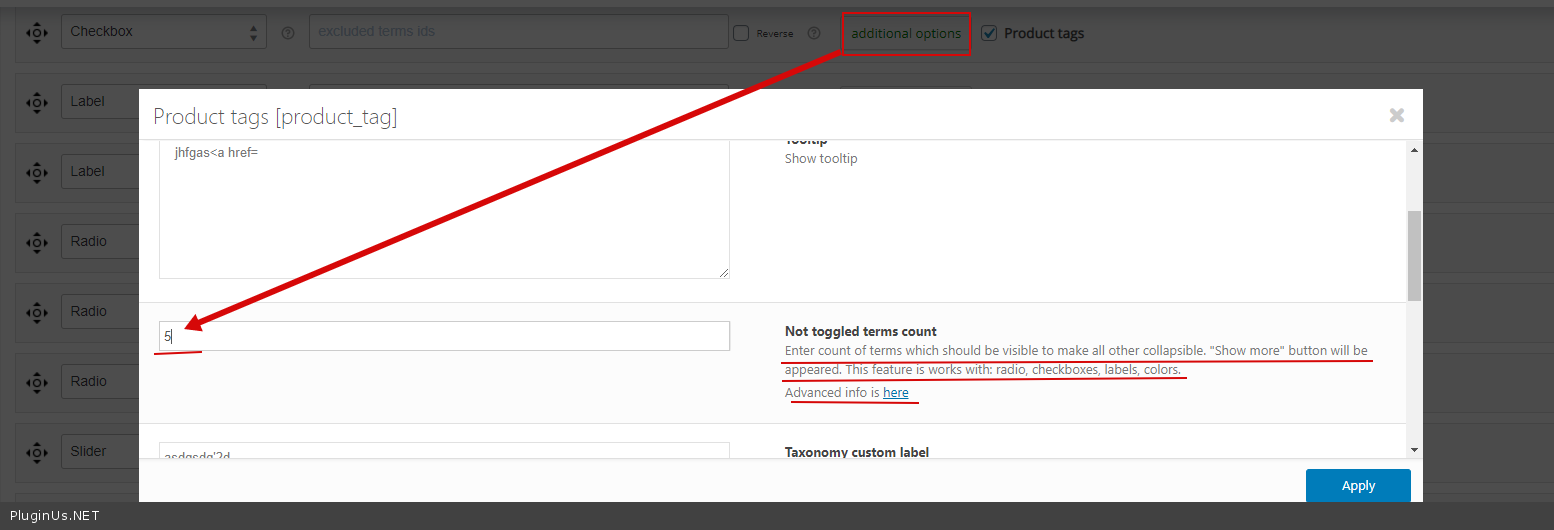
Q5: instead of fixed box height for long list of attributes, can i have a "show more" text button?
Also I find out that the "beautiful scroll" is buggy only if I have a very sort list (with 2 items) eaven if the height of the container is fixed and set for 5 items like 130px. See 3 pictures.
when you first load the page
https://clip2net.com/s/4aNmKOF
after you expand and contract the category list several times
transition phase snapshot: https://clip2net.com/s/4aNmEix
final phase snapshot: https://clip2net.com/s/4aNmOSI
Maybe you can fix it in the next versions. The normal scroll has no bugs, but can we change it`s css like colors at list..?
The link and access is in private area
Thank you
Than you!!
My next step si something about design.
Can you help me with the questions from the picture? https://clip2net.com/s/4aNlHtf
Q0: I need to set custom size for attributes font title also for widget title.
Q1: + and and - signs are reversed on extended and contracted attributes groups. Why?. Can I change with another simbols?
Q2: Can I lef align with some css code the In stock filter with another attributes checkboxes (a margin-left I suppose)
Q3: I need to change the default color for the woocommerge range slider. What css and where exactly to put it in wordpress interface? In woof, in theme or anothere place for custom css?
Q5: instead of fixed box height for long list of attributes, can i have a"show more" text button?
Also I find out that the"beautiful scroll" is buggy only if I have a very sort list (with 2 items) eaven if the height of the container is fixed and set for 5 items like 130px. See 3 pictures.
when you first load the page
https://clip2net.com/s/4aNmKOF
after you expand and contract the category list several times
transition phase snapshot: https://clip2net.com/s/4aNmEix
final phase snapshot: https://clip2net.com/s/4aNmOSI
Maybe you can fix it in the next versions. The normal scroll has no bugs, but can we change it`s css like colors at list..?
The link and access is in private area
Thank you
Quote from Pablo Borysenco on February 3, 2021, 13:09Hello
Q0 - Use custom CSS An example:
.widget-woof{
font-size: 22px;
}
Q1: - Design tab - https://c2n.me/4aNU0zP.png
Q2 :
.woof_checkbox_instock{
margin-left: 7px;
}
Q3 - https://wpopal.ticksy.com/ticket/1306845/Q5 - https://c2n.me/4aNUvLF.png
Hello
Q0 - Use custom CSS An example:
.widget-woof{
font-size: 22px;
}
Q1: - Design tab - https://c2n.me/4aNU0zP.png
Q2 :
.woof_checkbox_instock{
margin-left: 7px;
}
Q3 - https://wpopal.ticksy.com/ticket/1306845/
Q5 - https://c2n.me/4aNUvLF.png
Quote from gabriel.pribeagu on February 3, 2021, 16:28A big thank you :)
see picture https://clip2net.com/s/4aOayey
Q1: the "show more" text button can be left aligned and maybe color change for the text?
Q2: the remove filter that has a red circle close icon can be replaced with another picture?
A big thank you :)
see picture https://clip2net.com/s/4aOayey
Q1: the"show more" text button can be left aligned and maybe color change for the text?
Q2: the remove filter that has a red circle close icon can be replaced with another picture?
Quote from Pablo Borysenco on February 4, 2021, 12:36Hello
Q1: add CSS
.woof .woof_open_hidden_li {text-align: unset;
}
.woof .woof_open_hidden_li a{
color: red;
}
Q2:
body .woof_products_top_panel li span {background: url(../ADD_YOUR_IMAGE_LINK.png);}
Hello
Q1: add CSS
text-align: unset;
}
.woof .woof_open_hidden_li a{
color: red;
}
Q2:
Quote from gabriel.pribeagu on February 5, 2021, 12:29Thank you!!!
Thank you!!!
Quote from Pablo Borysenco on February 5, 2021, 13:12Hello
Welcome;)
Hello
Welcome;)
Quote from gabriel.pribeagu on May 7, 2021, 11:44Hello,
Image c496e-clip-27kb.png (clip2net.com)
Can i have that OR statements replaced with an array sintax? How should it be?
is_product_category(array("scaune","scaune-dining","scaune-bar","scaune-birou","scaune-balansoar","taburete-pufuri","bancute")) OR (isset($_GET['really_curr_tax']) AND( $_GET['really_curr_tax'] == '19-product_cat' OR
$_GET['really_curr_tax'] == '25-product_cat' OR
$_GET['really_curr_tax'] == '26-product_cat' OR
$_GET['really_curr_tax'] == '27-product_cat' OR
$_GET['really_curr_tax'] == '28-product_cat' OR
$_GET['really_curr_tax'] == '29-product_cat' OR
$_GET['really_curr_tax'] == '30-product_cat'
))
Thank you
Hello,
Image c496e-clip-27kb.png (clip2net.com)
Can i have that OR statements replaced with an array sintax? How should it be?
is_product_category(array("scaune","scaune-dining","scaune-bar","scaune-birou","scaune-balansoar","taburete-pufuri","bancute")) OR (isset($_GET['really_curr_tax']) AND( $_GET['really_curr_tax'] == '19-product_cat' OR
$_GET['really_curr_tax'] == '25-product_cat' OR
$_GET['really_curr_tax'] == '26-product_cat' OR
$_GET['really_curr_tax'] == '27-product_cat' OR
$_GET['really_curr_tax'] == '28-product_cat' OR
$_GET['really_curr_tax'] == '29-product_cat' OR
$_GET['really_curr_tax'] == '30-product_cat'
))
Thank you
Quote from Pablo Borysenco on May 7, 2021, 12:55Hello
Ok! try to use
array_intersect (array('19-product_cat','25-product_cat' ,'26-product_cat' ,'27-product_cat','28-product_cat','29-product_cat','30-product_cat'),$_GET['really_curr_tax'])
Hello
Ok! try to use
array_intersect (array('19-product_cat','25-product_cat' ,'26-product_cat' ,'27-product_cat','28-product_cat','29-product_cat','30-product_cat'),$_GET['really_curr_tax'])
Quote from gabriel.pribeagu on May 7, 2021, 13:30Like this? Now it doesn`t show the filter widget afret I press the filter value Image bd572-clip-63kb.png (clip2net.com)
is_product_category(array("scaune","scaune-dining","scaune-bar","scaune-birou","scaune-balansoar","taburete-pufuri","bancute")) OR
(isset($_GET['really_curr_tax']) AND
array_intersect(array('19-product_cat','25-product_cat' ,'26-product_cat' ,'27-product_cat','28-product_cat','29-product_cat','30-product_cat'),$_GET['really_curr_tax'])
)
Like this? Now it doesn`t show the filter widget afret I press the filter value Image bd572-clip-63kb.png (clip2net.com)
is_product_category(array("scaune","scaune-dining","scaune-bar","scaune-birou","scaune-balansoar","taburete-pufuri","bancute")) OR
(isset($_GET['really_curr_tax']) AND
array_intersect(array('19-product_cat','25-product_cat' ,'26-product_cat' ,'27-product_cat','28-product_cat','29-product_cat','30-product_cat'),$_GET['really_curr_tax'])
)