

Saudi currency
The support doesn work on Saturdays and Sundays, so some Friday requests can be answered on Monday. If you have problems with registration ask help on contact us page pleaseIf you not got email within 24~36 business hours, firstly check your spam box, and if no any email from the support there - back to the forum and read answer here. DO NOT ANSWER ON EMAILS [noreply@pluginus.net] FROM THE FORUM!! Emails are just for your info, all answers should be published only here.
The support doesn work on Saturdays and Sundays, so some Friday requests can be answered on Monday.

Quote from Doctoorc on April 24, 2025, 00:18All the currencies I've selected appear clearly to customers, each according to their country.
However, the Saudi currency doesn't appear to customers from Saudi Arabia. The dollar appears!!link:
https://dr-nafsi.online/%d8%a7%d9%84%d8%af%d9%83%d8%aa%d9%88%d8%b1%d8%a9-%d8%ad%d8%b3%d9%86%d9%87-%d8%ba%d9%86%d9%88%d9%85/
All the currencies I've selected appear clearly to customers, each according to their country.
However, the Saudi currency doesn't appear to customers from Saudi Arabia. The dollar appears!!
link:

Quote from Pablo Borysenco on April 24, 2025, 09:40Hello
Please paste your license key here - https://share.pluginus.net/image/i20230222134241.png -> https://share.pluginus.net/image/i20230222134511.png
Try doing a test from another IP and another device
Hello
Please paste your license key here - https://share.pluginus.net/image/i20230222134241.png -> https://share.pluginus.net/image/i20230222134511.png


Try doing a test from another IP and another device
Quote from Doctoorc on April 24, 2025, 12:32Please
Where can I find the license key?
I forgot to find it.
Please
Where can I find the license key?
I forgot to find it.
Quote from Pablo Borysenco on April 25, 2025, 09:35Hello
To get license key - https://codecanyon.net/downloads -> https://c2n.me/49ZXJv0.png
Hello
To get license key - https://codecanyon.net/downloads -> https://c2n.me/49ZXJv0.png
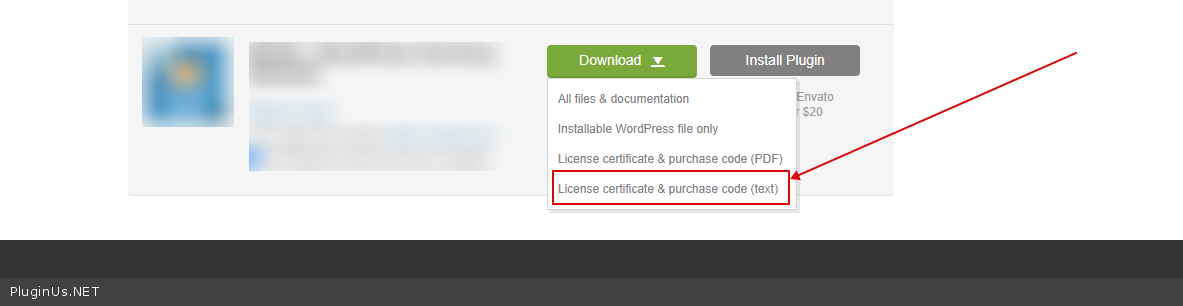
Quote from Doctoorc on April 26, 2025, 13:10Please.
Does the license key have to be renewed every year?
I lost access to Envato.
I purchased two plugins about a year ago. "I own two websites"
Is there another way to find license keys?
Please.
Does the license key have to be renewed every year?
I lost access to Envato.
I purchased two plugins about a year ago."I own two websites"
Is there another way to find license keys?
Quote from Pablo Borysenco on April 28, 2025, 09:33Hello
Does the license key have to be renewed every year? - You don't need to renew the license, you only need to renew the support (of course, if you need it)
I lost access to Envato. - Contact support, maybe they will help restore access
Unfortunately we do not support products without a license.
Hello
Does the license key have to be renewed every year? - You don't need to renew the license, you only need to renew the support (of course, if you need it)
I lost access to Envato. - Contact support, maybe they will help restore access
Unfortunately we do not support products without a license.
Quote from Doctoorc on December 31, 2025, 21:27The license code was placed
The license code was placed

Quote from Alex Dovlatov on January 7, 2026, 13:20Hello
Thank you for collaboration. WPCS update of the plugin is done, so please update it ( https://wp-currency.com/just-bought-plugin-cant-install-error ). For more precise defining of locations use please service maxmind https://share.pluginus.net/image/i20260107131845.png - its inuilt into WPCS plugin, but you need to get key for it, its free, you can do it here https://www.maxmind.com/en/home
Hello
Thank you for collaboration. WPCS update of the plugin is done, so please update it ( https://wp-currency.com/just-bought-plugin-cant-install-error ). For more precise defining of locations use please service maxmind https://share.pluginus.net/image/i20260107131845.png - its inuilt into WPCS plugin, but you need to get key for it, its free, you can do it here https://www.maxmind.com/en/home

Quote from Doctoorc on January 17, 2026, 18:40Thank you for your reply.
I don't know how to use https://www.maxmind.com/en/home. It doesn't allow new member registration; you have to submit a request to access the service, which is only a trial.This is a real problem!
Please, I'm still lost.
Thank you for your reply.
I don't know how to use https://www.maxmind.com/en/home. It doesn't allow new member registration; you have to submit a request to access the service, which is only a trial.
This is a real problem!
Please, I'm still lost.
Quote from Doctoorc on January 17, 2026, 18:40Thank you for your reply.
I don't know how to use https://www.maxmind.com/en/home. It doesn't allow new member registration; you have to submit a request to access the service, which is only a trial.This is a real problem!
Please, I'm still lost.
Thank you for your reply.
I don't know how to use https://www.maxmind.com/en/home. It doesn't allow new member registration; you have to submit a request to access the service, which is only a trial.
This is a real problem!
Please, I'm still lost.
Quote from Doctoorc on January 17, 2026, 19:09I'm having a major problem getting a code from this website.
It requires a professional email address and keeps blocking me, etc.
Please, I need a solution.
I'm having a major problem getting a code from this website.
It requires a professional email address and keeps blocking me, etc.
Please, I need a solution.
Quote from Doctoorc on January 17, 2026, 21:40I'm trying to register here:
https://www.maxmind.com/en/geolite2/signup
Registration fails and I get the following message:
Sorry, we were not able to create your account. Please ensure that you are using an email that is not disposable, and that you are not connecting via a proxy or VPN.I tried everything, but it was no use.
I'm trying to register here:
https://www.maxmind.com/en/geolite2/signup
Registration fails and I get the following message:
Sorry, we were not able to create your account. Please ensure that you are using an email that is not disposable, and that you are not connecting via a proxy or VPN.
I tried everything, but it was no use.
Quote from Alex Dovlatov on January 19, 2026, 12:43Hello
Contat them please: https://www.maxmind.com/en/company/contact-us - this is world wide service, maybe they are has temporary problems with web infrastructure
Hello
Contat them please: https://www.maxmind.com/en/company/contact-us - this is world wide service, maybe they are has temporary problems with web infrastructure
Quote from Alex Dovlatov on January 19, 2026, 12:46I successfully registered with MaxMind using a simple Gmail account - no corporate email needed.
If you're trying to register with an email from your own server/domain, that might be causing the problem. MaxMind may have policies blocking certain email servers or your server might be on a blocklist.
Please try:
- Use a simple Gmail or Outlook account instead
- Make sure you're NOT using VPN or proxy
- Try from a different internet connection (mobile data instead of WiFi)
If registration still fails with Gmail, please contact MaxMind support directly: https://www.maxmind.com/en/company/contact-us
They should help you resolve the registration issue, as this is a widely-used free service with millions of users.
I successfully registered with MaxMind using a simple Gmail account - no corporate email needed.
If you're trying to register with an email from your own server/domain, that might be causing the problem. MaxMind may have policies blocking certain email servers or your server might be on a blocklist.
Please try:
- Use a simple Gmail or Outlook account instead
- Make sure you're NOT using VPN or proxy
- Try from a different internet connection (mobile data instead of WiFi)
If registration still fails with Gmail, please contact MaxMind support directly: https://www.maxmind.com/en/company/contact-us
They should help you resolve the registration issue, as this is a widely-used free service with millions of users.
Quote from Doctoorc on January 21, 2026, 13:12I created the code and placed it where it was needed, but unfortunately, the problem wasn't solved.
I have two websites, and I use the same plugin and the same settings exactly.
The first one: https://dr-nafsi.online/ Everything works, and the currency appears in Saudi Riyals for visitors from Saudi Arabia.
The second website: https://www.doctoorc.com/ This is the one with the problem; the currency doesn't appear in Riyals for visitors from Saudi Arabia!
It appears in US Dollars or Euros.
I created the code and placed it where it was needed, but unfortunately, the problem wasn't solved.
I have two websites, and I use the same plugin and the same settings exactly.
The first one: https://dr-nafsi.online/ Everything works, and the currency appears in Saudi Riyals for visitors from Saudi Arabia.
The second website: https://www.doctoorc.com/ This is the one with the problem; the currency doesn't appear in Riyals for visitors from Saudi Arabia!
It appears in US Dollars or Euros.
Quote from Doctoorc on January 21, 2026, 13:17I launched the IP changer app on my device and went into the settings.
Notice what the first site shows below.
And what the other site shows below!
The first sound site:
I launched the IP changer app on my device and went into the settings.
Notice what the first site shows below.
And what the other site shows below!
The first sound site:

Quote from Doctoorc on January 21, 2026, 13:18The second site: the one with the problem
The second site: the one with the problem

Quote from Doctoorc on January 21, 2026, 13:22Note: On the first site, which works well, I don't use code from MaxMind.
open Geo IP
Note: On the first site, which works well, I don't use code from MaxMind.
open Geo IP
Quote from Alex Dovlatov on January 21, 2026, 13:47Hello
Your two sites are using different GeoIP databases, which is why you're getting different country detection results.
Site 1 (dr-nafsi.online) - WORKS:
- Using "Open Geo IP" method
- Uses built-in GeoIP.dat database (older, but reliable)
- Correctly detects Saudi Arabia as "SA"
Site 2 (doctoorc.com) - BROKEN:
- Using MaxMind GeoIP2 method
- Either the GeoLite2 database was never downloaded, or it's corrupted/outdated
- This is why it's showing "FR" (wrong country code) or falling back to USD
Solution - Choose ONE of these:
Option 1: Switch to Open Geo IP (RECOMMENDED - same as working site):
- Go to WordPress Admin → WPCS Settings
- Find "Geo position" setting
- Change from "MaxMind GeoIP2" to "Open GeoIP" (or similar option)
- Save settings
- Test from Saudi IP
Option 2: Fix MaxMind GeoIP2 database:
- Go to WordPress Admin → WPCS Settings
- Find MaxMind settings section
- Click "Update/Download Database" button
- Wait for download to complete (this downloads fresh GeoLite2-Country.mmdb file)
- Clear cache
- Test from Saudi IP
Why this happened:
The MaxMind GeoIP2 method requires downloading a separate database file into
/wp-content/uploads/currency-switcher/GeoLite2-Country.mmdb. If this file is missing or outdated, country detection fails or returns wrong results.The "Open Geo IP" method uses a built-in database that works immediately without any setup.
Hello
Your two sites are using different GeoIP databases, which is why you're getting different country detection results.
Site 1 (dr-nafsi.online) - WORKS:
- Using "Open Geo IP" method
- Uses built-in GeoIP.dat database (older, but reliable)
- Correctly detects Saudi Arabia as"SA"
Site 2 (doctoorc.com) - BROKEN:
- Using MaxMind GeoIP2 method
- Either the GeoLite2 database was never downloaded, or it's corrupted/outdated
- This is why it's showing"FR" (wrong country code) or falling back to USD
Solution - Choose ONE of these:
Option 1: Switch to Open Geo IP (RECOMMENDED - same as working site):
- Go to WordPress Admin → WPCS Settings
- Find "Geo position" setting
- Change from "MaxMind GeoIP2" to "Open GeoIP" (or similar option)
- Save settings
- Test from Saudi IP
Option 2: Fix MaxMind GeoIP2 database:
- Go to WordPress Admin → WPCS Settings
- Find MaxMind settings section
- Click "Update/Download Database" button
- Wait for download to complete (this downloads fresh GeoLite2-Country.mmdb file)
- Clear cache
- Test from Saudi IP
Why this happened:
The MaxMind GeoIP2 method requires downloading a separate database file into /wp-content/uploads/currency-switcher/GeoLite2-Country.mmdb. If this file is missing or outdated, country detection fails or returns wrong results.
The"Open Geo IP" method uses a built-in database that works immediately without any setup.