

Remove WOOF from single product page
The support doesn work on Saturdays and Sundays, so some Friday requests can be answered on Monday. If you have problems with registration ask help on contact us page pleaseIf you not got email within 24~36 business hours, firstly check your spam box, and if no any email from the support there - back to the forum and read answer here. DO NOT ANSWER ON EMAILS [noreply@pluginus.net] FROM THE FORUM!! Emails are just for your info, all answers should be published only here.
The support doesn work on Saturdays and Sundays, so some Friday requests can be answered on Monday.

Quote from Dimitris on April 12, 2022, 07:47In most cases, single product pages do not have sidebar, yet the sidebar is loaded with them. That means that also WOOF is loaded and this can have a rather big impact in the page's speed metrix.
There was a previous message here, but was unable to comment: https://pluginus.net/support/topic/remove-woof-filter-from-sidebar-on-all-product-pages-widget-logic-safety-concern/
I suggest that you are better off adding this snippet in your child theme's functions.php in order to get the best of it.
add_action( 'wp', 'dv_remove_sidebar_product_pages' );function dv_remove_sidebar_product_pages() {if ( is_product() ) {remove_action( 'woocommerce_sidebar', 'woocommerce_get_sidebar', 10 );}}
In most cases, single product pages do not have sidebar, yet the sidebar is loaded with them. That means that also WOOF is loaded and this can have a rather big impact in the page's speed metrix.
There was a previous message here, but was unable to comment: https://pluginus.net/support/topic/remove-woof-filter-from-sidebar-on-all-product-pages-widget-logic-safety-concern/
I suggest that you are better off adding this snippet in your child theme's functions.php in order to get the best of it.

Quote from Pablo Borysenco on April 12, 2022, 11:49Hello
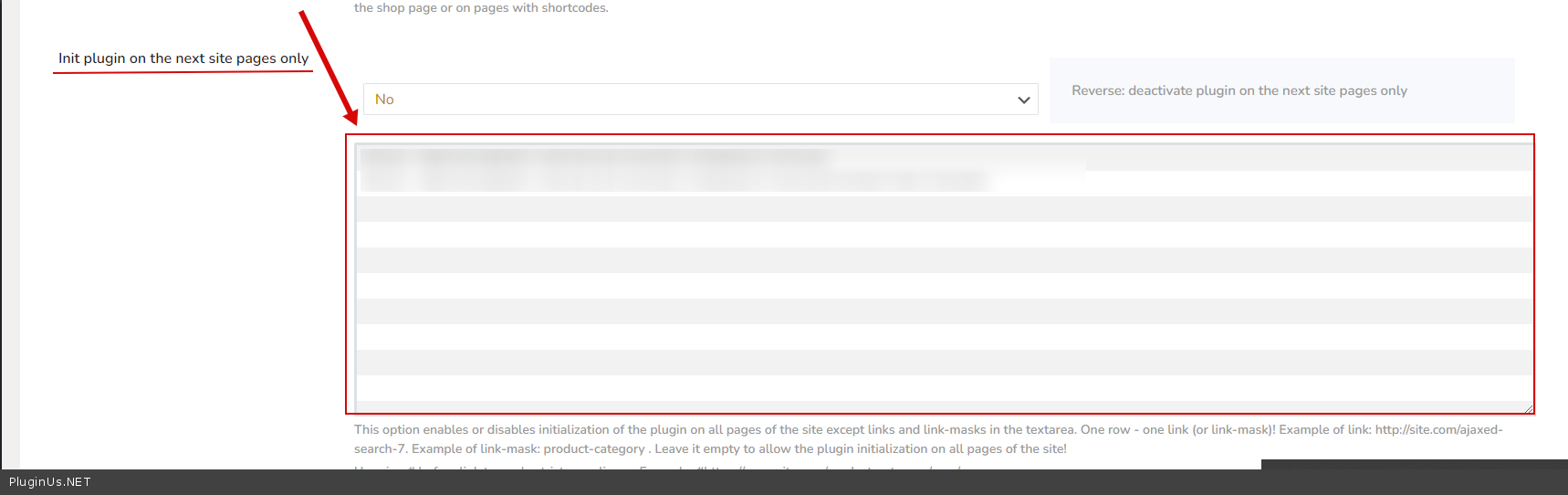
Please use this option - https://c2n.me/4fpfOpB.png
Hello
Please use this option - https://c2n.me/4fpfOpB.png
Quote from Dimitris on April 12, 2022, 12:07Thank you Pablo!
You are doing so much is hard to catch up with you.
BTW I am starting a project with 150k products (but only 5 attributes - is spare parts for cars) - is for cars... and this is going to be a really tough test for the plugin. But I am optimistic!
Thank you Pablo!
You are doing so much is hard to catch up with you.
BTW I am starting a project with 150k products (but only 5 attributes - is spare parts for cars) - is for cars... and this is going to be a really tough test for the plugin. But I am optimistic!
Quote from Pablo Borysenco on April 13, 2022, 10:57Hello
(but only 5 attributes - is spare parts for cars) - This should work fine, the main thing is to use as few taxonomies as possible
Hello
(but only 5 attributes - is spare parts for cars) - This should work fine, the main thing is to use as few taxonomies as possible
Quote from Dimitris on April 14, 2022, 10:27Pablo,
As I am experimenting with WOOF, I reached the first pitfall... The generation of the file for product and variants is limited to 15000.
I guess I am changing this value here:
$limit = apply_filters("woof_turbo_mode_products_limit", 15000);wp-content\plugins\woocommerce-products-filter\ext\turbo_mode\index.phpIt may be good to add to your faq\documentation a function to add to functions.php to override this value as you have done for the search products limit.
Pablo,
As I am experimenting with WOOF, I reached the first pitfall... The generation of the file for product and variants is limited to 15000.
I guess I am changing this value here:
Quote from Dimitris on April 14, 2022, 11:08Just to let you know that without building the turbo index (although I am not going to use the turbo display mode), the query times out... I think it needs to run for a few many hours to build it. The active attributes are only four in the filter, athough two of them (model types and categories have a few hundred terms each).
I will keep you update to see how it goes. May be can be a great case study for you as well...
Here is the page...
https://carro.gr/fanopoiia/
Initial display is the first term (models, I am using the conditional) is blazingly fast... I have to say.
Just to let you know that without building the turbo index (although I am not going to use the turbo display mode), the query times out... I think it needs to run for a few many hours to build it. The active attributes are only four in the filter, athough two of them (model types and categories have a few hundred terms each).
I will keep you update to see how it goes. May be can be a great case study for you as well...
Here is the page...
Initial display is the first term (models, I am using the conditional) is blazingly fast... I have to say.
Quote from Pablo Borysenco on April 14, 2022, 13:15Hello
Try to add
add_filter("woof_turbo_mode_products_limit", function($count){
return 200000;
});
Ok!
Hello
Try to add
add_filter("woof_turbo_mode_products_limit", function($count){
return 200000;
});
Ok!
Quote from Dimitris on April 21, 2022, 12:32Pablo hi,
I provided the credentials for you to look at this issue:
https://carro.gr/fanopoiia/110k items - five attributes (though a couple of them have a lot of choices)
I have used conditional filter, first brand, then model, then type but after selecting the brand nothing happens.
I tried to create the index in the turbo mode (although I am not going to use the turbo mode itself for display) but after a day it had reached about 50k items. I wonder if we can run it via WP CLI to expedite the creation of the index.
Pablo hi,
I provided the credentials for you to look at this issue:
https://carro.gr/fanopoiia/
110k items - five attributes (though a couple of them have a lot of choices)
I have used conditional filter, first brand, then model, then type but after selecting the brand nothing happens.
I tried to create the index in the turbo mode (although I am not going to use the turbo mode itself for display) but after a day it had reached about 50k items. I wonder if we can run it via WP CLI to expedite the creation of the index.
Quote from Pablo Borysenco on April 22, 2022, 15:58Hello
Please do a test
For such a large number of products, I think it is better not to use Turbo Mode / It will not be effective
Hello
Please do a test
For such a large number of products, I think it is better not to use Turbo Mode / It will not be effective
Quote from Dimitris on April 22, 2022, 19:13I am not using it. I just tried to create the indexes, that I was thinking are used regardless...
I noticed that it became disabled and it is working.
But it shows results prior to selecting the model type. To make it fast, it will be best to just list the brands, after the user picks a brand then hide the brands and just display the available models for the brand he chose,
when the user to selects the model then the other models disappear and is presented with the model types of the model he selected.
After he selects the model type of interest than to display the results.
This is what I expected to see unless I made a mistake in the conditional
I am not using it. I just tried to create the indexes, that I was thinking are used regardless...
I noticed that it became disabled and it is working.
But it shows results prior to selecting the model type. To make it fast, it will be best to just list the brands, after the user picks a brand then hide the brands and just display the available models for the brand he chose,
when the user to selects the model then the other models disappear and is presented with the model types of the model he selected.
After he selects the model type of interest than to display the results.
This is what I expected to see unless I made a mistake in the conditional
Quote from Dimitris on April 22, 2022, 19:26I changed the terms to AND instead of OR and now it functions as expected (although at times takes a bit too long - possibly because it also calculates/presents the results for each step). The good thing about it is that it displays the brands that share components with one another. Try for example Alfa Romeo and you will also see FIAT, LANCIA and OPEL that apparently share components with Alfa Romeo.
Pablo one more thing... please provide a link to your documentation about the formating of the choices when conditional. I would like to format the responses in second level in a number of columns, so that I can make it more presentable.
Also to have the results in colums as well. if you have any advice/links it will be great.
I changed the terms to AND instead of OR and now it functions as expected (although at times takes a bit too long - possibly because it also calculates/presents the results for each step). The good thing about it is that it displays the brands that share components with one another. Try for example Alfa Romeo and you will also see FIAT, LANCIA and OPEL that apparently share components with Alfa Romeo.
Pablo one more thing... please provide a link to your documentation about the formating of the choices when conditional. I would like to format the responses in second level in a number of columns, so that I can make it more presentable.
Also to have the results in colums as well. if you have any advice/links it will be great.
Quote from Pablo Borysenco on April 25, 2022, 12:32Hello
Read this - https://products-filter.com/extencion/conditionals
But perhaps another extension is better for you - https://products-filter.com/extencion/woocommerce-step-by-step-filter
Try to add CSS
body .woof_list_radio li{
width: 20%;
display: inline-block;}
Result: https://share.pluginus.net/image/i20220425103219.png
Hello
Read this - https://products-filter.com/extencion/conditionals
But perhaps another extension is better for you - https://products-filter.com/extencion/woocommerce-step-by-step-filter
Try to add CSS
body .woof_list_radio li{
width: 20%;
display: inline-block;
}
Result: https://share.pluginus.net/image/i20220425103219.png

Quote from Dimitris on April 26, 2022, 09:40Thank you Pablo!
Yes, this is more like it.
I noticed that when in the options I select "hide empty terms", I cannot hide the numbers of the items that match the query. If I do this (i.e. set hide count to yes) then it disables the "hide empty term". To hide the count I just added this on the CSS:
.woof_image_text_term span {
display:none !important;
}I also do not want to do dynamic recount to make it even faster. Ideally, I would like to cache all initial hits (for all brands) so that the search is much faster. Is there a way to "warm up" the cache, because right now in the first hit of a brand it takes quite a lot of time. How can I populate the cache?
Thank you Pablo!
Yes, this is more like it.
I noticed that when in the options I select"hide empty terms", I cannot hide the numbers of the items that match the query. If I do this (i.e. set hide count to yes) then it disables the"hide empty term". To hide the count I just added this on the CSS:
.woof_image_text_term span {
display:none !important;
}
I also do not want to do dynamic recount to make it even faster. Ideally, I would like to cache all initial hits (for all brands) so that the search is much faster. Is there a way to"warm up" the cache, because right now in the first hit of a brand it takes quite a lot of time. How can I populate the cache?
Quote from Dimitris on April 26, 2022, 10:00Also in the second step, if you choose dropdown the choices that are under the main div area are inactive.
See here:
https://carro.gr/fanopoiia/?swoof=1&pa_brand=citroen&paged=1
<img src="https://db3pap004files.storage.live.com/y4mrUEejGSFll-w-MdtpKI4AxWJ3YzC31Ui0c6jLf49SbBRUWcXgAySbYKessIbuDBq3dWtzoHtOlyh4LY0XJps4AyHA38h_Q4Hajo6hLpbRhpudOXgZ0PvzDosGSPXZl-z97JGewNOArTrKWJfuc_8rwDFu8u1ydDZ-hNGmTqyvyGO5cuHJH0FSAdhnyzCpo4t?width=1354&height=703&cropmode=none" width="1354" height="703" />
I tried this:
.woof_container select {
width: 40%;
overflow: visible !important;
z-index: 99999999999999 !important;
}But still is not working.
Also in the second step, if you choose dropdown the choices that are under the main div area are inactive.
See here:
https://carro.gr/fanopoiia/?swoof=1&pa_brand=citroen&paged=1
<img src="https://db3pap004files.storage.live.com/y4mrUEejGSFll-w-MdtpKI4AxWJ3YzC31Ui0c6jLf49SbBRUWcXgAySbYKessIbuDBq3dWtzoHtOlyh4LY0XJps4AyHA38h_Q4Hajo6hLpbRhpudOXgZ0PvzDosGSPXZl-z97JGewNOArTrKWJfuc_8rwDFu8u1ydDZ-hNGmTqyvyGO5cuHJH0FSAdhnyzCpo4t?width=1354&height=703&cropmode=none" width="1354" height="703" />
I tried this:
width: 40%;
overflow: visible !important;
z-index: 99999999999999 !important;
}
But still is not working.
Quote from Dimitris on April 26, 2022, 10:06fyi the options that I have in the page are as follows:
[woof_step autosubmit=0 filter_type=2 by_step="pa_brand,pa_model,pa_model-type" selector='.woof' img_behavior='prepend' ] [woof_products is_ajax=1 display_on_search=1]
If I press Alfa Romeo and there are spare parts that are common with other brands, it shows also the other brands - not just Alfa Romeo.
fyi the options that I have in the page are as follows:
[woof_step autosubmit=0 filter_type=2 by_step="pa_brand,pa_model,pa_model-type" selector='.woof' img_behavior='prepend' ] [woof_products is_ajax=1 display_on_search=1]
If I press Alfa Romeo and there are spare parts that are common with other brands, it shows also the other brands - not just Alfa Romeo.
Quote from Pablo Borysenco on April 26, 2022, 13:15Hello
I noticed that when in the options I select"hide empty terms", I cannot hide the numbers - https://share.pluginus.net/image/i20220426110624.png
Try to add CSS:
.vc_row.tdi_100.wpb_row.td-pb-row{
z-index: 999;
}
If I press Alfa Romeo and there are spare parts that are common with other brands, it shows also the other brands - not just Alfa Romeo. - I'm not sure I understood you correctly. The filter does a count of products, and if the counter is not equal to zero, this will be displayed.
Hello
I noticed that when in the options I select"hide empty terms", I cannot hide the numbers - https://share.pluginus.net/image/i20220426110624.png

Try to add CSS:
.vc_row.tdi_100.wpb_row.td-pb-row{
z-index: 999;
}
If I press Alfa Romeo and there are spare parts that are common with other brands, it shows also the other brands - not just Alfa Romeo. - I'm not sure I understood you correctly. The filter does a count of products, and if the counter is not equal to zero, this will be displayed.
Quote from Dimitris on April 27, 2022, 05:24Thank you, both worked!
Any suggestions about the warm-up of the cache?
Thank you, both worked!
Any suggestions about the warm-up of the cache?
Quote from Pablo Borysenco on April 27, 2022, 12:41Hello
Any suggestions about the warm-up of the cache? - unfortunately the plugin does not have this feature
Hello
Any suggestions about the warm-up of the cache? - unfortunately the plugin does not have this feature