martyn_gray50(@martyn_gray50)
5 Posts
Customers
Quote from martyn_gray50 on July 5, 2020, 11:16
On our website we sometimes get a 404 error when the product category is changed if the page number is higher than the products in the category.
Here is an example - Use the link below and then untick 'Blank Cards' you will get a 404 error.
https://hannahlongmuir.co.uk/shop/page/3?swoof=1&product_cat=kraftcards%2Ckraftcards%2Cblank-cards
Is there a way to remove the page number in the URL when the product filters are changed?
I am using the Premium version of the plugin.
Many thanks, Martyn
On our website we sometimes get a 404 error when the product category is changed if the page number is higher than the products in the category.
Here is an example - Use the link below and then untick 'Blank Cards' you will get a 404 error.
https://hannahlongmuir.co.uk/shop/page/3?swoof=1&product_cat=kraftcards%2Ckraftcards%2Cblank-cards
Is there a way to remove the page number in the URL when the product filters are changed?
I am using the Premium version of the plugin.
Many thanks, Martyn

Pablo Borysenco(@pavlo_borysenco)
34,196 Posts
Quote from Pablo Borysenco on July 6, 2020, 11:31
Hello Martyn
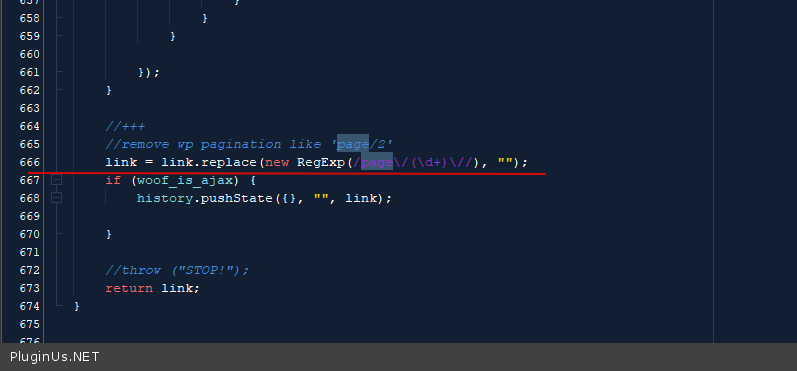
Try in file - \wp-content\plugins\woocommerce-products-filter\js\front.js - change code - https://c2n.me/48h77rX.png
link = link.replace(new RegExp(/page\/(\d+)/), "");
Hello Martyn
Try in file - \wp-content\plugins\woocommerce-products-filter\js\front.js - change code - https://c2n.me/48h77rX.png
link = link.replace(new RegExp(/page\/(\d+)/),"");
martyn_gray50(@martyn_gray50)
5 PostsTopic Author
Customers
Quote from martyn_gray50 on July 6, 2020, 12:20
Thanks for your help. I have updated the line of code in '\wp-content\plugins\woocommerce-products-filter\js\front.js' and cleared out the cache but still makes no difference.
In the private data I have added my admin login if you ant to take a closer look.

Thanks for your help. I have updated the line of code in '\wp-content\plugins\woocommerce-products-filter\js\front.js' and cleared out the cache but still makes no difference.
In the private data I have added my admin login if you ant to take a closer look.
martyn_gray50(@martyn_gray50)
5 PostsTopic Author
Customers
Quote from martyn_gray50 on July 6, 2020, 17:13
I have fixed the problem. The website was still using cache data. I changed the file name in '/wp-content/plugins/woocommerce-products-filter/index.php' and updated the new file name in 'js' folder.
Here is the code I changed. I just modified the file name.
wp_enqueue_script('woof_front', WOOF_LINK . 'js/front-mod.js', array('jquery'), WOOF_VERSION);
Thanks again for your help.
I have fixed the problem. The website was still using cache data. I changed the file name in '/wp-content/plugins/woocommerce-products-filter/index.php' and updated the new file name in 'js' folder.
Here is the code I changed. I just modified the file name.
wp_enqueue_script('woof_front', WOOF_LINK . 'js/front-mod.js', array('jquery'), WOOF_VERSION);
Thanks again for your help.
Pablo Borysenco(@pavlo_borysenco)
34,196 Posts
Quote from Pablo Borysenco on July 7, 2020, 11:41
Hello
Ok! Great!
Hello
Ok! Great!