

Re-save profile
The support doesn work on Saturdays and Sundays, so some Friday requests can be answered on Monday. If you have problems with registration ask help on contact us page pleaseIf you not got email within 24~36 business hours, firstly check your spam box, and if no any email from the support there - back to the forum and read answer here. DO NOT ANSWER ON EMAILS [noreply@pluginus.net] FROM THE FORUM!! Emails are just for your info, all answers should be published only here.
The support doesn work on Saturdays and Sundays, so some Friday requests can be answered on Monday.

Quote from cafesolo on January 25, 2023, 19:04Hello,
When I want to modify a column profile or a filter profile, I don't see how to re-save the profile...
There I have to create a new one and delete the old one... There is no solution that I did not find ?
Thanks
Hello,
When I want to modify a column profile or a filter profile, I don't see how to re-save the profile...
There I have to create a new one and delete the old one... There is no solution that I did not find ?
Thanks
Quote from cafesolo on January 25, 2023, 20:01Another question: I created fiter and column profiles with my admin status.
When I log in with Store Manager status, I can't see/read the profiles created...
How do I do this?
Another question: I created fiter and column profiles with my admin status.
When I log in with Store Manager status, I can't see/read the profiles created...
How do I do this?

Quote from Pablo Borysenco on January 26, 2023, 11:00Hello
There I have to create a new one and delete the old one.. - Yes, this is the solution
I can't see/read the profiles created... - Please check option - https://c2n.me/4hFVFHT.png - and create new profiles
Hello
There I have to create a new one and delete the old one.. - Yes, this is the solution
I can't see/read the profiles created... - Please check option - https://c2n.me/4hFVFHT.png - and create new profiles
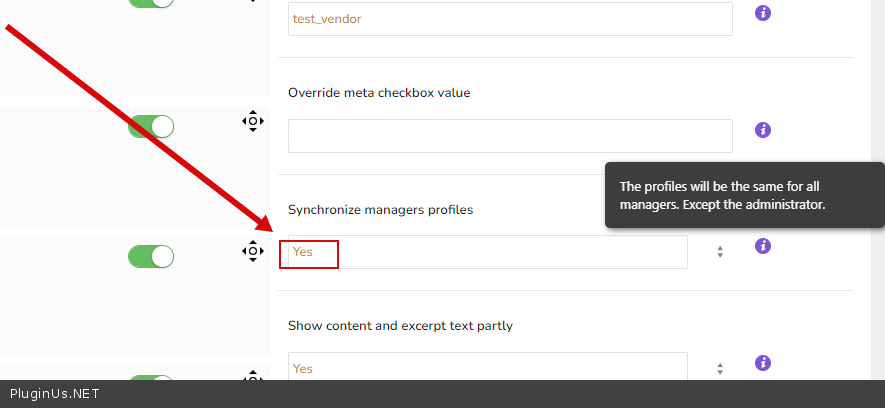
Quote from cafesolo on January 26, 2023, 11:07Hello,
If I understand well, it's not possible for Shop manager to see/read profiles created by administrator ?...
Hello,
If I understand well, it's not possible for Shop manager to see/read profiles created by administrator ?...
Quote from Pablo Borysenco on January 26, 2023, 13:03Yes. But you can create another roles for yourself and create profiles for all managers
Yes. But you can create another roles for yourself and create profiles for all managers
Quote from cafesolo on January 27, 2023, 12:33Hello,
1/ I have got many shop manager profiles for test, and synchronisation doesn't run between themselves.
Each one see only profiles filters/columns he has created...
2/ There is a problems with Settings savings, when I re-open settings some fields become activated whereas it wasn't,
and conversely some that were activated are deactivated...
to obtain the profile I wish to save, I have to open and save settings at least 3 or 4 times, to activate an desactivated fieds...
Thanks for your help
Hello,
1/ I have got many shop manager profiles for test, and synchronisation doesn't run between themselves.
Each one see only profiles filters/columns he has created...
2/ There is a problems with Settings savings, when I re-open settings some fields become activated whereas it wasn't,
and conversely some that were activated are deactivated...
to obtain the profile I wish to save, I have to open and save settings at least 3 or 4 times, to activate an desactivated fieds...
Thanks for your help
Quote from Pablo Borysenco on January 27, 2023, 14:04Hello
1 Can you give me two manager access so I can check it out? And ftp access - https://share.pluginus.net/image/i20210618130558.png -> https://share.pluginus.net/image/i20210618130637.png
2 Please make a video with error
Hello
1 Can you give me two manager access so I can check it out? And ftp access - https://share.pluginus.net/image/i20210618130558.png -> https://share.pluginus.net/image/i20210618130637.png


2 Please make a video with error
Quote from cafesolo on January 27, 2023, 14:53Access BO for 2 SEO managers and FTP in Private Data Box...
Access BO for 2 SEO managers and FTP in Private Data Box...
Quote from Pablo Borysenco on January 30, 2023, 17:20Hello
So please update the plugin to latest version - https://bulk-editor.com/how-to-make-auto-update-for-wordpress-plugins-and-themes-bought-on-envato - follow my instructions - https://share.pluginus.net/image/i20230130151512.png - and take a test
Hello
So please update the plugin to latest version - https://bulk-editor.com/how-to-make-auto-update-for-wordpress-plugins-and-themes-bought-on-envato - follow my instructions - https://share.pluginus.net/image/i20230130151512.png - and take a test

Quote from cafesolo on January 30, 2023, 17:29Hello,
Manually it's always good to do that on FTP :
- remove all files of woocommerce-products-filter folder
- upload file of new archive of plgin in woocommerce-products-filters folder
Run and all will be good !?
Thanks
Hello,
Manually it's always good to do that on FTP :
- remove all files of woocommerce-products-filter folder
- upload file of new archive of plgin in woocommerce-products-filters folder
Run and all will be good !?
Thanks
Quote from cafesolo on January 30, 2023, 18:32Your link for instructions doesn't work : https://share.pluginus.net/image/i20230130151512.png

Your link for instructions doesn't work : https://share.pluginus.net/image/i20230130151512.png
Quote from Pablo Borysenco on January 31, 2023, 11:35Hello
Correct link - https://share.pluginus.net/image/i20230130151512.png
Run and all will be good !? - Yes. But I recommend this way - https://bulk-editor.com/how-to-make-auto-update-for-wordpress-plugins-and-themes-bought-on-envato
Hello
Correct link - https://share.pluginus.net/image/i20230130151512.png
Run and all will be good !? - Yes. But I recommend this way - https://bulk-editor.com/how-to-make-auto-update-for-wordpress-plugins-and-themes-bought-on-envato