

Quick search questions
The support doesn work on Saturdays and Sundays, so some Friday requests can be answered on Monday. If you have problems with registration ask help on contact us page pleaseIf you not got email within 24~36 business hours, firstly check your spam box, and if no any email from the support there - back to the forum and read answer here. DO NOT ANSWER ON EMAILS [noreply@pluginus.net] FROM THE FORUM!! Emails are just for your info, all answers should be published only here.
The support doesn work on Saturdays and Sundays, so some Friday requests can be answered on Monday.

Quote from Simeon on June 20, 2024, 17:35Hello!
I have a few questions about the Quick search.
- If checkbox is used for the filter, can it be done to show only 5 categories with a button "show more" like in the regular product filter
- Can the price filter be something else than a slider. Because the shop has one extremely expensive item - 8,500 BGN (most products are between 5-200 BGN) and in this case the slider is not useful. Could it be a radio filter with a few options. For ex: 0-50, 51-100, 101-200 and etc.
- How to change the "Order by" titles. I am looking at this solution but I am not sure I understand what to do. - https://products-filter.com/hook/woof_qs_get_template_structure/#/woot-gallery-woof
Thank you!
Hello!
I have a few questions about the Quick search.
- If checkbox is used for the filter, can it be done to show only 5 categories with a button"show more" like in the regular product filter
- Can the price filter be something else than a slider. Because the shop has one extremely expensive item - 8,500 BGN (most products are between 5-200 BGN) and in this case the slider is not useful. Could it be a radio filter with a few options. For ex: 0-50, 51-100, 101-200 and etc.
- How to change the"Order by" titles. I am looking at this solution but I am not sure I understand what to do. - https://products-filter.com/hook/woof_qs_get_template_structure/#/woot-gallery-woof
Thank you!

Quote from Pablo Borysenco on June 21, 2024, 10:23Hello Simeon
1/2 - Unfortunately this filter does not have such a feature.
3 - You can translate this as normal string OR use hook in functions.php. An example:
add_filter('woof_qs_get_template_structure', 'change_title');
function change_title($data) {
if (isset($data['price'])) {
$data['price']['title'] = "Your custom title for price";
}
if (isset($data['title'])) {
$data['title']['title'] = "Your custom title for title";
}
if (isset($data['sku'])) {
$data['sku']['title'] = "Your custom title for sku";
}
return $data;
}
Hello Simeon
1/2 - Unfortunately this filter does not have such a feature.
3 - You can translate this as normal string OR use hook in functions.php. An example:
add_filter('woof_qs_get_template_structure', 'change_title');
function change_title($data) {
if (isset($data['price'])) {
$data['price']['title'] ="Your custom title for price";
}
if (isset($data['title'])) {
$data['title']['title'] ="Your custom title for title";
}
if (isset($data['sku'])) {
$data['sku']['title'] ="Your custom title for sku";
}
return $data;
}
Quote from Simeon on June 21, 2024, 11:30Thank you very much!
I have a few more questions. I want the grid to have 4 columns on bigger screens. This is why I used this code:
@media (min-width: 87rem) {
.woof_qs_result.woof_qs_list_grid_1 .cards__item {
width: 25% !important;
}
}But for some reason, it doesn't work. I added it in the CSS file in the grid template.
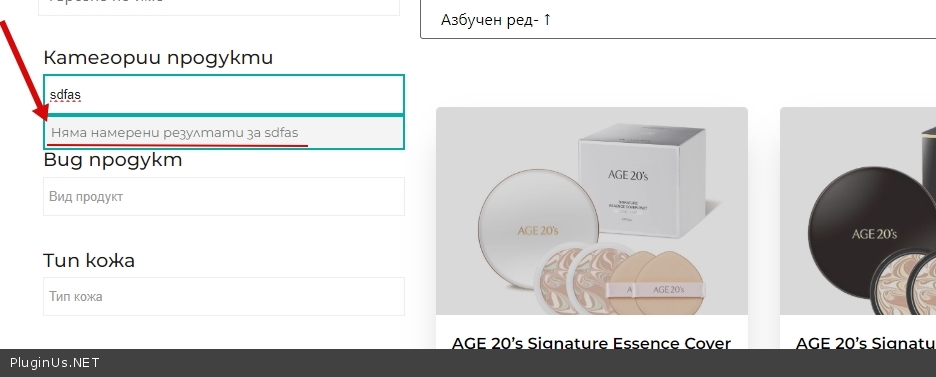
I also want to translate the "no results match "search input" in the multi dropdown, but I cannot find it as a string. Where can I translate it?
Thank you very much!
I have a few more questions. I want the grid to have 4 columns on bigger screens. This is why I used this code:
@media (min-width: 87rem) {
.woof_qs_result.woof_qs_list_grid_1 .cards__item {
width: 25% !important;
}
}
But for some reason, it doesn't work. I added it in the CSS file in the grid template.
I also want to translate the"no results match"search input" in the multi dropdown, but I cannot find it as a string. Where can I translate it?
Quote from Pablo Borysenco on June 21, 2024, 11:54Please drop me exact link to the issue
Please drop me exact link to the issue
Quote from Simeon on June 21, 2024, 11:56Its in the header. Click on "Каталог" in the top right.
Its in the header. Click on"Каталог" in the top right.
Quote from Pablo Borysenco on June 21, 2024, 12:21Please add this CSS
@media (min-width: 56rem) {body .woof_qs_result.woof_qs_list_grid_1 .cards__item {width: 25%;
}}@media (min-width: 87rem) {
body .woof_qs_result.woof_qs_list_grid_1 .cards__item {
width: 25% !important;
}
}Try in file - \wp-content\plugins\woocommerce-products-filter\ext\quick_search\js\quick_search.jsadd this code - https://share.pluginus.net/image/i20240621132028.pngjQuery("select.woof_qt_select").chosen({
no_results_text: "Add your text"
});
Please add this CSS
width: 25%;
body .woof_qs_result.woof_qs_list_grid_1 .cards__item {
width: 25% !important;
}
}

no_results_text:"Add your text"
});
Quote from Simeon on June 21, 2024, 12:37I have added both codes, but none of them work.
https://ibb.co/Swx0sCM
https://ibb.co/zhx6Cth
https://ibb.co/sJmY8jT
I have added both codes, but none of them work.
https://ibb.co/Swx0sCM
https://ibb.co/zhx6Cth
https://ibb.co/sJmY8jT
Quote from Pablo Borysenco on June 24, 2024, 10:35Hello
Please clear all cache and Ctrl+F5 and do a test
Hello
Please clear all cache and Ctrl+F5 and do a test
Quote from Simeon on June 24, 2024, 10:42I cleared them. And also I am opening from incognito.
Look at the screenshot - https://prnt.sc/IlqN-bpx5Rmt
Doest it appear correctly from your side?
I cleared them. And also I am opening from incognito.
Look at the screenshot - https://prnt.sc/IlqN-bpx5Rmt
Doest it appear correctly from your side?
Quote from Pablo Borysenco on June 24, 2024, 12:28https://prnt.sc/IlqN-bpx5Rmt - I gave you a different code.
Maybe you inserted the custom code in the wrong place or didn't clear the cache.
https://prnt.sc/IlqN-bpx5Rmt - I gave you a different code.
Maybe you inserted the custom code in the wrong place or didn't clear the cache.
Quote from Simeon on June 24, 2024, 12:37Now it works. For some reason when I add it in the CSS file of the template it doesn't work. I had to add it in the header.
What about the js code? because it also doesn't work?
Now it works. For some reason when I add it in the CSS file of the template it doesn't work. I had to add it in the header.
What about the js code? because it also doesn't work?
Quote from Pablo Borysenco on June 25, 2024, 10:45Hello
My test - https://c2n.me/4l59AOE.jpg
Hello
My test - https://c2n.me/4l59AOE.jpg
Quote from Simeon on July 3, 2024, 13:57It works now!
Thank you!
It works now!
Thank you!