

Quick Search
The support doesn work on Saturdays and Sundays, so some Friday requests can be answered on Monday. If you have problems with registration ask help on contact us page pleaseIf you not got email within 24~36 business hours, firstly check your spam box, and if no any email from the support there - back to the forum and read answer here. DO NOT ANSWER ON EMAILS [noreply@pluginus.net] FROM THE FORUM!! Emails are just for your info, all answers should be published only here.
The support doesn work on Saturdays and Sundays, so some Friday requests can be answered on Monday.

Quote from Coby on April 30, 2022, 05:24I have stuff showing up in my quick search results that no longer exist in my woocommerce products.
Also, some thing that are products don't want to show up in my store.
I had this happen on some items a couple weeks ago, and I removed them from categories then added back and it resolved the issue, but this time it's not helping.
I have stuff showing up in my quick search results that no longer exist in my woocommerce products.
Also, some thing that are products don't want to show up in my store.
I had this happen on some items a couple weeks ago, and I removed them from categories then added back and it resolved the issue, but this time it's not helping.

Quote from Pablo Borysenco on May 2, 2022, 12:44Hello
Does this happen after you have updated the search file?
What plugin version number are you using?
Hello
Does this happen after you have updated the search file?
What plugin version number are you using?
Quote from Coby on May 2, 2022, 16:18I did try updating the search file, and it did not help.
I am using version 2.2.6.4.
I believe it is some conflict between Elementor and WOOF.
In Elementor I need to choose one of the Elementor page themes for the page, but if I choose the Elementor page theme then my product grid only displays one column instead of the configured 5, but I am able to edit the page.
If I switch the Elementor page back to the default WordPress theme then the product grid displays 5 columns as it should, but I can no longer edit the page for some reason.
Seems to be like either WOOF is conflicting with Elementor, or Elementor is conflicting with WOOF. Not sure how to find out which is causing the issue.
I did try updating the search file, and it did not help.
I am using version 2.2.6.4.
I believe it is some conflict between Elementor and WOOF.
In Elementor I need to choose one of the Elementor page themes for the page, but if I choose the Elementor page theme then my product grid only displays one column instead of the configured 5, but I am able to edit the page.
If I switch the Elementor page back to the default WordPress theme then the product grid displays 5 columns as it should, but I can no longer edit the page for some reason.
Seems to be like either WOOF is conflicting with Elementor, or Elementor is conflicting with WOOF. Not sure how to find out which is causing the issue.

Quote from Pablo Borysenco on May 3, 2022, 11:53Hello
Please paste your license key here - https://share.pluginus.net/image/i20210618130558.png -> https://share.pluginus.net/image/i20210618130614.png and wp-admin+FTP access - https://share.pluginus.net/image/i20210618130637.png
I have stuff showing up in my quick search results that no longer exist in my woocommerce products. - Describe in detail what should I do to get this error
Hello
Please paste your license key here - https://share.pluginus.net/image/i20210618130558.png -> https://share.pluginus.net/image/i20210618130614.png and wp-admin+FTP access - https://share.pluginus.net/image/i20210618130637.png


I have stuff showing up in my quick search results that no longer exist in my woocommerce products. - Describe in detail what should I do to get this error
Quote from Coby on May 3, 2022, 17:48Information added as requested
Information added as requested
Quote from Pablo Borysenco on May 4, 2022, 10:48Hello
Please don't forget to add a link to your website.
Hello
Please don't forget to add a link to your website.
Quote from Coby on May 4, 2022, 17:22Woops my apologies, Pablo.
I added the link.
Woops my apologies, Pablo.
I added the link.
Quote from Pablo Borysenco on May 5, 2022, 11:10Hello
Please disable ajax mode - https://share.pluginus.net/image/i20220505090548.png - and do a test
Please write in more detail where should I go to see this error. Everything works correctly on the shop page and on the template editing page
Hello
Please disable ajax mode - https://share.pluginus.net/image/i20220505090548.png - and do a test

Please write in more detail where should I go to see this error. Everything works correctly on the shop page and on the template editing page
Quote from Coby on May 5, 2022, 21:45I tried disabling AJAX but no luck.
So that you can see the issue I changed the page template back to the Elementor page template so that it would screw up the archive results.
If you want to view the Elementor shop template you can go to Templates > Saved Templates > All > Shop Page
If you view the shop page
https://geektechsupply.com/online-shop/
you can see that it is only displaying 1 column of products even though I have the shortcode set to display 5.
Also, if I filter my products down some of the products are not showing up. For example this computer which is located in the category Computers > Desktops is not showing up.
https://geektechsupply.com/product/cougar-mx410-windows-10-gtx-1660-super-i3-10100-16gb-ddr4-3200-black-new/
I had this issue a couple weeks ago, but I was able to remove the products with issues from any category > save them > add them back to the category, and they showed back up. The issue has come back, and this solution is not resolving it.
I tried disabling AJAX but no luck.
So that you can see the issue I changed the page template back to the Elementor page template so that it would screw up the archive results.
If you want to view the Elementor shop template you can go to Templates > Saved Templates > All > Shop Page
If you view the shop page
https://geektechsupply.com/online-shop/
you can see that it is only displaying 1 column of products even though I have the shortcode set to display 5.
Also, if I filter my products down some of the products are not showing up. For example this computer which is located in the category Computers > Desktops is not showing up.
I had this issue a couple weeks ago, but I was able to remove the products with issues from any category > save them > add them back to the category, and they showed back up. The issue has come back, and this solution is not resolving it.
Quote from Pablo Borysenco on May 6, 2022, 12:21Hello
I disabled my plugin and paste a native shortcode [products] - https://share.pluginus.net/video/v20220506101704.mp4 - I think this bug has nothing to do with my plugin
, if I filter my products down some of the products are not showing up. -My test - https://share.pluginus.net/image/i20220506102125.png
Hello
I disabled my plugin and paste a native shortcode [products] - https://share.pluginus.net/video/v20220506101704.mp4 - I think this bug has nothing to do with my plugin
, if I filter my products down some of the products are not showing up. -My test - https://share.pluginus.net/image/i20220506102125.png

Quote from Coby on May 6, 2022, 17:40The video you provided doesn't seem to work.
So I changed my websites theme even though I use Elementor, and it resolved the 1 column issue.
I found that if I filter by color and cpu as you did in your picture the PC in question does show up, but if I filter just by computers > desktop it still does not show up =(
If i use the quick search the sample product PC does show up in the quick search results.
The video you provided doesn't seem to work.
So I changed my websites theme even though I use Elementor, and it resolved the 1 column issue.
I found that if I filter by color and cpu as you did in your picture the PC in question does show up, but if I filter just by computers > desktop it still does not show up =(
If i use the quick search the sample product PC does show up in the quick search results.
Quote from Pablo Borysenco on May 9, 2022, 10:53Hello
The new link - https://share.pluginus.net/video/v20220506101704.mp4
but if I filter just by computers > desktop it still does not show up =( - My test - https://c2n.me/4fCpjQv.jpg
Hello
The new link - https://share.pluginus.net/video/v20220506101704.mp4
but if I filter just by computers > desktop it still does not show up =( - My test - https://c2n.me/4fCpjQv.jpg
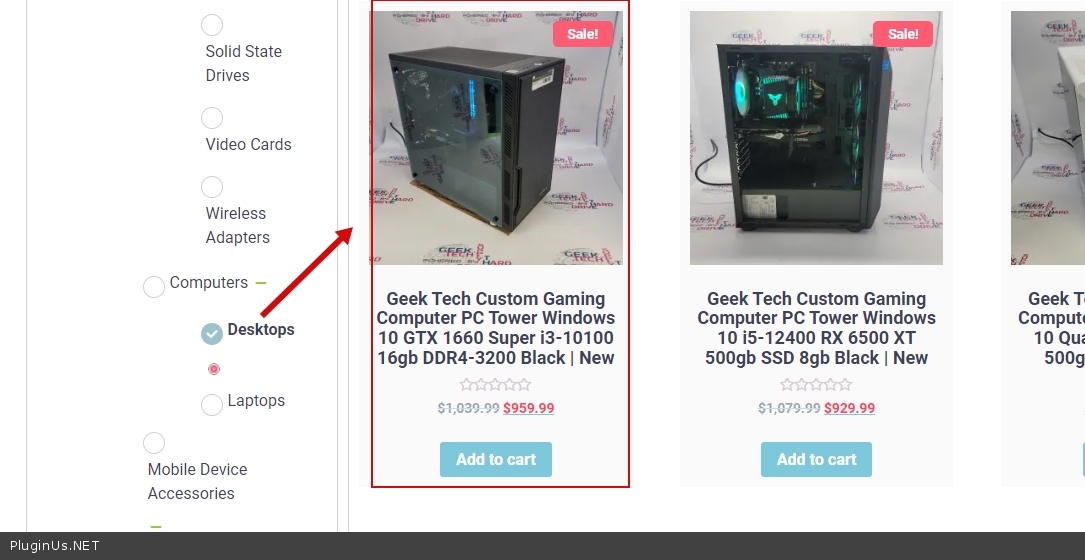
Quote from Coby on May 9, 2022, 16:48Hmm it still doesn't show up for me.
I cleared my website cache, cleared my browser cache, and tried a different browser. Checked both pages of filter results, and basically what I see is all of the In Stock desktop computers I have in my store are not showing up in the filter results for me.
I checked on my phone, and found the same thing in two different browsers. My In Stock desktop computers are not showing up for me.
Hmm it still doesn't show up for me.
I cleared my website cache, cleared my browser cache, and tried a different browser. Checked both pages of filter results, and basically what I see is all of the In Stock desktop computers I have in my store are not showing up in the filter results for me.
I checked on my phone, and found the same thing in two different browsers. My In Stock desktop computers are not showing up for me.
Quote from Pablo Borysenco on May 10, 2022, 11:47Hello
Please try to disable my plugin and check this link - https://geektechsupply.com/online-shop/?product_cat=desktops-computers-in-store-devices
Hello
Please try to disable my plugin and check this link - https://geektechsupply.com/online-shop/?product_cat=desktops-computers-in-store-devices