

Question on optimization of the plugin
The support doesn work on Saturdays and Sundays, so some Friday requests can be answered on Monday. If you have problems with registration ask help on contact us page pleaseIf you not got email within 24~36 business hours, firstly check your spam box, and if no any email from the support there - back to the forum and read answer here. DO NOT ANSWER ON EMAILS [noreply@pluginus.net] FROM THE FORUM!! Emails are just for your info, all answers should be published only here.
The support doesn work on Saturdays and Sundays, so some Friday requests can be answered on Monday.

Quote from Carlo on January 13, 2022, 11:03Hello,
i was using the plugin with 500 products on a VPS server and all was working fine.
Unfortunately the scale of the project has changed and now i need to have 5000+ products.
The fact is that these products have like 20+ attributes and i have an attribute with 900 values.
I will do a server upgrade because, obviously the site is now slow, but i have some questions on some plugin functionality and how they can affect the speed of the queries:
1 - Dynamic Recount: in on of our past tickets, for some functionalities, you suggests to enable this option. I don't understand exacly wht it does, do you have an article to link?
2 - Turbo Mode: What is this mode? Where can i find some informations.
3 - Do you have, beside the server upgrade, some specific settings to use in your plugin with these numbers of entry that i have?
Thank you.
Hello,
i was using the plugin with 500 products on a VPS server and all was working fine.
Unfortunately the scale of the project has changed and now i need to have 5000+ products.
The fact is that these products have like 20+ attributes and i have an attribute with 900 values.
I will do a server upgrade because, obviously the site is now slow, but i have some questions on some plugin functionality and how they can affect the speed of the queries:
1 - Dynamic Recount: in on of our past tickets, for some functionalities, you suggests to enable this option. I don't understand exacly wht it does, do you have an article to link?
2 - Turbo Mode: What is this mode? Where can i find some informations.
3 - Do you have, beside the server upgrade, some specific settings to use in your plugin with these numbers of entry that i have?
Thank you.

Quote from Pablo Borysenco on January 13, 2022, 14:59Hello
Please watch a video - https://products-filter.com/video#beGT6p_look
Dynamic Recount: - this keeps track of the actual number of products (recounts the counter) for the current search query
Turbo Mode: https://products-filter.com/extencion/turbo-mode
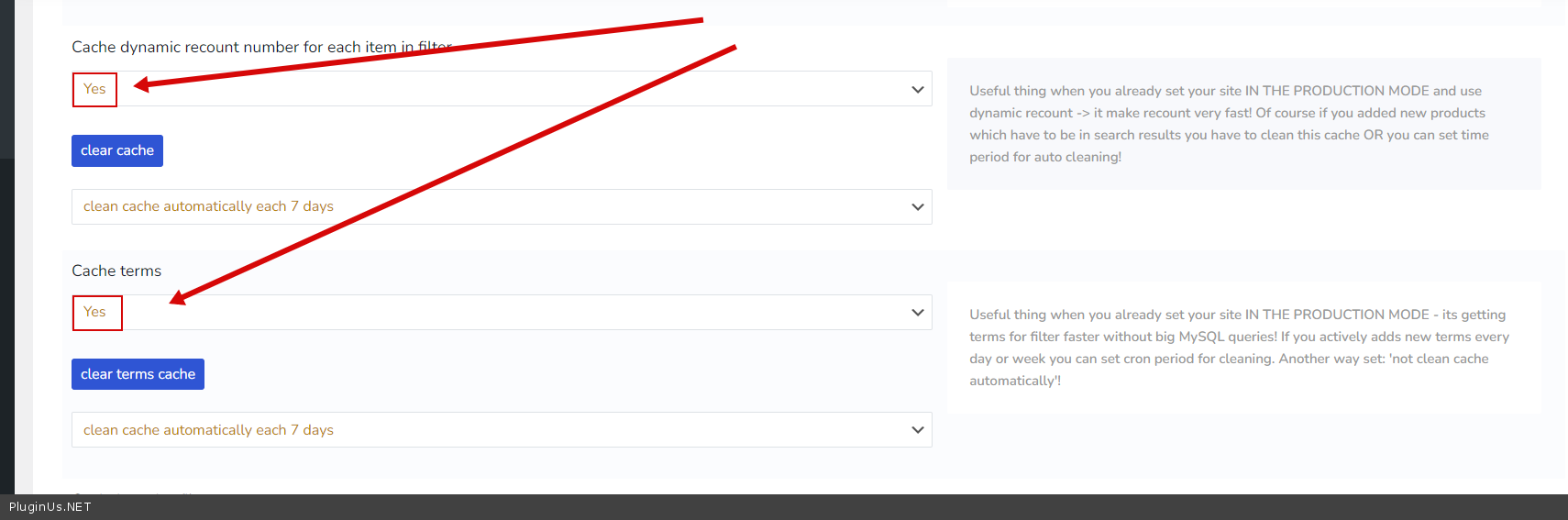
Try to use cache->Advanced->Options - https://c2n.me/4eAXj8z.png
Hello
Please watch a video - https://products-filter.com/video#beGT6p_look
Dynamic Recount: - this keeps track of the actual number of products (recounts the counter) for the current search query
Turbo Mode: https://products-filter.com/extencion/turbo-mode
Try to use cache->Advanced->Options - https://c2n.me/4eAXj8z.png
Quote from Carlo on January 13, 2022, 15:14Thank you, i will test these solutions.
In the end i think that maybe the cache one can be useful and not too risky, but since the products will be updated 1 times a day, i will need to configure the cache cleaning accordingly.
Thanks again.
Thank you, i will test these solutions.
In the end i think that maybe the cache one can be useful and not too risky, but since the products will be updated 1 times a day, i will need to configure the cache cleaning accordingly.
Thanks again.
Quote from Pablo Borysenco on January 14, 2022, 13:14Hello
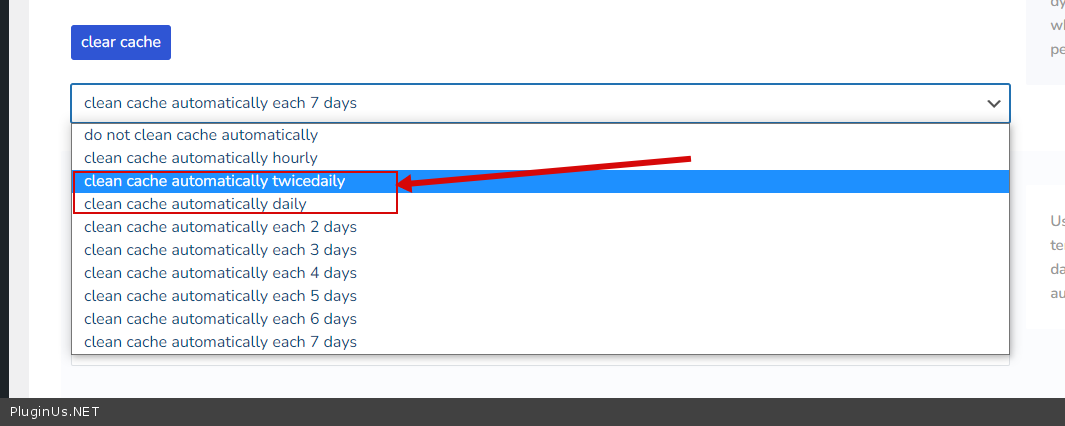
Yes, in this case, you need to clean cache every day - https://c2n.me/4eBzRFS.png
Welcome;)
Hello
Yes, in this case, you need to clean cache every day - https://c2n.me/4eBzRFS.png
Welcome;)
Quote from Carlo on February 4, 2022, 12:10Hello, i'll reopen this ticket because i had the time to do some tests on plugin optimization and i have the results to discuss with you and also some questions.
First of all, i've made an upgrade on the server and now i have 8 cores, 16gb of ram (and ssd as before). Now the site is a little faster but i think that work has to be done on software optimization.
I've tried the 2 solutions that you have provided: 1 - cache mysql queries with the option in the plugin and 2 - use Turbo Mode.
I think that in the end, at least for my site, the best solution is the number 1. Is actually faster, expecially since i have to keep dynamic recount on. I will let you in the private data of this topic 2 pages that you can check: one is in the staging site, where i've enabled turbo mode and the other is in the live site, where the "normal" cache is active. You can see that the queries are faster on the live site.
In general the site is still slow, and i've noticed 2 different scenarios: 1 - When a page with the filter in the sidebar is opened (it takes several seconds to draw the filter) and 2 - After a search query.
I have some questions about that:
1 - Is it possible to use a cache plugin for wordress like W3 total cache to speed up the page loading? I've noticed that the store pages with the filter in it are slow, and without the filter are not. I think that the problem is also the fact that i have not only like 5000 products, but also several attributes with several values and i think that it takes time to load them. Can a cache plugin help?
2 - To speed up the actual queries do you think that another server upgrade can help? My hosting provider says that the server is not particularly loaded right now. But i can do an upgrade from VPS to dedicated server.
3 - Do you have any other advice to speed up the site?
Thank you!
Hello, i'll reopen this ticket because i had the time to do some tests on plugin optimization and i have the results to discuss with you and also some questions.
First of all, i've made an upgrade on the server and now i have 8 cores, 16gb of ram (and ssd as before). Now the site is a little faster but i think that work has to be done on software optimization.
I've tried the 2 solutions that you have provided: 1 - cache mysql queries with the option in the plugin and 2 - use Turbo Mode.
I think that in the end, at least for my site, the best solution is the number 1. Is actually faster, expecially since i have to keep dynamic recount on. I will let you in the private data of this topic 2 pages that you can check: one is in the staging site, where i've enabled turbo mode and the other is in the live site, where the"normal" cache is active. You can see that the queries are faster on the live site.
In general the site is still slow, and i've noticed 2 different scenarios: 1 - When a page with the filter in the sidebar is opened (it takes several seconds to draw the filter) and 2 - After a search query.
I have some questions about that:
1 - Is it possible to use a cache plugin for wordress like W3 total cache to speed up the page loading? I've noticed that the store pages with the filter in it are slow, and without the filter are not. I think that the problem is also the fact that i have not only like 5000 products, but also several attributes with several values and i think that it takes time to load them. Can a cache plugin help?
2 - To speed up the actual queries do you think that another server upgrade can help? My hosting provider says that the server is not particularly loaded right now. But i can do an upgrade from VPS to dedicated server.
3 - Do you have any other advice to speed up the site?
Thank you!
Quote from Pablo Borysenco on February 4, 2022, 13:37Hello
turbo mode - This only makes sense if you are using a weak server.
I think that the problem is also the fact that i have not only like 5000 products, but also several attributes with several values - Load speed is more affected by the number of attributes. Because the filter must query the database for each term of each attribute. And in the end it can amount to tens of thousands of queries to the database, even if they are very fast it will take some time
My recommendation is to reduce the number of attributes as much as possible
Hello
turbo mode - This only makes sense if you are using a weak server.
I think that the problem is also the fact that i have not only like 5000 products, but also several attributes with several values - Load speed is more affected by the number of attributes. Because the filter must query the database for each term of each attribute. And in the end it can amount to tens of thousands of queries to the database, even if they are very fast it will take some time
My recommendation is to reduce the number of attributes as much as possible
Quote from Carlo on February 4, 2022, 15:40Is ti possible to use a plugin like w3total cache?
Is ti possible to use a plugin like w3total cache?
Quote from Pablo Borysenco on February 7, 2022, 12:46Hello
Yes. There shouldn't be a problem here. Just be careful with JS file optimization
Hello
Yes. There shouldn't be a problem here. Just be careful with JS file optimization