PluginUs.Net - Business Tools for WooCommerce and WordPress

[realize your idea - make your dreams come true]

Support Forum

You need to log-in to create request (topic) to the support

Question on how the plugin shows in mobile views

The support doesn work on Saturdays and Sundays, so some Friday requests can be answered on Monday. If you have problems with registration ask help on contact us page please
If you not got email within 24~36 business hours, firstly check your spam box, and if no any email from the support there - back to the forum and read answer here. DO NOT ANSWER ON EMAILS [noreply@pluginus.net] FROM THE FORUM!! Emails are just for your info, all answers should be published only here.
The support doesn work on Saturdays and Sundays, so some Friday requests can be answered on Monday.

I purchased the plugin. For smartphones/tablets I have this question.

When a user scroll to the bottom of a category listing page and clicks to see the next page of products then the screen remains at the bottom where the user is. It doesn't scroll to the top after the page changes.

There at the bottom the filters show. I have the filters shown in a sidebar widget in desktop view. All well so far, but... What if I want:

  1. the page to scroll to the top after a page number is clicked.
  2. to show the filters above the product listing in Responsive view (instead of the sidebar that sends them at the bottom, under the products listing). If they can be presented above products, can they be with a box that opens/closes on click? I mean with a toggle option? So to save space when a users doesn't need to click them?

Hello

  1.  Read  this  please -  https://products-filter.com/auto-scroll-to-element-after-ajax-is-done/
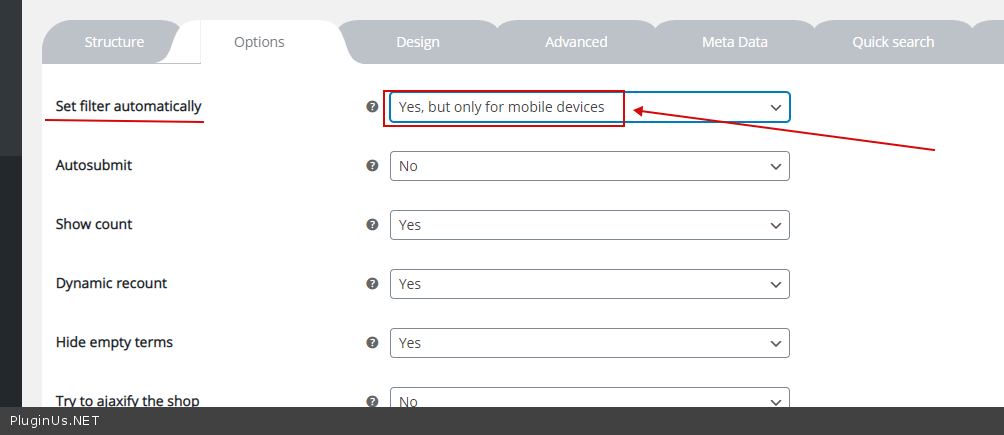
  2.  Try  it  please - https://c2n.me/4adEPk3.png

Cool. Is there a way to show the whole bunch of the filter closed on top? So the user can toggle them open on demand?

I mean in mobile only.

Hello

Try  to  read  this - https://products-filter.com/hook/woof_block_toggle_state/