

Quantity Cart Field Spinner Not Working Correctly
The support doesn work on Saturdays and Sundays, so some Friday requests can be answered on Monday. If you have problems with registration ask help on contact us page pleaseIf you not got email within 24~36 business hours, firstly check your spam box, and if no any email from the support there - back to the forum and read answer here. DO NOT ANSWER ON EMAILS [noreply@pluginus.net] FROM THE FORUM!! Emails are just for your info, all answers should be published only here.
The support doesn work on Saturdays and Sundays, so some Friday requests can be answered on Monday.

Quote from Quadica on May 12, 2022, 23:13For some reason, the quantity box next to the Add to Cart button for both the WOOT and WOOT Upsells tables is not working correctly. If you try to increase the quantity, nothing happens. If you decrease the quantity you will get a random negative value. Looking at the code, it appears that the Input max value for each row in the table is set to a different negative number.
I have tested this with all plugins disabled except for WooCommerce, Elementor, and WOOT.
I will provide example pages showing this behavior in the private area.
For some reason, the quantity box next to the Add to Cart button for both the WOOT and WOOT Upsells tables is not working correctly. If you try to increase the quantity, nothing happens. If you decrease the quantity you will get a random negative value. Looking at the code, it appears that the Input max value for each row in the table is set to a different negative number.
I have tested this with all plugins disabled except for WooCommerce, Elementor, and WOOT.
I will provide example pages showing this behavior in the private area.

Quote from Pablo Borysenco on May 13, 2022, 10:50Hello
It's a stock quantity problem.
Can you use positive values? - https://c2n.me/4fEyznz.png
Hello
It's a stock quantity problem.
Can you use positive values? - https://c2n.me/4fEyznz.png
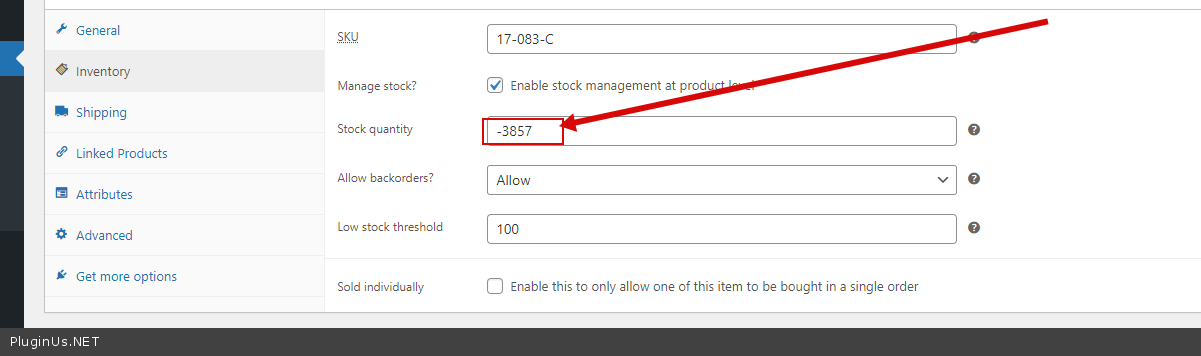
Quote from Quadica on May 13, 2022, 17:34Unfortunately no. Most of our products are built to order, so we need to allow backorders. We use negative stock quantities as part of our production system management process.
Unfortunately no. Most of our products are built to order, so we need to allow backorders. We use negative stock quantities as part of our production system management process.
Quote from Pablo Borysenco on May 16, 2022, 09:29Hello
Understood! But unfortunately the plugin does not allow you to order more products than we have in stock(if Manage stock enabled)
Can you drop me FTP? - https://share.pluginus.net/image/i20210618130558.png ->https://share.pluginus.net/image/i20210618130637.png I will try to fix it
Hello
Understood! But unfortunately the plugin does not allow you to order more products than we have in stock(if Manage stock enabled)
Can you drop me FTP? - https://share.pluginus.net/image/i20210618130558.png ->https://share.pluginus.net/image/i20210618130637.png I will try to fix it


Quote from Quadica on May 16, 2022, 18:06I have updated the access information to our production site and added the FTP login details to the private data box.
I have updated the access information to our production site and added the FTP login details to the private data box.
Quote from Pablo Borysenco on May 17, 2022, 16:58hello
Are you using cache on the server side? because my file changes are not reflected in front end
hello
Are you using cache on the server side? because my file changes are not reflected in front end
Quote from Quadica on May 17, 2022, 17:29Yes, we are hosted by Kinsta which uses server caching which cannot be disabled on the production site. It can be cleared in Wordpress by clicking on the Clear Cache option at the top right side of the toolbar.
You can also add specific paths that will not be cached by going to the Kinsta Cache option on the top left menu.
Yes, we are hosted by Kinsta which uses server caching which cannot be disabled on the production site. It can be cleared in Wordpress by clicking on the Clear Cache option at the top right side of the toolbar.
You can also add specific paths that will not be cached by going to the Kinsta Cache option on the top left menu.
Quote from Pablo Borysenco on May 18, 2022, 09:35Hello
It can be cleared in Wordpress by clicking on the Clear Cache - of course I tried it
But it looks like my changes that I made yesterday - took effect. Please do a test
Hello
It can be cleared in Wordpress by clicking on the Clear Cache - of course I tried it
But it looks like my changes that I made yesterday - took effect. Please do a test
Quote from Quadica on May 18, 2022, 17:41Right. I forgot to mention that clearing the Kinsta cache can sometimes take a few moments to process. Normally development work would be done on the staging site (which has no caching), but at the moment another developer is doing work and I could not turn on any of the plugins.
I tested your changes and the spinners are working correctly now.
Will you be making this change to your plugin? Or will I need to be sure that I make your change to any future plugin updates?
Right. I forgot to mention that clearing the Kinsta cache can sometimes take a few moments to process. Normally development work would be done on the staging site (which has no caching), but at the moment another developer is doing work and I could not turn on any of the plugins.
I tested your changes and the spinners are working correctly now.
Will you be making this change to your plugin? Or will I need to be sure that I make your change to any future plugin updates?
Quote from Pablo Borysenco on May 19, 2022, 09:19Hello
We will continue to investigate this and fix it in the next version.
Hot fix - in file - wp-content\plugins\woot-products-tables\profiles\woocommerce\js\woocommerce-cart.js - add code - https://share.pluginus.net/image/i20220519071929.png
quantity = 9999;
Hello
We will continue to investigate this and fix it in the next version.
Hot fix - in file - wp-content\plugins\woot-products-tables\profiles\woocommerce\js\woocommerce-cart.js - add code - https://share.pluginus.net/image/i20220519071929.png

quantity = 9999;
Quote from Quadica on May 19, 2022, 18:03OK. Thank you for your help and fix for this issue.
OK. Thank you for your help and fix for this issue.