
production mode
The support doesn work on Saturdays and Sundays, so some Friday requests can be answered on Monday. If you have problems with registration ask help on contact us page pleaseIf you not got email within 24~36 business hours, firstly check your spam box, and if no any email from the support there - back to the forum and read answer here. DO NOT ANSWER ON EMAILS [noreply@pluginus.net] FROM THE FORUM!! Emails are just for your info, all answers should be published only here.
The support doesn work on Saturdays and Sundays, so some Friday requests can be answered on Monday.

Quote from Ilan on September 24, 2019, 00:12Hello,
I lately purchased the premium version of the woof woocommerce products filter and applied it to my web site.
I realized that I have the magnifier left in the website and the users are able to open it and see again the filters.
Here you can see the magnifier (which I am not sure what is the feature name) http://prntscr.com/pa193q
I saw in one of the video tutorials that this feature shouldn't appear in production mode.
I didn't understand what I need to do to my wordpress site in order for the plugin to recognize it as production and not show this (redundant for me) feature.
I tried to read a lot about what should I change in my site in order to make it a PRODUCTION site and couldn't find the answer.
I would really be happy if you can promptly assist me with this since its might be a show stopper for me if I will not come with the resolution for it.
Other than that I am quite happy with the plugin.
Thanks a lot!
Ilan
Hello,
I lately purchased the premium version of the woof woocommerce products filter and applied it to my web site.
I realized that I have the magnifier left in the website and the users are able to open it and see again the filters.
Here you can see the magnifier (which I am not sure what is the feature name) http://prntscr.com/pa193q
I saw in one of the video tutorials that this feature shouldn't appear in production mode.
I didn't understand what I need to do to my wordpress site in order for the plugin to recognize it as production and not show this (redundant for me) feature.
I tried to read a lot about what should I change in my site in order to make it a PRODUCTION site and couldn't find the answer.
I would really be happy if you can promptly assist me with this since its might be a show stopper for me if I will not come with the resolution for it.
Other than that I am quite happy with the plugin.
Thanks a lot!
Ilan

Quote from Pablo Borysenco on September 24, 2019, 12:06Hello Ilan
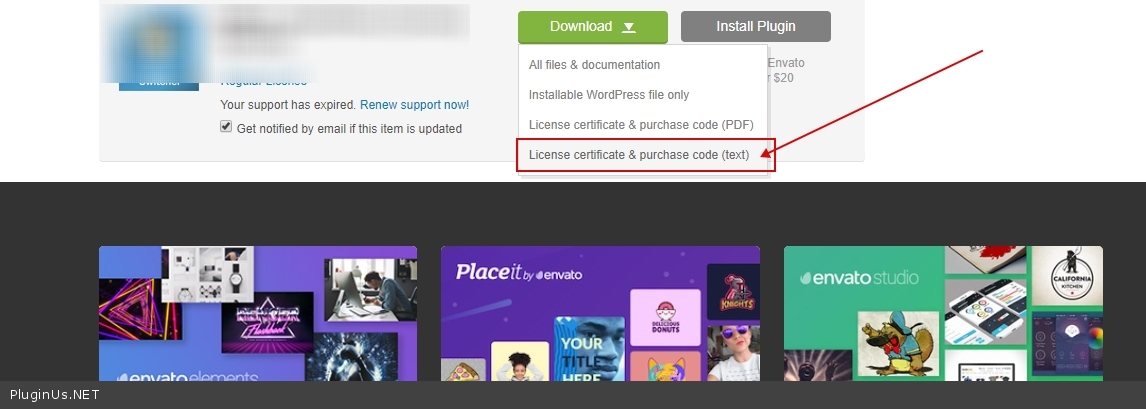
To get license key - https://c2n.me/43K1w6R.jpg
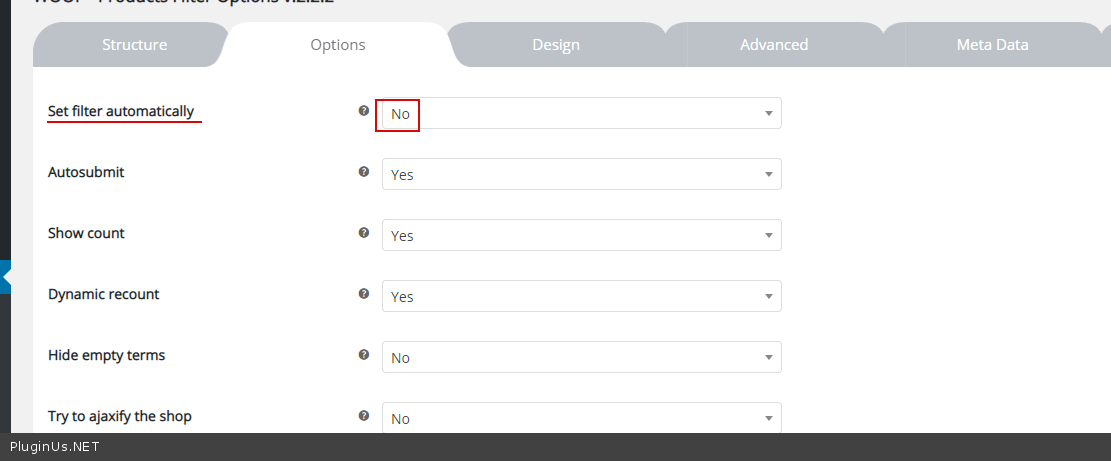
Please check option - https://c2n.me/43K1R0m.png
Hello Ilan
To get license key - https://c2n.me/43K1w6R.jpg
Please check option - https://c2n.me/43K1R0m.png
Quote from Ilan on September 24, 2019, 12:15Hello,
I know about this option https://c2n.me/43K1R0m.png but I dont want to go into that direction since I want that the filter will work "automatically" so without the user has to click the additional filter button.
If I will go with your suggestion the filter will loose its "beauty" of filtering immediately as the user (for example..) check the checkbox and immediately see the results.
Thats why I asked about the option of setting the site into the PRODUCTION mode and then hopefully this debug feature will disappear.
Thats at least what was specified in one of the plugin video tutorials (that this feature will not be shown in PRODUCTION mode..).
So I am not sure if your meaning of the wordpress "PRODUCTION" mode is by setting some environment variable or change other setting (maybe in the php files..) which will let the plugin recognize this mode and remove this feature.
So please let me know.
Thank you!!
Hello,
I know about this option https://c2n.me/43K1R0m.png but I dont want to go into that direction since I want that the filter will work"automatically" so without the user has to click the additional filter button.
If I will go with your suggestion the filter will loose its"beauty" of filtering immediately as the user (for example..) check the checkbox and immediately see the results.
Thats why I asked about the option of setting the site into the PRODUCTION mode and then hopefully this debug feature will disappear.
Thats at least what was specified in one of the plugin video tutorials (that this feature will not be shown in PRODUCTION mode..).
So I am not sure if your meaning of the wordpress"PRODUCTION" mode is by setting some environment variable or change other setting (maybe in the php files..) which will let the plugin recognize this mode and remove this feature.
So please let me know.
Thank you!!
Quote from Ilan on September 25, 2019, 00:13Hello,
The solution https://c2n.me/43K1R0m.png actually did worked.
I would really like to thank you for that.
Have a good day!!!
Hello,
The solution https://c2n.me/43K1R0m.png actually did worked.
I would really like to thank you for that.
Have a good day!!!
Quote from Pablo Borysenco on September 25, 2019, 12:46Hello
Welcome;)
Hello
Welcome;)