
Product sorting does not work
The support doesn work on Saturdays and Sundays, so some Friday requests can be answered on Monday. If you have problems with registration ask help on contact us page pleaseIf you not got email within 24~36 business hours, firstly check your spam box, and if no any email from the support there - back to the forum and read answer here. DO NOT ANSWER ON EMAILS [noreply@pluginus.net] FROM THE FORUM!! Emails are just for your info, all answers should be published only here.
The support doesn work on Saturdays and Sundays, so some Friday requests can be answered on Monday.

Quote from khromakov on December 11, 2021, 15:28Hello,
I have read that your plugin does not interfere with sorting. However, the sorting does not work and it might be relevant. Could you please check this page: https://ortoteka.lv/katalogs/kompresija/garas-zekes/ If I change the sorting, it falls back to the default option although it changes in your filter: https://ibb.co/5r51kjk
Sincerely,
Hello,
I have read that your plugin does not interfere with sorting. However, the sorting does not work and it might be relevant. Could you please check this page: https://ortoteka.lv/katalogs/kompresija/garas-zekes/ If I change the sorting, it falls back to the default option although it changes in your filter: https://ibb.co/5r51kjk
Sincerely,

Quote from Pablo Borysenco on December 13, 2021, 17:11Hello
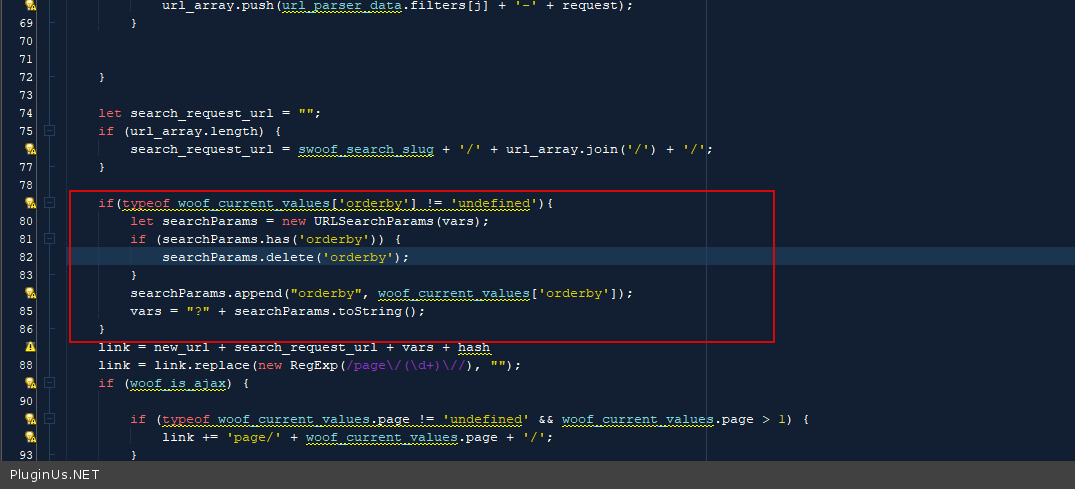
in file - wp-content\plugins\woocommerce-products-filter\ext\url_request\js\url_parser.js - add this code - https://c2n.me/4ejXuFD.png
if(typeof woof_current_values['orderby'] != 'undefined'){
let searchParams = new URLSearchParams(vars);
if (searchParams.has('orderby')) {
searchParams.delete('orderby');
}
searchParams.append("orderby", woof_current_values['orderby']);
vars = "?" + searchParams.toString();
}
Hello
in file - wp-content\plugins\woocommerce-products-filter\ext\url_request\js\url_parser.js - add this code - https://c2n.me/4ejXuFD.png
if(typeof woof_current_values['orderby'] != 'undefined'){
let searchParams = new URLSearchParams(vars);
if (searchParams.has('orderby')) {
searchParams.delete('orderby');
}
searchParams.append("orderby", woof_current_values['orderby']);
vars ="?" + searchParams.toString();
}
Quote from khromakov on December 13, 2021, 17:20Hello,
It worked for me in the main language. In the secondary language, I still experience issues with proper sorting. Could you please try: https://ru.ortoteka.lv/katalog/kompresiya/chulki/
In addition, what is very important, the review stars disappear once I apply any of the filters. You could check it on the same page.
Thank you for the great plugin in any case,
Hello,
It worked for me in the main language. In the secondary language, I still experience issues with proper sorting. Could you please try: https://ru.ortoteka.lv/katalog/kompresiya/chulki/
In addition, what is very important, the review stars disappear once I apply any of the filters. You could check it on the same page.
Thank you for the great plugin in any case,
Quote from Pablo Borysenco on December 14, 2021, 11:53Hello
I still experience issues with proper sorting. Could you please try - try to disable by plugin and do a test
the review stars disappear once I apply any of the filters. - it looks like template incompatibility with ajax mode
Hello
I still experience issues with proper sorting. Could you please try - try to disable by plugin and do a test
the review stars disappear once I apply any of the filters. - it looks like template incompatibility with ajax mode
Quote from khromakov on December 16, 2021, 20:05Hello,
We disabled your plugin, the error stayed. At least partially it is related to you another plugin BEAR. We put the product in drafts there but in a secondary language it stayed as published. How this could be changed? A draft should be a draft in all the languages.
Template incompatibility. What could we do in this case? These stars are a standard Woo feature.
Thank you,
Hello,
We disabled your plugin, the error stayed. At least partially it is related to you another plugin BEAR. We put the product in drafts there but in a secondary language it stayed as published. How this could be changed? A draft should be a draft in all the languages.
Template incompatibility. What could we do in this case? These stars are a standard Woo feature.
Thank you,
Quote from Pablo Borysenco on December 17, 2021, 13:05Hello
We put the product in drafts there but in a secondary language it stayed as published. - Yes, this is the correct behavior. this option is not copied
These stars are a standard Woo feature. - Yes, but the way they are displayed depends on the current template.
if yoiu use WPML - Enable support for ajax mode in wpml settings. This might fix the problem.
Hello
We put the product in drafts there but in a secondary language it stayed as published. - Yes, this is the correct behavior. this option is not copied
These stars are a standard Woo feature. - Yes, but the way they are displayed depends on the current template.
if yoiu use WPML - Enable support for ajax mode in wpml settings. This might fix the problem.