Pablo Borysenco(@pavlo_borysenco)
34,196 Posts
Quote from Pablo Borysenco on June 7, 2021, 13:26
Hello
Please check this option - https://c2n.me/4ciA5oM.png and do a test
Hello
Please check this option - https://c2n.me/4ciA5oM.png and do a test
Pablo Borysenco(@pavlo_borysenco)
34,196 Posts
Quote from Pablo Borysenco on June 8, 2021, 11:49
Hello
Malwarebyts found a trojan horse on your link - this service for transferring images is located in Belarus. We have been using it for over 6 years. And we have no reason to doubt the security of this service. But it looks like this message appears only for users of a certain country.
Awesome it works - Ok. great! Welcome;)
Hello
Malwarebyts found a trojan horse on your link - this service for transferring images is located in Belarus. We have been using it for over 6 years. And we have no reason to doubt the security of this service. But it looks like this message appears only for users of a certain country.
Awesome it works - Ok. great! Welcome;)
Pablo Borysenco(@pavlo_borysenco)
34,196 Posts
Quote from Pablo Borysenco on June 18, 2021, 12:04
Hello
Please paste your license key here - https://share.pluginus.net/image/i20210618130558.png -> https://share.pluginus.net/image/i20210618130614.png and wp-admin access - https://share.pluginus.net/image/i20210618130637.png
Hello
Please paste your license key here - https://share.pluginus.net/image/i20210618130558.png -> https://share.pluginus.net/image/i20210618130614.png and wp-admin access - https://share.pluginus.net/image/i20210618130637.png
Pablo Borysenco(@pavlo_borysenco)
34,196 Posts
Quote from Pablo Borysenco on June 21, 2021, 11:17
Hello
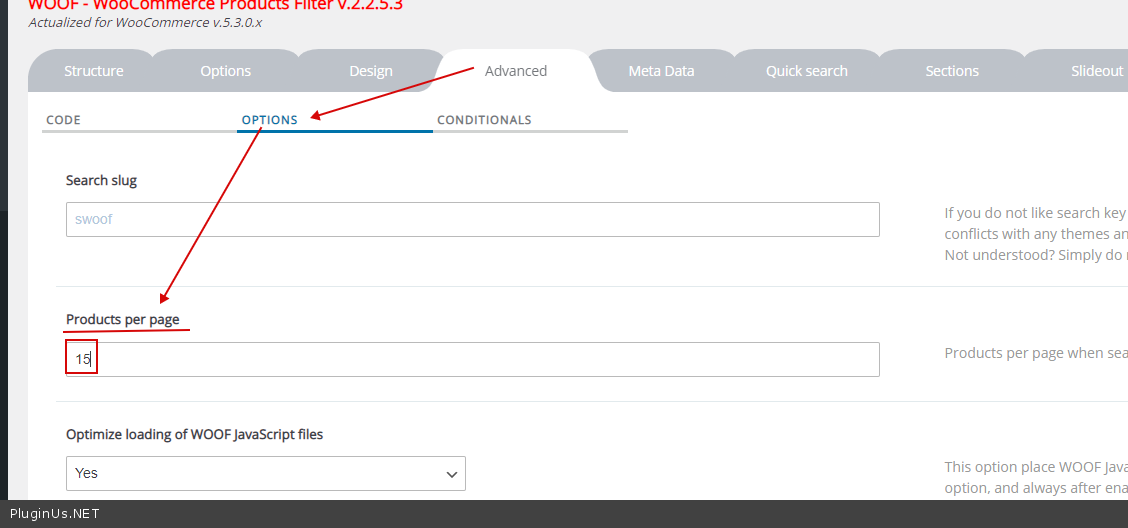
It looks like I figured out what the problem is.
per page for the current template and in the filter settings must be the same
An example: If you disable my plugin you will see the same result - https://share.pluginus.net/image/i20210621120728.png per-page is 16 - this is the settings of your template. Please set as 15( https://share.pluginus.net/image/i20210621121707.png )
Hello
It looks like I figured out what the problem is.
per page for the current template and in the filter settings must be the same
An example: If you disable my plugin you will see the same result - https://share.pluginus.net/image/i20210621120728.png per-page is 16 - this is the settings of your template. Please set as 15( https://share.pluginus.net/image/i20210621121707.png )
Pablo Borysenco(@pavlo_borysenco)
34,196 Posts
Quote from Pablo Borysenco on June 22, 2021, 11:45
Hello
Welcome;)
Hello
Welcome;)