

Product Filter not hidden on certain pages
The support doesn work on Saturdays and Sundays, so some Friday requests can be answered on Monday. If you have problems with registration ask help on contact us page pleaseIf you not got email within 24~36 business hours, firstly check your spam box, and if no any email from the support there - back to the forum and read answer here. DO NOT ANSWER ON EMAILS [noreply@pluginus.net] FROM THE FORUM!! Emails are just for your info, all answers should be published only here.
The support doesn work on Saturdays and Sundays, so some Friday requests can be answered on Monday.

Quote from pamboyd on October 8, 2020, 00:21Hello,
I have the product filter deactivated on this page; however, the filter still shows up. Please let me know how to fix this issue.
Thank you.
Hello,
I have the product filter deactivated on this page; however, the filter still shows up. Please let me know how to fix this issue.
Thank you.

Quote from Pablo Borysenco on October 8, 2020, 12:38Hello
Paste your license key here - https://c2n.me/43SC6rb.png -> https://c2n.me/42HBIt7.png - and wp-admin access - https://c2n.me/42BAoj4.png
I have the product filter deactivated on this - how did you deactivate the plugin
Hello
Paste your license key here - https://c2n.me/43SC6rb.png -> https://c2n.me/42HBIt7.png - and wp-admin access - https://c2n.me/42BAoj4.png



I have the product filter deactivated on this - how did you deactivate the plugin
Quote from pamboyd on October 8, 2020, 15:22Thanks for the quick response.
I misspoke. I didn't deactivate the plug-in entirely; I deactivated it on certain pages. The deactivation works fine on the first page in the link below; however, the product filter still shows on the other 3 pages. See what I did here.
The only thing I can think of is the 3 pages that aren't working properly are all subcategories. Could that be the issue? If so, how do I fix it so the filter doesn't show on those 3 pages?
Thank you.
Thanks for the quick response.
I misspoke. I didn't deactivate the plug-in entirely; I deactivated it on certain pages. The deactivation works fine on the first page in the link below; however, the product filter still shows on the other 3 pages. See what I did here.
The only thing I can think of is the 3 pages that aren't working properly are all subcategories. Could that be the issue? If so, how do I fix it so the filter doesn't show on those 3 pages?
Thank you.
Quote from pamboyd on October 8, 2020, 17:25Update: I changed how I had some things categorized (made pages instead of using a product filter); however, many of my category pages are still trying to show a product filter despite having disabled the product filter via Product Filters/Advanced/Init plugin on the next site pages only tool. See what I did here.
Again, I suppose it has something to do with the fact that these are all categories and not pages, but I still don't want the filter to show up on these pages. Is that possible?
Thank you!
Update: I changed how I had some things categorized (made pages instead of using a product filter); however, many of my category pages are still trying to show a product filter despite having disabled the product filter via Product Filters/Advanced/Init plugin on the next site pages only tool. See what I did here.
Again, I suppose it has something to do with the fact that these are all categories and not pages, but I still don't want the filter to show up on these pages. Is that possible?
Thank you!
Quote from Pablo Borysenco on October 9, 2020, 13:46Hello
Ok! Please add FTP access - https://c2n.me/43SC6rb.png ->https://c2n.me/42BAoj4.png I'll check what the problem is
Hello
Ok! Please add FTP access - https://c2n.me/43SC6rb.png ->https://c2n.me/42BAoj4.png I'll check what the problem is
Quote from pamboyd on October 12, 2020, 23:35Please see FTP access in private data.
Thank you.
Please see FTP access in private data.
Thank you.
Quote from Pablo Borysenco on October 13, 2020, 16:25Hello
Please check your FTP access
Hello
Please check your FTP access
Quote from pamboyd on October 13, 2020, 16:36Could you please be more specific? If you're receiving an error, what is it?
Could you please be more specific? If you're receiving an error, what is it?
Quote from pamboyd on October 13, 2020, 17:15I've added the IP address thinking you were having issues with the FTP server. My hosting site tested it & it worked.
If this doesn't work, please let me know what message you're receiving when trying to access.
Thank you.
I've added the IP address thinking you were having issues with the FTP server. My hosting site tested it & it worked.
If this doesn't work, please let me know what message you're receiving when trying to access.
Thank you.
Quote from Pablo Borysenco on October 13, 2020, 17:21Error - 530 Login incorrect.
Error - 530 Login incorrect.
Quote from pamboyd on October 13, 2020, 17:34Thank you.
I've changed the password & put it into the private data.
Thank you.
I've changed the password & put it into the private data.
Quote from Pablo Borysenco on October 14, 2020, 14:47Hello
The same error - 530 Login incorrect.
Hello
The same error - 530 Login incorrect.
Quote from pamboyd on October 14, 2020, 15:11I spoke with my hosting company & have once again changed the password & added the host IP address in the private data. Hosting company tested it on their end & it works.
I spoke with my hosting company & have once again changed the password & added the host IP address in the private data. Hosting company tested it on their end & it works.
Quote from Pablo Borysenco on October 15, 2020, 11:02Hello
Yes now closer. Now you should check the access folder setting . https://c2n.me/49rImUe.png - these are all the folders that I can go to
Hello
Yes now closer. Now you should check the access folder setting . https://c2n.me/49rImUe.png - these are all the folders that I can go to
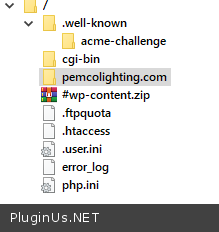
Quote from pamboyd on October 15, 2020, 18:17Please try again. Same credentials.
Please try again. Same credentials.
Quote from Pablo Borysenco on October 16, 2020, 14:57Hello
Please do a test
Hello
Please do a test
Quote from pamboyd on October 16, 2020, 15:10Wonderful!
There's still one page where "product filter" still shows:
http://staging.pemcolighting.com/product-category/accessories/
Other than that one page, everything looks great!
Thanks for your patience & help.
Wonderful!
There's still one page where"product filter" still shows:
http://staging.pemcolighting.com/product-category/accessories/
Other than that one page, everything looks great!
Thanks for your patience & help.
Quote from pamboyd on October 16, 2020, 15:44Update: Since your changes, this category's filters are completely out of whack on the page.
The filters are showing up in a weird place (to the left of each product image). They're also marked as sold out. We don't sell online, so nothing should be marked as sold out.Any help, please?
Thanks!
Update: Since your changes, this category's filters are completely out of whack on the page.
The filters are showing up in a weird place (to the left of each product image). They're also marked as sold out. We don't sell online, so nothing should be marked as sold out.
Any help, please?
Thanks!
Quote from pamboyd on October 16, 2020, 16:102nd update: ALL of the pages that have a filter included are messed up. They all look like the above page. I'm unsure what you did so I'm hesitant to change any of the settings for fear of making things worse.
This site is in staging & I was planning on launching this afternoon.
2nd update: ALL of the pages that have a filter included are messed up. They all look like the above page. I'm unsure what you did so I'm hesitant to change any of the settings for fear of making things worse.
This site is in staging & I was planning on launching this afternoon.
Quote from Pablo Borysenco on October 19, 2020, 11:44Hello
My plugin and my changes have nothing to do with this error - https://c2n.me/49ujk8B.mp4
Hello
My plugin and my changes have nothing to do with this error - https://c2n.me/49ujk8B.mp4