

Product filter has stopped working
The support doesn work on Saturdays and Sundays, so some Friday requests can be answered on Monday. If you have problems with registration ask help on contact us page pleaseIf you not got email within 24~36 business hours, firstly check your spam box, and if no any email from the support there - back to the forum and read answer here. DO NOT ANSWER ON EMAILS [noreply@pluginus.net] FROM THE FORUM!! Emails are just for your info, all answers should be published only here.
The support doesn work on Saturdays and Sundays, so some Friday requests can be answered on Monday.

Quote from laurent on September 4, 2020, 00:34The product filter has recently stopped working. I assume after theme or other plugin updates. I have these errors in the console when the plugin is active:
(index):2965
Uncaught SyntaxError: Unexpected token '<'front_comprssd.js?ver=5.5.1:1
Uncaught ReferenceError: woof_ext_init_functions is not defined
at HTMLDocument.<anonymous> (front_comprssd.js?ver=5.5.1:1)
at i (jquery.js?ver=1.12.4-wp:2)
at Object.fireWith [as resolveWith] (jquery.js?ver=1.12.4-wp:2)
at Function.ready (jquery.js?ver=1.12.4-wp:2)
at HTMLDocument.J (jquery.js?ver=1.12.4-wp:2)
(anonymous) @ front_comprssd.js?ver=5.5.1:1
i @ jquery.js?ver=1.12.4-wp:2
fireWith @ jquery.js?ver=1.12.4-wp:2
ready @ jquery.js?ver=1.12.4-wp:2
J @ jquery.js?ver=1.12.4-wp:2
The product filter has recently stopped working. I assume after theme or other plugin updates. I have these errors in the console when the plugin is active:
(index):2965
Uncaught SyntaxError: Unexpected token '<'
front_comprssd.js?ver=5.5.1:1
Uncaught ReferenceError: woof_ext_init_functions is not defined
at HTMLDocument.<anonymous> (front_comprssd.js?ver=5.5.1:1)
at i (jquery.js?ver=1.12.4-wp:2)
at Object.fireWith [as resolveWith] (jquery.js?ver=1.12.4-wp:2)
at Function.ready (jquery.js?ver=1.12.4-wp:2)
at HTMLDocument.J (jquery.js?ver=1.12.4-wp:2)
(anonymous) @ front_comprssd.js?ver=5.5.1:1
i @ jquery.js?ver=1.12.4-wp:2
fireWith @ jquery.js?ver=1.12.4-wp:2
ready @ jquery.js?ver=1.12.4-wp:2
J @ jquery.js?ver=1.12.4-wp:2

Quote from Pablo Borysenco on September 4, 2020, 12:19Hello
Please drop me exact link to the issue
Check option please - https://c2n.me/48YcnBM.png disable all optimization of JS code clear all cache and do a test
Hello
Please drop me exact link to the issue
Check option please - https://c2n.me/48YcnBM.png disable all optimization of JS code clear all cache and do a test
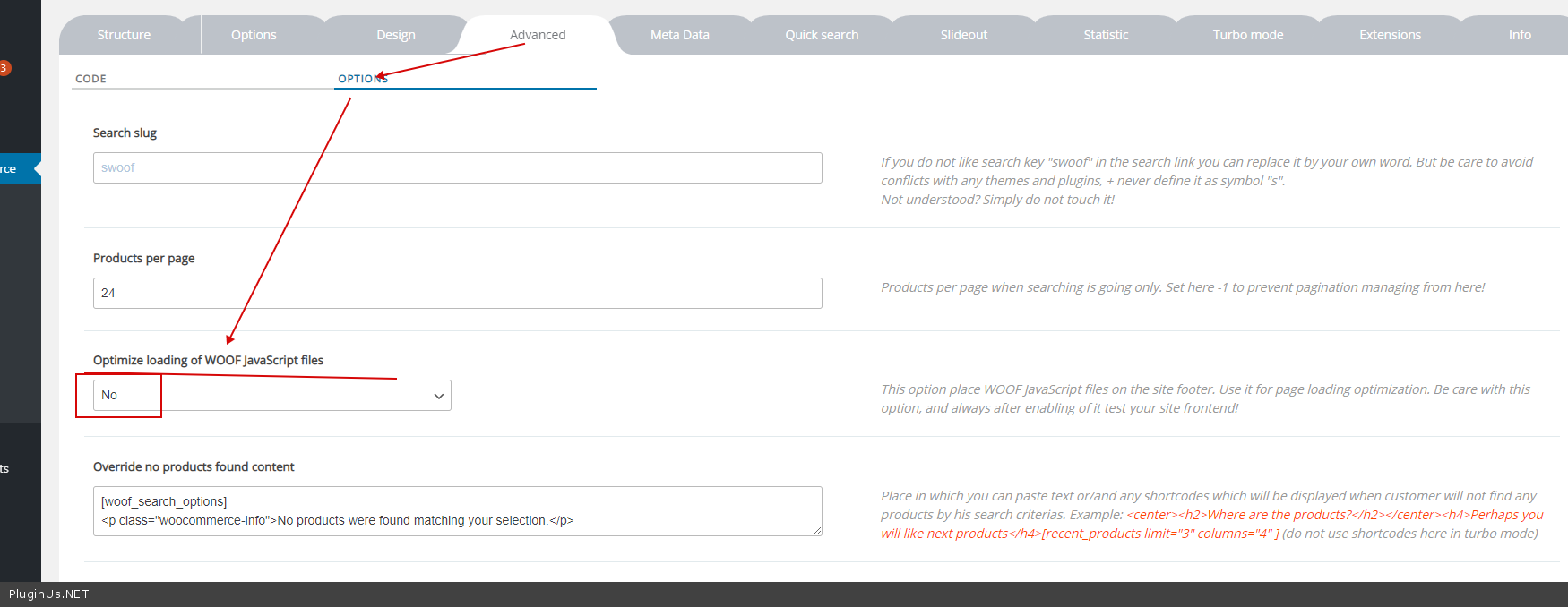
Quote from laurent on September 4, 2020, 16:29I already tried what you suggested before posting here. I saw other posts with similar issues but nothing I tried is working.
I already tried what you suggested before posting here. I saw other posts with similar issues but nothing I tried is working.
Quote from laurent on September 4, 2020, 17:18Also I noticed that when WOOF is active, Slider Revolution does not display properly on the home page.
Also I noticed that when WOOF is active, Slider Revolution does not display properly on the home page.
Quote from laurent on September 5, 2020, 19:03Hopefully you can answer soon otherwise I have to find a new plugin as my shop navigation has been down several days now. Thanks for your help.
Hopefully you can answer soon otherwise I have to find a new plugin as my shop navigation has been down several days now. Thanks for your help.
Quote from laurent on September 5, 2020, 20:33UPDATE: I was able to make the filter work, but I am still getting some error messages.
I deleted the following code:
//indexes which can be displayed in red buttons panel<?php$taxonomies = $this->get_taxonomies();$taxonomies_keys = array_keys($taxonomies);array_walk($taxonomies_keys, create_function('&$str', '$str = "\"$str\"";'));$taxonomies_keys = implode(',', $taxonomies_keys);$extensions_html_type_indexes = array();if (!empty(WOOF_EXT::$includes['html_type_objects'])) {foreach (WOOF_EXT::$includes['html_type_objects'] as $obj) {if ($obj->index !== NULL) {$extensions_html_type_indexes[] = $obj->index;}}}array_walk($extensions_html_type_indexes, create_function('&$str', '$str = "\"$str\"";'));$extensions_html_type_indexes = implode(',', $extensions_html_type_indexes);?>var woof_accept_array = ["min_price", "orderby", "perpage", <?php echo $extensions_html_type_indexes ?>,<?php echo $taxonomies_keys ?>];Now the products are getting filtered again but of course I cannot see the active filters since I removed the code. And now this is the new error in the console when the filter is applied:front.js?ver=5.5.1:661 Uncaught ReferenceError: woof_accept_array is not defined
at String.<anonymous> (front.js?ver=5.5.1:661)
at Function.each (jquery.js?ver=1.12.4-wp:2)
at woof_draw_products_top_panel (front.js?ver=5.5.1:658)
at HTMLDocument.<anonymous> (front.js?ver=5.5.1:225)
at i (jquery.js?ver=1.12.4-wp:2)
at Object.fireWith [as resolveWith] (jquery.js?ver=1.12.4-wp:2)
at Function.ready (jquery.js?ver=1.12.4-wp:2)
at HTMLDocument.J (jquery.js?ver=1.12.4-wp:2)
UPDATE: I was able to make the filter work, but I am still getting some error messages.
I deleted the following code:
//indexes which can be displayed in red buttons panel<?php$taxonomies = $this->get_taxonomies();$taxonomies_keys = array_keys($taxonomies);array_walk($taxonomies_keys, create_function('&$str', '$str ="\"$str\"";'));$taxonomies_keys = implode(',', $taxonomies_keys);$extensions_html_type_indexes = array();if (!empty(WOOF_EXT::$includes['html_type_objects'])) {foreach (WOOF_EXT::$includes['html_type_objects'] as $obj) {if ($obj->index !== NULL) {$extensions_html_type_indexes[] = $obj->index;}}}array_walk($extensions_html_type_indexes, create_function('&$str', '$str ="\"$str\"";'));$extensions_html_type_indexes = implode(',', $extensions_html_type_indexes);?>var woof_accept_array = ["min_price","orderby","perpage", <?php echo $extensions_html_type_indexes ?>,<?php echo $taxonomies_keys ?>];
front.js?ver=5.5.1:661 Uncaught ReferenceError: woof_accept_array is not defined
at String.<anonymous> (front.js?ver=5.5.1:661)
at Function.each (jquery.js?ver=1.12.4-wp:2)
at woof_draw_products_top_panel (front.js?ver=5.5.1:658)
at HTMLDocument.<anonymous> (front.js?ver=5.5.1:225)
at i (jquery.js?ver=1.12.4-wp:2)
at Object.fireWith [as resolveWith] (jquery.js?ver=1.12.4-wp:2)
at Function.ready (jquery.js?ver=1.12.4-wp:2)
at HTMLDocument.J (jquery.js?ver=1.12.4-wp:2)
Quote from laurent on September 6, 2020, 01:14I found the problem. This plugin is not compatible with PHP7.2 and higher. Problem disappeared when reverting to php7.1.
I've seen several articles about similar issues with other plugins. https://wordpress.org/support/topic/create_function-is-deprecated-in-php-7-2-2/
I found the problem. This plugin is not compatible with PHP7.2 and higher. Problem disappeared when reverting to php7.1.
I've seen several articles about similar issues with other plugins. https://wordpress.org/support/topic/create_function-is-deprecated-in-php-7-2-2/

Quote from admin on September 7, 2020, 15:59Hello
Thank you for feedback, this deprecated function will be replaced! And what starnge we have PHP 7.4.8 on the demo https://demo.products-filter.com/ and dev site and this issue is not visisble even with all issues monitoring ...
p.s. Looks like your site has enabled debug mode in wp-config.php - better set FALSE there
Hello
Thank you for feedback, this deprecated function will be replaced! And what starnge we have PHP 7.4.8 on the demo https://demo.products-filter.com/ and dev site and this issue is not visisble even with all issues monitoring ...
p.s. Looks like your site has enabled debug mode in wp-config.php - better set FALSE there